你可以下载代码: github.com/jiangyuzhen…
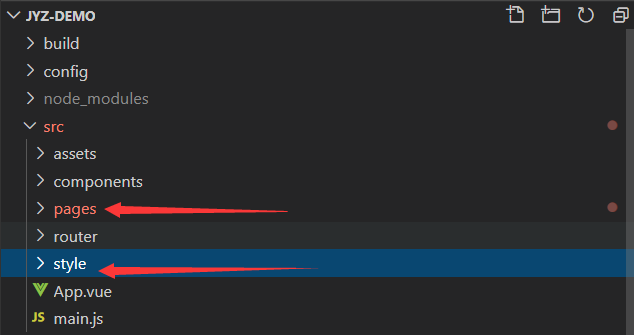
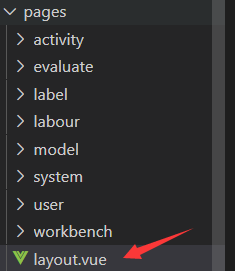
1.在项目文件夹src中新建pages和style
pages是存放页面的
style是存放样式的
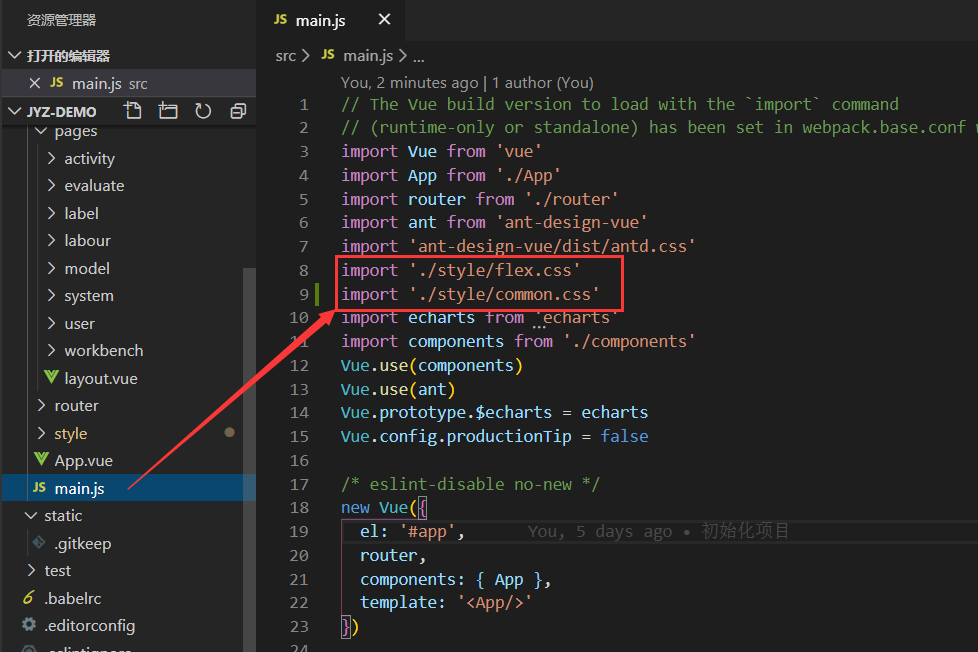
2.style文件夹新建flex.css和common.css
由于页面是使用flex布局的,所以我就直接手写一个flex公共样式
把这两个引入到main.js项目入口文件
flex.css
/* // 默认flex水平排列 */
.flex {
  display: flex;
}

/* // flex垂直排列 */
.direction-clo {
  display: flex;
  flex-direction: column;
}

/* 垂直水平居中 */
.center-align {
  display: flex;
  justify-content: center;
  align-items: center;
}


/* // 向左 */
.justify-l {
  display: flex;
  justify-content: flex-start;
}

/* // 向右 */
.justify-r {
  display: flex;
  justify-content: flex-end;
}

/* // 两边 */
.justify-b {
  display: flex;
  justify-content: space-between;
}

/* // 向上 */
.align-t {
  display: flex;
  align-items: flex-start;
}

/* // 向上 */
.align-c {
  display: flex;
  align-items: center;
}
/* // 向下 */
.align-b {
  display: flex;
  align-items: flex-end;
}

/* // 占剩下的全部 配合父级的 */
.flex-all {
  flex: 1;
}
common.css
/* 单行省略 */
.line-1 {
  text-overflow: -o-ellipsis-lastline;
  overflow: hidden;
  text-overflow: ellipsis;
  display: -webkit-box;
  -webkit-line-clamp: 1;
  line-clamp: 1;
  -webkit-box-orient: vertical;
}
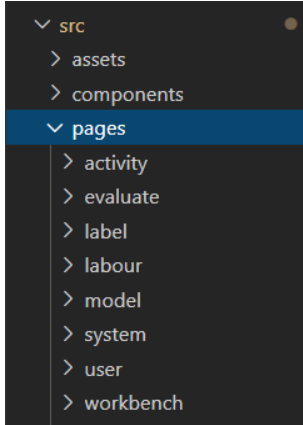
2.在pages中建立文件夹
分析头部菜单

在每一个对应的文件夹都建立index.vue页面,并使用快捷键建立vue模板文件代码
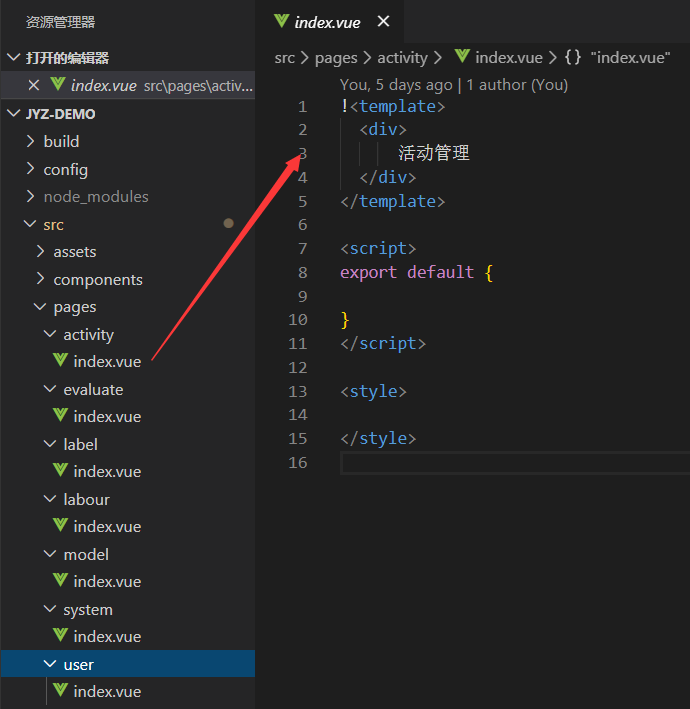
<template>
  <div>
      活动管理
  </div>
</template>

<script>
export default {

}
</script>

<style>

</style>
再在pages里新建一个layout.vue布局页面
3.把pages里建立的文件夹index.vue,注册到路由
import Vue from 'vue'
import Router from 'vue-router'

import layout from '@/pages/layout'
Vue.use(Router)

export default new Router({
  routes: [
    {
      path: '/',
      name: '首页',
      component: layout,
      redirect: '/workbench',
      children: [
        {
          path: 'workbench',
          name: '工作台',
          component: () => import(/* webpackChunkName:"workbench" */ '@/pages/workbench/index')
        },
        {
          path: 'activity',
          name: '活动管理',
          component: () => import(/* webpackChunkName:"activity" */ '@/pages/activity/index')
        },
        {
          path: 'evaluate',
          name: '评估中心',
          component: () => import(/* webpackChunkName:"evaluate" */ '@/pages/evaluate/index')
        },
        {
          path: 'label',
          name: '标签管理',
          component: () => import(/* webpackChunkName:"label" */ '@/pages/label/index')
        },
        {
          path: 'labour',
          name: '劳动竞赛',
          component: () => import(/* webpackChunkName:"labour" */ '@/pages/labour/index')
        },
        {
          path: 'system',
          name: '系统管理',
          component: () => import(/* webpackChunkName:"system" */ '@/pages/system/index')
        },
        {
          path: 'model',
          name: '模型管理',
          component: () => import(/* webpackChunkName:"model" */ '@/pages/model/index')
        },
        {
          path: 'user',
          name: '个人中心',
          component: () => import(/* webpackChunkName:"user" */ '@/pages/user/index')
        }
      ]
    }
  ]
})
编辑页面
layout.vue
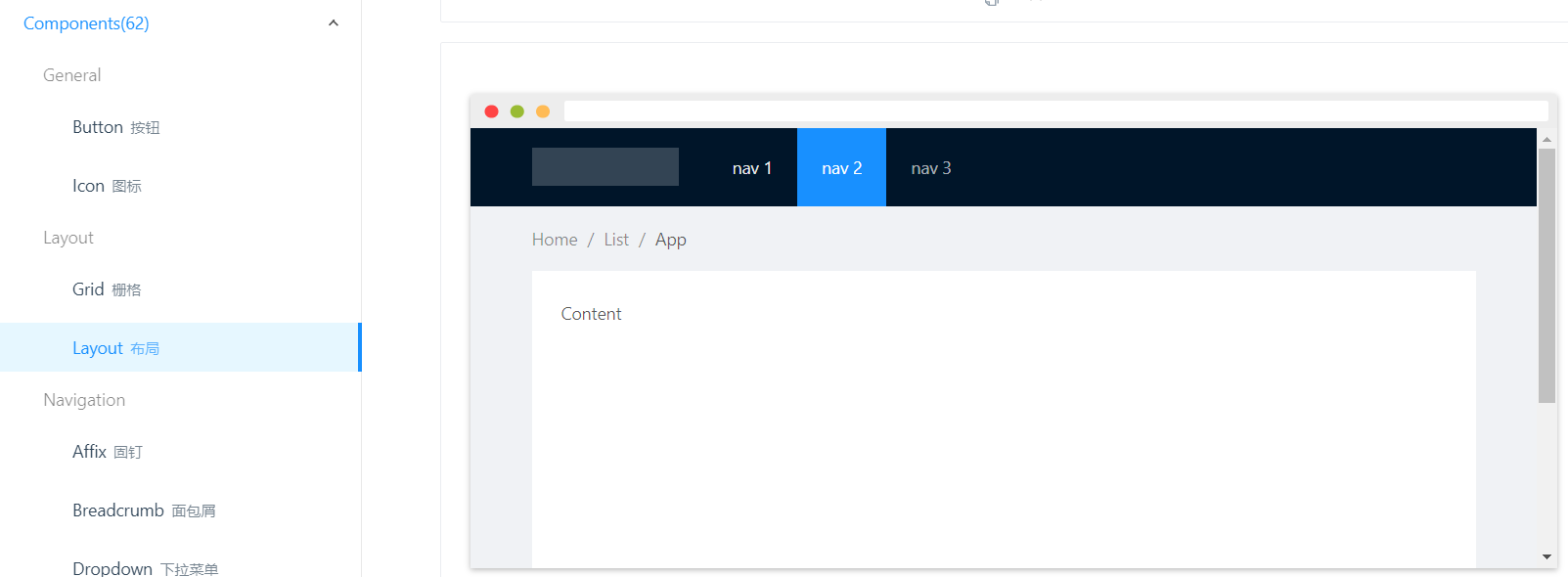
主要的布局是使用antDesign-vue的loyout布局
<template>
  <a-layout id="components-layout-demo-fixed">
    <a-layout-header :style="{ position: 'fixed', zIndex: 1, width: '100%', display: 'flex'}">
      <div class="logo flex center-align">
        <div>
          <a-icon type="dribbble" style="color: #fff;font-size: 25px" title="大数据精准营销系统"/>
        </div>
        <div class="flex direction-clo justify-l" style="margin-left: 15px" v-show="showLogo">
            <div style="font-size: 1.2rem;line-height:25px;" class="line-1" title="大数据精准营销系统">大数据精准营销系统</div>
            <div style="font-size: 0.65rem;line-height:15px;" class="line-1" title="Big data Precision Markenting System">Big data Precision Markenting System</div>
        </div>
      </div>
      <!-- 菜单 -->
      <a-menu
        theme="light"
        mode="horizontal"
        :default-selected-keys="defaultSelect"
        :style="{ lineHeight: '64px', flex: '1', display: 'flex', alignItems: 'center', justifyContent: 'center'}"
      >
        <a-menu-item :key="item.key" v-for="item in menu" @click="jumpRouter(item)">
          {{item.name}}
        </a-menu-item>
      </a-menu>
      <div>
          <a-dropdown class="dropdow flex center-align" >
            <a class="ant-dropdown-link" @click="e => e.preventDefault()">
                <a-icon type="user" /><span style="margin: 0 10px">admin </span><a-icon type="down" />
            </a>
            <a-menu slot="overlay">
            <a-menu-item>
                <a href="javascript:;">登录</a>
            </a-menu-item>
            <a-menu-item>
                <a href="javascript:;">个人中心</a>
            </a-menu-item>
            </a-menu>
        </a-dropdown>
      </div>
    </a-layout-header>
    <a-layout-content :style="{marginTop: '64px',display: 'flex',flexDirection: 'column' }">
      <!-- <a-breadcrumb :style="{ margin: '16px 0' , display: 'flex', }">
        <a-breadcrumb-item>Home</a-breadcrumb-item>
        <a-breadcrumb-item>List</a-breadcrumb-item>
        <a-breadcrumb-item>App</a-breadcrumb-item>
      </a-breadcrumb> -->
      <!-- 页面内容 -->
      <div :style="{ background: '#f4f4f4', padding: '0',flex: '1', display: 'flex',}">
        <router-view></router-view>
      </div>
    </a-layout-content>
  </a-layout>
</template>

<script>
export default {
  data () {
    return {
      showLogo: true,
      defaultSelect: ['1'],
      menu: [
        {
          name: '工作台',
          key: '1',
          routerPath: '/workbench'
        },
        {
          name: '标签管理',
          key: '2',
          routerPath: '/label'
        },
        {
          name: '模型管理',
          key: '3',
          routerPath: '/model'
        },
        {
          name: '活动管理',
          key: '4',
          routerPath: '/activity'
        },
        {
          name: '评估中心',
          key: '5',
          routerPath: '/evaluate'
        },
        {
          name: '劳动竞赛',
          key: '6',
          routerPath: '/labour'
        },
        {
          name: '系统管理',
          key: '7',
          routerPath: '/system'
        }
      ]
    }
  },
  created () {
    this.defaultSelect = ['1']
  },
  mounted () {
    const _this = this
    window.addEventListener('resize', () => {
      _this.onresize()
    })
    this.onresize()
  },
  methods: {
    /**
     * 窗口缩放事件
     * @method onresize
     */
    onresize () {
      // this.parentDom.offsetWidth 父元素的宽
      console.log()
      if (document.body.offsetWidth > 1000) {
        this.showLogo = true
      } else {
        this.showLogo = false
      }
    },
    /**
     * 跳转路由
     * @method jumpRouter
     */
    jumpRouter (item) {
      this.$router.push({ path: item.routerPath })
    }
  }
}
</script>
<style scoped>
#components-layout-demo-fixed .logo {
  /* background: rgba(255, 255, 255, 0.2); */
  margin: 16px 24px 16px 0;
  justify-content: flex-start;
  align-items: center;
  display: flex;
  color: #fff;
  line-height: 15px;
}
.ant-layout-header {
  background: linear-gradient(#304678 ,#172b5a);
}
.ant-menu {
    background: none;
}
.ant-menu-horizontal > .ant-menu-item:hover, .ant-menu-horizontal > .ant-menu-submenu:hover, .ant-menu-horizontal > .ant-menu-item-active, .ant-menu-horizontal > .ant-menu-submenu-active, .ant-menu-horizontal > .ant-menu-item-open, .ant-menu-horizontal > .ant-menu-submenu-open, .ant-menu-horizontal > .ant-menu-item-selected, .ant-menu-horizontal > .ant-menu-submenu-selected {
    color: #fff;
    background: rgba(255,255,255,0.2);
}
.ant-menu-horizontal > .ant-menu-item, .ant-menu-horizontal > .ant-menu-submenu {
    color: #fff;
    margin-bottom: 3px;
}
.ant-layout-header {
    padding: 0 20px;
}
.ant-menu-horizontal {
    border: none;
}
.dropdow {
    color: #fff;
}

.dropdow:hover{
    color: #00a2ff;
}
</style>
workbench文件夹下的index.vue
<template>
  <div class="page-box flex"  id="sale-states" >
    <div class="flex direction-clo flex-all">
      <Atitle title="我参与的"></Atitle>
      <div class="flex center-align">
          <a-card class="flex-all car" hoverable>
            <h3 style="color: #fff">8月战狼行动</h3>
            <p>超级日租卡用户获取活动,1天1元800M循环叠加,全国流量不封顶!</p>
            <a-progress
              :percent="55"
              :stroke-color="{
                '0%': '#fff',
                '100%': '#fff',
              }"
            />
          </a-card>
          <a-card class="flex-all car back-blue" hoverable>
            <h3 style="color: #fff">3G升4G大冲锋</h3>
            <p>超级日租卡用户获取活动,1天1元800M循环叠加,全国流量不封顶!</p>
            <a-progress
              :percent="55"
              :stroke-color="{
                '0%': '#fff',
                '100%': '#fff',
              }"
            />
          </a-card>
          <a-card class="flex-all car back-yellow" hoverable>
            <h3 style="color: #fff">异网获取,“飓风”活动</h3>
            <p>超级日租卡用户获取活动,1天1元800M循环叠加,全国流量不封顶!</p>
            <a-progress
              :percent="55"
              :stroke-color="{
                '0%': '#fff',
                '100%': '#fff',
              }"
            />
          </a-card>
      </div>
      <Atitle title="统计概览" class="title-margin"></Atitle>
      <div class="flex direction-clo flex-all" style="width:100%;height:100%; margin-bottom: 15px;">
        <a-card class="flex-all direction-clo" hoverable>
          <h3>销售目标完成情况</h3>
          <div class="chart-box flex-all direction-clo" style="width:100%;height:100%;">
            <evaChart
              style="width:100%;height:100%"
              :parentId="'sale-states'"
              :option="saleStateOption"
              >
            </evaChart>
          </div>
        </a-card>
      </div>

    </div>
    <div style="margin-left: 15px; width: 20%; background: #eee">
      <!-- 更多消息 -->
      <div class="flex center-align justify-l message-list">
        <a-avatar style="backgroundColor:rgb(254, 91, 12)" icon="bell" />
        <span style="margin: 0 8px;">我的消息</span>
        <a-badge
          count="12"
          :number-style="{
            backgroundColor: '#fff',
            color: 'rgb(234, 83, 35)',
            borderColor: 'rgb(234, 83, 35)'
          }"
        />
        <div class="flex-all" style="text-align: right; cursor:pointer">更多 >></div>
      </div>
      <!-- 我的待办 -->
      <div>
        <h3>我的待办</h3>
        <div id="reviewBox">
          <div id="comment1">
            <div class="car-line flex center-align justify-l" v-for="(item,index) in myWaitList" :key="index">
              <div class="border-br"></div>
              <div class="car-content flex direction-clo">
                <span class="car-content-text"> {{ item.title }} </span>
                <span style="margin-top: 3%;color: rgb(173, 170, 170);font-size: 12px">{{ item.time }}</span>
              </div>
            </div>
          </div>
          <div id="comment2"></div>
        </div>

      </div>

      <!-- 其他 -->
      <div style="padding: 5%">
        <a-tabs default-active-key="1" @change="tabChange">
          <a-tab-pane key="1" tab="公告">
            <div>
              <div v-for="(item, index) in noticeList" :key="index" class="flex center-align">
                <div class="flex flex-all">
                  <a-badge status="default" /> <span class="flex-all tab-li-title">{{item.title}} </span><span style="margin-left: 5%;color: rgb(173, 170, 170);font-size: 12px">{{ item.time }}</span>
                </div>
              </div>
            </div>
          </a-tab-pane>
          <a-tab-pane key="2" tab="动态" force-render>
            <div>
              <div v-for="(item, index) in activeList" :key="index" class="flex center-align">
                <div class="flex flex-all">
                  <a-badge status="default" /> <span class="flex-all tab-li-title">{{item.title}} </span><span style="margin-left: 5%;color: rgb(173, 170, 170);font-size: 12px">{{ item.time }}</span>
                </div>
              </div>
            </div>
          </a-tab-pane>
        </a-tabs>
      </div>
    </div>
  </div>
</template>
<script>
const saleStateOption = {
  color: ['#8486dc', '#f49181'],
  // title: {
  //   text: '销售目标完成情况'
  //   // x:'center'
  // },
  tooltip: {
    trigger: 'axis',
    axisPointer: { // 坐标轴指示器,坐标轴触发有效
      type: 'shadow' // 默认为直线,可选为:'line' | 'shadow'
    }
  },
  legend: {
    data: ['目标销售额', '当前销售额'],
    align: 'right'
  },
  grid: {
    left: '3%',
    right: '4%',
    bottom: '3%',
    containLabel: true
  },
  xAxis: [
    {
      type: 'category',
      axisTick: {
        show: false
      },
      axisLine: {
        show: false
      },
      data: ['1月', '2月', '3月', '4月', '5月', '6月', '7月', '8月', '9月', '10月', '11月', '12月']
    }
  ],
  yAxis: [
    {
      type: 'value',
      axisTick: {
        show: false
      },
      axisLine: {
        show: false
      },
      splitLine: {
        lineStyle: {
          // 使用深浅的间隔色
          color: ['#eee']
        }
      }
    }
  ],
  series: [
    {
      name: '目标销售额',
      type: 'bar',
      barWidth: 15,
      barMinWidth: 9,
      barMaxWidth: 25,
      data: [320, 332, 301, 334, 390, 330, 320, 301, 334, 390, 330, 320]
    },
    {
      name: '当前销售额',
      type: 'bar',
      stack: '广告',
      barWidth: 15,
      barMinWidth: 9,
      barMaxWidth: 25,
      data: [120, 32, 31, 54, 80, 300, 10, 201, 84, 390, 30, 99]
    }
  ]
}

const myWaitList = [
  {
    title: '地市约谈:广州市电信分公司,关于省公司集约活动参与情况积极性问题约谈',
    time: '2020-08-11 15:32:05'
  },
  {
    title: '场地预约:办公室场地申请',
    time: '2020-05-23 15:32:05'
  },
  {
    title: 'ESIM办理预约:联通ESIM办理,关于省公司集约活动参与情况积极性问题约谈',
    time: '2020-05-24 15:32:05'
  },
  {
    title: '节目筹备:六一儿童节水上乐园节日狂欢筹备',
    time: '2020-06-01 15:32:05'
  },
  {
    title: '记者会召开:关于澄清月季话费费用事项的记者招待会',
    time: '2020-05-26 15:32:05'
  }
]

const noticeList = [
  {
    title: '超级日租卡用户获取活动',
    time: '08-11'
  },
  {
    title: '宽带装新限时优惠活动',
    time: '05-23'
  },
  {
    title: '政企专线提速',
    time: '05-24'
  },
  {
    title: '第三季度各地市销售额季度排名',
    time: '06-01'
  },
  {
    title: '明日活动发布事项,通知如下',
    time: '05-26'
  },
  {
    title: '超级日租卡用户获取活动',
    time: '08-11'
  },
  {
    title: '宽带装新限时优惠活动',
    time: '05-23'
  },
  {
    title: '政企专线提速',
    time: '05-24'
  }
]
const activeList = [
  {
    title: '宽带装新限时优惠活动',
    time: '05-23'
  },
  {
    title: '政企专线提速',
    time: '05-24'
  },
  {
    title: '第三季度各地市销售额季度排名',
    time: '06-01'
  },
  {
    title: '明日活动发布事项,通知如下',
    time: '05-26'
  },
  {
    title: '超级日租卡用户获取活动',
    time: '08-11'
  },
  {
    title: '超级日租卡用户获取活动',
    time: '08-11'
  },
  {
    title: '宽带装新限时优惠活动',
    time: '05-23'
  },
  {
    title: '政企专线提速',
    time: '05-24'
  }
]
export default {
  data () {
    return {
      collapsed: false,
      saleStateOption,
      myWaitList,
      noticeList,
      activeList,
      timer: undefined
    }
  },
  created () {
    this.$nextTick(() => {
      if (document.getElementById('comment1') && document.getElementById('comment2') && document.getElementById('reviewBox')) {
        this.roll(150)
      } else {
        if (this.timer) {
          clearInterval(this.timer)
        }
      }
    })
  },
  methods: {
    tabChange (val) {
      // console.log(val)
      if (this.timer) {
        clearInterval(this.timer)
      }
    },
    roll (t) {
      if (document.getElementById('comment1') && document.getElementById('comment2') && document.getElementById('reviewBox')) {
        clearInterval(this.timer)
        let ul1 = document.getElementById('comment1')
        let ul2 = document.getElementById('comment2')
        let ulbox = document.getElementById('reviewBox')
        if (!ul1.innerHTML) {
          ul1.innerHTML = ul2.innerHTML
        } else {
          ul2.innerHTML = ul1.innerHTML
        }

        ulbox.scrollTop = 0 // 开始无滚动时设为0
        this.timer = setInterval(this.rollStart, t) // 设置定时器,参数t用在这为间隔时间(单位毫秒),参数t越小,滚动速度越快
        // 鼠标移入div时暂停滚动
        ulbox.onmouseover = () => {
          clearInterval(this.timer)
        }
        // 鼠标移出div后继续滚动
        ulbox.onmouseout = () => {
          this.timer = setInterval(this.rollStart, t)
        }
      }
    },
    /**
     * 开始滚动函数
     */
    rollStart () {
      // 上面声明的DOM对象为局部对象需要再次声明
      if (document.getElementById('comment1') && document.getElementById('comment2') && document.getElementById('reviewBox')) {
        let ul1 = document.getElementById('comment1')
        let ulbox = document.getElementById('reviewBox')
        if (ulbox.scrollTop >= ul1.scrollHeight) {
          ulbox.scrollTop = 0
        } else {
          ulbox.scrollTop++
        }
      }
    }
  }
}
</script>

<style scoped>
.page-box {
  flex: 1;
  padding: 15px 0 0 15px;
  background: #f4f4f4;
}
.content-box {
  flex: 1;
  margin-right: 15px;
}
.title-margin {
  margin: 10px 0;
}
.car {
  color: #fff;
  background: linear-gradient(45deg, #a4a7ea ,#8486dc);
}
.car.back-blue{
  background: linear-gradient(45deg, #7cc0fd ,#769dfc);
}
.car.back-yellow{
  background: linear-gradient(45deg, #fbb173 ,#f49181);
}
.car:nth-child(2n){
  margin: 1%;
}
/deep/ .ant-progress-inner {
  background-color: rgba(0, 0, 0, 0.1) !important;
}
/deep/ .ant-progress-text {
  color: #fff;
}
.chart-box {
  flex: 1;
}

/* 消息 */
.message-list {
  background: #fff;
  width: 100%;
  height: 50px;
  padding: 0 5%;
  white-space: nowrap;
}

/* 我的待办 */
.car-line {
  height: 70px;
  background: #fff;
  margin-top: 5px;
  border-radius: 4px;
  overflow: hidden;
}
.car-content {
  padding: 5%;
  box-sizing: border-box;
  width: 100%;
}
.car-content-text {
  text-overflow: -o-ellipsis-lastline;
  overflow: hidden;
  text-overflow: ellipsis;
  display: -webkit-box;
  -webkit-line-clamp: 2;
  line-clamp: 2;
  -webkit-box-orient: vertical;
}
.border-br {
  height: 100%;
  border: 2px solid #e1e2e3;
}
.car-line:hover .border-br {
  border: 2px solid  #f99b50;
}
.car-line:hover .car-content{
  background: rgba(255, 240, 233, 0.5);
}
/deep/ .ant-card-body {
  height: 100%;
  display: flex;
  flex-direction: column;
}

/* 预览滚动的高度 */
#review_box, #reviewBox{
  height: 250px;
  overflow: hidden;
}

/* tab */
.tab-li-title {
  text-overflow: -o-ellipsis-lastline;
  overflow: hidden;
  text-overflow: ellipsis;
  display: -webkit-box;
  -webkit-line-clamp: 1;
  line-clamp: 1;
  -webkit-box-orient: vertical;
}
/deep/ .ant-tabs .ant-tabs-top-content.ant-tabs-content-animated, .ant-tabs .ant-tabs-bottom-content.ant-tabs-content-animated {
  max-height: 280px;
}
</style>
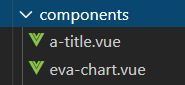
其中我封装了标题和echart
a-title.vue
!<template>
    <div class="flex justify-l align-c">
      <span class="title-br"></span>
      <slot name="title"> <span class="a-title">{{ title }} </span></slot>
    </div>
</template>

<script>
export default {
  props: {
    title: {
      default: '标题'
    }
  }
}
</script>

<style scoped>
.title-br {
  display: flex;
  width: 4px;
  height: 25px;
  border-radius: 8px;
  background: #547cd8;
  margin-right: 10px;
}
.a-title {
  color: #547cd8 !important;
  font-size: 15px;
}
</style>
eva-chart.vue
<template>
  <div :id="id" style="height:100%;margin: 0 auto;width: 100%" class="chartH"></div>
</template>

<script>
const option = {
  title: {
    text: '销售目标完成情况'
    // x:'center'
  },
  color: ['#3398DB'],
  tooltip: {
    trigger: 'axis',
    axisPointer: { // 坐标轴指示器,坐标轴触发有效
      type: 'shadow' // 默认为直线,可选为:'line' | 'shadow'
    }
  },
  grid: {
    left: '3%',
    right: '4%',
    bottom: '3%',
    containLabel: true
  },
  xAxis: [
    {
      type: 'category',
      data: ['Mon', 'Tue', 'Wed', 'Thu', 'Fri', 'Sat', 'Sun'],
      axisTick: {
        alignWithLabel: true
      }
    }
  ],
  yAxis: [
    {
      type: 'value'
    }
  ],
  series: [
    {
      name: '直接访问',
      type: 'bar',
      barWidth: '60%',
      data: [10, 52, 200, 334, 390, 330, 220]
    }
  ]
}
export default {
  name: 'HelloWorld',
  props: {
    id: {
      default: 'chartEle'
    },
    parentId: {},
    option: {
      type: Object,
      default () {
        return option
      }
    }
  },
  data () {
    return {
      Chart: undefined
    }
  },
  created () {
    // 监听父元素的宽高变化
    // window.addEventListener('resize', this.onresize())
    // this.$nextTick(() => {
    //   let targetNode = document.getElementById(this.parentId)
    //   let observer = new MutationObserver((mutations) => {
    //     this.onresize(mutations)
    //   })
    //   observer.observe(targetNode, { attributes: true, childList: false, subtree: false })
    //   // document.getElementById(this.parentId).addEventListener('resize', this.onresize())
    // })
  },
  mounted () {
    // 基于准备好的dom,初始化echarts实例
    this.initChart() // 重点
    this.renderChart()
    const _this = this
    window.addEventListener('resize', () => {
      _this.onresize()
    })
    this.onresize()
  },
  methods: {
    /**
     * 初始化表格
     * @method initChart
     */
    initChart () {
      if (this.Chart) {
        this.Chart = null
        this.Chart = this.$echarts.init(document.getElementById('chartEle'))
      } else {
        this.Chart = this.$echarts.init(document.getElementById('chartEle'))
        this.Chart = null
        this.Chart = this.$echarts.init(document.getElementById('chartEle'))
      }
    },
    /**
     * 窗口缩放事件
     * @method onresize
     */
    onresize () {
      // this.parentDom.offsetWidth 父元素的宽
      if (this.Chart) {
        this.Chart.resize() // 自适应表格
      }
      this.$emit('resize', this.parentDom) // 设置屏幕自适应
    },
    /**
     * 渲染表格数据
     * @method renderChart
     * @param {Object} option
     */
    renderChart (option) {
      this.onresize()
      if (this.Chart) {
        this.Chart.setOption(option || this.option, true)
      } else {
        this.initChart()
        this.Chart.setOption(option || this.option, true)
      }
      // setOption:设置图表实例的配置项以及数据,万能接口,所有参数和数据的修改都可以通过它完成,ECharts会合并新的参数和数据,然后刷新图表。
    }
  }
}
</script>

<!-- Add "scoped" attribute to limit CSS to this component only -->
<style scoped>
.chartH > div {
  height: 100%;
}
</style>