

基础
什么是ElasticSearch?
本质上是一个分布式数据库. 是一款开源的高扩展的分布式全文检索引擎,它可以近乎实时的存储,检索数据,扩展性很好,可以扩展到上百台服务器,处理PB级别的数据. ElasticSearch使用Java开发,并使用Lucene作为其核心来实现所有索引和搜索功能,但是它的目的是通过简单的RESTful API来隐藏Lucene的复杂性,从而让全文检索变得简单. 在2016年1月,ElasticSearch已经超过Solr,成为排名第一的搜索引擎类应用.
ElasticSearch有什么应用?
- 维基百科的全文检索
- 新闻网站的用户行为日志+社交网络数据,数据分析反馈给作者.
- 知乎等网站的全文检索.
- gitee网站的代码搜索
- 电商网站商品检索
- 日志的数据分析: logstash采集日志,ES进行复杂的数据分析,ELK技术: elasticsearch+logstash+kibana
- 商品价格监控
- BI系统(商业智能): ES执行数据分析和挖掘.
Lucene与ES的关系?
Lucene是Apache软件基金会下的用于全文检索和搜寻的开源程序库.它包含了索引结构,读写索引工具,相关性工具,排序等功能.但是它不包含搜索引擎系统,例如: 数据获取,解析,分词等方面的东西.而solr和elasticsearch都是基于该工具包做的一些封装.ElasticSearch采用的策略是分布式实时文件存储,将每一个字段都编入索引,使其可以被搜索. solr利用zookeeper进行分布式管理,而ElasticSearch自身带有分布式协调管理功能. solr比ElasticSearch实现更加全面,solr官方提供的功能更多,而ElasticSearch本身更注重核心功能,高级功能由第三方插件提供. solr从静态数据库中筛选结果中表现好于ElasticSearch,而ElasticSearch在实时搜索应用方面比solr表现好.
ElasticSearch的作用是什么?
快速的检索数据并返回统计结果.
什么是Solr?
Apache Solr是一个高性能,基于Java开发的,基于Lucene的流行的开源搜索服务器.提供统计,高亮及多种格式输出.
什么是Lucene?
Apache基金会支持的,用于全文检索的开源程序库.它不是现成的搜索引擎产品,但可以用来制作搜索引擎产品.
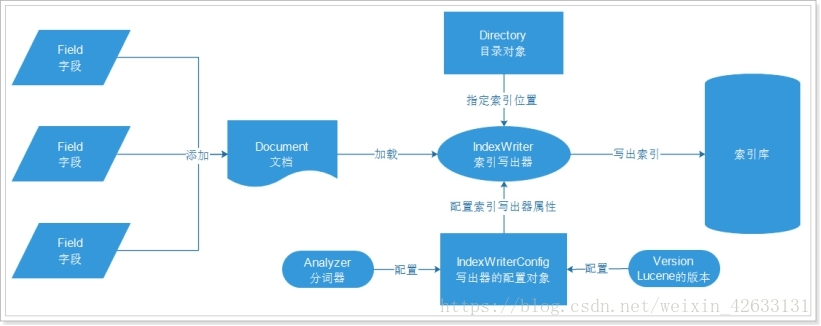
什么是全文检索?
计算机索引程序通过扫描文章的每一个词,对每一个词建立一个索引,指明该词出现的次数和位置,当用户查询时,检索程序根据事先建立的索引进行查找,并将查找的结果反馈给用户.
ElasticSearch怎么安装?
注意: 安装ElasticSearch的最低JDK版本: JDK1.8.
- 官网下载Elasticsearch,Kibana
- 解压
- 双击bin下下的bat文件启动
- cmd直接显示访问路径,使用浏览器访问.
怎么安装可视化插件?
- 下载: github.com/mobz/elasti…
- 在路径下使用
npm install下载依赖- 使用
npm run start来启动项目
怎么解决可视化插件的跨域问题?
- 打开
elasticsearch-7.7.0\config路径,编辑elasticsearch.yml- 在文件末尾添加以下解决跨域问题的语句.
http.cors.enabled: true
http.cors.allow-origin: "*"
什么是kibana?
kibana是一个针对ElasticSearch的开源分析和可视化平台,用来搜索,查看存储在elasticsearch索引中的数据.使用kibana可以通过各种图表进行高级数据分析及展示.
什么是ELK?
指ElasticSearch,Logstash,Kibana.Logstash是一个用来搜集,分析,过滤日志的工具.它支持几乎任何类型的日志,包括系统日志,错误日志和自定义应用程序日志.它可以从许多来源接收日志,包括syslog,消息传递和JMX,它能够以多种方式输出日志,包括电子邮件,websockets和ElasticSearch.
安装kibana要注意什么?
kibana的版本必须和ElasticSearch的版本保持一致.
怎么汉化kibana?
- 修改kibana-7.7.0-windows-x86_64\config目录下的文件kibana.yml.
- 设置语言:
i18n.locale: "zh-CN"
核心概念
什么是索引?
indices.索引对应数据库.ElasticSearch会索引所有字段,经过处理后写入一个反向索引,查找数据的时候,直接查找该索引. 每个Index的名字必须是小写.
GET _cat/indices?v命令可以查看所有的索引.
什么是字段类型(type)?
Types.对应数据库的表. 它是虚拟的逻辑分组,用来过滤Document. 现在不推荐使用type.而是统一使用
_doc类型. 如果在同一个索引中使用两种不同的type,将会报错.
PUT /ecommerce/product/1
{
  "name":"高露洁牙膏",
  "desc":"高效美白",
  "price":30,
  "producer":"高露洁",
  "tags":["美白","防蛀"]
}
PUT /ecommerce/pro/1
{
  "name":"高露洁牙膏",
  "desc":"高效美白",
  "price":30,
  "producer":"高露洁",
  "tags":["美白","防蛀"]
}
{
  "error" : {
    "root_cause" : [
      {
        "type" : "illegal_argument_exception",
        "reason" : "Rejecting mapping update to [ecommerce] as the final mapping would have more than 1 type: [product, pro]"
      }
    ],
    "type" : "illegal_argument_exception",
    "reason" : "Rejecting mapping update to [ecommerce] as the final mapping would have more than 1 type: [product, pro]"
  },
  "status" : 400
}
为什么ElasticSearch删除映射类型type?
因为我们将一个映射类型类比为关系型数据库的一张表.但是这是一个错误的类比,在关系型数据库中,表之间是相互独立的,一个表中的列与另一个表同名的列没有关系,但是在ElasticSearch索引中,不同的type的相同名字的field在Lucene内部是由同一个字段支持的.那么在两个type的同名字段中设置不同的字段类型就会出问题. 另外,在一个索引中存储哪些很少或没有相同字段的实体会导致稀疏数据,并且干扰Lucene有效压缩文档.
什么是fields?
对应数据库的字段/列名.
什么是文档(document)?
Index索引里的每条记录称为Document文档. 文档使用JSON格式表示.
什么是分片(shard)?
分片就是ElasticSearch中所有数据的文件块,也是数据的最小单元块.类似于关系型数据库的表分区的概念.
什么是映射(mapping)?
存储分析链所需的所有信息.所有文档在被写入索引之前都将被分析,用户可以设置一些参数,决定如何将输入文本分割为词条,哪些词条应该被过滤,哪些附加处理被调用.
什么是节点(node)?
一个ElasticSearch实例就是一个节点.
什么是集群(cluster)?
多个协同工作的es节点的集合被称为集群.
什么是副本(replica)?
副本解决了访问压力过大时单机无法处理所有请求的问题,或者主分片丢失的问题.
什么是正排索引?
正排索引的结构如下: “文档1”的ID > 单词1:出现次数,出现位置列表;单词2:出现次数,出现位置列表;…………。 “文档2”的ID > 此文档出现的关键词列表。
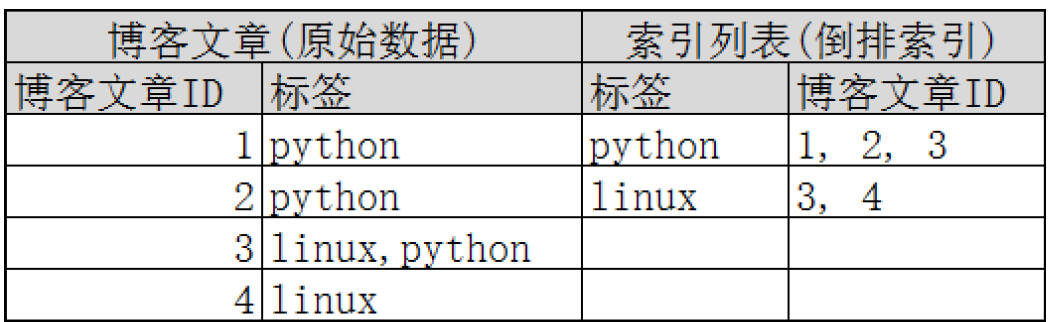
什么是倒排索引?
倒排索引的结构如下: "关键词1”:“文档1”的ID,“文档2”的ID,…………。 “关键词2”:带有此关键词的文档ID列表。
ES的物理设计是什么样的?
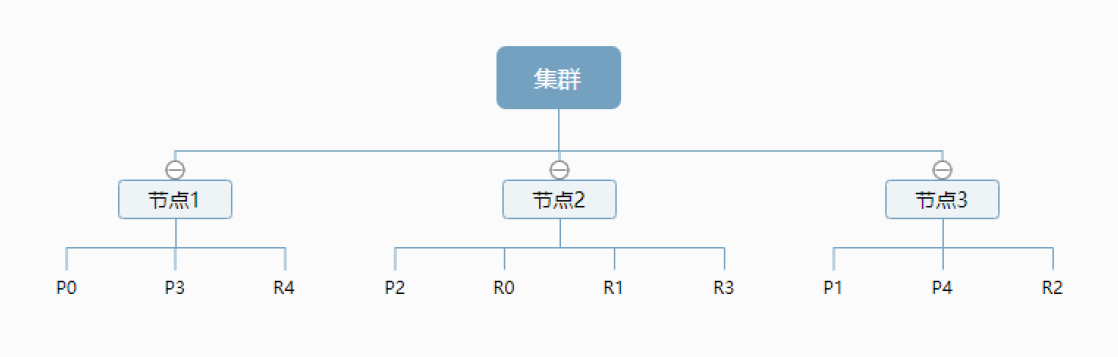
默认情况下,每个索引由5个主要分片组成,而每个主要分片又有一个副本,所以一共10个分片. ElasticSearch通过副本分片可以提高服务可靠性与搜索性能.另外分片也是ElasticSearch将数据从一个节点迁移到另一个节点的最小单位. 如果是多个节点的集群,主分片和对应的复制分片不会在同一个节点内,这样就算某个节点挂了,数据也不会丢失. 一个节点是一个ElasticSearch实例. 以下是拥有3个节点的集群:
ES的逻辑设计是什么样的?
一个索引中,包含多个文档,当我们索引一篇文档时,可以通过这样的顺序找到它: 索引->类型->文档id,这样就可以索引到具体的文档.
ElasticSearch的索引和Lucene的索引有什么区别?
在ElasticSearch中,索引被分为多个分片,每份分片是一个Lucene索引.所以一个ElasticSearch索引是由多个Lucene索引组成的.
默认的集群名字是什么?
主机名
怎么安装IK分词器?
- 下载ik分词器: github.com/medcl/elast…
- 解压后的文件夹放在elasticsearch-7.7.0\plugins目录下
- 可以使用elasticsearch-plugin list来查看加载的插件
什么是分词?
把文字按照词组进行划分
ik提供了哪些分词算法?
- 智能模式(ik_smart):
GET _analyze
{
  "analyzer": "ik_smart",
  "text": "没有GCD就没有新中国"
}
{
  "tokens" : [
    {
      "token" : "没有",
      "start_offset" : 0,
      "end_offset" : 2,
      "type" : "CN_WORD",
      "position" : 0
    },
    {
      "token" : "GCD",
      "start_offset" : 2,
      "end_offset" : 5,
      "type" : "CN_WORD",
      "position" : 1
    },
    {
      "token" : "就",
      "start_offset" : 5,
      "end_offset" : 6,
      "type" : "CN_CHAR",
      "position" : 2
    },
    {
      "token" : "没有",
      "start_offset" : 6,
      "end_offset" : 8,
      "type" : "CN_WORD",
      "position" : 3
    },
    {
      "token" : "新中国",
      "start_offset" : 8,
      "end_offset" : 11,
      "type" : "CN_WORD",
      "position" : 4
    }
  ]
}
- 细粒度模式(ik_max_word)
GET _analyze
{
  "analyzer": "ik_max_word",
  "text": "没有GCD就没有新中国"
}
{
  "tokens" : [
    {
      "token" : "没有",
      "start_offset" : 0,
      "end_offset" : 2,
      "type" : "CN_WORD",
      "position" : 0
    },
    {
      "token" : "GCD",
      "start_offset" : 2,
      "end_offset" : 5,
      "type" : "CN_WORD",
      "position" : 1
    },
    {
      "token" : "GC",
      "start_offset" : 2,
      "end_offset" : 4,
      "type" : "CN_WORD",
      "position" : 2
    },
    {
      "token" : "D",
      "start_offset" : 4,
      "end_offset" : 5,
      "type" : "CN_CHAR",
      "position" : 3
    },
    {
      "token" : "就",
      "start_offset" : 5,
      "end_offset" : 6,
      "type" : "CN_CHAR",
      "position" : 4
    },
    {
      "token" : "没有",
      "start_offset" : 6,
      "end_offset" : 8,
      "type" : "CN_WORD",
      "position" : 5
    },
    {
      "token" : "新中国",
      "start_offset" : 8,
      "end_offset" : 11,
      "type" : "CN_WORD",
      "position" : 6
    },
    {
      "token" : "中国",
      "start_offset" : 9,
      "end_offset" : 11,
      "type" : "CN_WORD",
      "position" : 7
    }
  ]
}
怎么测试不同分词器效果?
使用
GET _analyze命令.
GET _analyze
{
  "analyzer": "ik_smart",
  "text": "没有GCD就没有新中国"
}
怎么往分词器的字典中加入自造的词?
- 进入分词器目录elasticsearch-7.7.0\plugins\elasticsearch-analysis-ik-7.7.0\config
- 新建一个xxx.dic的文件
- 文件中加入自造的词,以换行分割
- 在IKAnalyzer.cfg.xml文件中配置自造的词的文件
<entry key="ext_dict">xxx.dic</entry>
什么是rest风格?
rest是一种软件架构风格,而不是标准,只是提供了一组设计原则和约束条件.它主要用于客户端和服务器交互类的软件.
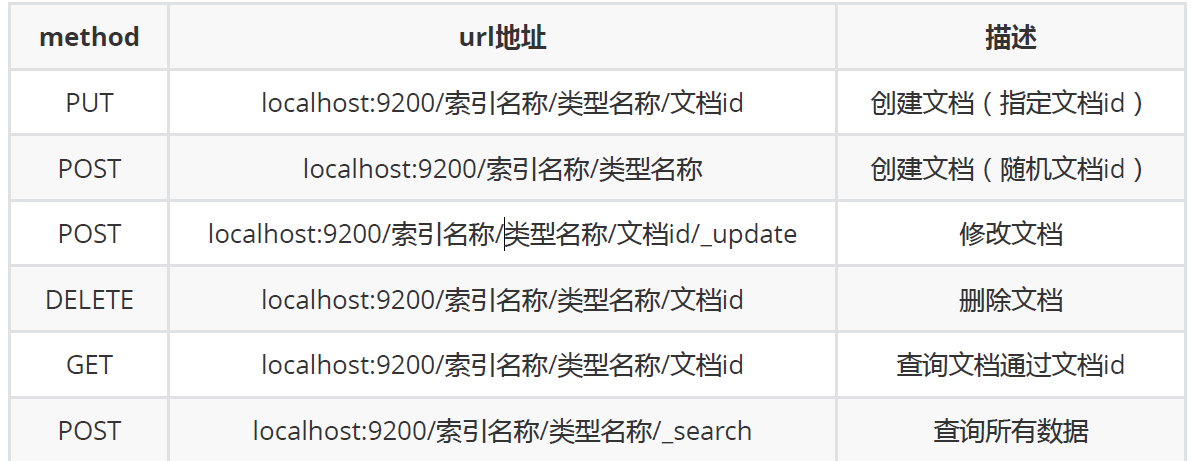
操作
怎么获取集群健康状态?
使用命令:
GET _cat/health?vgreen: 每个索引的primary shard和replica shard都是active状态的 yellow: 每个索引的primary shard都是active状态的,但是部分replica shard不是active状态,处于不可用状态. red: 不是所有的索引的primary shard都是active状态的,部分索引有数据丢失了.

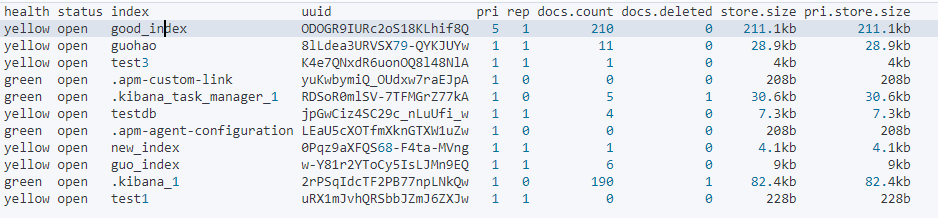
怎么查看集群中有哪些索引?
使用
GET /_cat/indices?v命令
怎么创建索引?
PUT /索引名/类型名/文档id{请求体}示例:
PUT /ecommerce/product/1
{
  "name":"高露洁牙膏",
  "desc":"高效美白",
  "price":30,
  "producer":"高露洁",
  "tags":["美白","防蛀"]
}
返回:
#! Deprecation: [types removal] Specifying types in document index requests is deprecated, use the typeless endpoints instead (/{index}/_doc/{id}, /{index}/_doc, or /{index}/_create/{id}).
{
  "_index" : "ecommerce",
  "_type" : "product",
  "_id" : "1",
  "_version" : 1,
  "result" : "created",
  "_shards" : {
    "total" : 2,
    "successful" : 1,
    "failed" : 0
  },
  "_seq_no" : 0,
  "_primary_term" : 1
}
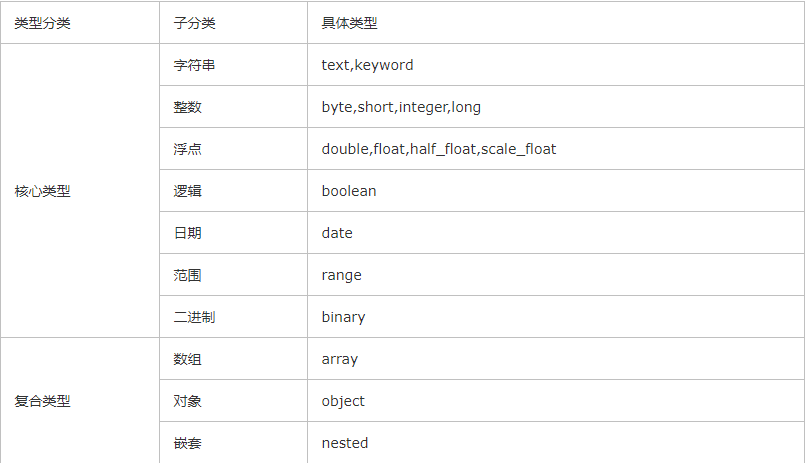
ES有哪些数据类型?
怎么指定字段的类型?
PUT /test_index
{
  "mappings": {
      "properties":{
        "name":{
          "type":"text"
        },
        "age":{
          "type":"integer"
        }
      }
    }
}
{
  "acknowledged" : true,
  "shards_acknowledged" : true,
  "index" : "test_index"
}
总结: 如果没有指定字段类型,那么es 就会给我们默认配置字段类型!
怎么查看索引字段类型?
GET /ecommerce
{
  "ecommerce" : {
    "aliases" : { },
    "mappings" : {
      "properties" : {
        "desc" : {
          "type" : "text",
          "fields" : {
            "keyword" : {
              "type" : "keyword",
              "ignore_above" : 256
            }
          }
        },
        "name" : {
          "type" : "text",
          "fields" : {
            "keyword" : {
              "type" : "keyword",
              "ignore_above" : 256
            }
          }
        },
        "price" : {
          "type" : "long"
        },
        "producer" : {
          "type" : "text",
          "fields" : {
            "keyword" : {
              "type" : "keyword",
              "ignore_above" : 256
            }
          }
        },
        "tags" : {
          "type" : "text",
          "fields" : {
            "keyword" : {
              "type" : "keyword",
              "ignore_above" : 256
            }
          }
        }
      }
    },
    "settings" : {
      "index" : {
        "creation_date" : "1590653364708",
        "number_of_shards" : "1",
        "number_of_replicas" : "1",
        "uuid" : "mllxr5AkS1-JhGxO7r9jTQ",
        "version" : {
          "created" : "7070099"
        },
        "provided_name" : "ecommerce"
      }
    }
  }
}
怎么简单查询?
通过id来查询
GET /ecommerce/product/1
{
  "_index" : "ecommerce",
  "_type" : "product",
  "_id" : "1",
  "_version" : 1,
  "_seq_no" : 0,
  "_primary_term" : 1,
  "found" : true,
  "_source" : {
    "name" : "高露洁牙膏",
    "desc" : "高效美白",
    "price" : 30,
    "producer" : "高露洁",
    "tags" : [
      "美白",
      "防蛀"
    ]
  }
}
怎么更新索引的单条文档的单个字段?
POST /ecommerce/product/1/_update
{
  "doc":{
    "name":"高露洁冰爽薄荷牙膏"
  }
}
{
  "_index" : "ecommerce",
  "_type" : "product",
  "_id" : "1",
  "_version" : 2,
  "result" : "updated",
  "_shards" : {
    "total" : 2,
    "successful" : 1,
    "failed" : 0
  },
  "_seq_no" : 1,
  "_primary_term" : 1
}
通过POST请求的_update方法可以只更新文档中的指定field,而不会跟PUT方法的更新一样,全部替换原来的单条文档内容.
怎么删除某个索引?
DELETE /test_index2/
{
  "acknowledged" : true
}
怎么删除索引中的单个文档?
DELETE /test_index/_doc/1
{
  "_index" : "test_index",
  "_type" : "_doc",
  "_id" : "1",
  "_version" : 2,
  "result" : "deleted",
  "_shards" : {
    "total" : 2,
    "successful" : 1,
    "failed" : 0
  },
  "_seq_no" : 2,
  "_primary_term" : 1
}
什么是query string search搜索?
又名: 简单的条件查询 search参数都是以http请求的query string来附带的. 适用于在命令行使用一些工具,例如curl,快速发出请求,来检索想要的信息.在生产环境,几乎不会使用query string search.
GET /ecommerce/product/_search?q=name:牙膏&sort=price:desc
{
  "took" : 455,
  "timed_out" : false,
  "_shards" : {
    "total" : 1,
    "successful" : 1,
    "skipped" : 0,
    "failed" : 0
  },
  "hits" : {
    "total" : {
      "value" : 3,
      "relation" : "eq"
    },
    "max_score" : null,
    "hits" : [
      {
        "_index" : "ecommerce",
        "_type" : "product",
        "_id" : "2",
        "_score" : null,
        "_source" : {
          "name" : "中华健齿白牙膏",
          "desc" : "护龈美白",
          "price" : 35,
          "producer" : "高露洁",
          "tags" : [
            "美白",
            "护龈蛀"
          ]
        },
        "sort" : [
          35
        ]
      },
      {
        "_index" : "ecommerce",
        "_type" : "product",
        "_id" : "3",
        "_score" : null,
        "_source" : {
          "name" : "佳洁士牙膏",
          "desc" : "护龈去渍",
          "price" : 32,
          "producer" : "佳洁士",
          "tags" : [
            "去渍",
            "护龈"
          ]
        },
        "sort" : [
          32
        ]
      },
      {
        "_index" : "ecommerce",
        "_type" : "product",
        "_id" : "1",
        "_score" : null,
        "_source" : {
          "name" : "高露洁冰爽薄荷牙膏",
          "desc" : "高效美白",
          "price" : 30,
          "producer" : "高露洁",
          "tags" : [
            "美白",
            "防蛀"
          ]
        },
        "sort" : [
          30
        ]
      }
    ]
  }
}
took: 耗费了多少毫秒. timed_out: 是否超时. _shards: 数据拆分到各个分片的情况 hits.total: 查询结果的数量 hits.max_score: 匹配的分数 hits.hits: 包含了匹配搜索的document的详细数据
什么是query DSL?
DSL: Domain Specified Language.特定领域的语言. 请求体可以使用json的格式来构建查询语法.
GET /ecommerce/product/_search
{
  "query": { "match_all": {} }
}
{
  "took" : 0,
  "timed_out" : false,
  "_shards" : {
    "total" : 1,
    "successful" : 1,
    "skipped" : 0,
    "failed" : 0
  },
  "hits" : {
    "total" : {
      "value" : 3,
      "relation" : "eq"
    },
    "max_score" : 1.0,
    "hits" : [
      {
        "_index" : "ecommerce",
        "_type" : "product",
        "_id" : "1",
        "_score" : 1.0,
        "_source" : {
          "name" : "高露洁冰爽薄荷牙膏",
          "desc" : "高效美白",
          "price" : 30,
          "producer" : "高露洁",
          "tags" : [
            "美白",
            "防蛀"
          ]
        }
      },
      {
        "_index" : "ecommerce",
        "_type" : "product",
        "_id" : "2",
        "_score" : 1.0,
        "_source" : {
          "name" : "中华健齿白牙膏",
          "desc" : "护龈美白",
          "price" : 35,
          "producer" : "高露洁",
          "tags" : [
            "美白",
            "护龈蛀"
          ]
        }
      },
      {
        "_index" : "ecommerce",
        "_type" : "product",
        "_id" : "3",
        "_score" : 1.0,
        "_source" : {
          "name" : "佳洁士牙膏",
          "desc" : "护龈去渍",
          "price" : 32,
          "producer" : "佳洁士",
          "tags" : [
            "去渍",
            "护龈"
          ]
        }
      }
    ]
  }
}
match_all是匹配所有的文档.
怎么设置只返回指定的字段?
使用
_source,在数组中声明要返回的字段
GET /ecommerce/product/_search
{
  "query": {
    "match_all": {}
  },
  "_source": ["name","desc"]
}
{
  "took" : 6,
  "timed_out" : false,
  "_shards" : {
    "total" : 1,
    "successful" : 1,
    "skipped" : 0,
    "failed" : 0
  },
  "hits" : {
    "total" : {
      "value" : 3,
      "relation" : "eq"
    },
    "max_score" : 1.0,
    "hits" : [
      {
        "_index" : "ecommerce",
        "_type" : "product",
        "_id" : "1",
        "_score" : 1.0,
        "_source" : {
          "name" : "高露洁冰爽薄荷牙膏",
          "desc" : "高效美白"
        }
      },
      {
        "_index" : "ecommerce",
        "_type" : "product",
        "_id" : "2",
        "_score" : 1.0,
        "_source" : {
          "name" : "中华健齿白牙膏",
          "desc" : "护龈美白"
        }
      },
      {
        "_index" : "ecommerce",
        "_type" : "product",
        "_id" : "3",
        "_score" : 1.0,
        "_source" : {
          "name" : "佳洁士牙膏",
          "desc" : "护龈去渍"
        }
      }
    ]
  }
}
怎么使用match查询?
match: 支持全文检索和精确查询.取决于字段是否支持全文检索. match查询语句分词 match查询keyword字段,keyword字段不分词,需要完全匹配 match查询text字段,text字段分词,只要部分匹配即可.
GET /ecommerce/product/_search
{
  "query": {
    "match": {
      "name":"高露洁 牙膏"
    }
  }
}
{
  "took" : 2,
  "timed_out" : false,
  "_shards" : {
    "total" : 1,
    "successful" : 1,
    "skipped" : 0,
    "failed" : 0
  },
  "hits" : {
    "total" : {
      "value" : 4,
      "relation" : "eq"
    },
    "max_score" : 1.8059323,
    "hits" : [
      {
        "_index" : "ecommerce",
        "_type" : "product",
        "_id" : "1",
        "_score" : 1.8059323,
        "_source" : {
          "name" : "高露洁冰爽薄荷牙膏",
          "desc" : "高效美白",
          "price" : 30,
          "producer" : "高露洁",
          "tags" : [
            "美白",
            "防蛀"
          ]
        }
      },
      {
        "_index" : "ecommerce",
        "_type" : "product",
        "_id" : "4",
        "_score" : 1.8059323,
        "_source" : {
          "name" : "高露洁全能防护牙膏",
          "desc" : "清新口气",
          "price" : 10,
          "producer" : "高露洁",
          "tags" : [
            "美白",
            "防蛀"
          ]
        }
      },
      {
        "_index" : "ecommerce",
        "_type" : "product",
        "_id" : "3",
        "_score" : 0.6569848,
        "_source" : {
          "name" : "佳洁士牙膏",
          "desc" : "护龈去渍",
          "price" : 32,
          "producer" : "佳洁士",
          "tags" : [
            "去渍",
            "护龈"
          ]
        }
      },
      {
        "_index" : "ecommerce",
        "_type" : "product",
        "_id" : "2",
        "_score" : 0.2166291,
        "_source" : {
          "name" : "中华健齿白牙膏",
          "desc" : "护龈美白",
          "price" : 35,
          "producer" : "高露洁",
          "tags" : [
            "美白",
            "护龈蛀"
          ]
        }
      }
    ]
  }
}
match全文搜索多个检索词默认是用or连接,部分匹配就会查询出来,按照分数的高低排序.
怎么设置全文检索多个词都匹配才能检索到?
使用
operator操作,设置连接符为and
GET /ecommerce/product/_search
{
  "query": {
    "match": {
      "name":{
        "query": "高露洁 牙膏",
        "operator": "and"
      }
    }
  }
}
{
  "took" : 7,
  "timed_out" : false,
  "_shards" : {
    "total" : 1,
    "successful" : 1,
    "skipped" : 0,
    "failed" : 0
  },
  "hits" : {
    "total" : {
      "value" : 2,
      "relation" : "eq"
    },
    "max_score" : 1.8059323,
    "hits" : [
      {
        "_index" : "ecommerce",
        "_type" : "product",
        "_id" : "1",
        "_score" : 1.8059323,
        "_source" : {
          "name" : "高露洁冰爽薄荷牙膏",
          "desc" : "高效美白",
          "price" : 30,
          "producer" : "高露洁",
          "tags" : [
            "美白",
            "防蛀"
          ]
        }
      },
      {
        "_index" : "ecommerce",
        "_type" : "product",
        "_id" : "4",
        "_score" : 1.8059323,
        "_source" : {
          "name" : "高露洁全能防护牙膏",
          "desc" : "清新口气",
          "price" : 10,
          "producer" : "高露洁",
          "tags" : [
            "美白",
            "防蛀"
          ]
        }
      }
    ]
  }
}
使用operator的and只有多个词同时满足的结果才会搜索到.
怎么进行多字段查询?
使用
multi_match
GET /ecommerce/product/_search
{
  "query": {
    "multi_match": {
      "query": "美白",
      "fields": ["desc","tags"]
    }
  }
}
{
  "took" : 1,
  "timed_out" : false,
  "_shards" : {
    "total" : 1,
    "successful" : 1,
    "skipped" : 0,
    "failed" : 0
  },
  "hits" : {
    "total" : {
      "value" : 3,
      "relation" : "eq"
    },
    "max_score" : 1.3862942,
    "hits" : [
      {
        "_index" : "ecommerce",
        "_type" : "product",
        "_id" : "1",
        "_score" : 1.3862942,
        "_source" : {
          "name" : "高露洁冰爽薄荷牙膏",
          "desc" : "高效美白",
          "price" : 30,
          "producer" : "高露洁",
          "tags" : [
            "美白",
            "防蛀"
          ]
        }
      },
      {
        "_index" : "ecommerce",
        "_type" : "product",
        "_id" : "2",
        "_score" : 1.3862942,
        "_source" : {
          "name" : "中华健齿白牙膏",
          "desc" : "护龈美白",
          "price" : 35,
          "producer" : "高露洁",
          "tags" : [
            "美白",
            "护龈蛀"
          ]
        }
      },
      {
        "_index" : "ecommerce",
        "_type" : "product",
        "_id" : "4",
        "_score" : 0.7309394,
        "_source" : {
          "name" : "高露洁全能防护牙膏",
          "desc" : "清新口气",
          "price" : 10,
          "producer" : "高露洁",
          "tags" : [
            "美白",
            "防蛀"
          ]
        }
      }
    ]
  }
}
怎么进行范围查询?
range
GET /ecommerce/product/_search
{
  "query": {
    "range": {
      "price": {
        "gte": 20,
        "lte": 30
      }
    }
  }
}
{
  "took" : 0,
  "timed_out" : false,
  "_shards" : {
    "total" : 1,
    "successful" : 1,
    "skipped" : 0,
    "failed" : 0
  },
  "hits" : {
    "total" : {
      "value" : 1,
      "relation" : "eq"
    },
    "max_score" : 1.0,
    "hits" : [
      {
        "_index" : "ecommerce",
        "_type" : "product",
        "_id" : "1",
        "_score" : 1.0,
        "_source" : {
          "name" : "高露洁冰爽薄荷牙膏",
          "desc" : "高效美白",
          "price" : 30,
          "producer" : "高露洁",
          "tags" : [
            "美白",
            "防蛀"
          ]
        }
      }
    ]
  }
}
gt: 大于,gte: 大于等于,lt: 小于,lte: 小于等于
怎么进行精确查找?
使用term方式查找. term查询语句不分词 term查询keyword字段: keyword部分词,需要完全匹配 term查询text字段: text字段分词,term查询语句必须匹配分词后的某一行才行. es默认是用的standard分词器(会将中文按字进行拆分)
GET /ecommerce/product/_search
{
  "query": {
    "term": {
      "name": {
        "value": "gaolujie"
      }
    }
  }
}
{
  "took" : 0,
  "timed_out" : false,
  "_shards" : {
    "total" : 1,
    "successful" : 1,
    "skipped" : 0,
    "failed" : 0
  },
  "hits" : {
    "total" : {
      "value" : 1,
      "relation" : "eq"
    },
    "max_score" : 1.9287573,
    "hits" : [
      {
        "_index" : "ecommerce",
        "_type" : "product",
        "_id" : "5",
        "_score" : 1.9287573,
        "_source" : {
          "name" : "gaolujie yagao",
          "desc" : "gaoxiao meibai",
          "price" : 30,
          "producer" : "gaolujie",
          "tags" : [
            "meibai",
            "fangzhu"
          ]
        }
      }
    ]
  }
}
怎么使用进行多个值进行匹配?
使用terms
GET /ecommerce/product/_search
{
  "query": {
    "terms": {
      "name": ["中","高"]
    }
  }
}
{
  "took" : 0,
  "timed_out" : false,
  "_shards" : {
    "total" : 1,
    "successful" : 1,
    "skipped" : 0,
    "failed" : 0
  },
  "hits" : {
    "total" : {
      "value" : 3,
      "relation" : "eq"
    },
    "max_score" : 1.0,
    "hits" : [
      {
        "_index" : "ecommerce",
        "_type" : "product",
        "_id" : "1",
        "_score" : 1.0,
        "_source" : {
          "name" : "高露洁冰爽薄荷牙膏",
          "desc" : "高效美白",
          "price" : 30,
          "producer" : "高露洁",
          "tags" : [
            "美白",
            "防蛀"
          ]
        }
      },
      {
        "_index" : "ecommerce",
        "_type" : "product",
        "_id" : "2",
        "_score" : 1.0,
        "_source" : {
          "name" : "中华健齿白牙膏",
          "desc" : "护龈美白",
          "price" : 35,
          "producer" : "高露洁",
          "tags" : [
            "美白",
            "护龈蛀"
          ]
        }
      },
      {
        "_index" : "ecommerce",
        "_type" : "product",
        "_id" : "4",
        "_score" : 1.0,
        "_source" : {
          "name" : "高露洁全能防护牙膏",
          "desc" : "清新口气",
          "price" : 10,
          "producer" : "高露洁",
          "tags" : [
            "美白",
            "防蛀"
          ]
        }
      }
    ]
  }
}
总结: terms和match的区别: terms的查询语句不会被分词,而match的会.相同点是对多个短语进行or匹配.
怎么查询索引中某个字段有值的文档?
query->bool->filter->exists
GET /ecommerce/product/_search
{
  "query": {
    "bool": {
      "filter": {
        "exists": {
          "field": "desc"
        }
      }
    }
  }
}
{
  "took" : 0,
  "timed_out" : false,
  "_shards" : {
    "total" : 1,
    "successful" : 1,
    "skipped" : 0,
    "failed" : 0
  },
  "hits" : {
    "total" : {
      "value" : 6,
      "relation" : "eq"
    },
    "max_score" : 0.0,
    "hits" : [
      {
        "_index" : "ecommerce",
        "_type" : "product",
        "_id" : "1",
        "_score" : 0.0,
        "_source" : {
          "name" : "高露洁冰爽薄荷牙膏",
          "desc" : "高效美白",
          "price" : 30,
          "producer" : "高露洁",
          "tags" : [
            "美白",
            "防蛀"
          ]
        }
      },
      {
        "_index" : "ecommerce",
        "_type" : "product",
        "_id" : "2",
        "_score" : 0.0,
        "_source" : {
          "name" : "中华健齿白牙膏",
          "desc" : "护龈美白",
          "price" : 35,
          "producer" : "高露洁",
          "tags" : [
            "美白",
            "护龈蛀"
          ]
        }
      },
      {
        "_index" : "ecommerce",
        "_type" : "product",
        "_id" : "3",
        "_score" : 0.0,
        "_source" : {
          "name" : "佳洁士牙膏",
          "desc" : "护龈去渍",
          "price" : 32,
          "producer" : "佳洁士",
          "tags" : [
            "去渍",
            "护龈"
          ]
        }
      },
      {
        "_index" : "ecommerce",
        "_type" : "product",
        "_id" : "4",
        "_score" : 0.0,
        "_source" : {
          "name" : "高露洁全能防护牙膏",
          "desc" : "清新口气",
          "price" : 10,
          "producer" : "高露洁",
          "tags" : [
            "美白",
            "防蛀"
          ]
        }
      },
      {
        "_index" : "ecommerce",
        "_type" : "product",
        "_id" : "5",
        "_score" : 0.0,
        "_source" : {
          "name" : "gaolujie yagao",
          "desc" : "gaoxiao meibai",
          "price" : 30,
          "producer" : "gaolujie",
          "tags" : [
            "meibai",
            "fangzhu"
          ]
        }
      },
      {
        "_index" : "ecommerce",
        "_type" : "product",
        "_id" : "6",
        "_score" : 0.0,
        "_source" : {
          "name" : "gaolujie yagao",
          "desc" : "",
          "price" : 30,
          "producer" : "gaolujie",
          "tags" : [
            "meibai",
            "fangzhu"
          ]
        }
      }
    ]
  }
}
怎么查询索引中某个字段没有值的文档?
query->bool->must_not->exists
GET /ecommerce/product/_search
{
  "query": {
    "bool": {
      "must_not": {
        "exists": {
          "field": "desc"
        }
      }
    }
  }
}
{
  "took" : 0,
  "timed_out" : false,
  "_shards" : {
    "total" : 1,
    "successful" : 1,
    "skipped" : 0,
    "failed" : 0
  },
  "hits" : {
    "total" : {
      "value" : 1,
      "relation" : "eq"
    },
    "max_score" : 0.0,
    "hits" : [
      {
        "_index" : "ecommerce",
        "_type" : "product",
        "_id" : "7",
        "_score" : 0.0,
        "_source" : {
          "name" : "gaolujie yagao",
          "price" : 30,
          "producer" : "gaolujie",
          "tags" : [
            "meibai",
            "fangzhu"
          ]
        }
      }
    ]
  }
}
怎么进行查询语句为短语并且不分词完全匹配的查询?
query->match_phrase match_phrase与term查询的区别: match_phrase字段不会进行分词.term的字段会进行分词,而且默认是standard分词,按单词(字)进行分词.match_phrase与term查询的共同点: 查询语句都不会进行分词. match_phrase与match查询的区别: 完全不一样,match_phrase查询语句和字段都不会分词.match是都会进行分词.
GET /ecommerce/product/_search
{
  "query": {
    "match_phrase": {
      "name": "高露洁"
    }
  }
}
{
  "took" : 5,
  "timed_out" : false,
  "_shards" : {
    "total" : 1,
    "successful" : 1,
    "skipped" : 0,
    "failed" : 0
  },
  "hits" : {
    "total" : {
      "value" : 2,
      "relation" : "eq"
    },
    "max_score" : 2.412715,
    "hits" : [
      {
        "_index" : "ecommerce",
        "_type" : "product",
        "_id" : "1",
        "_score" : 2.412715,
        "_source" : {
          "name" : "高露洁冰爽薄荷牙膏",
          "desc" : "高效美白",
          "price" : 30,
          "producer" : "高露洁",
          "tags" : [
            "美白",
            "防蛀"
          ]
        }
      },
      {
        "_index" : "ecommerce",
        "_type" : "product",
        "_id" : "4",
        "_score" : 2.412715,
        "_source" : {
          "name" : "高露洁全能防护牙膏",
          "desc" : "清新口气",
          "price" : 10,
          "producer" : "高露洁",
          "tags" : [
            "美白",
            "防蛀"
          ]
        }
      }
    ]
  }
}
怎么进行顺序分页查询?
scroll=xxxm 类似于分页查询,不支持跳页查询,只能一页一页的往下查询.scroll查询不是针对实时用户请求,而是针对处理大量数据,例如为了将一个索引的内容重新索引到具有不同配置的新索引中.
GET /ecommerce/product/_search?scroll=5m
{
  "query": {
    "match_all": {}
  },
  "from": 0,
  "size": 2
}
{
  "_scroll_id" : "FGluY2x1ZGVfY29udGV4dF91dWlkDXF1ZXJ5QW5kRmV0Y2gBFExHMUdYbklCZ1N0WlhtRGxZZWtoAAAAAAAAUcMWR2cxT1NPcDVTV21QOHlMWVVzUldhZw==",
  "took" : 0,
  "timed_out" : false,
  "_shards" : {
    "total" : 1,
    "successful" : 1,
    "skipped" : 0,
    "failed" : 0
  },
  "hits" : {
    "total" : {
      "value" : 8,
      "relation" : "eq"
    },
    "max_score" : 1.0,
    "hits" : [
      {
        "_index" : "ecommerce",
        "_type" : "product",
        "_id" : "1",
        "_score" : 1.0,
        "_source" : {
          "name" : "高露洁冰爽薄荷牙膏",
          "desc" : "高效美白",
          "price" : 30,
          "producer" : "高露洁",
          "tags" : [
            "美白",
            "防蛀"
          ]
        }
      },
      {
        "_index" : "ecommerce",
        "_type" : "product",
        "_id" : "2",
        "_score" : 1.0,
        "_source" : {
          "name" : "中华健齿白牙膏",
          "desc" : "护龈美白",
          "price" : 35,
          "producer" : "高露洁",
          "tags" : [
            "美白",
            "护龈蛀"
          ]
        }
      }
    ]
  }
}
GET _search/scroll
{
  "scroll":"5m",
  "scroll_id":"FGluY2x1ZGVfY29udGV4dF91dWlkDXF1ZXJ5QW5kRmV0Y2gBFExHMUdYbklCZ1N0WlhtRGxZZWtoAAAAAAAAUcMWR2cxT1NPcDVTV21QOHlMWVVzUldhZw=="
}
{
  "_scroll_id" : "FGluY2x1ZGVfY29udGV4dF91dWlkDXF1ZXJ5QW5kRmV0Y2gBFExHMUdYbklCZ1N0WlhtRGxZZWtoAAAAAAAAUcMWR2cxT1NPcDVTV21QOHlMWVVzUldhZw==",
  "took" : 1,
  "timed_out" : false,
  "terminated_early" : true,
  "_shards" : {
    "total" : 1,
    "successful" : 1,
    "skipped" : 0,
    "failed" : 0
  },
  "hits" : {
    "total" : {
      "value" : 8,
      "relation" : "eq"
    },
    "max_score" : 1.0,
    "hits" : [
      {
        "_index" : "ecommerce",
        "_type" : "product",
        "_id" : "3",
        "_score" : 1.0,
        "_source" : {
          "name" : "佳洁士牙膏",
          "desc" : "护龈去渍",
          "price" : 32,
          "producer" : "佳洁士",
          "tags" : [
            "去渍",
            "护龈"
          ]
        }
      },
      {
        "_index" : "ecommerce",
        "_type" : "product",
        "_id" : "4",
        "_score" : 1.0,
        "_source" : {
          "name" : "高露洁全能防护牙膏",
          "desc" : "清新口气",
          "price" : 10,
          "producer" : "高露洁",
          "tags" : [
            "美白",
            "防蛀"
          ]
        }
      }
    ]
  }
}
怎么进行bool(布尔过滤器)进行查询?
布尔过滤器的作用是将多个条件组合查询. must: 与AND等价 must_not: 与NOT等价 should: 与OR等价
GET /ecommerce/product/_search
{
  "query": {
    "bool": {
      "must": {
        "match_phrase":{
          "name":"高露"
        }
      },
      "should": {
        "match":{
          "name":"全能"
        }
      },
      "must_not": {
        "match":{
          "name":"冰爽"
        }
      }
    }
  }
}
{
  "took" : 1,
  "timed_out" : false,
  "_shards" : {
    "total" : 1,
    "successful" : 1,
    "skipped" : 0,
    "failed" : 0
  },
  "hits" : {
    "total" : {
      "value" : 1,
      "relation" : "eq"
    },
    "max_score" : 4.4307747,
    "hits" : [
      {
        "_index" : "ecommerce",
        "_type" : "product",
        "_id" : "4",
        "_score" : 4.4307747,
        "_source" : {
          "name" : "高露洁全能防护牙膏",
          "desc" : "清新口气",
          "price" : 10,
          "producer" : "高露洁",
          "tags" : [
            "美白",
            "防蛀"
          ]
        }
      }
    ]
  }
}
ElasticSearch可以修改字段类型吗?
不可以.只能创建一个新的索引,然后将数据迁移过去.
有哪些复杂搜索?
排序,分页,高亮,模糊搜索,精确查询,范围查询
怎么进行排序?
sort
GET /ecommerce/product/_search
{
  "query":{
    "match": {
      "name": "牙膏"
    }
  },
  "sort": [
    {
      "price": {
        "order": "desc"
      }
    }
  ]
}
{
  "took" : 6,
  "timed_out" : false,
  "_shards" : {
    "total" : 1,
    "successful" : 1,
    "skipped" : 0,
    "failed" : 0
  },
  "hits" : {
    "total" : {
      "value" : 4,
      "relation" : "eq"
    },
    "max_score" : null,
    "hits" : [
      {
        "_index" : "ecommerce",
        "_type" : "product",
        "_id" : "2",
        "_score" : null,
        "_source" : {
          "name" : "中华健齿白牙膏",
          "desc" : "护龈美白",
          "price" : 35,
          "producer" : "高露洁",
          "tags" : [
            "美白",
            "护龈蛀"
          ]
        },
        "sort" : [
          35
        ]
      },
      {
        "_index" : "ecommerce",
        "_type" : "product",
        "_id" : "3",
        "_score" : null,
        "_source" : {
          "name" : "佳洁士牙膏",
          "desc" : "护龈去渍",
          "price" : 32,
          "producer" : "佳洁士",
          "tags" : [
            "去渍",
            "护龈"
          ]
        },
        "sort" : [
          32
        ]
      },
      {
        "_index" : "ecommerce",
        "_type" : "product",
        "_id" : "1",
        "_score" : null,
        "_source" : {
          "name" : "高露洁冰爽薄荷牙膏",
          "desc" : "高效美白",
          "price" : 30,
          "producer" : "高露洁",
          "tags" : [
            "美白",
            "防蛀"
          ]
        },
        "sort" : [
          30
        ]
      },
      {
        "_index" : "ecommerce",
        "_type" : "product",
        "_id" : "4",
        "_score" : null,
        "_source" : {
          "name" : "高露洁全能防护牙膏",
          "desc" : "清新口气",
          "price" : 10,
          "producer" : "高露洁",
          "tags" : [
            "美白",
            "防蛀"
          ]
        },
        "sort" : [
          10
        ]
      }
    ]
  }
}
怎么进行分页?
使用from和size进行分页. from: 表示从多少条开始取.第一条是0 size: 表示取多少条.
GET /ecommerce/product/_search
{
  "query": {
    "match_all": {}
  },
  "from": 1,
  "size": 2
}
{
  "took" : 0,
  "timed_out" : false,
  "_shards" : {
    "total" : 1,
    "successful" : 1,
    "skipped" : 0,
    "failed" : 0
  },
  "hits" : {
    "total" : {
      "value" : 3,
      "relation" : "eq"
    },
    "max_score" : 1.0,
    "hits" : [
      {
        "_index" : "ecommerce",
        "_type" : "product",
        "_id" : "2",
        "_score" : 1.0,
        "_source" : {
          "name" : "中华健齿白牙膏",
          "desc" : "护龈美白",
          "price" : 35,
          "producer" : "高露洁",
          "tags" : [
            "美白",
            "护龈蛀"
          ]
        }
      },
      {
        "_index" : "ecommerce",
        "_type" : "product",
        "_id" : "3",
        "_score" : 1.0,
        "_source" : {
          "name" : "佳洁士牙膏",
          "desc" : "护龈去渍",
          "price" : 32,
          "producer" : "佳洁士",
          "tags" : [
            "去渍",
            "护龈"
          ]
        }
      }
    ]
  }
}
ElasticSearch使用from,size进行深度分页有性能问题吗?
有.假设每页10条数据,现在查询第100页,它会从每个分片中取出100*10条数据,假设有5个分片,会取出5000条数据,然后再内存中进行排序,然后返回排序后的集合中的990-1000条数据.会发生性能问题. 默认from+size<=10000 如果from+size>10000,需要调大max_result_window的值.
怎么使用filter查询?
GET /ecommerce/product/_search
{
  "query":{
    "bool": {
      "filter": {
        "range": {
          "price": {
            "gte": 10,
            "lte": 20
          }
        }
      }
    }
  }
}
{
  "took" : 0,
  "timed_out" : false,
  "_shards" : {
    "total" : 1,
    "successful" : 1,
    "skipped" : 0,
    "failed" : 0
  },
  "hits" : {
    "total" : {
      "value" : 1,
      "relation" : "eq"
    },
    "max_score" : 0.0,
    "hits" : [
      {
        "_index" : "ecommerce",
        "_type" : "product",
        "_id" : "4",
        "_score" : 0.0,
        "_source" : {
          "name" : "高露洁全能防护牙膏",
          "desc" : "清新口气",
          "price" : 10,
          "producer" : "高露洁",
          "tags" : [
            "美白",
            "防蛀"
          ]
        }
      }
    ]
  }
}
gt,lt,gte,lte是什么意思?
gt: 大于 lt: 小于 gte: 大于等于 lte: 小于等于
怎么查询类型是数组的字段?
跟普通查询一样
文本的分词有哪两种类型?
text: 会被分词器分词 keyword: 不会被分词器分词
怎么进行高亮查询?
highlight->fields
GET /ecommerce/product/_search
{
  "query":{
    "match": {
      "name": "高露"
    }
  },
  "highlight": {
    "pre_tags": "<span style='color:red;'>",
    "post_tags": "</span>",
    "fields": {
      "name":{}
    }
  }
}
{
  "took" : 1,
  "timed_out" : false,
  "_shards" : {
    "total" : 1,
    "successful" : 1,
    "skipped" : 0,
    "failed" : 0
  },
  "hits" : {
    "total" : {
      "value" : 2,
      "relation" : "eq"
    },
    "max_score" : 1.8470862,
    "hits" : [
      {
        "_index" : "ecommerce",
        "_type" : "product",
        "_id" : "1",
        "_score" : 1.8470862,
        "_source" : {
          "name" : "高露洁冰爽薄荷牙膏",
          "desc" : "高效美白",
          "price" : 30,
          "producer" : "高露洁",
          "tags" : [
            "美白",
            "防蛀"
          ]
        },
        "highlight" : {
          "name" : [
            "<span style='color:red;'>高</span><span style='color:red;'>露</span>洁冰爽薄荷牙膏"
          ]
        }
      },
      {
        "_index" : "ecommerce",
        "_type" : "product",
        "_id" : "4",
        "_score" : 1.8470862,
        "_source" : {
          "name" : "高露洁全能防护牙膏",
          "desc" : "清新口气",
          "price" : 10,
          "producer" : "高露洁",
          "tags" : [
            "美白",
            "防蛀"
          ]
        },
        "highlight" : {
          "name" : [
            "<span style='color:red;'>高</span><span style='color:red;'>露</span>洁全能防护牙膏"
          ]
        }
      }
    ]
  }
}
怎么自定义高亮条件?
使用highlight->pre_tags和highlight->post_tags
集成SpringBoot
springboot怎么集成elasticsearch?
- 引入核心依赖:必须自定义ElasticSearch的版本(默认是6.x版本).
<properties>
    <java.version>1.8</java.version>
    <elasticsearch.version>7.7.0</elasticsearch.version>
</properties>
<dependency>
    <groupId>org.jsoup</groupId>
    <artifactId>jsoup</artifactId>
    <version>1.13.1</version>
</dependency>
<dependency>
    <groupId>com.alibaba</groupId>
    <artifactId>fastjson</artifactId>
    <version>1.2.68</version>
</dependency>
<dependency>
    <groupId>org.springframework.boot</groupId>
    <artifactId>spring-boot-starter-data-elasticsearch</artifactId>
</dependency>
- 引入高级客户端的bean
@Configuration
public class ElasticSearchConfig {
    @Bean
    public RestHighLevelClient restHighLevelClient(){
        RestHighLevelClient client = new RestHighLevelClient(
                RestClient.builder(
                        new HttpHost("127.0.0.1",9200,"http")
                )
        );
        return client;
    }
}
- 关闭thymeleaf的缓存
server.port=9090
#关闭thymeleaf的缓存
spring.thymeleaf.cache=false
怎么查看elasticsearch高级客户端是怎么配置的?
怎么创建索引?
使用CreateIndexRequest直接创建
@Test
void testCreateIndex() throws IOException {
    //1. 创建索引请求: CreateIndexRequest
    CreateIndexRequest request = new CreateIndexRequest("newone1");
    //2. 客户端执行请求.通过client的indices().create方法
    //RequestOptions options参数: 请求选项(例如请求头),如果不需要自定义任何内容,使用RequestOptions.DEFAULT
    CreateIndexResponse response = restHighLevelClient.indices().create(request, RequestOptions.DEFAULT);
    //打印: true
    System.out.println(response.isAcknowledged());
}
怎么查看索引是否存在?
使用GetIndexRequest
@Test
void testExistIndex() throws IOException {
    //获取索引请求: GetIndexRequest
    GetIndexRequest request = new GetIndexRequest("newone");
    boolean exists = restHighLevelClient.indices().exists(request, RequestOptions.DEFAULT);
    //打印: true
    System.out.println(exists);
}
怎么删除索引?
使用DeleteIndexRequest
@Test
void testDeleteIndex() throws IOException {
    //删除索引请求: DeleteIndexRequest
    DeleteIndexRequest request = new DeleteIndexRequest("newone");
    AcknowledgedResponse delete = restHighLevelClient.indices().delete(request, RequestOptions.DEFAULT);
    System.out.println(delete.isAcknowledged());
}
怎么创建文档?
使用IndexRequest.在source里添加实体
@Test
void testAddDoc() throws IOException {
    //创建对象
    Content content = new Content("testTitle","999.99","blank_img");
    //创建请求,指定索引名
    IndexRequest request = new IndexRequest("newone");
    //设置文档id,如果不设置,会设置随机值,如: 2G3kX3IBgStZXmDlB_tm
    request.id("1");
    //设置请求的超时
    request.timeout(TimeValue.timeValueSeconds(1));
    //设置请求的文档内容
    request.source(JSON.toJSONString(content), XContentType.JSON);
    IndexResponse response = restHighLevelClient.index(request, RequestOptions.DEFAULT);
    //打印: CREATED
    System.out.println(response.status());
    //打印: IndexResponse[index=newone,type=_doc,id=2G3kX3IBgStZXmDlB_tm,version=1,result=created,seqNo=0,primaryTerm=1,shards={"total":2,"successful":1,"failed":0}]
    System.out.println(response.toString());
}
怎么查看文档是否存在?
使用GetRequest,通过索引名和文档id
@Test
void testExists() throws IOException {
    //创建请求: GetRequest,通过索引名和文档id来请求
    GetRequest request = new GetRequest("newone","2G3kX3IBgStZXmDlB_tm");
    boolean exists = restHighLevelClient.exists(request, RequestOptions.DEFAULT);
    //打印: true
    System.out.println(exists);
}
怎么获得文档?
使用GetRequest请求,通过索引名和文档id来获取.从结果的source中取出结果.
@Test
void testGetDocument() throws IOException {
    //创建请求: GetRequest,通过索引和文档id创建请求
    GetRequest request = new GetRequest("newone","2G3kX3IBgStZXmDlB_tm");
    GetResponse response = restHighLevelClient.get(request, RequestOptions.DEFAULT);
    //通过response.getSourceAsString()方法来
    //打印: {"img":"blank_img","price":"999.99","title":"testTitle"}
    System.out.println(response.getSourceAsString());
    //打印: {"_index":"newone","_type":"_doc","_id":"2G3kX3IBgStZXmDlB_tm","_version":1,"_seq_no":0,"_primary_term":1,"found":true,"_source":{"img":"blank_img","price":"999.99","title":"testTitle"}}
    System.out.println(response);
}
怎么更新文档?
使用updateRequest请求.
@Test
void testUpdateRequest() throws IOException {
    //创建更新请求: UpdateRequest,通过索引和文档id来创建请求
    UpdateRequest request = new UpdateRequest("newone","2G3kX3IBgStZXmDlB_tm");
    request.timeout("5s");
    Content content = new Content("new_title","888.88","http://www.fff.coom");
    //设置请求体
    request.doc(JSON.toJSONString(content), XContentType.JSON);
    UpdateResponse response = restHighLevelClient.update(request, RequestOptions.DEFAULT);
    //打印: 200
    System.out.println(response.status().getStatus());
    //打印: UpdateResponse[index=newone,type=_doc,id=2G3kX3IBgStZXmDlB_tm,version=2,seqNo=1,primaryTerm=1,result=updated,shards=ShardInfo{total=2, successful=1, failures=[]}]
    System.out.println(response.toString());
}
怎么删除文档?
使用DeleteRequest请求.
@Test
void testDeleteRequest() throws IOException {
    //创建请求: DeleteRequest.根据索引名和文档id创建请求.
    DeleteRequest request = new DeleteRequest("newone","2G3kX3IBgStZXmDlB_tm");
    //设置超时时间
    request.timeout("5s");
    DeleteResponse response = restHighLevelClient.delete(request, RequestOptions.DEFAULT);
    //打印: OK
    System.out.println(response.status());
    //打印: DeleteResponse[index=newone,type=_doc,id=2G3kX3IBgStZXmDlB_tm,version=3,result=deleted,shards=ShardInfo{total=2, successful=1, failures=[]}]
    System.out.println(response.toString());
}
怎么批量执行?
使用bulkRequest
@Test
void testBulkRequest() throws IOException {
    //创建批量处理请求
    BulkRequest request = new BulkRequest();
    //设置超时时间
    request.timeout("10s");
    //新建list来封装批量请求
    List<Content> contentList = new ArrayList<>();
    contentList.add(new Content("title1","1","img1"));
    contentList.add(new Content("title2","2","img2"));
    contentList.add(new Content("title3","3","img3"));
    contentList.add(new Content("title4","4","img4"));
    contentList.add(new Content("title5","5","img5"));
    contentList.add(new Content("title6","6","img6"));
    contentList.add(new Content("title7","7","img7"));
    contentList.add(new Content("title8","8","img8"));
    contentList.add(new Content("title9","9","img9"));
    for(int i = 0;i<contentList.size();i++){
        //批量更新和批量删除,在这里修改对应的请求就可以了
        request.add(
                //将单个的IndexRequest请求丢到BulkRequest中,然后批量执行
                new IndexRequest("new_one")
                        .id(i+1+"")
                        .source(JSON.toJSONString(contentList.get(i)),XContentType.JSON)
        );
    }
    BulkResponse responses = restHighLevelClient.bulk(request, RequestOptions.DEFAULT);
    //打印: false
    System.out.println(responses.hasFailures());
    //打印: OK
    System.out.println(responses.status());
    //打印: org.elasticsearch.action.bulk.BulkResponse@60f21960
    System.out.println(responses.toString());
}
怎么搜索文档?
使用SearchRequest,SearchSourceBuilder,HighlightBuilder,MatchQueryBuilder
@Test
void testSearch() throws IOException {
    //创建请求: SearchRequest
    SearchRequest request = new SearchRequest("new_one");
    //构建搜索条件: SearchSourceBuilder
    SearchSourceBuilder sourceBuilder = new SearchSourceBuilder();
    //分页: 起始条数,下标从0开始
    sourceBuilder.from(0);
    //分页: 每页展示的条数
    sourceBuilder.size(2);
    //构建高亮条件
    HighlightBuilder highlightBuilder = new HighlightBuilder();
    //设置高亮字段
    highlightBuilder.field("title");
    highlightBuilder.preTags("<span style='color:red;'>");
    highlightBuilder.postTags("</span>");
    sourceBuilder.highlighter(highlightBuilder);
    //设置查询器: MatchQueryBuilder
    MatchQueryBuilder queryBuilder = QueryBuilders.matchQuery("title","title1 title2 title3");
    sourceBuilder.query(queryBuilder);
    sourceBuilder.timeout(new TimeValue(60, TimeUnit.SECONDS));
    request.source(sourceBuilder);
    SearchResponse response = restHighLevelClient.search(request, RequestOptions.DEFAULT);
    SearchHits hits = response.getHits();
    //打印: org.elasticsearch.search.SearchHits@f3ca2c79
    System.out.println(hits);
    for(SearchHit hit : hits){
        /**
         * {"img":"img1","price":"1","title":"title1"}
         * {"img":"img2","price":"2","title":"title2"}
         * {"img":"img3","price":"3","title":"title3"}
         */
        System.out.println(hit.getSourceAsString());
        //得到所有的高亮字段
        Map<String, HighlightField> highlightFields = hit.getHighlightFields();
        //取到想要的高亮字段
        HighlightField title = highlightFields.get("title");
        //打印: [title], fragments[[<span style='color:red;'>title1</span>]]
        System.out.println(title);
        String titleStr = "";
        if(title != null){
            Text[] fragments = title.fragments();
            for(Text text : fragments){
                titleStr += text;
            }
        }
        //打印: <span style='color:red;'>title1</span>
        System.out.println(titleStr);
    }
}
怎么将搜索结果高亮?
HighlightBuilder,并且用高亮内容替换原来内容
@Test
void testHighLightSearch() throws IOException {
    //创建请求: SearchRequest
    SearchRequest request = new SearchRequest("new_one");
    //构建搜索条件: SearchSourceBuilder
    SearchSourceBuilder sourceBuilder = new SearchSourceBuilder();
    //构建高亮条件
    HighlightBuilder highlightBuilder = new HighlightBuilder();
    //设置高亮字段
    highlightBuilder.field("title");
    highlightBuilder.preTags("<span style='color:red;'>");
    highlightBuilder.postTags("</span>");
    sourceBuilder.highlighter(highlightBuilder);
    //设置查询器: MatchQueryBuilder
    MatchQueryBuilder queryBuilder = QueryBuilders.matchQuery("title","title1 title2 title3");
    sourceBuilder.query(queryBuilder);
    sourceBuilder.timeout(new TimeValue(60, TimeUnit.SECONDS));
    request.source(sourceBuilder);
    SearchResponse response = restHighLevelClient.search(request, RequestOptions.DEFAULT);
    SearchHits hits = response.getHits();
    List<Map<String,Object>> rtnList = new ArrayList<>();
    //打印: org.elasticsearch.search.SearchHits@f3ca2c79
    System.out.println(hits);
    //遍历每一个hit
    for(SearchHit hit : hits){
        Map<String, Object> sourceMap = hit.getSourceAsMap();
        //得到所有的高亮字段
        Map<String, HighlightField> highlightFields = hit.getHighlightFields();
        //取到想要的高亮字段
        HighlightField title = highlightFields.get("title");
        //打印: [title], fragments[[<span style='color:red;'>title1</span>]]
        System.out.println(title);
        String titleStr = "";
        if(title != null){
            Text[] fragments = title.fragments();
            //高亮内容会被分词,因此需要拼接
            for(Text text : fragments){
                titleStr += text;
            }
        }
        sourceMap.put("title",titleStr);
        //打印: <span style='color:red;'>title1</span>
        System.out.println(titleStr);
        rtnList.add(sourceMap);
    }
    //打印: [{img=img1, price=1, title=<span style='color:red;'>title1</span>}, {img=img2, price=2, title=<span style='color:red;'>title2</span>}, {img=img3, price=3, title=<span style='color:red;'>title3</span>}]
    System.out.println(rtnList);
}
实战
怎么利用爬虫爬取信息?
Jsoup其实就是模仿人访问网页,而是用程序自动访问.
- 引入依赖
<dependency>
    <groupId>org.jsoup</groupId>
    <artifactId>jsoup</artifactId>
    <version>1.13.1</version>
</dependency>
- 使用jsoup获取页面内容
Document document = Jsoup.parse(new URL(url),30000);
- 处理返回的页面内容.处理方式和js差不多.
//所有js中的方法这里都能用
Element element = document.getElementById("J_goodsList");
//获取所有的li元素
Elements elements = element.getElementsByTag("li");
List<Content> goodList = new ArrayList<>();
for(Element el : elements){
    String img = el.getElementsByTag("img").eq(0).attr("src");
    String price = el.getElementsByClass("p-price").eq(0).text();
    String title = el.getElementsByClass("p-name").eq(0).text();
    Content content = new Content(title,price,img);
    goodList.add(content);
}
jsoup能不能爬取电影?
不能.
使用什么可以爬取电影?
tika
怎么编写京东的爬虫?
public static List<Content> parseJD(String keyword) throws Exception {
    String url = "https://search.jd.com/Search?keyword="+keyword+"&enc=utf-8";
    //解析网页
    Document document = Jsoup.parse(new URL(url),30000);
    //所有js中的方法这里都能用
    Element element = document.getElementById("J_goodsList");
    //获取所有的li元素
    Elements elements = element.getElementsByTag("li");
    List<Content> goodList = new ArrayList<>();
    for(Element el : elements){
        String img = el.getElementsByTag("img").eq(0).attr("src");
        String price = el.getElementsByClass("p-price").eq(0).text();
        String title = el.getElementsByClass("p-name").eq(0).text();
        Content content = new Content(title,price,img);
        goodList.add(content);
    }
    return goodList;
}
怎么将项目改成前后端分离的模式?
可以通过vue完成前后端分离.前端项目通过axios访问后端提供的接口返回的数据来渲染页面. 普通的thymeleaf项目,可以通过引入vue.js来使用vue.

