

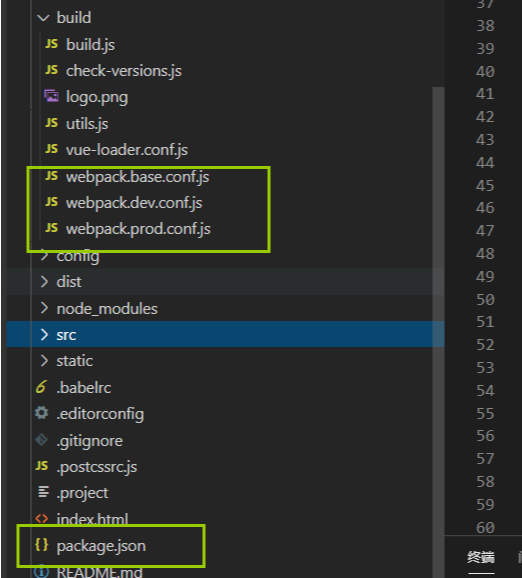
第一步:先上个截图,这次主要讲这四个文件,作用都在代码中添加了注释
第二步:package.json讲解
{
  "name": "item_name",//项目名称
  "version": "1.0.0", //项目版本号
  "description": "A Vue.js project", //项目描述
  "author": "feiyu", //项目作者
  "private": true, // 私有的
  "scripts": {
    "dev": "webpack-dev-server --inline --progress --config build/webpack.dev.conf.js",
    // webpack-dev-server:建立软连webpack-dev-server/bin/webpack-dev-server.js
    // --inline 开启修改保存后刷新页面 禁止:--inline=false
     //--progress 将运行进度输出到控制台。
     //其实这里也可以不写这些配置,直接在build/webpack.dev.conf.js的devServer对象中修改
     //找到 build/webpack.dev.conf.js文件,开始启动服务的配置  不写的话默认查找webpack.config.js

    "start": "npm run dev",//先运行 npm run dev 再重复上一步内容
    "build": "node build/build.js"  //运行项目打包文件
  },
  "dependencies": {  //生产环境依赖包 安装 npm i xxx -S
    "axios": "^0.19.0",
    // 第一个数字代表大版本:大版本号改变,有可能存在不向后兼容问题
    // 第二个数字是次要版本:一般代表新功能的增加
    // 第三个数字是小版本:一般是修了复某些bug
    //在依赖版本我们会看到插入符号(^)或者波浪号(~),这是SemVer中定义的版本范围的表示法
    //^代表 安装依赖时,大版本不可变,次要版本和小版本下载最新版本
    //~代表 安装依赖时,大版本和次要版本不可变,小版本下载最新版本
    "babel-polyfill": "^6.26.0",
    "echarts": "^4.2.1",
    "element-ui": "^2.3.9",
    "moment": "^2.24.0",
    "qs": "^6.7.0",
    "vue": "^2.5.2",
    "vue-json-excel": "^0.2.98",
    "vue-router": "^3.0.1",
    "vuex": "^3.1.3"
  },
  "devDependencies": {  //开发环境依赖包 安装 npm i xxx -D
    "autoprefixer": "^7.1.2",
    "babel-core": "^6.22.1",
    "babel-helper-vue-jsx-merge-props": "^2.0.3",
  },
  "engines": { //启动的最低版本限制
    "node": ">= 6.0.0",
    "npm": ">= 3.0.0"
  },
  "browserslist": [//浏览器版本支持
    "> 1%",
    "last 2 versions",
    "not ie <= 8"
  ]
}
第三步:执行npm run dev 进入 build/webpack.dev.conf.js
const utils = require('./utils')
const webpack = require('webpack')
const config = require('../config')
//合并资源的模块
const merge = require('webpack-merge')
//node的模块,用来查找路径
const path = require('path')
//开发环境和生产环境都需要的公共配置项
const baseWebpackConfig = require('./webpack.base.conf')
 //把static中一些文件原封不动的拷贝到打包文件中去dist/static
const CopyWebpackPlugin = require('copy-webpack-plugin')
//把根目录中的index.html拷贝到打包文件,并自动引入打包后的文件路径的插件
const HtmlWebpackPlugin = require('html-webpack-plugin')
const FriendlyErrorsPlugin = require('friendly-errors-webpack-plugin')// 识别某些类别的webpack错误,并清理,聚合和优先级,以提供更好的开发人员体验。
const portfinder = require('portfinder') //端口查找器

const HOST = process.env.HOST //获取环境host
const PORT = process.env.PORT && Number(process.env.PORT) //获取进程环境端口号

const devWebpackConfig = merge(baseWebpackConfig, { //通过merge与./webpack.base.conf中的配置合并
  module: {
    // 加载loader  loader的作用就是处理不被浏览器识别的文件,生成可被识别文件
    rules: utils.styleLoaders({ sourceMap: config.dev.cssSourceMap, usePostCSS: true })
  },
  ////开启或者关闭 source-map   关闭:none  如果不写这个属性,开发环境默认打开,生产环境默认关闭
  //source-map 作用 /将编译后的代码映射会原始源代码,方便查看是哪里出的错,追踪到错误和警告在源代码中的原始位置
  devtool: config.dev.devtool,

  // 配置启动的服务相关配置
  //相关配置官网 https://webpack.docschina.org/configuration/dev-server/#devserver
  devServer: {
    //重新加载之前的控制台的信息输出 //'none' | 'info' | 'error' | 'warning'
    clientLogLevel: 'warning',
    historyApiFallback: {
      rewrites: [
        { from: /.*/, to: path.posix.join(config.dev.assetsPublicPath, 'index.html') },
      ],
    },
    //是否启用模块的热替换
    hot: true,
     //告诉服务器从哪个目录中提供内容。只有在你想要提供静态文件时才需要 false string [string] number
    contentBase: false,
     //是否启用  gzip 压缩
    compress: true,
    //是否允许浏览器使用本地 IP 打开。
    useLocalIp:true,
    //HOST
    host: HOST || config.dev.host,
    //端口号
    port: PORT || config.dev.port,
    //是否直接浏览器
    open: config.dev.autoOpenBrowser,
    //当出现编译器错误或警告时,在浏览器中显示全屏覆盖层。默认禁用
    overlay: config.dev.errorOverlay
      ? { warnings: false, errors: true }
      : false,
     // 此路径下的打包文件可在浏览器中访问,默认是'/'。   127.0.0.1:8080/
    publicPath: config.dev.assetsPublicPath,
    //代理 一般处理后端接口的跨域问题
    proxy: config.dev.proxyTable,
    // 初始启动信息之外的任何内容都不会被打印到控制台。这也意味着来自 webpack 的错误或警告在控制台不可见。
    quiet: true,
    // 获取文件改动的通知,重新构建
    watchOptions: {
      poll: config.dev.poll,
    }
  },
  //插件 用来处理webpack无法处理的一些事情,
  // https://www.webpackjs.com/plugins/copy-webpack-plugin/
  plugins: [
    // DefinePlugin可以为webpack提供一个在编译时可以配置的全局常量
    // 在这里我们可以通过"process.env"这个全局变量的值来判定所处的环境
    new webpack.DefinePlugin({
      'process.env': require('../config/dev.env')
    }),
    //启用热替换模块(Hot Module Replacement),也被称为 HMR。
    new webpack.HotModuleReplacementPlugin(),
    // HMR更新时在控制台中显示正确的文件名
    new webpack.NamedModulesPlugin(),
    // 页面中的报错不会阻塞编译,但是会在编译结束后报错
    new webpack.NoEmitOnErrorsPlugin(),
    //生成html模版文件
    new HtmlWebpackPlugin({
      filename: 'index.html',
      template: 'index.html',
      inject: true
    }),
    // 最上边有介绍
    new CopyWebpackPlugin([
      {
        from: path.resolve(__dirname, '../static'),
        to: config.dev.assetsSubDirectory,
        ignore: ['.*']
      }
    ])
  ]
})

module.exports = new Promise((resolve, reject) => {
  portfinder.basePort = process.env.PORT || config.dev.port
  portfinder.getPort((err, port) => {
    if (err) {
      reject(err)
    } else {
      // publish the new Port, necessary for e2e tests
      process.env.PORT = port
      // add port to devServer config
      devWebpackConfig.devServer.port = port

      // 错误提示插件
      devWebpackConfig.plugins.push(new FriendlyErrorsPlugin({
        // 运行成功
        compilationSuccessInfo: {
          messages: [`Your application is running here: http://${devWebpackConfig.devServer.host}:${port}`],
        },
        onErrors: config.dev.notifyOnErrors
        ? utils.createNotifierCallback()
        : undefined
      }))

      resolve(devWebpackConfig)
    }
  })
})
第四步:开发和生产环境的基础配置 build/webpack.base.conf.js
'use strict'
const path = require('path')
const utils = require('./utils')
const config = require('../config')
const vueLoaderConfig = require('./vue-loader.conf')

function resolve (dir) {
  return path.join(__dirname, '..', dir)
}


module.exports = {
  context: path.resolve(__dirname, '../'), //上下文路径
  entry: {  ////入口文件  可以使数组或者对象
    app: './src/main.js'
  },
  output: {
    path: config.build.assetsRoot, //文件存放的目录,有则替换,没有则生成
    filename: '[name].js',//输出文件需要使用占位符 [name].js  , [name][hash:6].js [name][chunkhash].js
    publicPath: process.env.NODE_ENV === 'production'  //此选项指定在浏览器中所引用的文件路径
      ? config.build.assetsPublicPath
      : config.dev.assetsPublicPath
  },
  resolve: {
    //自动解析确定的扩展
    extensions: ['.js', '.vue', '.json'],
    alias: {  //创建 import 或 require 的别名,来确保模块引入变得更简单
      'vue$': 'vue/dist/vue.esm.js',
      '@': resolve('src'),
      '@static': resolve('static'),
    }
  },
  module: {
    rules: [
      {
        test: /\.vue$/,
        loader: 'vue-loader',
        options: vueLoaderConfig
      },
      {
        test: /\.js$/, //匹配特定条件
        loader: 'babel-loader', //加载的依赖包
        //匹配特定条件
        include: [resolve('src'), resolve('test'), resolve('node_modules/webpack-dev-server/client'),resolve('static/js'),]
       // exclude: Condition   排除特定条件
      },
      {
        test: /\.(png|jpe?g|gif|svg)(\?.*)?$/,
        loader: 'url-loader',
        options: {
          //文件大小限时
          limit: 10000,
          //文件名字命名方式
          name: utils.assetsPath('img/[name].[hash:7].[ext]')
        }
      },
      {
        test: /\.(mp4|webm|ogg|mp3|wav|flac|aac)(\?.*)?$/,
        loader: 'url-loader',
        options: {
          limit: 10000,
          name: utils.assetsPath('media/[name].[hash:7].[ext]')
        }
      },
      {
        test: /\.(woff2?|eot|ttf|otf)(\?.*)?$/,
        loader: 'url-loader',
        options: {
          limit: 10000,
          name: utils.assetsPath('fonts/[name].[hash:7].[ext]')
        }
      }
    ]
  },
  node: {
    // prevent webpack from injecting useless setImmediate polyfill because Vue
    // source contains it (although only uses it if it's native).
    setImmediate: false,
    // prevent webpack from injecting mocks to Node native modules
    // that does not make sense for the client
    dgram: 'empty',
    fs: 'empty',
    net: 'empty',
    tls: 'empty',
    child_process: 'empty'
  }
}
第五步:项目打包的配置 webpack.prod.conf.js
const path = require('path')
const utils = require('./utils')
const webpack = require('webpack')
const config = require('../config')
const merge = require('webpack-merge')
const baseWebpackConfig = require('./webpack.base.conf')
const CopyWebpackPlugin = require('copy-webpack-plugin')
const HtmlWebpackPlugin = require('html-webpack-plugin')
const ExtractTextPlugin = require('extract-text-webpack-plugin')
const OptimizeCSSPlugin = require('optimize-css-assets-webpack-plugin')
const UglifyJsPlugin = require('uglifyjs-webpack-plugin')

const env = require('../config/prod.env')

const webpackConfig = merge(baseWebpackConfig, {
  module: {
    // 将.vue外部的css或css预处理器文件进行处理
    rules: utils.styleLoaders({
      sourceMap: config.build.productionSourceMap,
      extract: true,
      usePostCSS: true
    })
  },
  // 是否开启调试
  devtool: config.build.productionSourceMap ? config.build.devtool : false,
  output: {
    path: config.build.assetsRoot,
    filename: utils.assetsPath('js/[name].[chunkhash].js'),
    // 定义在非入口文件引用的文件的名称
    chunkFilename: utils.assetsPath('js/[id].[chunkhash].js')
  },
  plugins: [
    // 定义一个在编译时间内可以使用的全局变量,用来关闭vue的所有警告功能
    new webpack.DefinePlugin({
      'process.env': env
    }),
    // 最小化所有JavaScript输出块,消除无作用的代码
    new UglifyJsPlugin({
      uglifyOptions: {
        compress: {
          warnings: false
        }
      },
      sourceMap: config.build.productionSourceMap,
      parallel: true
    }),
    // // ExtractTextPlugin会将所有的「入口 chunk(entry chunks)」中的 require("style.css") 移动到独立分离的css文件。因此,样式不再内联到javascript里面,但会放到一个单独的css包文件 (styles.css)当中。 如果样式文件较大,这会更快,因为样式文件会跟javascript包并行加载
    new ExtractTextPlugin({
      filename: utils.assetsPath('css/[name].[contenthash].css'),
      allChunks: true,
    }),
    // 压缩提取出来的CSS,并且进行css的复用以解决extract-text-webpack-plugin将css处理后会出现的css重复的情况
    new OptimizeCSSPlugin({
      cssProcessorOptions: config.build.productionSourceMap
        ? { safe: true, map: { inline: false } }
        : { safe: true }
    }),
    // 构建要编译输出的index.html,并在文件中嵌入资源文件
    new HtmlWebpackPlugin({
      filename: config.build.index,
      template: 'index.html',
      // 设置为true或body可以将js代码放到<body>元素最后
      // 设置为head将js代码加到<head>里面
      // 设置为false所有静态资源css和JavaScript都不会注入到模板文件中
      inject: true,
      minify: {
         // 删除注释
        removeComments: true,
         // 合并空白
        collapseWhitespace: true,
        // 删除属性的引号
        removeAttributeQuotes: true
        // more options:
        // https://github.com/kangax/html-minifier#options-quick-reference
      },
      // 通过CommonsChunkPlugin控制chunks在html文件中添加的顺序
      // 设置为dependency即按照它们之间的依赖关系添加
      chunksSortMode: 'dependency'
    }),
    //稳定 chunkhash
    new webpack.HashedModuleIdsPlugin(),
    // enable scope hoisting
    //启用作用域提升,作用是让代码文件更小、运行的更快
    new webpack.optimize.ModuleConcatenationPlugin(),
    // split vendor js into its own file
    //// webpack将公共模块打包的vendor.js里面使用CommonsChunkPlugin将vendor.js分离到单独的文件
    new webpack.optimize.CommonsChunkPlugin({
      name: 'vendor',
      minChunks (module) {
        // any required modules inside node_modules are extracted to vendor
        return (
          module.resource &&
          /\.js$/.test(module.resource) &&
          module.resource.indexOf(
            path.join(__dirname, '../node_modules')
          ) === 0
        )
      }
    }),
    // 使用CommonsChunkPlugin可以保证如果我们的第三方插件没有变动,在打包的时候可以不被重新的打包
    // 待到上线后就不会重新的加载以达到缓存的目的
    // 我们会获得webpack执行时间和输出一份json文件保存chunk的id和最终引用它们的文件映射关系
    new webpack.optimize.CommonsChunkPlugin({
      name: 'manifest',
      minChunks: Infinity
    }),
    // This instance extracts shared chunks from code splitted chunks and bundles them
    // in a separate chunk, similar to the vendor chunk
    // see: https://webpack.js.org/plugins/commons-chunk-plugin/#extra-async-commons-chunk
    new webpack.optimize.CommonsChunkPlugin({
      name: 'app',
      async: 'vendor-async',
      children: true,
      minChunks: 3
    }),

   // 复制static文件夹内的静态资源到打包好的文件中
    // 具体的路径是之前我们设置的"config.build.assetsSubDirectory"
    new CopyWebpackPlugin([
      {
        from: path.resolve(__dirname, '../static'),
        to: config.build.assetsSubDirectory,
        ignore: ['.*']
      }
    ])
  ]
})
// 如果开启了Gzip压缩,使用以下配置
if (config.build.productionGzip) {
  const CompressionWebpackPlugin = require('compression-webpack-plugin')

  webpackConfig.plugins.push(
    new CompressionWebpackPlugin({
      asset: '[path].gz[query]',
      algorithm: 'gzip',
      test: new RegExp(
        '\\.(' +
        config.build.productionGzipExtensions.join('|') +
        ')$'
      ),
      threshold: 10240,
      minRatio: 0.8
    })
  )
}
// 如果开启了编译报告,使用以下配置
if (config.build.bundleAnalyzerReport) {
  const BundleAnalyzerPlugin = require('webpack-bundle-analyzer').BundleAnalyzerPlugin
  webpackConfig.plugins.push(new BundleAnalyzerPlugin())
}

module.exports = webpackConfig
