
在日常的工作当中,HTTP请求中使用最多的就是GET和POST这两种请求方式。深度掌握这两种请求方式的原理以及异同之处,也是之后做接口测试一个重要基础。
GET,POST的区别总结
- 请求行的方法不同;
- POST可以附加正文,可以支持form,json,xml,binary等各种数据格式;
- 从行业通用规范的角度来讲,无状态变化的建议使用GET请求,数据的写入与状态建议用POST请求;
演示环境搭建
为了避免其他因素的干扰,使用Flask编写一个简单的Demo Server。
- 安装烧瓶
pip install flask- 创建一个hello.py文件
你好
from flask import Flask, requestapp = Flask (_name__)@app.route('/')def hello_world(): return 'Hello, World!'@app.route("/request", methods=['POST', 'GET']) def hellp(): #拿到request参数 query = request.args #El request form post = request.form #分别打印拿到的参数和form return f"query: {query}\n"\ f"post: {post}"- 启动服务
export FLASK_APP=hello.py flask run提示下面信息则表示构建成功。
* Serving Flask app "hello.py" * Environment: production WARNING: Do not use the development server in a production environment. Use a production WSGI server instead. * Debug mode: off * Running on http://127.0.0.1:5000/ (Press CTRL+C to quit)CURL命令发起GET / POST请求
发起GET请求,a,b参数加入URL中发送,并保存在get文件中:
curl 'http://127.0.0.1:5000/request?a=1&b=2' -V -S &>get发起POST请求,a,b参数以form-data格式发送,并保存在post文件中:
curl 'http://127.0.0.1:5000/request?' -d "a=1&b=2" -V -S &>postGET / POST要求对比
注意:>的右边为请求内容,<左边为响应内容。
GET请求过程
* Trying 127.0.0.1...* TCP_NODELAY set* Connected to 127.0.0.1 (127.0.0.1) port 5000 (#0)> GET /request?a=1&b=2 HTTP/1.1> Host: 127.0.0.1:5000> User-Agent: curl/7.64.1> Accept: */*>* HTTP 1.0, assume close after body< HTTP/1.0 200 OK< Content-Type: text/html; charset=utf-8< Content-Length: 80< Server: Werkzeug/0.14.1 Python/3.7.5< Date: Wed, 01 Apr 2020 07:35:42 GMT<{ [80 bytes data]* Closing connection 0query: ImmutableMultiDict([('a', '1'), ('b', '2')])post: ImmutableMultiDict([])POST请求过程
* Trying 127.0.0.1...* TCP_NODELAY set* Connected to 127.0.0.1 (127.0.0.1) port 5000 (#0)> POST /request?a=1&b=2 HTTP/1.1> Host: 127.0.0.1:5000> User-Agent: curl/7.64.1> Accept: */*> Content-Length: 7> Content-Type: application/x-www-form-urlencoded>} [7 bytes data]* upload completely sent off: 7 out of 7 bytes* HTTP 1.0, assume close after body< HTTP/1.0 200 OK< Content-Type: text/html; charset=utf-8< Content-Length: 102< Server: Werkzeug/0.14.1 Python/3.7.5< Date: Wed, 01 Apr 2020 08:15:08 GMT<{ [102 bytes data]* Closing connection 0query: ImmutableMultiDict([('a', '1'), ('b', '2')])post: ImmutableMultiDict([('c', '3'), ('d', '4')])对两个文件进行对比:
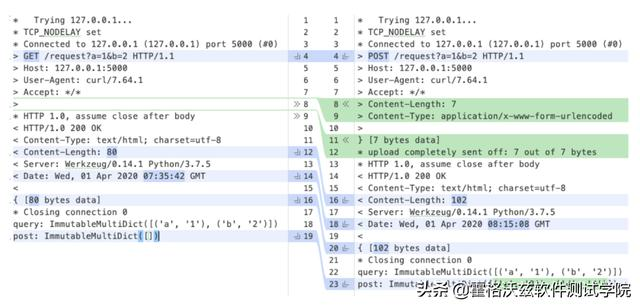
从图中可以清楚看到GET请求的方法为GET,POST请求的方法为POST,转换,GET请求没有Content-Type以及Content-Length这两个分支,而请求行中的URL带有查询参数,是两种请求都允许的格式。
(文章来源于霍格沃兹测试学院)
--福利福利:
免费领取:接口测试+性能测试+自动化测试+测试开发+测试用例+简历模板+测试文档