一、什么是跨域?
同源策略
同源策略:是一个重要的安全策略,它用于限制一个origin的文档,或者它加载的脚本如何能与另一个源的资源进行交互。它能帮助阻隔恶意文档,减少可能被攻击的媒介。
同源示例
那么如何才算是同源呢?先来看看 url 的组成部分?
www.example.com:80/path/to/myf…

正确示例: www.example.com:80/a.js www.example.com:80/b.js 属于协议、域名、端口一致。
错误示例: www.example.com:8080 www.example.com:80 没有三者一致。
二、如何解决跨域?
1.CORS
CORS(跨域资源共享):是一种机制,它使用额外的http头来告诉浏览器,让运行在(domain)上的web可以被允许访问不同资源服务器上的指定资源。 在cors中会有简单请求和非简单请求。
- 简单请求 不会触发cors预检请求,这样的请求为“简单请求”,
- 情况一:使用以下方法请求: GET、POST、HEAD
- 情况二:人为设置以下集合外的请求头:Accept、Accept-Language、Content-Language、Content-Type、DPR。
- 情况三:Content-type的值仅限:text/plain、multipart/form-data、application/x-www-form-urlencoded。
- 情况四:请求中的任意XMLHttpRequestUpload对象均没有注册任何事件监听器
- 请求中没有使用ReadableStream对象。
- 非简单请求 除以上情况。
- node中的解决方案
- 原生方式
app.use(async (ctx, next) => {
  ctx.set("Access-Control-Allow-Origin", ctx.headers.origin);
  ctx.set("Access-Control-Allow-Credentials", true);
  ctx.set("Access-Control-Request-Method", "PUT,POST,GET,DELETE,OPTIONS");
  ctx.set(
    "Access-Control-Allow-Headers",
    "Origin, X-Requested-With, Content-Type, Accept, cc"
  );
  if (ctx.method === "OPTIONS") {
    ctx.status = 204;
    return;
  }
  await next();
});
- 第三方中间件
const cors = require("koa-cors");
app.use(cors());
- CORS中的cookie问题 要同时满足3个条件
- web 请求设置withCredentials 这里默认情况下在跨域请求,浏览器是不带 cookie 的。但是我们可以通过设置 withCredentials 来进行传递 cookie.
// 原生 xml 的设置方式
var xhr = new XMLHttpRequest();
xhr.withCredentials = true;
// axios 设置方式
axios.defaults.withCredentials = true;
- Access-Control-Allow-Credentials 为 true
- Access-Control-Allow-Origin为非 *
- 避免重复options请求 Access-Control-Max-Age:(number)数值代表(预检请求)的返回结果可以被缓存多久,单位是秒。
2.Node 正向代理
代理的思路为,利用服务端请求不会跨域的特性,让接口和当前站点同域。
- Webpack (4.x) 在webpack中可以配置proxy来快速获得接口代理的能力。
  devServer: {
    port: 8000,
    proxy: {
      "/api": {
        target: "http://localhost:8080"
      }
    }
  }
原理:其实devServer是以express起的服务,起核心是用到http-proxy-middleware中的socket、rewrite 等功能。
- charles
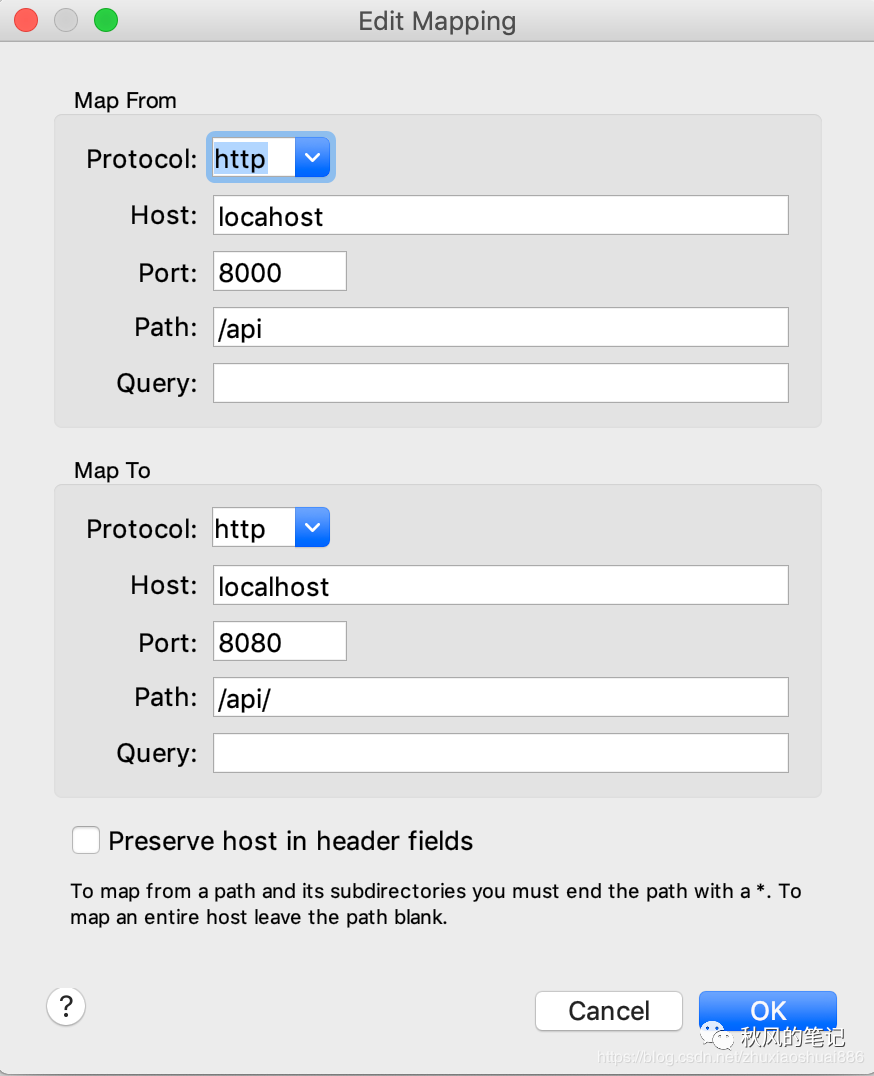
利用 charles 进行跨域,本质就是请求的拦截与代理。、
在 tools/map remote 中设置代理
3.Nginx 反向代理
通过反向代理的方式能够进行跨域,前端通过nginx代理到后端接口。
- 配置下 hosts:127.0.0.1 local.test
- 配置 nginx
server {
        listen 80;
        server_name local.test;
        location /api {
            proxy_pass http://localhost:8080;
        }
        location / {
            proxy_pass http://localhost:8000;
        }
}
- 重启 nginx:sudo nginx -s reload 代码展示 前端代码:
<script>
  axios.defaults.withCredentials = true;
  getlist.onclick = () => {
    axios.get("/api/corslist").then(res => {
      console.log(res.data);
    });
  };
  login.onclick = () => {
    axios.post("/api/login");
  };
</script>
后端代码:
router.get("/api/corslist", async ctx => {
  ctx.body = {
    data: [{ name: "秋风的笔记" }]
  };
});

router.post("/api/login", async ctx => {
  ctx.cookies.set("token", token, {
    expires: new Date(+new Date() + 1000 * 60 * 60 * 24 * 7)
  });
  ctx.body = {
    msg: "成功",
    code: 0
  };
});
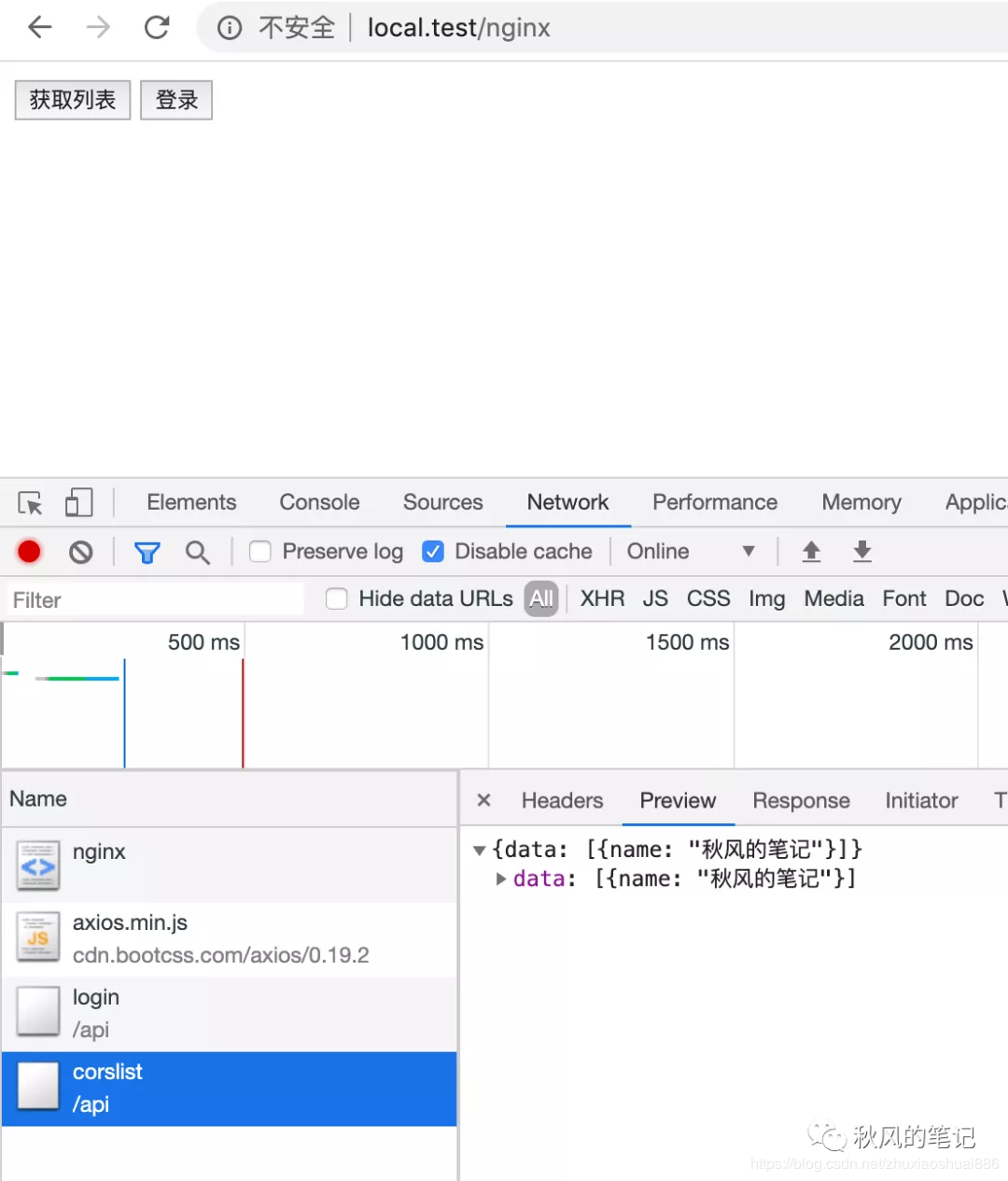
效果 访问 local.test/charles
4.JSONP
JSONP 主要就是利用了 script 标签没有跨域限制的这个特性来完成的。 「使用限制」 仅支持 GET 方法,如果想使用完整的 REST 接口,请使用 CORS 或者其他代理方式 「流程解析」
- 前端定义解析函数(例如 jsonpCallback=function(){....})
- 通过 params 形式包装请求参数,并且声明执行函数(例如 cb=jsonpCallback)
- 后端获取前端声明的执行函数(jsonpCallback),并以带上参数并调用执行函数的方式传递给前端。 「使用示例」 后端实现:
const Koa = require("koa");
const fs = require("fs");
const app = new Koa();

app.use(async (ctx, next) => {
 if (ctx.path === "/api/jsonp") {
   const { cb, msg } = ctx.query;
   ctx.body = `${cb}(${JSON.stringify({ msg })})`;
   return;
 }
});

app.listen(8080);
普通 js 示例
<script type="text/javascript">
 window.jsonpCallback = function(res) {
   console.log(res);
 };
</script>
<script
 src="http://localhost:8080/api/jsonp?msg=hello&cb=jsonpCallback"
 type="text/javascript"
></script>
「原理解析」 1,最基本的js调用
<script>
 window.jsonpCallback = function(res) {
   console.log(res);
 };
</script>
<script>
 jsonpCallback({ a: 1 });
</script>
2,在script中的src去外链 js代码
<script>
 window.jsonpCallback = function(res) {
   console.log(res);
 };
</script>
<script src="http://localhost:8080/api/a.js"></script>
3,最终与后端接口进行联调,其实也是一个js函数 ``
// http://localhost:8080/api/a.js jsonpCallback({a:123});` ``
5.Websocket
WebSocket 规范定义了一种 API,可在网络浏览器和服务器之间建立“套接字”连接。简单地说:客户端和服务器之间存在持久的连接,而且双方都可以随时开始发送数据。 这种方式本质没有使用了 HTTP, 因此也没有跨域的限制。 前端部分
<script>
  let socket = new WebSocket("ws://localhost:8080");
  socket.onopen = function() {
    socket.send("秋风的笔记");
  };
  socket.onmessage = function(e) {
    console.log(e.data);
  };
</script>
后端部分
const WebSocket = require("ws");
const server = new WebSocket.Server({ port: 8080 });
server.on("connection", function(socket) {
  socket.on("message", function(data) {
    socket.send(data);
  });
});
6.window.postMessage
「window.postMessage()」 方法可以安全地实现跨源通信。
7.document.domain + Iframe
「该方式只能用于二级域名相同的情况下,比如 a.test.com 和 b.test.com 适用于该方式」。只需要给页面添加 document.domain ='test.com' 表示二级域名都相同就可以实现跨域。
www.   baidu.  com     .
三级域  二级域   顶级域   根域
// a.test.com
<body>
  helloa
  <iframe
    src="http://b.test.com/b.html"
    frameborder="0"
    onload="load()"
    id="frame"
  ></iframe>
  <script>
    document.domain = "test.com";
    function load() {
      console.log(frame.contentWindow.a);
    }
  </script>
</body>
// b.test.com
<body>
  hellob
  <script>
    document.domain = "test.com";
    var a = 100;
  </script>
</body>
8.window.location.hash + Iframe
实现原理 原理就是通过 url 带 hash ,通过一个非跨域的中间页面来传递数据。 实现流程
// a.html
<iframe src="http://localhost:8080/hash/c.html#name1"></iframe>
<script>
  console.log(location.hash);
  window.onhashchange = function() {
    console.log(location.hash);
  };
</script>
// c.html
<body></body>
<script>
  console.log(location.hash);
  const iframe = document.createElement("iframe");
  iframe.src = "http://localhost:8000/hash/b.html#name2";
  document.body.appendChild(iframe);
</script>
// b.html
<script>
  window.parent.parent.location.hash = location.hash;
</script>
9.window.name + Iframe
三、为什么需要跨域?
1.限制不同源的请求 限制攻击者窃取请求数据 2.限制 dom 操作 限制钓鱼网站.操作dom节点