

效果一(大段文字自动换行+插入固定分辨率图片)
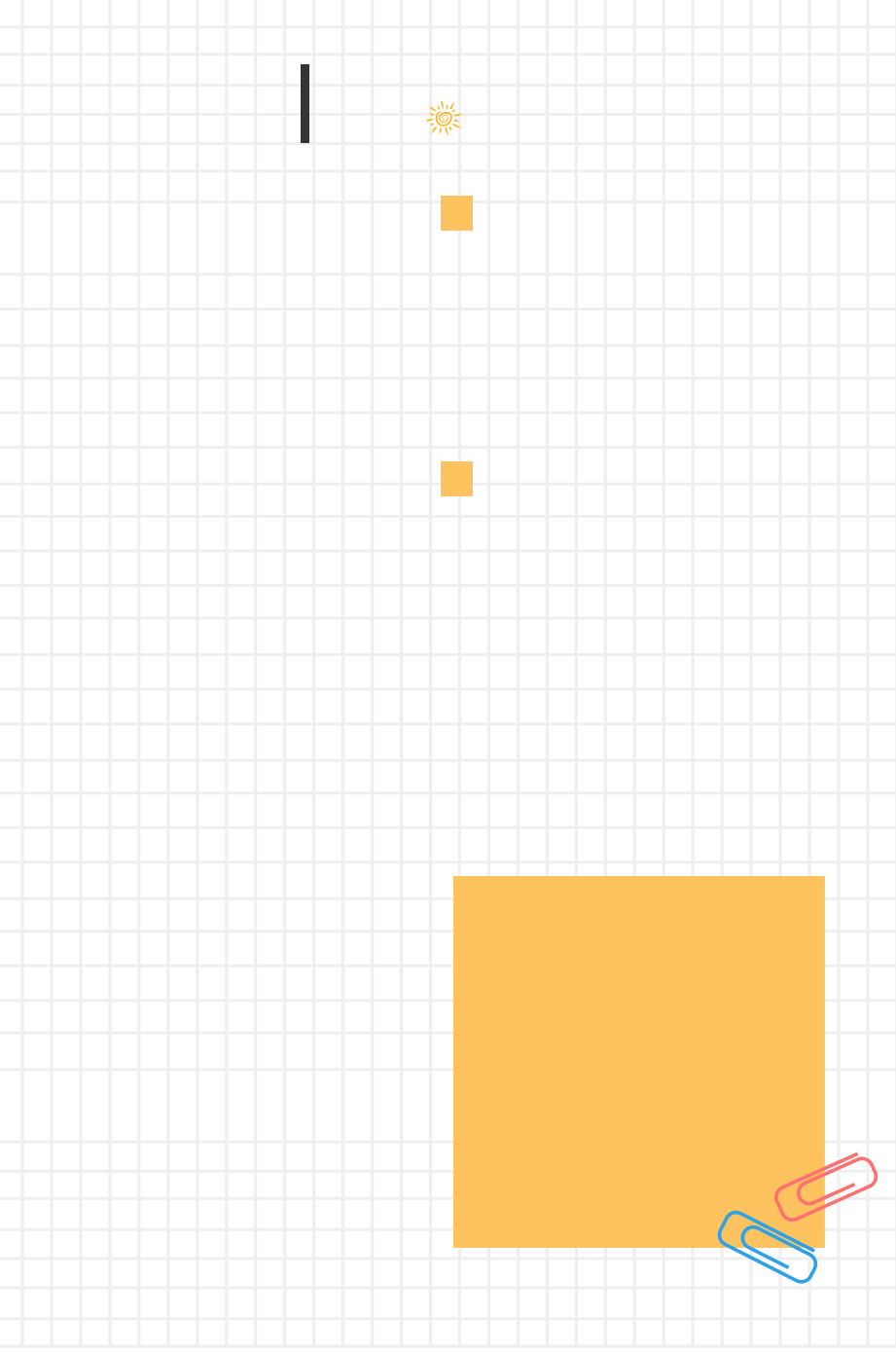
原图
效果
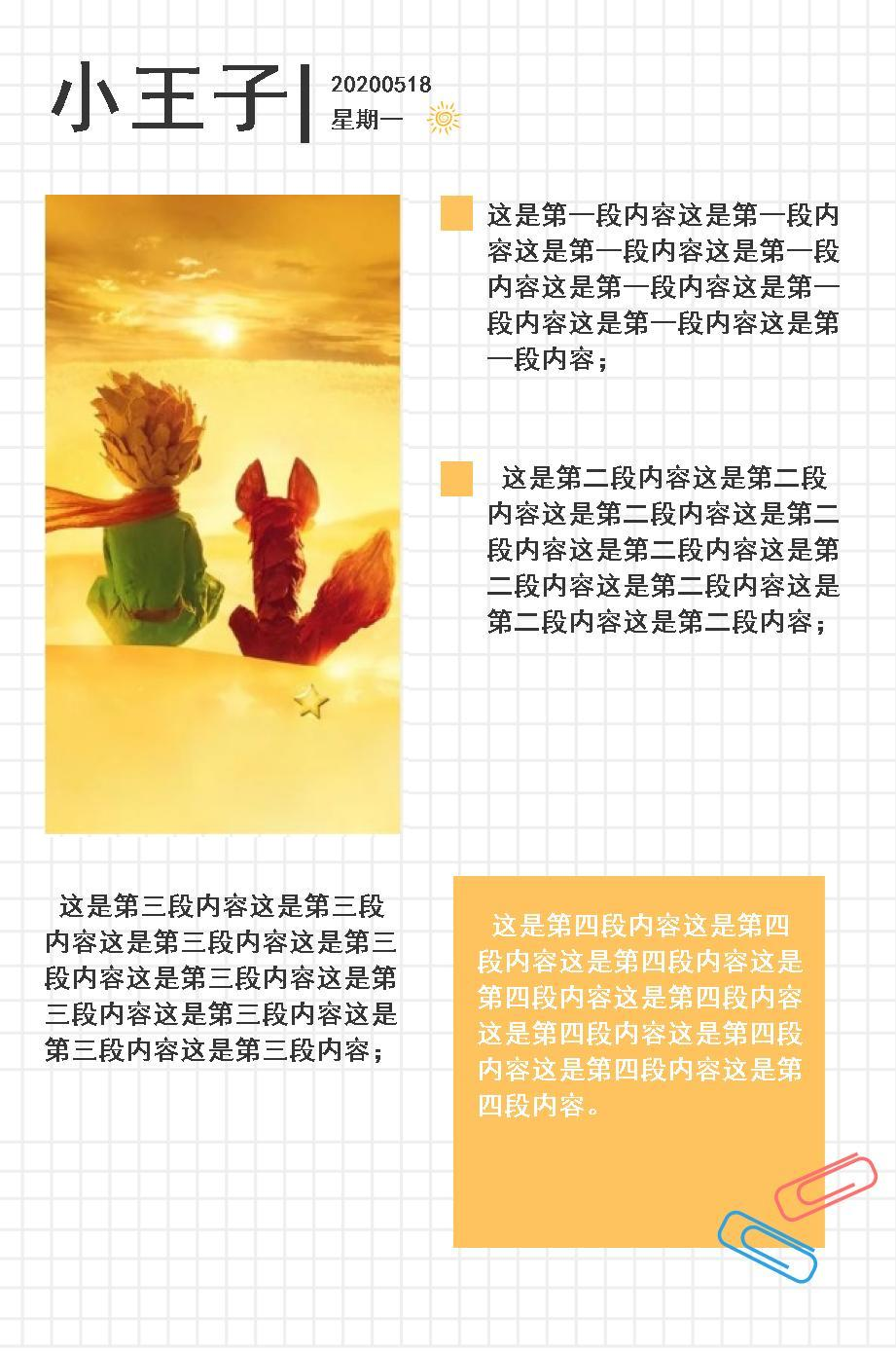
代码:
package com.example.demo;

import com.sun.image.codec.jpeg.JPEGCodec;
import com.sun.image.codec.jpeg.JPEGImageEncoder;

import javax.imageio.ImageIO;
import java.awt.*;
import java.awt.image.BufferedImage;
import java.io.File;
import java.io.FileOutputStream;
import java.util.Arrays;
import java.util.List;


/**
 * @author zhanglu
 * @date Created in 2020/5/15 13:12
 * @description 生成手账模板4
 * @modifiedBy
 * @version:
 */

public class ImageUtils4 {


    public static void main(String[] args) {
        String title = "小王子";
        String date = "20200518 \n星期一";
        String content = "这是第一段内容这是第一段内容这是第一段内容这是第一段内容这是第一段内容这是第一段内容这是第一段内容这是第一段内容; " +
                "\n 这是第二段内容这是第二段内容这是第二段内容这是第二段内容这是第二段内容这是第二段内容这是第二段内容这是第二段内容这是第二段内容; " +
                "\n 这是第三段内容这是第三段内容这是第三段内容这是第三段内容这是第三段内容这是第三段内容这是第三段内容这是第三段内容这是第三段内容; " +
                "\n 这是第四段内容这是第四段内容这是第四段内容这是第四段内容这是第四段内容这是第四段内容这是第四段内容这是第四段内容这是第四段内容。";
        Font titleFont = new Font("黑体", Font.BOLD, 81);
        Font dateFont = new Font("黑体", Font.BOLD, 24);
        Font contentFont = new Font("黑体", Font.BOLD, 27);
        Color titleColor = new Color(53, 53, 53);
        Color dateColor = new Color(53, 53, 53);
        Color contentColor = new Color(53, 53, 53);
        String srcFilePath = "C:/Users/Administrator/Desktop/最美书评-手账/最美书评-手账/手账模板4/组 1200@3x.png";
        String insertPhoto = "C:/Users/Administrator/Desktop/最美书评-手账/最美书评-手账/手账模板4/水印.jpg";
        String tempFilePath = "C:/Users/Administrator/Desktop/最美书评-手账/最美书评-手账/手账模板4/temp.jpg";
        String targetFilePath = "C:/Users/Administrator/Desktop/最美书评-手账/最美书评-手账/手账模板4/target.jpg";
        int picWidth = 375;
        draw(title, date, content, titleFont, dateFont, contentFont, titleColor, dateColor, contentColor, picWidth, srcFilePath, insertPhoto, tempFilePath, targetFilePath);


    }


    /**
     * 图片水印
     *
     * @param imgPath  底图图片
     * @param markPath 需要插入的图片
     * @param x        水印位于图片左上角的 x 坐标值
     * @param y        水印位于图片左上角的 y 坐标值
     * @param x2       水印位于图片宽度
     * @param y2       水印位于图片长度
     * @param alpha    水印透明度 0.1f ~ 1.0f
     */
    public static void waterMark(String imgPath, String markPath, String targetFilePath, int x, int y, int x2, double y2, float alpha) {
        try {
            // 加载待处理图片文件
            Image img = ImageIO.read(new File(imgPath));
            BufferedImage image = new BufferedImage(img.getWidth(null), img.getHeight(null), BufferedImage.TYPE_INT_RGB);
            Graphics2D g = image.createGraphics();
            g.drawImage(img, 0, 0, null);

            // 加载水印图片文件
            Image src_biao = ImageIO.read(new File(markPath));
            BufferedImage buffImg = null;
            /**
             * 重新修改插入图片大小
             */
            /**
             * 插入图片的大小根据底图的分辨率调整。
             * 3x用360*480
             * 1x用120*160
             */
            buffImg = new BufferedImage(x2, (int) y2, BufferedImage.TYPE_INT_RGB);

            buffImg.getGraphics().drawImage(src_biao.getScaledInstance(x2, (int) y2, Image.SCALE_SMOOTH), 0, 0, null);
            g.setComposite(AlphaComposite.getInstance(AlphaComposite.SRC_ATOP, alpha));
            g.drawImage(buffImg, x, y, null);
            g.dispose();

            // 保存处理后的文件
            FileOutputStream out = new FileOutputStream(targetFilePath);
            JPEGImageEncoder encoder = JPEGCodec.createJPEGEncoder(out);
            encoder.encode(image);
            out.close();
        } catch (Exception e) {
            e.printStackTrace();
        }
    }


    /**
     * 插入手账5文字内容
     *
     * @param imgPath 底图路径
     * @param title   标题
     * @param date    日期
     * @param content 内容(\n隔开的内容)
     * @param font1   标题字体
     * @param font2   日期字体
     * @param font3   内容字体
     * @param color1  标题颜色
     * @param color2  日期颜色
     * @param color3  内容颜色
     * @param x1      标题坐标
     * @param y1
     * @param x2      日期坐标
     * @param y2
     * @param x3      内容坐标
     * @param y3
     * @param alpha   模糊程度0.1-1.0f
     * @param rect    用于对齐的矩形框
     */

    public static void textMark(String imgPath, String title,
                                String date, String content,
                                Font font1, Font font2, Font font3,
                                Color color1, Color color2, Color color3,
                                int x1, int y1, int x2, int y2, int x3, int y3,
                                Rectangle rect,
                                float alpha, String tempFilePath) {

        List<String> contents = Arrays.asList(content.split("\n"));
        List<String> dataList = Arrays.asList(date.split("\n"));
        try {
            Font Dfont = (font1 == null) ? new Font("宋体", 20, 13) : font1;
            //最关键的代码来了:
            Image img = ImageIO.read(new File(imgPath));

            BufferedImage image = new BufferedImage(img.getWidth(null), img.getHeight(null), BufferedImage.TYPE_INT_RGB);
            Graphics2D g = image.createGraphics();
            g.drawImage(img, 0, 0, null);
            g.setColor(color1);
            g.setFont(Dfont);
            g.setComposite(AlphaComposite.getInstance(AlphaComposite.SRC_ATOP, alpha));
            g.drawString(title, x1, y1);
            g.setFont(font2);
            g.setColor(color2);
            for (int i = 0; i < dataList.size(); i++) {
                g.drawString(dataList.get(i), x2, y2 + i * 36);
            }
            g.setFont(font3);
            g.setColor(color3);
            for (int i = 0; i < contents.size(); i++) {

                switch (i) {
                    case 0:
                        int xa = 500;
                        int ya = 230;
                        drawStringWithFontStyleLineFeed(g, contents.get(i), xa, ya, 380);
                        break;
                    case 1:
                        int xb = 500;
                        int yb = 500;
                        drawStringWithFontStyleLineFeed(g, contents.get(i), xb, yb, 380);
                        break;
                    case 2:
                        int xc = 45;
                        int yc = 940;
                        drawStringWithFontStyleLineFeed(g, contents.get(i), xc, yc, 380);
                        break;
                    case 3:
                        int xd = 490;
                        int yd = 960;
                        g.setColor(new Color(255, 255, 255));
                        drawStringWithFontStyleLineFeed(g, contents.get(i), xd, yd, 360);
                        break;
                    default:
                        System.out.println("没有对应的数据");
                        break;
                }
            }
            g.dispose();
            FileOutputStream out = new FileOutputStream(tempFilePath);
            JPEGImageEncoder encoder = JPEGCodec.createJPEGEncoder(out);
            encoder.encode(image);
            out.close();
        } catch (Exception e) {
            System.out.println(e);
        }
    }


    /**
     * 手账4模板生成
     *
     * @param title        标题
     * @param date         日期
     * @param content      内容
     * @param srcFilePath  底图地址
     * @param insertPhoto  插入的图片地址
     * @param tempFilePath 临时存放插入文字的图片地址
     * @param picWidth     插入的图片在手账中的宽度
     */
    public static void draw(String title, String date, String content,
                            Font titleFont, Font dateFont, Font contentFont,
                            Color titleColor, Color dateColor, Color contentColor,
                            int picWidth,
                            String srcFilePath, String insertPhoto, String tempFilePath, String targetFilePath) {


//        /**
//         * 内容矩形框
//         */
        Rectangle rect = new Rectangle(600, 840);

        /**
         * 插入文字
         */
        textMark(srcFilePath, title, date, content, titleFont, dateFont, contentFont,
                titleColor, dateColor, contentColor,
                45, 128, 340, 95, 156, 360, rect, 1.0f, tempFilePath);

        /**
         * 插入图片
         */
        waterMark(tempFilePath, insertPhoto, targetFilePath, 45, 200, picWidth, 1.76 * picWidth, 1.0f);
        File file = new File(tempFilePath);
        if (file.exists()) {
            file.delete();
        }
    }


    /**
     * 获取字符长度
     *
     * @param g
     * @param str
     * @return
     */
    private static int getStringLength(Graphics g, String str) {
        char[] strcha = str.toCharArray();
        int strWidth = g.getFontMetrics().charsWidth(strcha, 0, str.length());
        System.out.println("字符总宽度:" + strWidth);
        return strWidth;
    }

    /**
     * 每行的字符数
     *
     * @param strnum   字符数
     * @param rowWidth 行宽度
     * @param strWidth 字符宽度
     * @return
     */
    private static int getRowStrNum(int strnum, int rowWidth, int strWidth) {
        int rowstrnum = 0;
        rowstrnum = (rowWidth * strnum) / strWidth;
        System.out.println("每行的字符数:" + rowstrnum);
        return rowstrnum;
    }

    /**
     * 获得行数
     *
     * @param strWidth 字符总宽度
     * @param rowWidth 行宽度
     * @return
     */
    private static int getRows(int strWidth, int rowWidth) {
        int rows = 0;
        if (strWidth % rowWidth > 0) {
            rows = strWidth / rowWidth + 1;
        } else {
            rows = strWidth / rowWidth;
        }
        System.out.println("行数:" + rows);
        return rows;
    }


    /**
     * 获得每行字符高度
     *
     * @param g
     * @return
     */
    private static int getStringHeight(Graphics g) {
        int height = g.getFontMetrics().getHeight() + 5;
        System.out.println("字符高度:" + height);
        return height;
    }

    /**
     * @param g          Graphics(包含设置好字体)
     * @param strContent 文本内容
     * @param loc_X      坐标
     * @param loc_Y
     * @param rowWidth   每行宽度
     */
    private static void drawStringWithFontStyleLineFeed(Graphics g, String strContent, int loc_X, int loc_Y, int rowWidth) {
        //获取字符串 字符的总宽度
        int strWidth = getStringLength(g, strContent);
        System.out.println("每行字符宽度:" + rowWidth);
        //获取字符高度
        int strHeight = getStringHeight(g);
        //字符串总个数
        System.out.println("字符串总个数:" + strContent.length());
        if (strWidth > rowWidth) {
            int rowstrnum = getRowStrNum(strContent.length(), rowWidth, strWidth);
            int rows = getRows(strWidth, rowWidth);
            String temp = "";
            for (int i = 0; i < rows; i++) {
                //获取各行的String
                if (i == rows - 1) {
                    //最后一行
                    temp = strContent.substring(i * rowstrnum, strContent.length());
                } else {
                    temp = strContent.substring(i * rowstrnum, i * rowstrnum + rowstrnum);
                }
                if (i > 0) {
                    //第一行不需要增加字符高度,以后的每一行在换行的时候都需要增加字符高度
                    loc_Y = loc_Y + strHeight;
                }
                g.drawString(temp, loc_X, loc_Y);
            }
        } else {
            //直接绘制
            g.drawString(strContent, loc_X, loc_Y);
        }

    }


}
效果二(诗句居中展示+插入固定分辨率图片)
原片:

实现效果:
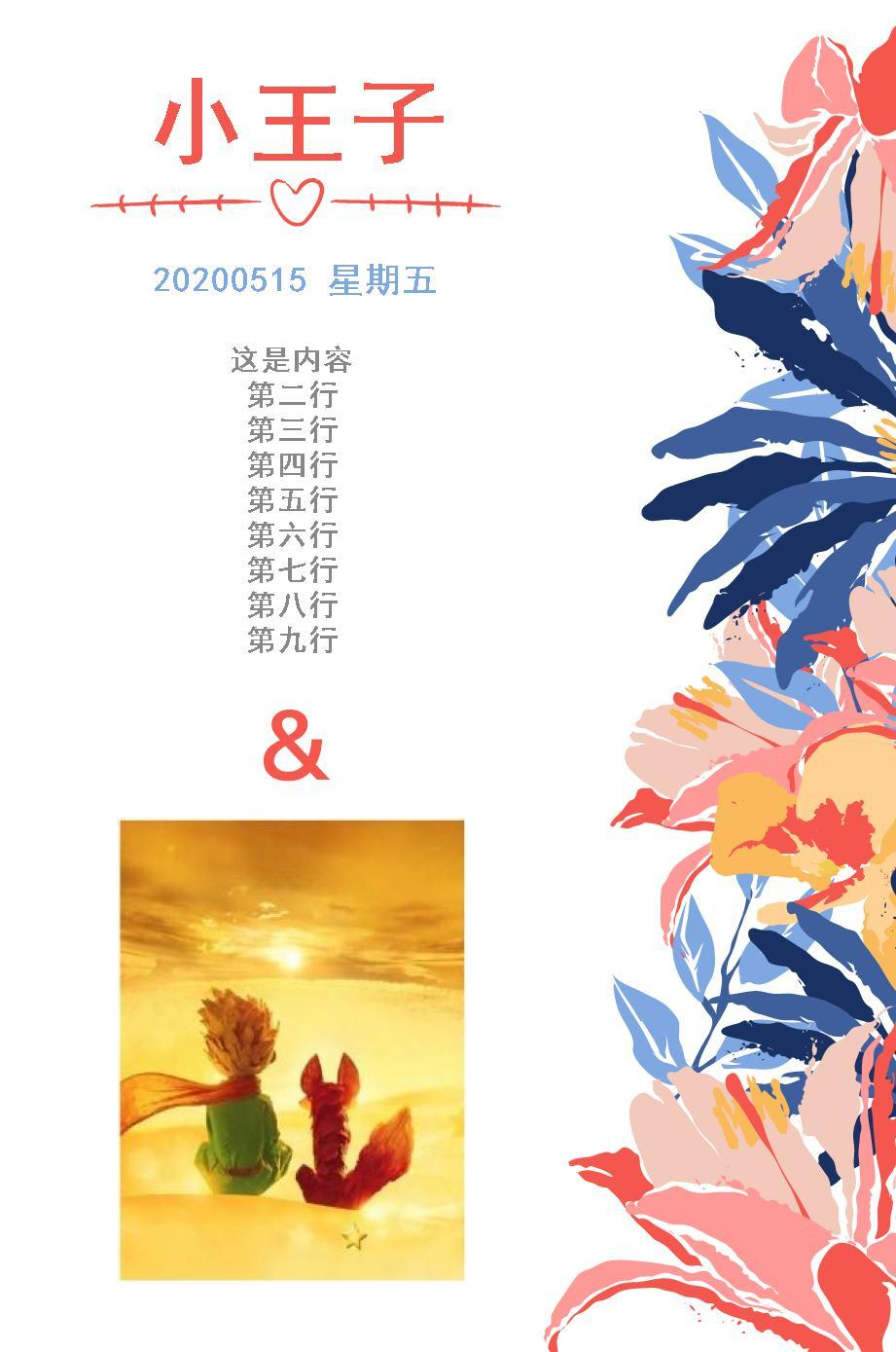
部分代码(主方法为):
package com.example.demo;

import javax.imageio.ImageIO;
import java.awt.*;
import java.awt.image.BufferedImage;
import java.io.File;
import java.util.Arrays;
import java.util.List;

import java.io.FileOutputStream;


import com.sun.image.codec.jpeg.JPEGCodec;
import com.sun.image.codec.jpeg.JPEGImageEncoder;


/**
 * @author zhanglu
 * @date Created in 2020/5/15 13:12
 * @description 图片上叠加文字/图片
 * @modifiedBy
 * @version:
 */

public class ImageUtils {


    /**
     * 图片水印
     *
     * @param imgPath  底图图片
     * @param markPath 需要插入的图片
     * @param x        水印位于图片左上角的 x 坐标值
     * @param y        水印位于图片左上角的 y 坐标值
     * @param x2       水印位于图片宽度
     * @param y2       水印位于图片长度
     * @param alpha    水印透明度 0.1f ~ 1.0f
     */
    public static void waterMark(String imgPath, String markPath, String targetFilePath, int x, int y, int x2, int y2, float alpha) {
        try {
            // 加载待处理图片文件
            Image img = ImageIO.read(new File(imgPath));
            BufferedImage image = new BufferedImage(img.getWidth(null), img.getHeight(null), BufferedImage.TYPE_INT_RGB);
            Graphics2D g = image.createGraphics();
            g.drawImage(img, 0, 0, null);

            // 加载水印图片文件
            Image src_biao = ImageIO.read(new File(markPath));
            BufferedImage buffImg = null;
            /**
             * 重新修改插入图片大小
             */
            /**
             * 插入图片的大小根据底图的分辨率调整。
             * 3x用360*480
             * 1x用120*160
             */
            buffImg = new BufferedImage(x2, y2, BufferedImage.TYPE_INT_RGB);

            buffImg.getGraphics().drawImage(src_biao.getScaledInstance(x2, y2, Image.SCALE_SMOOTH), 0, 0, null);
            g.setComposite(AlphaComposite.getInstance(AlphaComposite.SRC_ATOP, alpha));
            g.drawImage(buffImg, x, y, null);
            g.dispose();

            // 保存处理后的文件
            FileOutputStream out = new FileOutputStream(targetFilePath);
            JPEGImageEncoder encoder = JPEGCodec.createJPEGEncoder(out);
            encoder.encode(image);
            out.close();
        } catch (Exception e) {
            e.printStackTrace();
        }
    }


    /**
     * 插入手账5文字内容
     *
     * @param imgPath 底图路径
     * @param title   标题
     * @param date    日期
     * @param content 内容(\n隔开的内容)
     * @param font1   标题字体
     * @param font2   日期字体
     * @param font3   内容字体
     * @param color1  标题颜色
     * @param color2  日期颜色
     * @param color3  内容颜色
     * @param x1      标题坐标
     * @param y1
     * @param x2      日期坐标
     * @param y2
     * @param x3      内容坐标
     * @param y3
     * @param alpha   模糊程度0.1-1.0f
     * @param rect    用于对齐的矩形框
     */

    public static void textMark(String imgPath, String title,
                                String date, String content,
                                Font font1, Font font2, Font font3,
                                Color color1, Color color2, Color color3,
                                int x1, int y1, int x2, int y2, int x3, int y3,
                                Rectangle rect,
                                float alpha, String tempFilePath) {

        List<String> contents = Arrays.asList(content.split("\n"));
        try {
            Font Dfont = (font1 == null) ? new Font("宋体", 20, 13) : font1;
            Image img = ImageIO.read(new File(imgPath));

            BufferedImage image = new BufferedImage(img.getWidth(null), img.getHeight(null), BufferedImage.TYPE_INT_RGB);
            Graphics2D g = image.createGraphics();
            Integer degree = -45;//设置水印文字的旋转角度
            g.drawImage(img, 0, 0, null);
            g.setColor(color1);
            g.setFont(Dfont);
            g.setComposite(AlphaComposite.getInstance(AlphaComposite.SRC_ATOP, alpha));
            g.drawString(title, x1, y1);
            g.setFont(font2);
            g.setColor(color2);
            g.drawString(date, x2, y2);
            g.setFont(font3);
            g.setColor(color3);

            //文字分段居中的关键代码

            for (int i = 0; i < contents.size(); i++) {
                /**
                 * 居中
                 */
                FontMetrics metrics = g.getFontMetrics(font3);
                int x = rect.x + (rect.width - metrics.stringWidth(contents.get(1))) / 2;
                /**
                 * Y的递增根据图片分辨率修改。
                 */
                int y = rect.y + ((rect.height - metrics.getHeight()) / 2) + metrics.getAscent() + i * 36 - 50;
                g.drawString(contents.get(i), x, y);
            }

            g.dispose();
            FileOutputStream out = new FileOutputStream(tempFilePath);
            JPEGImageEncoder encoder = JPEGCodec.createJPEGEncoder(out);
            encoder.encode(image);
            out.close();
        } catch (Exception e) {
            System.out.println(e);
        }
    }


    /**
     * 手账5模板生成
     *
     * @param title        标题
     * @param date         日期
     * @param content      内容
     * @param srcFilePath  底图地址
     * @param insertPhoto  插入的图片地址
     * @param tempFilePath 临时存放插入文字的图片地址
     */
    public static void x3(String title, String date, String content, String srcFilePath, String insertPhoto, String tempFilePath, String targetFilePath) {

        /**
         * 不同的字体
         */
        Font titleFont = new Font("黑体", Font.BOLD, 99);
        Font dateFont = new Font("黑体", Font.BOLD, 36);
        Font contentFont = new Font("黑体", Font.BOLD, 30);

        /**
         * 内容矩形框
         */
        Rectangle rect = new Rectangle(600, 840);

        /**
         * 插入文字
         */
        textMark(srcFilePath, title, date, content, titleFont, dateFont, contentFont,
                new Color(245, 86, 78), new Color(127, 168, 226), new Color(136, 136, 136),
                150, 160, 156, 300, 156, 360, rect, 1.0f, tempFilePath);

        /**
         * 插入图片
         */
        waterMark(tempFilePath, insertPhoto, targetFilePath, 120, 840, 360, 480, 1.0f);
        File file = new File(tempFilePath);
        if (file.exists()) {
            file.delete();
        }
    }


}
一个工具类
import java.awt.*;
import java.awt.image.BufferedImage;


/**
 * @author zhanglu
 * @date Created in 2020/5/15 13:12
 * @description
 * @modifiedBy
 * @version:
 */

public class ImageUtils {


    /**
     * 插入文字内容(只固定起点坐标,不做其他处理)
     *
     * @param title  标题
     * @param font1  标题字体
     * @param color1 标题颜色
     * @param x     标题坐标
     * @param y
     */

    public static void commonTextMark(Graphics2D g, String title,
                                      Font font1,
                                      Color color1,
                                      int x, int y) {
        try {
            g.setColor(color1);
            g.setFont(font1);
            g.setComposite(AlphaComposite.getInstance(AlphaComposite.SRC_ATOP, 1));
            g.drawString(title, x, y);

        } catch (Exception e) {
            System.out.println(e);
        }
    }

    /**
     * 插入文字内容(设置行宽度 文字自动换行)
     *
     * @param strContent 文本内容
     * @param font1      字体
     * @param color1     颜色
     * @param x1         坐标
     * @param y1
     * @param rowWidth   行宽px
     */

    public static void lineFeedTextMark(Graphics2D g, String strContent,
                                        Font font1,
                                        Color color1,
                                        int x1, int y1,
                                        int rowWidth) {
        try {
            g.setColor(color1);
            g.setFont(font1);
            g.setComposite(AlphaComposite.getInstance(AlphaComposite.SRC_ATOP, 1));
            drawStringWithFontStyleLineFeed(g, strContent, x1, y1, rowWidth);
        } catch (Exception e) {
            System.out.println(e);
        }
    }


    /**
     * 插入文字内容(设置矩形框,文字在矩形框内居中)
     *
     * @param g
     * @param strContent 文本内容
     * @param font       字体
     * @param color      颜色
     * @param rect       矩形框(Rectangle可设置左上角坐标,长、宽等参数)
     */
    public static void centerTextMark(Graphics2D g, String strContent,
                                      Font font,
                                      Color color,
                                      Rectangle rect) {
        try {
            g.setColor(color);
            g.setFont(font);
            g.setComposite(AlphaComposite.getInstance(AlphaComposite.SRC_ATOP, 1.0f));
            FontMetrics metrics = g.getFontMetrics(font);
            int x = rect.x + (rect.width - metrics.stringWidth(strContent)) / 2;
            int y = rect.y + ((rect.height - metrics.getHeight()) / 2) + metrics.getAscent();
            g.drawString(strContent, x, y);
        } catch (Exception e) {
            System.out.println(e);
        }
    }


    /**
     * @param g          Graphics(包含设置好字体)
     * @param strContent 文本内容
     * @param loc_X      坐标
     * @param loc_Y
     * @param rowWidth   每行宽度
     */
    private static void drawStringWithFontStyleLineFeed(Graphics g, String strContent, int loc_X, int loc_Y, int rowWidth) {
        //获取字符串 字符的总宽度
        int strWidth = getStringLength(g, strContent);
        System.out.println("每行字符宽度:" + rowWidth);
        //获取字符高度
        int strHeight = getStringHeight(g);
        //字符串总个数
        System.out.println("字符串总个数:" + strContent.length());
        if (strWidth > rowWidth) {
            int rowstrnum = getRowStrNum(strContent.length(), rowWidth, strWidth);
            int rows = getRows(strWidth, rowWidth);
            String temp = "";
            for (int i = 0; i < rows; i++) {
                //获取各行的String
                if (i == rows - 1) {
                    //最后一行
                    temp = strContent.substring(i * rowstrnum, strContent.length());
                } else {
                    temp = strContent.substring(i * rowstrnum, i * rowstrnum + rowstrnum);
                }
                if (i > 0) {
                    //第一行不需要增加字符高度,以后的每一行在换行的时候都需要增加字符高度
                    loc_Y = loc_Y + strHeight;
                }
                g.drawString(temp, loc_X, loc_Y);
            }
        } else {
            //直接绘制
            g.drawString(strContent, loc_X, loc_Y);
        }

    }

    /**
     * 插入图片
     *
     * @param srcFile 需要插入的图片
     * @param x       水印位于图片左上角的 x 坐标值
     * @param y       水印位于图片左上角的 y 坐标值
     * @param width   水印图片宽度
     * @param height  水印图片长度
     * @param degree  插入图片旋转角度
     */
    public static void waterMark(BufferedImage image, Graphics2D g, Image srcFile, int x, int y, int width, int height, Integer degree) {
        try {

            // 加载水印图片文件
            BufferedImage buffImg = null;
            if (null != degree) {
                //设置水印旋转
                g.rotate(Math.toRadians(degree), (double) image.getWidth(), (double) image.getHeight());
            }
            buffImg = new BufferedImage(width, height, BufferedImage.TYPE_INT_RGB);
            buffImg.getGraphics().drawImage(srcFile.getScaledInstance(width, height, Image.SCALE_SMOOTH), 0, 0, null);
            g.setComposite(AlphaComposite.getInstance(AlphaComposite.SRC_ATOP, 1));
            g.drawImage(buffImg, x, y, null);
        } catch (Exception e) {
            e.printStackTrace();
        }
    }


    /**
     * 获取字符长度
     *
     * @param g
     * @param str
     * @return
     */
    private static int getStringLength(Graphics g, String str) {
        char[] strcha = str.toCharArray();
        int strWidth = g.getFontMetrics().charsWidth(strcha, 0, str.length());
        System.out.println("字符总宽度:" + strWidth);
        return strWidth;
    }

    /**
     * 每行的字符数
     *
     * @param strnum   字符数
     * @param rowWidth 行宽度
     * @param strWidth 字符宽度
     * @return
     */
    private static int getRowStrNum(int strnum, int rowWidth, int strWidth) {
        int rowstrnum = 0;
        rowstrnum = (rowWidth * strnum) / strWidth;
        System.out.println("每行的字符数:" + rowstrnum);
        return rowstrnum;
    }

    /**
     * 获得行数
     *
     * @param strWidth 字符总宽度
     * @param rowWidth 行宽度
     * @return
     */
    private static int getRows(int strWidth, int rowWidth) {
        int rows = 0;
        if (strWidth % rowWidth > 0) {
            rows = strWidth / rowWidth + 1;
        } else {
            rows = strWidth / rowWidth;
        }
        System.out.println("行数:" + rows);
        return rows;
    }


    /**
     * 获得每行字符高度
     *
     * @param g
     * @return
     */
    private static int getStringHeight(Graphics g) {
        int height = g.getFontMetrics().getHeight() + 5;
        System.out.println("字符高度:" + height);
        return height;
    }
