

搭建vuex
import Vue from 'vue'
import App from './App'
import router from './router'
import store from './store/index.js'
//导入vuex
Vue.config.productionTip = false
/* eslint-disable no-new */
new Vue({
  el: '#app',
  router,
  store,
  //进行注册
  components: { App },
  template: '<App/>'
})
在src 下面建立如下文件夹
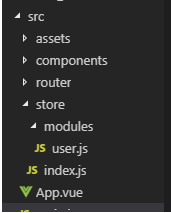
index.js 内容
import Vue from 'vue';
import Vuex from 'vuex';
import user from "./modules/user";
//导入这个modules
Vue.use(Vuex);


export default new Vuex.Store({
    modules: {
      user
    }
    //暴露user接口
  })
modules/user.js 如下
const state = {
  count: 1
}
//状态
const getters={

}
//取值
const mutations = {
  add(state, data) {
    count += data
  }
}
// 方法
const actions={

}
// 异步方法
export default {
  namespaced: true,
// 允许重命名
  state,
  getters,
  actions,
  mutations
}
使用vuex
简单取值
{{this.$store.state.user.count}}
修改值
this.$store.commit('user/add',3)
异步修改值,首先定义action
const state = {
  count: 1
}
//状态
const getters={

}
//取值
const mutations = {
  add(state, data) {
    count += data
  }
}
// 异步方法
const actions={
   ADD(context,num){
      context.commit('add',num)
   }
}
// 异步方法
export default {
  namespaced: true,
// 允许重命名
  state,
  getters,
  actions,
  mutations
}
提交修改
this.$store.dispatch('user/ADD',"修改值")
使用vuex 语法糖
使用mapStat
示例获取vuex中的值,我们这边以count跟kk为主
const state = {
  count: 1,
  kk:2
}
//状态
const getters={

}
//取值
const mutations = {
  add(state, data) {
    state.count += data
  }
}
// 方法
const actions={
   addAction(context,num){
      context.commit('add',num)
   }
}
// 异步方法
export default {
  namespaced: true,
// 允许重命名
  state,
  getters,
  actions,
  mutations
}
在需要使用地方导入语法糖映射
import {mapState} from 'vuex';
在计算属性映射
 computed: {
      ...mapState({
        count: state => state.user.count, //理解为传入state对象,修改state.count属性
        kk:state => state.user.kk
      })
    }
在模板中使用
{{count}}
使用mapActions
import {mapActions} from 'vuex';
方法中使用
 methods: {
 ...mapActions({
          addnum: 'tag/ADDTAGS'
        }),
    },
