

自动装配模式
我们可以通过bean标签的autowire属性来为一个bean指定自动装配模式:
- 在xml中显式配置;
- 在java中显式配置;
- 隐式的bean发现机制和自动装配。
此处我们先讲解第三种:自动装配bean。Spring的自动装配会从两个角度来实现:
- 组件扫描:spring会自动发现应用上下文中所创建的bean
- 自动装配:spring自动满足bean之间的依赖
我们可以使用< bean>元素的autowire属性来为一个bean指定自动装配模式:
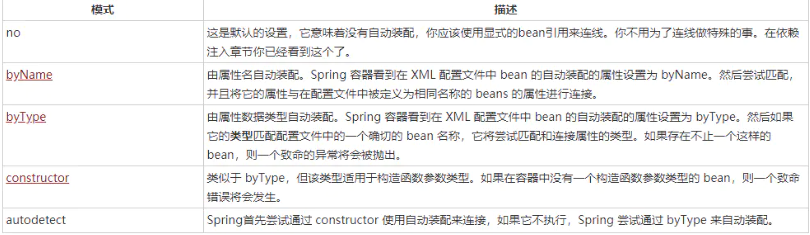
byName
当一个bean标签带有autowire=byName的属性时:
- 它将在该bean对应的类中所有的set方法名查找对应的name,比如setAbc,获得去掉set并首字母小写的字符串abc。
- 然后在spring容器中查找是否有与此字符串abc相等的id。
- 若有则取出注入,否则空指针异常
示例
public class Student {
    private String studentID;
    private PersonalInfor personalInfor;

    public Student(String studentID, PersonalInfor personalInfor) {
        System.out.println("Student类的有参构造函数");
        this.studentID = studentID;
        this.personalInfor = personalInfor;
    }

    public Student() {
        System.out.println("Student类的无参构造函数");
    }

    public void setStudentID(String studentID) {
        this.studentID = studentID;
    }

    public void setPersonalInfor(PersonalInfor personalInfor) {
        this.personalInfor = personalInfor;
    }

   //省略toString方法
}
public class PersonalInfor {
    private String name;
    private int age;

    public PersonalInfor() {
        System.out.println("PersonalInfor类的无参构造函数");
    }

    public PersonalInfor(String name, int age) {
        System.out.println("PersonalInfor类的有参构造函数");
        this.name = name;
        this.age = age;
    }


    public void setName(String name) {
        this.name = name;
    }

    public void setAge(int age) {
        this.age = age;
    }
}
beans.xml:
    <bean id="student" class="com.jnju.entity.Student" autowire="byName">
        <property name="studentID" value="201902151918"/>
    </bean>

    <bean id="personalInfor" class="com.jnju.entity.PersonalInfor">
        <property name="name" value="on1"/>
        <property name="age" value="18"/>
    </bean>
输出为:
Student类的无参构造函数
PersonalInfor类的无参构造函数
Student{studentID='201902151918', personalInfor=PersonalInfor{name='on1', age=18}}
需要注意:bean id的值personalInfor与setPersonalInfor()是必须对应的,一定要注意大小写。
byType
当一个bean的autowire属性设置为byType,则如果这个类存在一个属性类型与配置文件中一个beans相同,则注入bean。
同样是上一个例子,修改autowire的值为byType,那么Spring会在xml中查找对应类型的bean,并设置相关属性。运行后输出不变。如果beans.xml里又多出一个PersonalInfor类型的bean,则会报错(bean标签报红)。
<bean id="parentInfor" class="com.jnju.entity.PersonalInfor">
        <property name="name" value="test"/>
        <property name="age" value="22"/>
</bean>
因此此处我们需要保证配置文件里类型的唯一性。
constructor
该模式与byType 非常相似,但它应用于构造器参数。
例子不变,如果一个bean的autowire 属性设置为 constructor,并且它有一个带PersonalInfor类型的构造函数,则Spring会在配置文件beans.xml中查找对应类型的bean并注入值
    <bean id="student" class="com.jnju.entity.Student" autowire="constructor">
        <constructor-arg  value="201902151918" />
<!--      若此处是set注入studentID,则perssonalInfor不会被注入值-->
<!--        <property name="studentID" value="201902151918"/>-->
    </bean>
	<!-- 此处的id名随意写/>-->
    <bean id="personalInfor" class="com.jnju.entity.PersonalInfor">
        <property name="name" value="on1"/>
        <property name="age" value="18"/>
    </bean>
输出为:
PersonalInfor类的无参构造函数
Student类的有参构造函数
Student{studentID='201902151918', personalInfor=PersonalInfor{name='on1', age=18}}
使用注解支持自动装配
准备工作
(1)更换beans.xml中的文件头
<?xml version="1.0" encoding="UTF-8"?>
<beans xmlns="http://www.springframework.org/schema/beans"
       xmlns:xsi="http://www.w3.org/2001/XMLSchema-instance"
       xmlns:context="http://www.springframework.org/schema/context"
       xsi:schemaLocation="http://www.springframework.org/schema/beans
       http://www.springframework.org/schema/beans/spring-beans.xsd
       http://www.springframework.org/schema/context
       http://www.springframework.org/schema/beans/spring-context.xsd">
(2)开启注解扫描
<context:annotation-config/>
@Autowired注解
Setter 方法中的 @Autowired
当 Spring遇到一个在 setter 方法中使用的 @Autowired 注释,它会在方法中视图执行 byType 自动连接。
public class Student {
    private String studentID;

    private PersonalInfor personalInfor;

    public Student(String studentID, PersonalInfor personalInfor) {
        System.out.println("Student类的有参构造函数");
        this.studentID = studentID;
        this.personalInfor = personalInfor;
    }

    public Student() {
        System.out.println("Student类的无参构造函数");
    }

    public void setStudentID(String studentID) {
        this.studentID = studentID;
    }

    @Autowired
    public void setPersonalInfor(PersonalInfor personalInfor) {
        this.personalInfor = personalInfor;
    }

    @Override
    public String toString() {
        return "Student{" +
                "studentID='" + studentID + '\'' +
                ", personalInfor=" + personalInfor +
                '}';
    }
}
beans.xml
  <bean id="student" class="com.jnju.entity.Student" >
        <property name="studentID"  value="2019021519"/>
    </bean>

    <bean id="perssonalInfor" class="com.jnju.entity.PersonalInfor">
        <property name="name" value="on1"/>
        <property name="age" value="18"/>
    </bean>
输出:
Student类的无参构造函数
PersonalInfor类的无参构造函数
Student{studentID='2019021519', personalInfor=PersonalInfor{name='on1', age=18}}
属性中的 @Autowired
我们可以在属性中使用 @Autowired 注释来除去 set 方法:
public class Student {
    private String studentID;
    @Autowired
    private PersonalInfor personalInfor;
 	//除去personalInfor的set方法,其余部分不变
}
运行后输出不变
构造函数中的 @Autowired
当构造函数遇上构造函数中的 @Autowired,则它会在beans.xml中找到对应的bean。此处@Autowired的构造函数是两个参数,因此在配置文件中Student中studentID必须是构造函数注入值,否则会报错。
public class Student {
    private String studentID;
    private PersonalInfor personalInfor;

    @Autowired
    public Student(String studentID, PersonalInfor personalInfor) {
        System.out.println("Student类的有参构造函数");
        this.studentID = studentID;
        this.personalInfor = personalInfor;
    }

    public Student() {
        System.out.println("Student类的无参构造函数");
    }

    public void setStudentID(String studentID) {
        this.studentID = studentID;
    }
	//省略toString方法
}
beans.xml
    <bean id="student" class="com.jnju.entity.Student" >
        <constructor-arg  value="201902151918" />
        <!--若是 <property name="studentID"  value="2019021519"/>则会报错->
    </bean>

    <bean id="perssonalInfor" class="com.jnju.entity.PersonalInfor">
        <property name="name" value="on1"/>
        <property name="age" value="18"/>
    </bean>
运行后输出:
PersonalInfor类的无参构造函数
Student类的有参构造函数
Student{studentID='201902151918', personalInfor=PersonalInfor{name='on1', age=18}}
@Autowired 的(required=false)
如果Spring发现@Autowired注解的属性在配置文件beans.xml中没有找到对应的bean,则它会报错。若我们不在乎这个属性值,则可以使用**@Autowired 的(required=false)**
public class Student {
    private String studentID;

    @Autowired(required = false)
    private PersonalInfor personalInfor;

    public Student(String studentID, PersonalInfor personalInfor) {
        System.out.println("Student类的有参构造函数");
        this.studentID = studentID;
        this.personalInfor = personalInfor;
    }

    public Student() {
        System.out.println("Student类的无参构造函数");
    }

    public void setStudentID(String studentID) {
        this.studentID = studentID;
    }


    @Override
    public String toString() {
        return "Student{" +
                "studentID='" + studentID + '\'' +
                ", personalInfor=" + personalInfor +
                '}';
    }
}
beans.xml
 <!-- 删掉perssonalInfor的bean-->
<bean id="student" class="com.jnju.entity.Student" >
        <property name="studentID"  value="2019021519"/>

</bean>
输出:
Student类的无参构造函数
Student{studentID='2019021519', personalInfor=null}
@Resource注解
@Resource注解的功能与@Autowired注解相似,都可以用来装配bean。都可以写在字段上,或写在setter方法上。两者的区别在于:
(1)@Autowired默认按照byType方式进行bean匹配,@Resource默认按照byName方式进行bean匹配(若没有指定name属性,则默认将属性名作为查找依据;若注解写在set方法则默认取属性名进行装配。当找不到与名称匹配的bean时才按照类型进行装配);
(2)@Autowired是Spring的注解,@Resource是J2EE的注解
@Qualifier注解
你可能会遇到这样一个场景:在配置文件beans.xml中存在多个相同类型的bean,并且你希望装配一个指定的属性,那么你可以使用**@Qualifier** 注释和 @Autowired 注释来指定值
示例
beans.xml
    <bean id="student" class="com.jnju.entity.Student" >
        <property name="studentID"  value="2019021519"/>
    </bean>

    <bean id="personalInfor1" class="com.jnju.entity.PersonalInfor">
        <property name="name" value="on1"/>
        <property name="age" value="18"/>
    </bean>

    <bean id="personalInfor2" class="com.jnju.entity.PersonalInfor">
        <property name="name" value="C2y"/>
        <property name="age" value="22"/>
    </bean>
bean类
public class Student {
    private String studentID;

    @Autowired
    @Qualifier("personalInfor2")		//注入id为personalInfor2的值
    private PersonalInfor personalInfor;

    public Student(String studentID, PersonalInfor personalInfor) {
        System.out.println("Student类的有参构造函数");
        this.studentID = studentID;
        this.personalInfor = personalInfor;
    }

    public Student() {
        System.out.println("Student类的无参构造函数");
    }

    public void setStudentID(String studentID) {
        this.studentID = studentID;
    }


    @Override
    public String toString() {
        return "Student{" +
                "studentID='" + studentID + '\'' +
                ", personalInfor=" + personalInfor +
                '}';
    }
}
输出:
Student类的无参构造函数
PersonalInfor类的无参构造函数
PersonalInfor类的无参构造函数
Student{studentID='2019021519', personalInfor=PersonalInfor{name='C2y', age=22}}
@Component注解
我们可以通过@Component注解来省略配置文件里的各个bean标签。首先需要在配置文件中开启注解扫描:
<context:component-scan base-package="com.jnju.entity"/>
然后是bean类
@Component("personalInfor")	//  <bean id="personalInfor" class=""/ 此外还有@Scope("prototype")指示Bean的作用域>
public class PersonalInfor {
    @Value("on1")  			// <property name="name" value="on1"/>
    private String name;
    @Value("21")
    private int age;

    @Override
    public String toString() {
        return "PersonalInfor{" +
                "name='" + name + '\'' +
                ", age=" + age +
                '}';
    }
}
此外@Value还可以放在set方法上:
@Value("on1")
public void setName(String name) {
    this.name = name;
}
@Value("21")
public void setAge(int age) {
     this.age = age;
}
测试方法:
    @Test
    public void testPersonalInfor() {
        ApplicationContext ac = new ClassPathXmlApplicationContext("bean.xml");
        PersonalInfor personalInfor = (PersonalInfor) ac.getBean("personalInfor");
        System.out.println(personalInfor);
    }
输出:
PersonalInfor{name='on1', age=21}
为了更好的封层,@Component衍生了三个注解,这三个注解功能一样:
- @Controller:web层
- @Service:service层
- @Repository:dao层
@Configuration注解
我们可以使用@Configuration注解来表示一个代替配置文件角色的配置类。
示例
@Component	//将这个类标注为Spring的一个组件,放到容器中
public class PersonalInfor {

    private String name = "on1";

    private int age = 21;

    @Override
    public String toString() {
        return "PersonalInfor{" +
                "name='" + name + '\'' +
                ", age=" + age +
                '}';
    }
}
@Configuration  //配置类
public class MyConfig {
    @Bean   //通过方法注册一个bean,这里的返回值就Bean的类型,方法名是bean的id
    public PersonalInfor personalInfor() {
        return new PersonalInfor();
    }
}
测试方法不变,可以得到同样的输出语句。
如果要在配置类里导入其他配置,则可以使用@Import注解:
@Import(MyConfig2.class)
