UIWebView 和 WKWebView 的区别
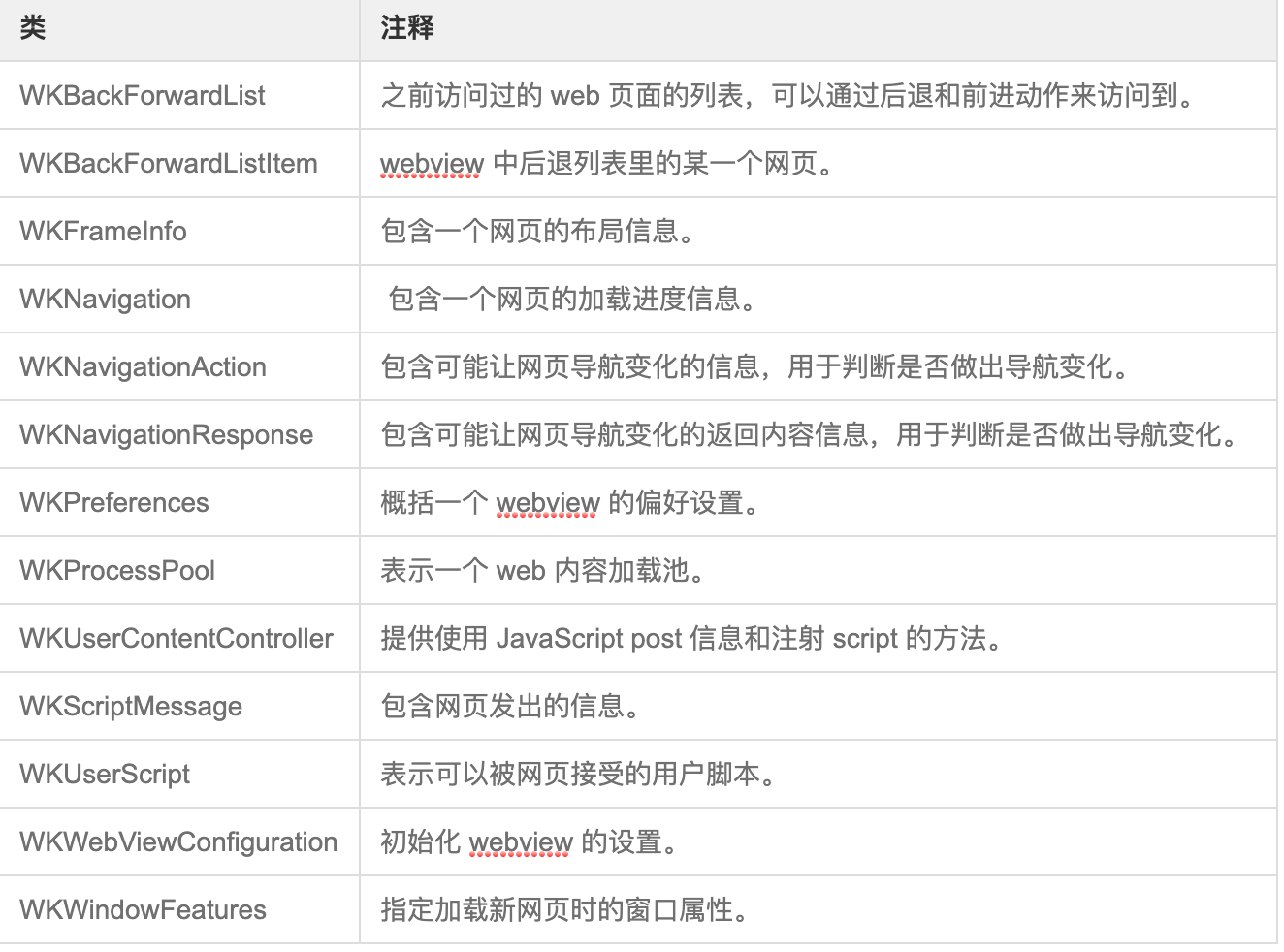
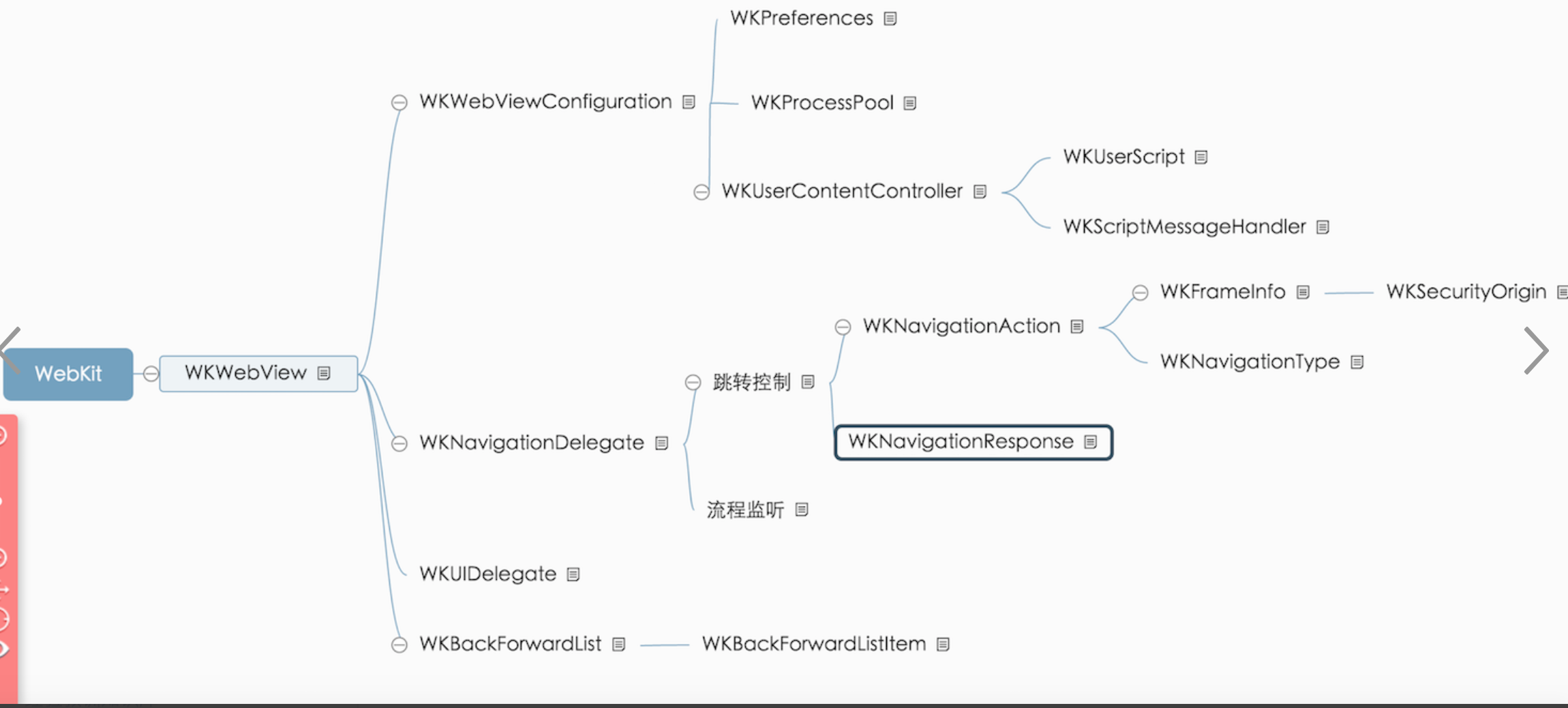
WKWebView 更快(占用内存可能只有 UIWebView 的1/3~1/4),没有缓存,更为细致地拆分了 UIWebViewDelegate 中的方法。 想要了解更多关于 WKWebView 的特性的,可以自行 Google,这里你可以简单地把它当做是轻量级的 UIWebView。 常用代理方法在 WKWebView 中,UIWebViewDelegate 与 UIWebView 被重构成了14类与3个协议,下面给出一些在 UIWebView 中常用的方法的 WKWebView 版本。
WKNavigationDelegate: 提供了追踪主窗口网页加载过程和判断主窗口和子窗口是否进行页面加载新页面的相关方法。
WKUIDelegate: 提供用原生控件显示网页的方法回调。
WKScriptMessageHandler: 提供从网页中收消息的回调方法。
//上文介绍过的偏好配置
@property (nonatomic, readonly, copy) WKWebViewConfiguration *configuration;
// 导航代理
@property (nullable, nonatomic, weak) id <WKNavigationDelegate> navigationDelegate;
// 用户交互代理
@property (nullable, nonatomic, weak) id <WKUIDelegate> UIDelegate;

// 页面前进、后退列表
@property (nonatomic, readonly, strong) WKBackForwardList *backForwardList;

// 默认构造器
- (instancetype)initWithFrame:(CGRect)frame configuration:(WKWebViewConfiguration *)configuration NS_DESIGNATED_INITIALIZER;


//加载请求API
- (nullable WKNavigation *)loadRequest:(NSURLRequest *)request;

// 加载URL
- (nullable WKNavigation *)loadFileURL:(NSURL *)URL allowingReadAccessToURL:(NSURL *)readAccessURL NS_AVAILABLE(10_11, 9_0);

// 直接加载HTML
- (nullable WKNavigation *)loadHTMLString:(NSString *)string baseURL:(nullable NSURL *)baseURL;

// 直接加载data
- (nullable WKNavigation *)loadData:(NSData *)data MIMEType:(NSString *)MIMEType characterEncodingName:(NSString *)characterEncodingName baseURL:(NSURL *)baseURL NS_AVAILABLE(10_11, 9_0);

// 前进或者后退到某一页面
- (nullable WKNavigation *)goToBackForwardListItem:(WKBackForwardListItem *)item;

// 页面的标题,支持KVO的
@property (nullable, nonatomic, readonly, copy) NSString *title;

// 当前请求的URL,支持KVO的
@property (nullable, nonatomic, readonly, copy) NSURL *URL;

// 标识当前是否正在加载内容中,支持KVO的
@property (nonatomic, readonly, getter=isLoading) BOOL loading;

// 当前加载的进度,范围为[0, 1]
@property (nonatomic, readonly) double estimatedProgress;

// 标识页面中的所有资源是否通过安全加密连接来加载,支持KVO的
@property (nonatomic, readonly) BOOL hasOnlySecureContent;

// 当前导航的证书链,支持KVO
@property (nonatomic, readonly, copy) NSArray *certificateChain NS_AVAILABLE(10_11, 9_0);

// 是否可以招待goback操作,它是支持KVO的
@property (nonatomic, readonly) BOOL canGoBack;

// 是否可以执行gofarward操作,支持KVO
@property (nonatomic, readonly) BOOL canGoForward;

// 返回上一页面,如果不能返回,则什么也不干
- (nullable WKNavigation *)goBack;

// 进入下一页面,如果不能前进,则什么也不干
- (nullable WKNavigation *)goForward;

// 重新载入页面
- (nullable WKNavigation *)reload;

// 重新从原始URL载入
- (nullable WKNavigation *)reloadFromOrigin;

// 停止加载数据
- (void)stopLoading;

// 执行JS代码
- (void)evaluateJavaScript:(NSString *)javaScriptString completionHandler:(void (^ __nullable)(__nullable id, NSError * __nullable error))completionHandler;

// 标识是否支持左、右swipe手势是否可以前进、后退
@property (nonatomic) BOOL allowsBackForwardNavigationGestures;

// 自定义user agent,如果没有则为nil
@property (nullable, nonatomic, copy) NSString *customUserAgent NS_AVAILABLE(10_11, 9_0);

// 在iOS上默认为NO,标识不允许链接预览
@property (nonatomic) BOOL allowsLinkPreview NS_AVAILABLE(10_11, 9_0);

#if TARGET_OS_IPHONE
/*! @abstract The scroll view associated with the web view.
 */
@property (nonatomic, readonly, strong) UIScrollView *scrollView;
#endif

#if !TARGET_OS_IPHONE
// 标识是否支持放大手势,默认为NO
@property (nonatomic) BOOL allowsMagnification;

// 放大因子,默认为1
@property (nonatomic) CGFloat magnification;

// 根据设置的缩放因子来缩放页面,并居中显示结果在指定的点
- (void)setMagnification:(CGFloat)magnification centeredAtPoint:(CGPoint)point;
准备加载页面 UIWebViewDelegate - webView:shouldStartLoadWithRequest:navigationType WKNavigationDelegate - webView:didStartProvisionalNavigation:
已开始加载页面,可以在这一步向view中添加一个过渡动画 UIWebViewDelegate - webViewDidStartLoad: WKNavigationDelegate - webView:didCommitNavigation:
页面已全部加载,可以在这一步把过渡动画去掉 UIWebViewDelegate - webViewDidFinishLoad: WKNavigationDelegate - webView:didFinishNavigation:
加载页面失败 UIWebViewDelegate - webView:didFailLoadWithError: WKNavigationDelegate - webView:didFailNavigation:withError: WKNavigationDelegate - webView:didFailProvisionalNavigation:withError:
以上方法分别存在于 UIWebViewDelegate 和 WKNavigationDelegate 中。 要注意的是 webview.delegate = self 需要改写为 webview.navigationDelegate = self。
因为苹果更改规则,iOS App Store不推荐使用的API。UIWebView废弃,以后使用WKWebView。 ITMS-90809:不推荐使用的API -Apple将停止接受使用UIWebView API的应用程序的提交。有关更多信息,请参见https://developer.apple.com/documentation/uikit/uiwebview 。
WKWebView和JS交互
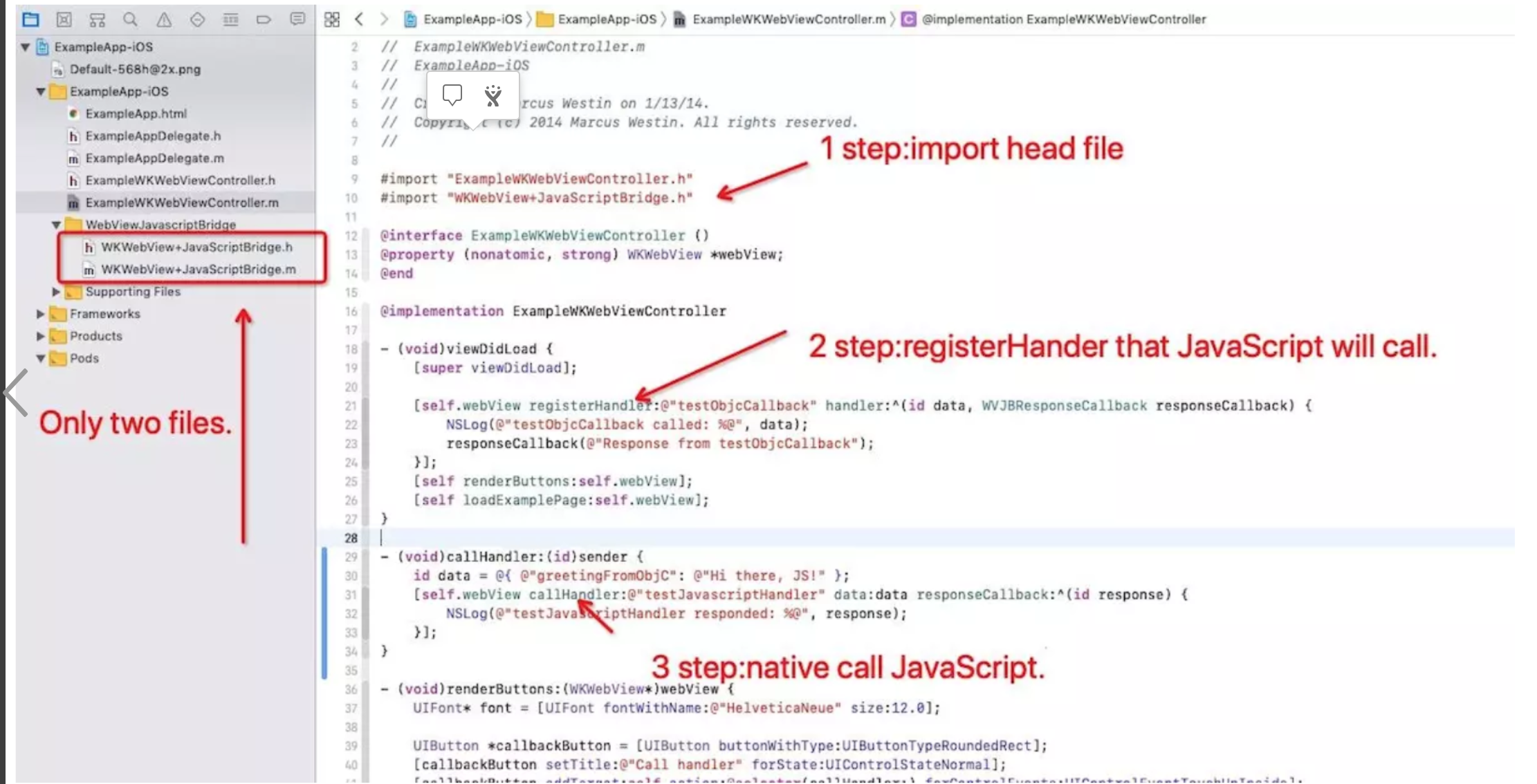
OC加入代码:
javaScript加入代码:
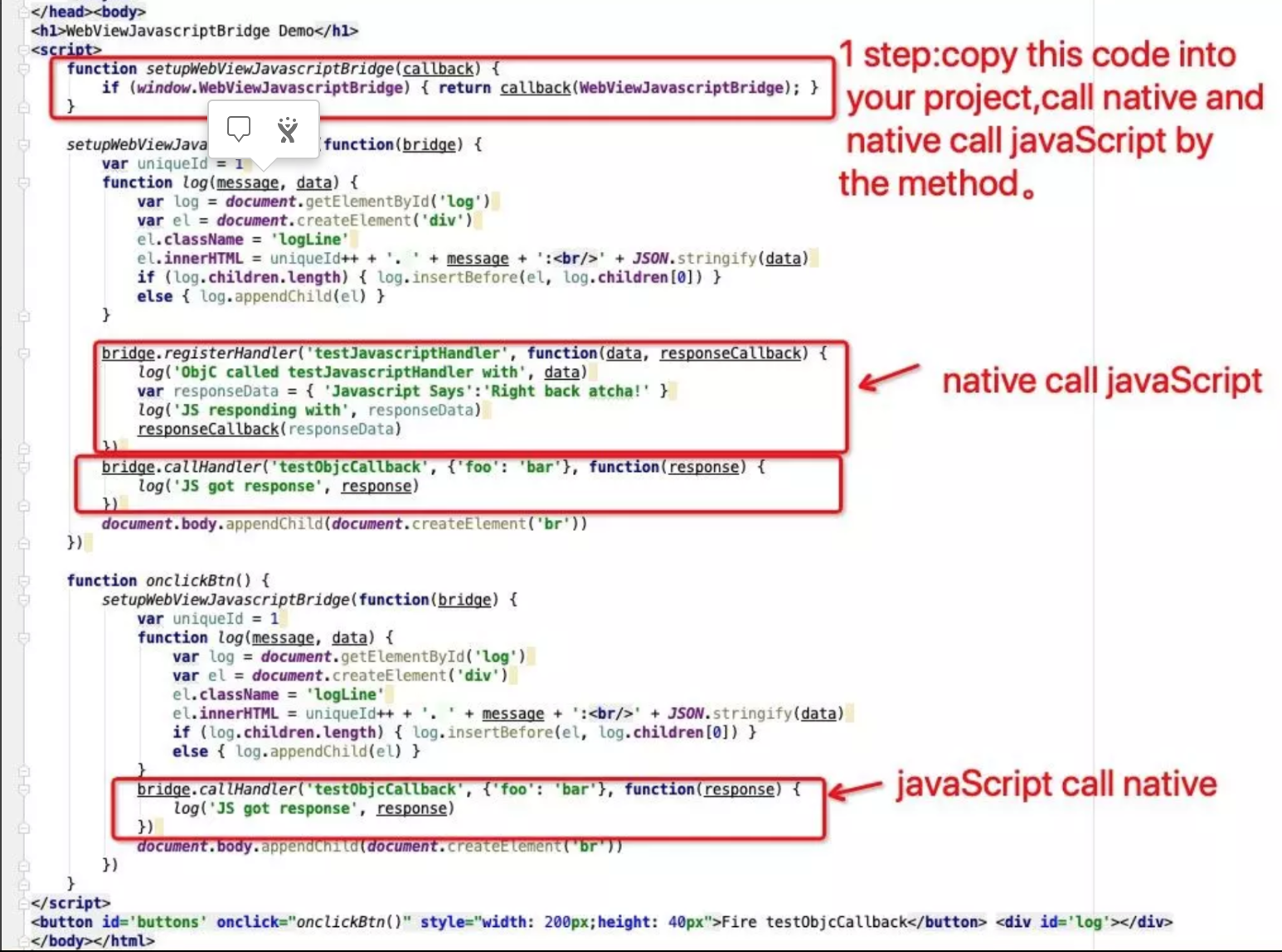
原理:双向注册方法,双向接收方法,OC可以调用js,js可以调用OC。
//注册js调用oc方法
- (void)registerHandler:(NSString *) handlerName handler:(WVJBHandler)handler;
//oc调用js方法
- (void)callHandler:(NSString *) handlerName data:(id)data responseCallback:(WVJBResponseCallback)responseCallback;
1.runtime(method_exchangeImplementations)交换init方法:注册(_injectJavascriptFile)初始化js交互方法(_WebViewJavascriptBridge_js())。
NSString * _WebViewJavascriptBridge_js() {

#define __WVJB_js_func__(x) #x
    // BEGIN preprocessorJSCode
    static NSString * preprocessorJSCode = @__WVJB_js_func__(
                                                             ;(function() {
        console.log = (function (oriLogFunc) {
            return function (str) {
                window.webkit.messageHandlers.log.postMessage(str);
                oriLogFunc.call(console, str);
            }
        })(console.log);
        window.WebViewJavascriptBridge = {
        registerHandler: registerHandler,
        callHandler: callHandler,
        _handleMessageFromObjC: _handleMessageFromObjC
        };
        var sendMessageQueue = [];
        var messageHandlers = {};
        var responseCallbacks = {};
        var uniqueId = 1;
        function registerHandler(handlerName, handler) {
            messageHandlers[handlerName] = handler;
        }

        function callHandler(handlerName, data, responseCallback) {
            if (arguments.length === 2 && typeof data == 'function') {
                responseCallback = data;
                data = null;
            }
            _doSend({ handlerName:handlerName, data:data }, responseCallback);
        }

        function _doSend(message, responseCallback) {
            if (responseCallback) {
                var callbackId = 'cb_'+(uniqueId++)+'_'+new Date().getTime();
                responseCallbacks[callbackId] = responseCallback;
                message['callbackId'] = callbackId;
            }
            sendMessageQueue.push(message);
            console.log('__bridge__'+ JSON.stringify(sendMessageQueue));
            sendMessageQueue = [];
        }

        function _dispatchMessageFromObjC(messageJSON) {
            _doDispatchMessageFromObjC();
            function _doDispatchMessageFromObjC() {
                var message = JSON.parse(messageJSON);
                var messageHandler;
                var responseCallback;
                if (message.responseId) {
                    responseCallback = responseCallbacks[message.responseId];
                    if (!responseCallback) {
                        return;
                    }
                    responseCallback(message.responseData);
                    delete responseCallbacks[message.responseId];
                } else {
                    if (message.callbackId) {
                        var callbackResponseId = message.callbackId;
                        responseCallback = function(responseData) {
                            _doSend({ handlerName:message.handlerName, responseId:callbackResponseId, responseData:responseData });
                        };
                    }
                    var handler = messageHandlers[message.handlerName];
                    if (!handler) {
                        console.log("WebViewJavascriptBridge: WARNING: no handler for message from ObjC:", message);
                    } else {
                        handler(message.data, responseCallback);
                    }
                }
            }
        }
        function _handleMessageFromObjC(messageJSON) {
            _dispatchMessageFromObjC(messageJSON);
        }
    })();
                                                            ); // END preprocessorJSCode

#undef __WVJB_js_func__
    return preprocessorJSCode;
};
2.将和前端定义的协议方法从iOS发送给js。
{
    NSString *messageJSON = [self _serializeMessage:message pretty:NO];
    [self _log:@"SEND" json:messageJSON];
    messageJSON = [messageJSON stringByReplacingOccurrencesOfString:@"\\" withString:@"\\\\"];
    messageJSON = [messageJSON stringByReplacingOccurrencesOfString:@"\"" withString:@"\\\""];
    messageJSON = [messageJSON stringByReplacingOccurrencesOfString:@"\'" withString:@"\\\'"];
    messageJSON = [messageJSON stringByReplacingOccurrencesOfString:@"\n" withString:@"\\n"];
    messageJSON = [messageJSON stringByReplacingOccurrencesOfString:@"\r" withString:@"\\r"];
    messageJSON = [messageJSON stringByReplacingOccurrencesOfString:@"\f" withString:@"\\f"];
    messageJSON = [messageJSON stringByReplacingOccurrencesOfString:@"\u2028" withString:@"\\u2028"];
    messageJSON = [messageJSON stringByReplacingOccurrencesOfString:@"\u2029" withString:@"\\u2029"];
    NSString* javascriptCommand = [NSString stringWithFormat:@"WebViewJavascriptBridge._handleMessageFromObjC('%@');", messageJSON];
    if ([[NSThread currentThread] isMainThread]) {
       [self evaluateJavaScript:javascriptCommand completionHandler:nil];
    } else {
        dispatch_sync(dispatch_get_main_queue(), ^{
            [self evaluateJavaScript:javascriptCommand completionHandler:nil];
        });
    }
}
3.js调用的方法 “ WebViewJavascriptBridge._handleMessageFromObjC ”