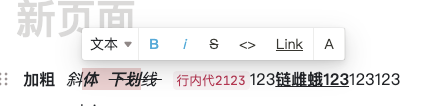
通常,在开发编辑器的时候,为了对每一个文字进行样式独立编辑,我们会给这个字段添加一些元信息,比如颜色,字体,大小等等配置。 上图对应的数据结构为
[['加粗',['b'],['斜体',['i'],['下划线',['s']]
在进行编辑的时候,先获得框选位置,在进行数据结构截断重组合并。

[['加粗',['b'],['斜',['i'],['体',['i','b'],['下划',['b','s'],['线',['s']]
再进行合并
[['加粗',['b'],['斜',['i'],['体下划',['i','b'],['线',['s']]
伪代码实现
-
document.getSelection,获得当前框选的位置,包含4个参数 开始 dom 节点,开始节点中的光标位置,结束 dom 节点,结束节点中的光标为止。
-
根据4个参数,进行数据分割,判断条件为
- 将当前数组,切割为3大块,编辑前区域,编辑中区域,编辑后区域
const preTitle = title.slice(0, startPoint.index) const lastTitle = title.slice(endPoint.index + 1) let editTitle = title.slice(startPoint.index, endPoint.index + 1)- 在编辑中区域进行分割,如果开始/结束的光标位置,与当前dom的text节点,长度不一致,则将原节点切割为2个
if (startPoint.offset !== 0) { // 如果开始切割点不是0的话,则切割为两个 const titleItem = editTitle.shift() const newTitle = [titleItem[0].substr(0, startPoint.offset), titleItem[1] || []] const oldTitle = [titleItem[0].substr(startPoint.offset), titleItem[1] || []] preTitle.push(newTitle) editTitle.unshift(oldTitle) } const length = get(title, `${endPoint.index}[0].length`, 0) if (endPoint.offset !== length) { // 如果结束的切割点不是末端的话,则切割为两个 const titleItem = editTitle.pop() const newTitle = [titleItem[0].substr(0, endPoint.offset - startPoint.offset), titleItem[1] || []] const oldTitle = [titleItem[0].substr(endPoint.offset - startPoint.offset), titleItem[1] || []] editTitle.push(newTitle) lastTitle.unshift(oldTitle) }- 对正在编辑的区域,进行样式重置
editTitle = editTitle.map((e, index) => { // 对样式进行修改 let oldType = get(e, '1', []).map(t => ({ key: t[0], value: t[1] })) const newTypes = [{ key: type[0], value: type[1] }] newTypes.forEach(newObj => { const isIncludeKey = oldType.findIndex(oldTypesObj => oldTypesObj.key === newObj.key) > -1 if (isIncludeKey) { // 如果样式的 key 存在,则是移除 const isIncludeValue = oldType.findIndex(oldTypesObj => newObj.value === oldTypesObj.value) > -1 oldType = oldType.filter(f => newObj.key !== f.key) if (!isIncludeValue) { // 如果样式的值不同,表明是修改,则需要再push一次。 oldType.push(newObj) } } else { // 如果不存在,则是添加 oldType.push(newObj) } }) const res = [e[0], oldType.map(ee => [ee.key, ee.value])] return res })- 样式合并,在进行切割的时候,可能新生成的节点样式,会和前/后的老节点一致,需要将样式合并(拼接 text 节点)。
 const resTitle = [...preTitle, ...editTitle, ...lastTitle].reduce(
  (preItem, nextItem, index) => {
    // 合并
    const preTitleItem = preItem.pop()
    const preType = get(preTitleItem, '1', [])
    const lastType = get(nextItem, '1', [])
    let res
    if (isEqual(preType, lastType)) {
      res = [...preItem, [`${preTitleItem[0]}${nextItem[0]}`, preType]]
    } else {
      if (preTitleItem.length && preTitleItem[0] !== '') {
        res = [...preItem, preTitleItem, nextItem]
      } else {
        res = [...preItem, nextItem]
      }
      if (nextItem.isEdit) {
        rangeMark.push({ index: res.length - 1, offset: 0, editIndex: nextItem.editIndex })
      }
    }
    return res
  },
  [['', []]],
)
ps. 暂缺节点重置前后的,光标框选留存功能点。