subjects=['math','English','physical','art']

print(subjects[0].title())


massage="my favorite subject is "+subjects[0].title()+"!"


subjects.append('chemistry')

subjects.insert(0,'geography')


poped_subjects=subjects.pop()
print("I was poped the last element in subjects,it is "+poped_subjects)

any_poped_subjects=subjects.pop(1)
print("I was poped the seccond element in subjects,it is "+any_poped_subjects)

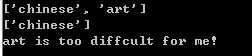
subjects.remove(diffclt_subject)
print(diffclt_subject+" is too diffcult for me!")
下面的练习比第2章的练习要复杂些,但让你有机会以前面介绍过的各种方式使用列表。
3-4 嘉宾名单 :如果你可以邀请任何人一起共进晚餐(无论是在世的还是故去的),你会邀请哪些人?请创建一个列表,其中包含至少3个你想邀请的人;然后,使用
3-5 修改嘉宾名单 :你刚得知有位嘉宾无法赴约,因此需要另外邀请一位嘉宾。
以完成练习3-4时编写的程序为基础,在程序末尾添加一条print 语句,指出哪位嘉宾无法赴约。
修改嘉宾名单,将无法赴约的嘉宾的姓名替换为新邀请的嘉宾的姓名。
3-6 添加嘉宾 :你刚找到了一个更大的餐桌,可容纳更多的嘉宾。请想想你还想邀请哪三位嘉宾。
以完成练习3-4或练习3-5时编写的程序为基础,在程序末尾添加一条print 语句,指出你找到了一个更大的餐桌。
使用insert() 将一位新嘉宾添加到名单开头。
使用insert() 将另一位新嘉宾添加到名单中间。
使用append() 将最后一位新嘉宾添加到名单末尾。
3-7 缩减名单 :你刚得知新购买的餐桌无法及时送达,因此只能邀请两位嘉宾。
以完成练习3-6时编写的程序为基础,在程序末尾添加一行代码,打印一条你只能邀请两位嘉宾共进晚餐的消息。
使用pop() 不断地删除名单中的嘉宾,直到只有两位嘉宾为止。每次从名单中弹出一位嘉宾时,都打印一条消息,让该嘉宾知悉你很抱歉,无法邀请他来共进
对于余下的两位嘉宾中的每一位,都打印一条消息,指出他依然在受邀人之列。
使用del 将最后两位嘉宾从名单中删除,让名单变成空的。打印该名单,核实程序结束时名单确实是空的。
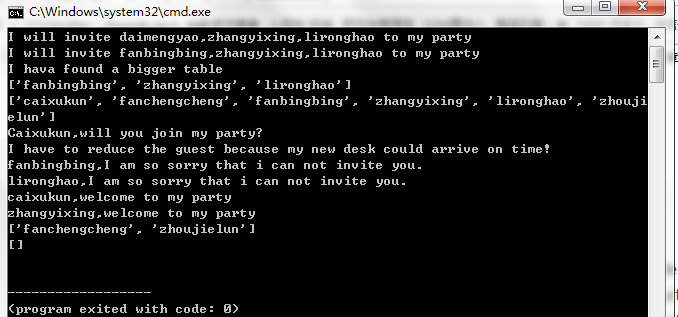
guests=['daimengyao','zhangyixing','lironghao']
print("I will invite "+guests[0]+","+guests[1]+","+guests[2]+" to my party")
print("I will invite "+guests[0]+","+guests[1]+","+guests[2]+" to my party")
print("I hava found a bigger table")
guests.insert(0,'fanchengcheng')
guests.insert(0,'caixukun')
guests.append('zhoujielun')
print(guests[0].title()+",will you join my party?")
print("I have to reduce the guest because my new desk could arrive on time!")
print(guests.pop(2)+",I am so sorry that i can not invite you.")
print(guests.pop(3)+",I am so sorry that i can not invite you.")
print(guests.pop(0)+",welcome to my party")
print(guests.pop(1)+",welcome to my party")
######################分界线###################### #按字母先后排序,永久
foods=['bread','tofu','cabbage','salad','apple']
print(foods)
foods.sort()
print(foods)
 #倒序,永久 foods.sort(reverse=True) print(foods)  #临时排序 foods=['bread','tofu','cabbage','salad','apple'] print(foods) print("\nHere is the sorted list:") print(sorted(foods)) print("\nHere is the original list:") print(foods) 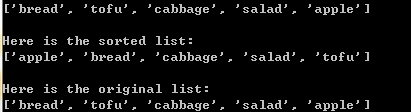 #倒着打印列表 foods=['bread','tofu','cabbage','salad','apple'] print(foods) foods.reverse() print(foods)  #确定列表的长度 foods=['bread','tofu','cabbage','salad','apple'] print(foods) print(len(foods)) 3-8 放眼世界 :想出至少5个你渴望去旅游的地方。
将这些地方存储在一个列表中,并确保其中的元素不是按字母顺序排列的。
按原始排列顺序打印该列表。不要考虑输出是否整洁的问题,只管打印原始Python列表。
使用sorted() 按字母顺序打印这个列表,同时不要修改它。
再次打印该列表,核实排列顺序未变。
使用sorted() 按与字母顺序相反的顺序打印这个列表,同时不要修改它。
再次打印该列表,核实排列顺序未变。
使用reverse() 修改列表元素的排列顺序。打印该列表,核实排列顺序确实变了。
使用reverse() 再次修改列表元素的排列顺序。打印该列表,核实已恢复到原来的排列顺序。
使用sort() 修改该列表,使其元素按字母顺序排列。打印该列表,核实排列顺序确实变了。
使用sort() 修改该列表,使其元素按与字母顺序相反的顺序排列。打印该列表,核实排列顺序确实变了。
3-9 晚餐嘉宾 :在完成练习3-4~练习3-7时编写的程序之一中,使用len() 打印一条消息,指出你邀请了多少位嘉宾来与你共进晚餐。
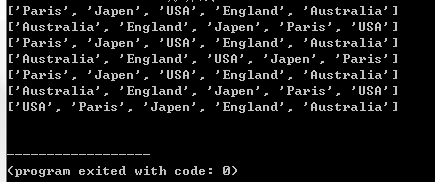
places=['Paris','Japen','USA','England','Australia']
print(places)
print(sorted(places))
print(places)
places.reverse()
print(places)
places.reverse()
print(places)
places.sort()
print(places)
places.sort(reverse=True)
guests=['daimengyao','zhangyixing','lironghao']
print(guests)
length=len(guests)
print("I will invite "+str(length)+" people!")
|
|