

已经通过vue-cli3搭建好了一个项目,想引入ts
安装了以下依赖
npm install --save-dev typescript
npm install --save-dev @vue/cli-plugin-typescript
并编写了相关tsconfig
根目录下新建 shims-vue.d.ts,让 ts 识别 *.vue 文件,文件内容如下
{
  "compilerOptions": {
    "target": "esnext",
    "module": "esnext",
    "strict": true,
    "jsx": "preserve",
    "importHelpers": true,
    "moduleResolution": "node",
    "esModuleInterop": true,
    "allowSyntheticDefaultImports": true,
    "sourceMap": true,
    "baseUrl": ".",
    "types": [
      "webpack-env"
    ],
    "paths": {
      "@/*": [
        "src/*"
      ]
    },
    "lib": [
      "esnext",
      "dom",
      "dom.iterable",
      "scripthost"
    ]
  },
  "include": [
    "src/**/*.ts",
    "src/**/*.tsx",
    "src/**/*.vue",
    "tests/**/*.ts",
    "tests/**/*.tsx"
  ],
  "exclude": [
    "node_modules"
  ]
}
这个时候我去声明shims-vue.d.ts文件
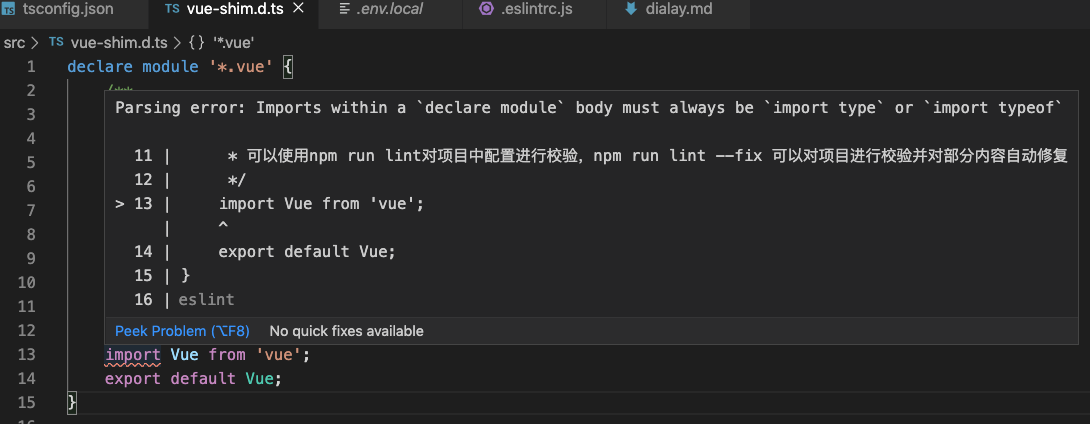
报错了:
Parsing error: Imports within a declare module body must always be import typeor import typeof查了很多相关文章,都没有找到对应方法,后来发现这个错误是eslint报出来的,查看了.eslintrc.js的配置
发现其中重点配置如下
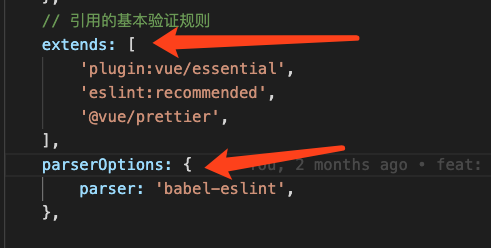
错误点:
- 在extends中没有引入@vue/typescript,这个是vue项目中关于ts的语法检测
- 错误的使用了babel-eslint
删除babel-eslint,增加@vue/typescript即可解决问题
拓展: babel-eslint:简而言之babel-eslint就是将不能被常规linter解析的代码转换为能被常规解析的代码
