前言:
在应用中我们经常见到tabs的身影,在开发过程中,如果每次都去手写或copy,首先是很累,其次代码冗余
后期有其他组件发布,可持续关注GitHub,欢迎Start、Watch
1、少啰嗦,先看东西
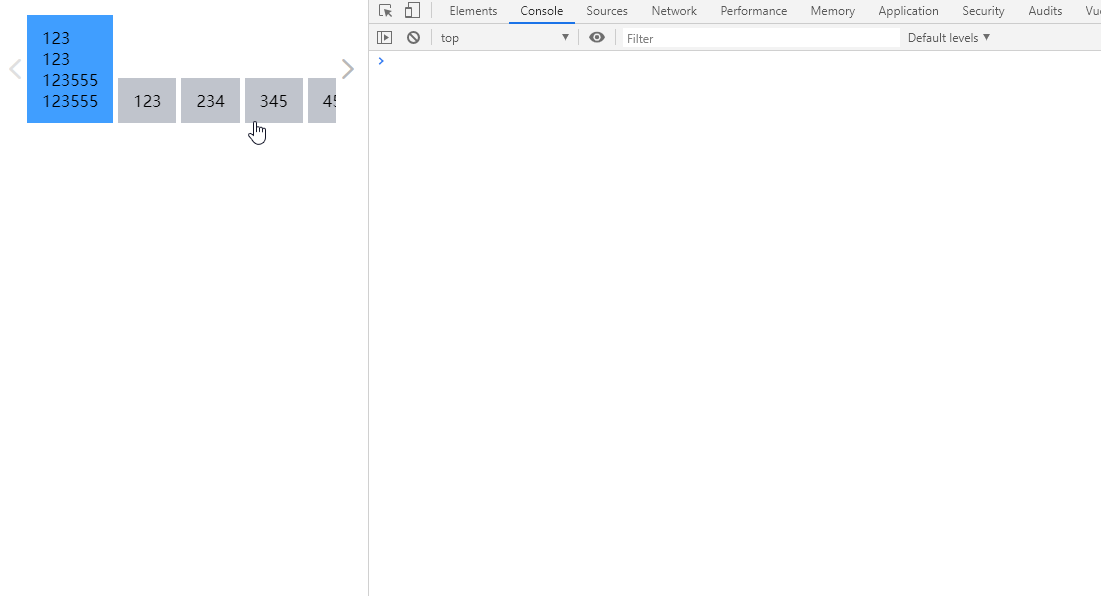
1、tabs
<script>
  import tabNav from './tab-nav'
  export default {
    name: "CTabs",
    inheritAttrs: false,
    components: {
      tabNav
    },
    data() {
      return {
        navData: []
      }
    },
    methods: {
      change(value) {
        this.$emit('change', value);
      },
      disposeNavData() {
        if (!this.$slots.default) return;
        this.navData = this.$slots.default.filter(vnode => {
          return vnode.tag && vnode.componentOptions && vnode.componentOptions.Ctor.options.name === 'CTabItem'
        });
      }
    },
    created() {
      this.disposeNavData()
    },
    render(h) {
      let {navData, change} = this;
      return (
        <div class="crazy-tabs">
          <tab-nav navData={navData} onChange={change}></tab-nav>
        </div>
      )
    }
  }
</script>
1、tabs需要接收tab-item的内容,所以使用render渲染方式(初期也是在template中,由于无法完成一些操作,所以换为render)
2、tabs需要把tab-item中需要渲染的数据交给tab-nav,所以需要过滤掉不需要渲染的VNode
2、tab-item
<script>
  export default {
    name: "CTabItem",
    inheritAttrs: false,
    render(h) {
      return (<slot></slot>)
    }
  }
</script>
tab-item只需要插槽把内容转发过去
3、tab-nav
<script>
  import {addResizeListener} from '../utils/resize-event';
  import getStyle from "../utils/getStyle";
  export default {
    name: "tab-nav",
    data() {
      return {
        activeData: 0,
        scrollable: false,
        disabledButton: '',
        currentLocation: 0,
        timeoutTimer: null
      }
    },
    props: {
      clickCurrent: Boolean,
      navData: {
        type: Array,
        default: []
      }
    },
    methods: {
      scrollPrev() {
        if (this.disabledButton === 'prev' || getStyle(this.$refs.navInner, 'transitionProperty') === 'transform') return;
        let navContainerSize = this.$refs.navContainer.offsetWidth;
        let moveLocation = this.currentLocation + navContainerSize;
        if (moveLocation >= 0) {
          moveLocation = 0;
        }
        this.currentLocation = moveLocation;
        this.setNavScroll();
      },
      scrollNext() {
        if (this.disabledButton === 'next' || getStyle(this.$refs.navInner, 'transitionProperty') === 'transform') return;
        let navSize = this.$refs.navInner.offsetWidth;
        let navContainerSize = this.$refs.navContainer.offsetWidth;
        let moveLocation = this.currentLocation - navContainerSize;
        if (moveLocation - navContainerSize <= -navSize) {
          moveLocation = navContainerSize - navSize;
        }
        this.currentLocation = moveLocation;
        this.setNavScroll();
      },
      setNavScroll() {
        if (this.timeoutTimer) clearTimeout(this.timeoutTimer);
        this.$refs.navInner.style.transition = 'transform 500ms'
        this.$refs.navInner.style.transform = 'translate3d(' + this.currentLocation + 'px,0,0)';
        this.clearNavInnerTransition();
        this.setButtonStatus();
      },
      clearNavInnerTransition() {
        this.timeoutTimer = setTimeout(() => {
          this.$refs.navInner.style.transition = 'none'
        }, 500);
      },
      tabClick(index, item) {
        if (!this.clickCurrent && this.activeData === index) return;
        this.activeData = index;
        this.$emit('change', item);
        this.$nextTick(this.updateLocation)
      },
      updateLocation() {
        let target = this.$el.querySelector('.active');
        if (!target) return;
        if (target.offsetLeft + this.currentLocation < 0) {
          this.currentLocation = -target.offsetLeft;
        } else if (target.offsetLeft + target.offsetWidth + this.currentLocation - this.$refs.navContainer.offsetWidth > 0) {
          this.currentLocation = -(target.offsetLeft + target.offsetWidth - this.$refs.navContainer.offsetWidth);
        }
        this.setNavScroll();
      },
      setButtonStatus() {
        if (this.currentLocation >= 0) {
          this.disabledButton = 'prev'
          return
        }
        if (this.currentLocation < 0 && this.currentLocation + this.$refs.navInner.offsetWidth - this.$refs.navContainer.offsetWidth <= 0) {
          this.disabledButton = 'next'
          return
        }
        this.disabledButton = ''
      },
      setScrollable() {
        this.scrollable = this.$refs.navInner.offsetWidth > this.$refs.navContainer.offsetWidth;
        let navSize = this.$refs.navInner.offsetWidth;
        let navContainerSize = this.$refs.navContainer.offsetWidth;
        if (this.scrollable) {
          if (navSize + this.currentLocation < navContainerSize) {
            this.currentLocation = navContainerSize - navSize;
          }
        } else {
          if (this.currentLocation > 0) this.currentLocation = 0;
        }
        this.setButtonStatus();
        this.setNavScroll();
      }
    },
    mounted() {
      this.$nextTick(this.setScrollable);
      addResizeListener(this.$el, this.setScrollable);
    },
    updated() {
      this.$nextTick(this.setScrollable);
    },
    render(h) {
      const {
        scrollable,
        disabledButton,
        activeData,
        scrollPrev,
        scrollNext,
        tabClick
      } = this;
      let navInner = this.navData.map((item, index) => {
        return (
          <div class={{
            'crazy-tabs-nav-item': true,
            'active': activeData === index
          }}
               onClick={() => {
                 tabClick(index, item.data.attrs.value)
               }}>
            <div class="crazy-tabs-nav-item__inner">
              {item.componentOptions.children || item.data.attrs.label}
            </div>
          </div>
        )
      });
      return (
        <div class={{'crazy-tabs-nav__wrap': true, 'is-scrollable': !scrollable}}>
          <div ref="navContainer" class="crazy-tabs-nav__container">
            <div ref="navInner" class="crazy-tabs-nav__inner">{navInner}</div>
          </div>
          {scrollable ? <div
            class={{
              'icon-crazy-left': true,
              'crazy-tabs-nav__button': true,
              'crazy-tabs-nav-button__prev': true,
              'crazy-tabs-nav-button-disabled': disabledButton === 'prev'
            }}
            onClick={() => {
              scrollPrev()
            }}
          >
          </div> : null}
          {scrollable ? <div
            class={{
              'icon-crazy-right': true,
              'crazy-tabs-nav__button': true,
              'crazy-tabs-nav-button__next': true,
              'crazy-tabs-nav-button-disabled': disabledButton === 'next'
            }}
            onClick={() => {
              scrollNext()
            }}
          >
          </div> : null}
        </div>
      )
    }
  }
</script>
1、判断其是否显示滑动按钮setScrollable
2、判断其滑动按钮是否可点击setButtonStatus
3、点击一项,需要此项高亮tabClick,需判断其是否在可视区内updateLocation
4、滑动到某个位置setNavScroll
5、点击左右滑动按钮计算其滚动位置scrollPrev、scrollNext
总结:
tabs主要是选项卡的切换和对应内容区的显示,还有就是监听tabs的大小变化,根据tabs大小判断其滑动按钮是否需要显示