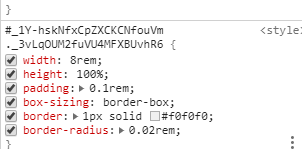
1. 安装postcss-pxtorem包
npm i postcss-pxtorem -D
2. 新建rem.js
// 基本大小,和webpack.config里配置的数值一样
const baseSize = 100
// 设置 rem 函数
function setRem () {
  // 当前页面宽度相对于 1920 宽的缩放比例,可根据自己设计图的宽度修改。
  const scale = document.documentElement.clientWidth / 1920
  // 设置页面根节点字体大小
  document.documentElement.style.fontSize = (baseSize * Math.min(scale, 2)) + 'px'
}
// 初始化
setRem()
// 改变窗口大小时重新设置 rem
window.onresize = function () {
  setRem()
}
3. 在index.js中导入
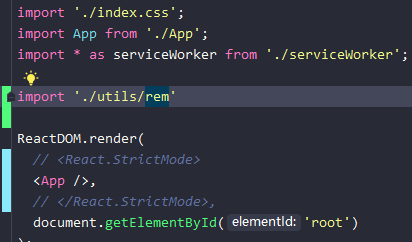
4. 修改webpack.config.js
4-1. 初始化配置
run eject
如果报错需要先提交代码
4-2. 修改webpack.config.js
在文件内搜索getStyleLoaders,看有
// rem布局修改
该注释就是修改的地方
const getStyleLoaders = (cssOptions, preProcessor) => {
    const loaders = [
      isEnvDevelopment && require.resolve('style-loader'),
      isEnvProduction && {
        loader: MiniCssExtractPlugin.loader,
        // css is located in `static/css`, use '../../' to locate index.html folder
        // in production `paths.publicUrlOrPath` can be a relative path
        options: paths.publicUrlOrPath.startsWith('.')
          ? { publicPath: '../../' }
          : {},
      },
      {
        loader: require.resolve('css-loader'),
        options: cssOptions,
      },
      {
        // Options for PostCSS as we reference these options twice
        // Adds vendor prefixing based on your specified browser support in
        // package.json
        loader: require.resolve('postcss-loader'),
        options: {
          // Necessary for external CSS imports to work
          // https://github.com/facebook/create-react-app/issues/2677
          ident: 'postcss',
          plugins: () => [
            require('postcss-flexbugs-fixes'),
            require('postcss-preset-env')({
              autoprefixer: {
                flexbox: 'no-2009',
              },
              stage: 3,
            }),
            // Adds PostCSS Normalize as the reset css with default options,
            // so that it honors browserslist config in package.json
            // which in turn let's users customize the target behavior as per their needs.
            postcssNormalize(),
            // rem布局修改
            require('postcss-pxtorem')({
              rootValue: 100, // 和rem.js 里面的baseSize数值一样
              propWhiteList: [],
              minPixelValue: 2,
            })
            // rem布局修改
          ],
          sourceMap: isEnvProduction && shouldUseSourceMap,
        },
      },
    ].filter(Boolean);
    if (preProcessor) {
      loaders.push(
        {
          loader: require.resolve('resolve-url-loader'),
          options: {
            sourceMap: isEnvProduction && shouldUseSourceMap,
          },
        },
        {
          loader: require.resolve(preProcessor),
          options: {
            sourceMap: true,
          },
        }
      );
    }
    return loaders;
  };
5. 查看效果