

阿里云的函数计算对WSGI协议支持较好,例如Flask。
但目前市场上介绍ASGI系列的文章不多(截止2020-05-18)。
本篇将介绍函数计算部署 FastAPI 框架。
默认你对工具 fun 有一定的了解
本demo部署后的效果
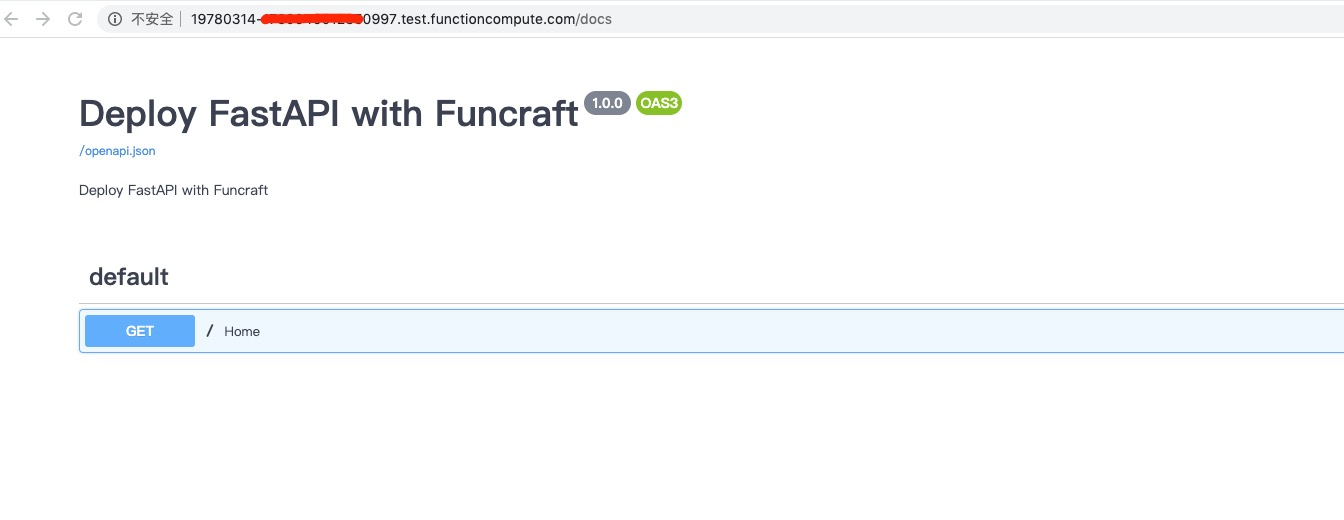
本demo代码地址
1.fun init
选择 “http-trigger-python3”模式,完成工程初始化。
2.调整template.ymal
- Runtime 改成 custom
- 添加一个domain 配置,具体内容:
ROSTemplateFormatVersion: '2015-09-01'
Transform: 'Aliyun::Serverless-2018-04-03'
Resources:
  my_fast:
    Type: 'Aliyun::Serverless::Service'
    Properties:
      Description: 'fastapi deploy with fun tools'
    my_fast:
      Type: 'Aliyun::Serverless::Function'
      Properties:
        Handler: index.app
        Runtime: custom
        CodeUri: './'
      Events:
        httpTrigger:
          Type: HTTP
          Properties:
            AuthType: ANONYMOUS
            Methods: ['POST', 'GET']
  my_domain:
    Type: 'Aliyun::Serverless::CustomDomain'
    Properties:
      DomainName: Auto
      Protocol: HTTP
      RouteConfig:
        Routes:
          '/*':
            ServiceName: my_fast
            FunctionName: my_fast
3. 调整 index.py
app的命名,保持与上一步配置的入口:“indexHandler: index.app”一致。
from fastapi import FastAPI


app = FastAPI(
    title="Deploy FastAPI with Funcraft",
    description="Deploy FastAPI with Funcraft",
    version="1.0.0",
)

@app.get("/")
def home():
    return "Deploy FastAPI with Funcraft"
4. 创建 Funfile
RUNTIME custom
RUN mkdir -p ~/.pip
RUN echo "[global]" >> ~/.pip/pip.conf
RUN echo "index-url = http://mirrors.aliyun.com/pypi/simple" >> ~/.pip/pip.conf
RUN echo "[install]" >> ~/.pip/pip.conf
RUN echo "trusted-host=mirrors.aliyun.com" >> ~/.pip/pip.conf
RUN fun-install pip install uvicorn
RUN fun-install pip install fastapi
- RUNTIME custom 表示Custom Runtime运行方式
- 中间几行调整pip的源,可以让本地安装环境时更顺利
- 最后两行属于业务需要的框架,即自己需要的第三方依赖,可以添加更多的第三方依赖
5. 创建 bootstrap
#!/bin/bash
uvicorn  index:app --host=0.0.0.0 --port=9000
- 5.1 bootstrap 需要可执行权限
chmod +x bootstrap - 5.2 bootstrap 需要添加 #!/bin/bash,不然会出错
- 5.3 需要监听 0.0.0.0:9000(或者*:9000),否则会超时,这个是它内部的规则。
6. 安装第三方依赖
#fun install
首次安装,会下载 runtime-custom 镜像,以及一些第三方依赖包,需要几分钟的时间
7. build
$ fun build
using template: template.yml
start building function dependencies without docker

building my_fast/my_fast
Funfile exist, Fun will use container to build forcely
Step 1/8 : FROM registry.cn-beijing.aliyuncs.com/aliyunfc/runtime-custom:build-1.9.5
 ---> d9dc9b425320

......

Build Success

Built artifacts: .fun/build/artifacts
Built template: .fun/build/artifacts/template.yml

Tips for next step
======================
* Invoke Event Function: fun local invoke
* Invoke Http Function: fun local start
* Deploy Resources: fun deploy
8. 本地启动
#fun local start
确保本地运行ok,最后部署
9. deploy
#fun deploy -y
$ fun deploy
using template: .fun/build/artifacts/template.yml
using region: cn-shanghai
using accountId: ***********0997
using accessKeyId: ***********dT9i
using timeout: 300

Collecting your services information, in order to caculate devlopment changes...

Resources Changes(Beta version! Only FC resources changes will be displayed):

┌──────────┬──────────────────────────────┬────────┬──────────┐
│ Resource │ ResourceType                 │ Action │ Property │
├──────────┼──────────────────────────────┼────────┼──────────┤
│ my_fast  │ Aliyun::Serverless::Function │ Modify │ CodeUri  │
└──────────┴──────────────────────────────┴────────┴──────────┘

? Please confirm to continue. Yes
Waiting for service my_fast to be deployed...
        Waiting for function my_fast to be deployed...
                Waiting for packaging function my_fast code...
                ......
                trigger httpTrigger deploy success
        function my_fast deploy success
service my_fast deploy success

...your url ...

Waiting for custom domain my_domain to be deployed...
custom domain my_domain deploy success
10. 测试访问
上一步骤部署成功后,会得到一个 url,直接浏览器访问即可。

