data{array:[...]}传给Vue后的变化
- data{array:[...]}传给Vue后,vue会在[...]和数组原来的
__proto__:Array(0)之间加一层原型"__proto__:Array" - 这一层原型
"__proto__:Array"有7个methods与原来的__proto__:Array(0)的7个methods是同名,但代码不同(可能是在原来的methods上,增加了自动添加代理和监听的功能)。 push()pop()shift()unshift()splice()sort()reverse()
用这7个methods对数组进行变更,比Vue.set或者this.$set更简洁。
先看用Vue.set或者this.$set变更数组
new Vue({
    data: {
        array:["a" , "b" , "c"]
    },
    template:`
    <div>
       {{array}}
       <button @click="setD">set d</button>
    </div>
    `,
    methods:{
        setD{
            this.$set(this.array, 3 , "d")
            //在下标为3处添加第四项"d"
        }
    }
}).$mount("#app")
再看用push()变更数组
new Vue({
    data: {
        array:["a" , "b" , "c"]
    },
    template:`
    <div>
       {{array}}
       <button @click="setD">set d</button>
    </div>
    `,
    methods:{
        setD{
            this.array.push("d")
            //这里的push()是Vue里面的push()
            console.log(this.array);
        }
    }
}).$mount("#app")
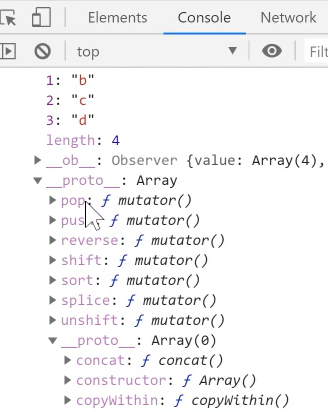
以push()为例看看Vue的7个数组变异方法的编写思路
示例代码
class VueArray extends Array{
//声明一个class叫VueArray,VueArray继承了数组Array
//所谓继承就是我的原型链在你的原型链前面

    push(...args){
    //声明一个methods叫做push(),它接受参数'...args'
    //'...args'是所有参数组成的一个数组

        const oldLength = this.length//this就是当前数组
        //获取到push()之前的oldLength,即push()之前下标的最后一个

        super.push(...args)
        //如果你调用super.push(),我就调用父类的push()

        //this.length//本句隐藏//push()完之后,出现的新的this.length
        //即push()之后下标的最后一个

        console.log("你 push 了")

        for(let i = oldLength; i<this.length; i++){
        //i就是我push()的所有元素的下标。i = oldLength就是push()的第一个元素
        //从i = oldLength 到 i = this.length-1 把所有push()的元素遍历一遍

            Vue.set(this, i ,this[i])
            //Vue.set(this/当前数组, i/第i项 ,this[i]/第i项的值)
            //Vue.set()即把所有push()的元素用for循环遍历一项一项加入到当前数组this
            //将每个新增的key都告诉vue
        }
    }
}