

Vuex 是一个专为 Vue.js 应用程序开发的状态管理模式。 可以解决各个应用场景之间的数据共享,而且是双向绑定的。 ###1.安装
npm install --save vuex
###2.src下创建store(存储)文件夹,新建index.js文件
import Vue from "vue"
import Vuex from "vuex"

Vue.use(Vuex)

// 注册上面引入的各大模块
const store = new Vuex.Store({
    state: {
        counter: 1000
    }, // 共同维护的一个状态,state里面可以是很多个全局状态
    getters:{}, // 获取数据并渲染
    actions:{}, // 数据的异步操作
    mutations:{} // 处理数据的唯一途径,state的改变或赋值只能在这里
})

export default store // 导出store并在 main.js中引用注册。
###3.main.js中导入并挂载
import store from './store'


//生产或者开发环境,会多一些警告
Vue.config.productionTip = false

new Vue({
  router,
  store,
  render: h => h(App)
}).$mount('#app')
###4.需求:定义全局的counter,组件中增加或者修改
#####mutations是处理数据的唯一途径,state的改变或赋值只能在这里 #####这里要说一个注意的地方 其实vue的文档中已级作了说明,就是在 vue的 methods中的方法定义的时候不要使用 箭头函数 如果使用的话, this 的指向就是错误的
store/index.js中定义
import Vue from "vue"
import Vuex from "vuex"

Vue.use(Vuex)

// 注册上面引入的各大模块
const store = new Vuex.Store({
    state: {
        counter: 1000
    }, // 共同维护的一个状态,state里面可以是很多个全局状态
    getters: {}, // 获取数据并渲染
    actions: {}, // 数据的异步操作
    mutations: {
        increment(state) {
            state.counter += 1;
        },
        decrement(state) {
            state.counter -= 1;
        }
    } // 处理数据的唯一途径,state的改变或赋值只能在这里
})

export default store // 导出store并在 main.js中引用注册。
组件中动态修改数值
<template>
  <div>
    <ul>
      <li>新闻1</li>
      <li>新闻2</li>
      <li>新闻3</li>
      <li>新闻4</li>
      <li>{{$store.state.counter}}</li>
    </ul>
    <button @click="add">+</button>
    <button @click="sub">-</button>
  </div>
</template>

<script>
export default {
  name: "HomeNews",
  methods:{
    add(){
      this.$store.commit('increment')
    },
    sub(){
      this.$store.commit('decrement')
    }
  }
};
</script>

<style>
</style>
###5.vue中vuex的五个属性和基本用法 (1) 核心概念-- State单一状态树 Vuex 使用单一状态树——是的,用一个对象就包含了全部的应用层级状态。至此它便作为一个“唯一数据源 (SSOT)”而存在。这也意味着,每个应用将仅仅包含一个 store 实例 (2)getters 从基本数据(state)派生的数据,相当于state的计算属性。 当使用state中的数据需要运算或者改变属性,需要getters 例如:计算state中数值的平方 store/index.js
 state: {
        counter: 1000,
        student:[
            {name : 'kebi' ,age : 12},
            {name : 'hong' ,age : 25},
            {name : 'blue' ,age : 27},
            {name : 'black' ,age : 20},
            {name : 'pink' ,age : 22}
        ]
    }, // 共同维护的一个状态,state里面可以是很多个全局状态
    getters: {
        power: state => state.counter * state.counter
    }, // 获取数据并渲染
页面中调用
<h2>{{$store.getters.power}}</h2>

//或者
 computed: {
    stuList() {
      return this.$store.state.student.filter(s => s.age >= 20);
    }
  },
getters可以作为参数让里面的计算方式使用
getters: {
       power: state => state.counter * state.counter,
       stuList: state => state.student.filter(s => s.age >= 20),
       stuListLength : (state,getters) => getters.stuList.stuListLength
   }
场景:用户自定义搜索条件,输入年龄过滤数组 可以使用getters传参的方式,但是getters属性要返回函数
 stuListFilter: (state) => {
            return age => {
                return state.student.filter(s => s.age > age)
            }
        }
页面传参
<h2>{{$store.getters.stuListFilter(18)}}</h2>
(3)mutations传参(提交载荷(Payload))
//页面中方法
addStu() {
      let stu = { name: "weide", age: 22 };
      this.$store.commit("addStu", stu);
    }

//store/index.js中赋值
 addStu: (state, stu) => state.student.push(stu)
mutations第二种提交方式(传输对象)
//页面中方法
 addMore(count) {
      //第一种方式
      // this.$store.commit("incrementMore", count);
      //第二种特殊方式
      this.$store.commit({
        type: 'incrementMore',
        count: count
      });
    },

//store/index.js中赋值
//第一种,这里的count时传过来的数字
//incrementMore: (state,count) => state.counter += count,
//第二种,这里的payload传的是整个commit中的对象
incrementMore: (state,payload) => state.counter += payload.count,
mutations的响应式方法
//向state数组中添加未定义的属性时,需要用数组的响应式方法才可以生效
//添加属性
//updateInfo: (state) => Vue.set(state.info, 'address', '洛杉矶')
//删除属性
updateInfo: (state) => Vue.delete(state.info, 'age')
官方推荐mutations定义常量类型 ①新建mutation-types.js文件
export const Increment= 'Increment'
②index.js引入
import {
    Increment
} from './mutation-types'

export const mutations = {
    [Increment] (state) {
       Vue.delete(state.info, 'age')
    }
}
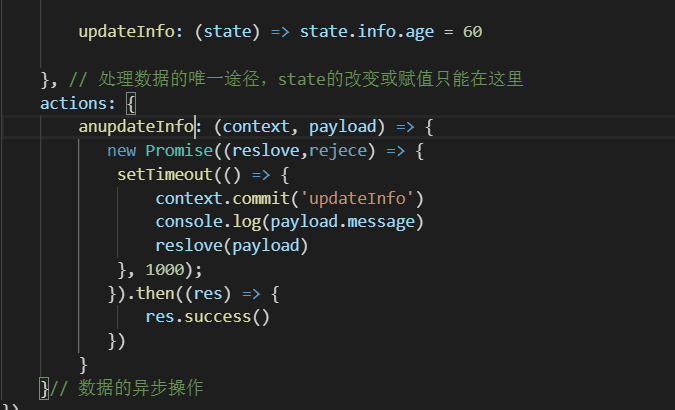
(4)Action 类似于 Mutations,是用来代替 Mutations 进行异步操作的
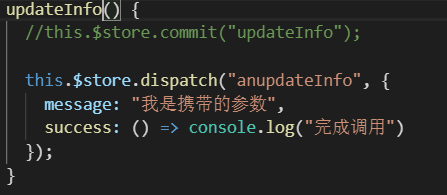
action调用Mutations中的函数,anupdateInfo: (context, payload) => {},context指store上下文
const ModuleA = {
  state:{},
  mutations:{},
  actions:{},
  getters:{}
}

const ModuleB = {
  state:{},
  mutations:{},
  actions:{},
  getters:{}
}

const store = new Vuex.Store({
  modules:{
    a:ModuleA,
    b:ModuleB
  }
})

store.state.a // ModuleA 的状态
store.state.b // ModuleB 的状态
