RabbitMQ延迟队列
介绍
实现方式:
- 混合使用message TTL 和 Dead Letter Exchanges
- 使用RabbitMQ Delayed Message Plugin来实现
混合使用Message TTL和Dead Letter Exchanges
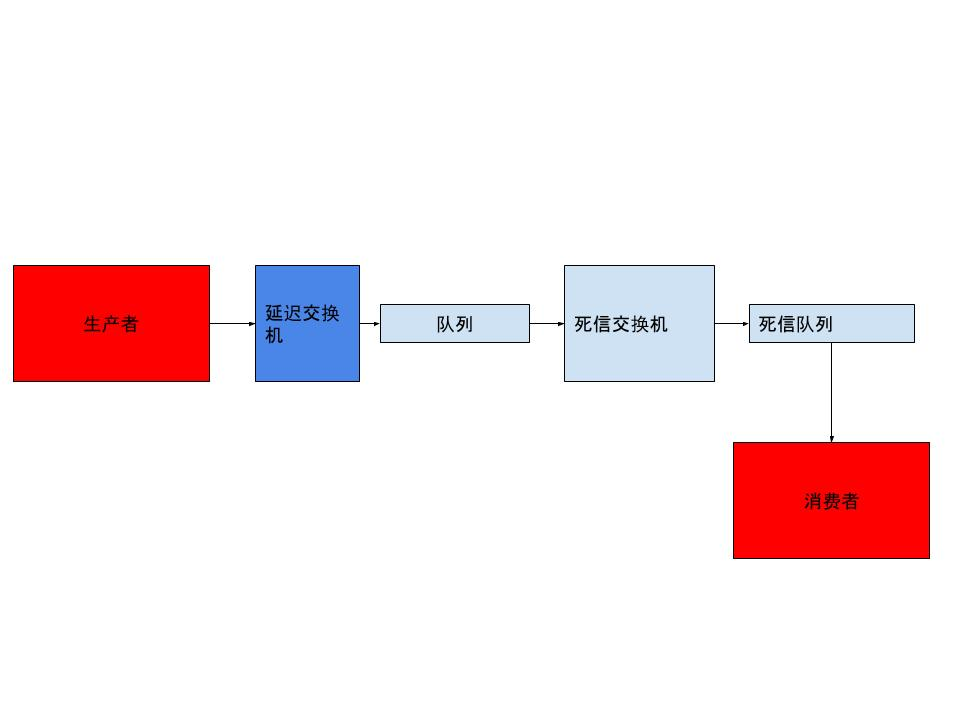
利用dead letter exchange的规则
- The message is negatively acknowledged by a consumer using basic.reject or basic.nack with requeue parameter set to false.消费者拒绝或者nack
- The message expires due to per-message TTL; or 消息ttl
- The message is dropped because its queue exceeded a length limit 消息被丢弃由于队列超过长度限制
生产者发送消息给延迟交换机时,让消息设置特定时间过期,转发到延迟队列。这个延迟队列创建时,声明dead letter exchange name和dead letter routing key。由于没有设置消费者,去监听这个延迟队列,导致这个消息ttl,最终转发到死信exchange,根据死信routingkey转发死信队列。(这边的例子,我会在下面举例)
消费者
# application.yml
server:
  port: 8080
spring:
  rabbitmq:
    username: admin
    password: admin@789
    host: 121.36.241.65
    port: 5672
    virtual-host: /test
@Configuration
public class RabbitConfig {
       private static final String DELAY_QUEUE_NAME = "test_delay_ttl_springboot_queue";
        private static final String DELAY_EXCHANGE_NAME = "test_delay_ttl_springboot_exchange";
        private static final String DELAY_ROUTING_KEY = "test_delay_ttl_springboot_routingkey";
        private static final String DEAD_QUEUE_NAME = "test_dead_ttl_springboot_queue";
        private static final String DEAD_EXCHANGE_NAME = "test_dead_ttl_springboot_exchange";
        private static final String DEAD_ROUTING_KEY = "test_dead_ttl_springboot_routingkey";

    // 延迟队列
        @Bean
        public Queue dealyQueue(){
            Map<String,Object> args = new HashMap<>();
            // x-dead-letter-exchange 当前队列声明的死信路由
            args.put("x-dead-letter-exchange", DEAD_EXCHANGE_NAME);
            // x-dead-letter-routing-key  这里声明当前队列的死信路由key
            args.put("x-dead-letter-routing-key", DEAD_ROUTING_KEY);
            return QueueBuilder.durable(DELAY_QUEUE_NAME).withArguments(args).build();
        }

    // 死信queue
        @Bean
        public Queue deadQueue(){
            return new Queue(DEAD_QUEUE_NAME);
        }

    // 延迟exchange
        @Bean
        public DirectExchange delayExchange(){
            return new DirectExchange(DELAY_EXCHANGE_NAME);
        }
// 死信exchange
        @Bean
        public DirectExchange deadExchange(){
            return new DirectExchange(DEAD_EXCHANGE_NAME);
        }

        @Bean
        public Binding dealyBinding(@Qualifier("dealyQueue")Queue queue,@Qualifier("delayExchange")Exchange exchange){
            return BindingBuilder.bind(queue).to(exchange).with(DELAY_ROUTING_KEY).noargs();
        }

        @Bean
        public Binding deadBinding(@Qualifier("deadQueue")Queue queue,@Qualifier("deadExchange")Exchange exchange){
            return BindingBuilder.bind(queue).to(exchange).with(DEAD_ROUTING_KEY).noargs();
        }
    }
    private static final String DELAY_EXCHANGE_NAME = "test_delay_ttl_springboot_exchange";
    private static final String DELAY_ROUTING_KEY = "test_delay_ttl_springboot_routingkey";

    @Resource
    private RabbitTemplate rabbitTemplate;
	@Override
    public void sendDelayMsgTTL(String msg, Integer delay) {
        rabbitTemplate.convertAndSend(DELAY_EXCHANGE_NAME,DELAY_ROUTING_KEY,msg,msgProcessor->{
            msgProcessor.getMessageProperties().setExpiration(delay.toString());
            return msgProcessor;
        });
    }
// 发送短信
mqService.sendDelayMsgTTL("hello,i send a delay msg by ttl",5000);
消费者
消费者配置文件和生成者一样
    private static final String DEAD_QUEUE_NAME = "test_dead_ttl_springboot_queue";
    @RabbitListener(queues = DEAD_QUEUE_NAME)
    public void delay(Message message, Channel channel) throws IOException {
        String msg = new String(message.getBody(),"UTF-8");
        System.out.println("msg : " + msg);
        channel.basicAck(message.getMessageProperties().getDeliveryTag(),false);
    }
运行上面消费者,可以看到5秒后消费者收到
那么,我们来监听延迟队列
    private static final String DEAD_QUEUE_NAME = "test_dead_ttl_springboot_queue";

    @RabbitListener(queues = "test_delay_ttl_springboot_queue")
    public void delay(Message message, Channel channel) throws IOException {
        String msg = new String(message.getBody(),"UTF-8");
        System.out.println("msg : " + msg);
        channel.basicAck(message.getMessageProperties().getDeliveryTag(),false);
    }

    @RabbitListener(queues = DEAD_QUEUE_NAME)
    public void delay2(Message message, Channel channel) throws IOException {
        String msg = new String(message.getBody(),"UTF-8");
        System.out.println("msg : " + msg);
        channel.basicAck(message.getMessageProperties().getDeliveryTag(),false);
    }
可以看到,生产者发送消息,消费者瞬间收到。并且死信队列不会监听到消息。
使用RabbitMQ Delayed Message Plugin来实现延迟队列
安装步骤
- 前往https://www.rabbitmq.com/community-plugins.html,下载rabbitmq_delayed_message_exchange插件
- 将下载好的插件放入rabbitmq安装目录中的plugin 文件夹下
- 执行命令
rabbitmq-plugins enable rabbitmq_delayed_message_exchange让该plugin可以使用 - 插件安装完毕后,就会有一个x-delayed-message类型的exchange 代码
// 声明队列和queue
private static final String DELAY_QUEUE_NAME = "test_delay_queue_springboot";
    private static final String DELAY_EXCHANGE_NAME = "test_delay_exchange_springboot";
    private static final String DELAY_EXCHANGE_ROUTING_KEY = "test_delay_routingkey_springboot";
@Bean
    public Queue delayQueue(){
        return new Queue(DELAY_QUEUE_NAME);
    }

    @Bean
    public CustomExchange customExchange(){
        Map<String,Object> args = new HashMap<>();
        args.put("x-delayed-type","direct");
        return new CustomExchange(DELAY_EXCHANGE_NAME,"x-delayed-message",true,false,args);
    }

    @Bean
    public Binding binding(@Qualifier("delayQueue")Queue queue,@Qualifier("customExchange")CustomExchange customExchange){
        return BindingBuilder.bind(queue).to(customExchange).with(DELAY_EXCHANGE_ROUTING_KEY).noargs();
    }
// 设置具体的延迟时间
@Override
    public void sendDelayMsg(String message, Integer delay) {
        rabbitTemplate.convertAndSend(DELAY_EXCHANGE_NAME,DELAY_EXCHANGE_ROUTING_KEY,message,msgProcessor->{
            msgProcessor.getMessageProperties().setDelay(delay);
            return msgProcessor;
        });
    }
// 接收消息
    @RabbitListener(queues = DELAY_QUEUE_NAME)
    public void delay(Message message, Channel channel) throws IOException {
        String msg = new String(message.getBody(),"UTF-8");
        System.out.println("msg : " + msg);
        // 可以看到具体延迟了多少时间,其实也就是x-delay这个头
        System.out.println(message.getMessageProperties().getReceivedDelay());
        channel.basicAck(message.getMessageProperties().getDeliveryTag(),false);
    }
可以看到使用插件也可以实现这个功能。
下面,我们来测试一下死信相关的功能
我们发生一条信息到延迟队列里面,监听这个队列,消费的时候拒绝这个消息,这样这条消息就会发往死信队列
// 生产者
@Override
    public void sendMsgUAck(String message) {
        rabbitTemplate.convertAndSend(DELAY_EXCHANGE_NAME,DELAY_ROUTING_KEY,message);
    }
   // 消费者
//监听死信队列
   @RabbitListener(queues = DEAD_QUEUE_NAME)
    public void delay2(Message message, Channel channel) throws IOException {
        String msg = new String(message.getBody(),"UTF-8");
        System.out.println("msg : " + msg);
        channel.basicAck(message.getMessageProperties().getDeliveryTag(),false);
    }

// 监听延迟队列
    @RabbitListener(queues = "test_delay_ttl_springboot_queue")
    public void delay3(Message message, Channel channel) throws IOException {
        channel.basicNack(message.getMessageProperties().getDeliveryTag(),false,false);
        System.out.println("uack message");
    }
可以看到发生消息,延迟队列消费者拒绝,立刻发往死信队列。(扣库存相关逻辑,可以参考)