

概述
Java数据库连接简称JDBC,它是Java用来规范如何访问数据库的应用程序接口。它可以用来连接数据库,查询/更新数据库等。
ORM
ORM是对象和关系数据库的映射,即一个对象对应数据库里的一条记录。
示例
首先需要导入mysql-connector的jar包。
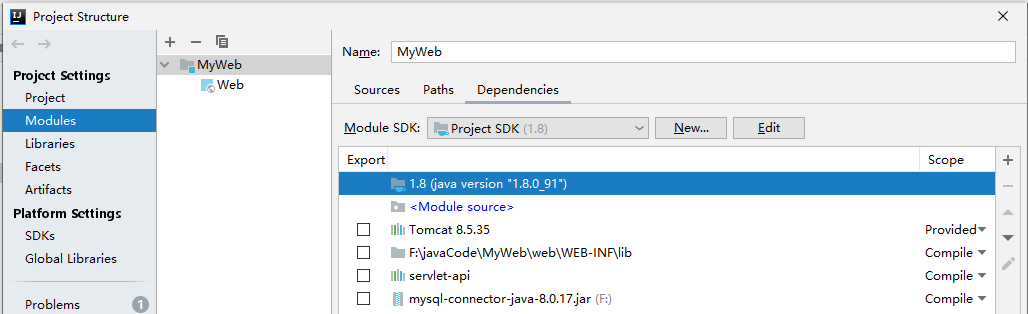
然后加载数据库驱动,获取连接。
public class JDBCTool {
    static final String DRIVER = "com.mysql.cj.jdbc.Driver";
    static final String URL = "jdbc:mysql://localhost/justtest?serverTimezone=GMT%2B8";
    static final String USER = "root";
    static final String PWD = "123";

    public static Connection getDBConnection() {
        Connection connection = null;
        try {
            Class.forName(DRIVER);      //加载MySql驱动程序的类文件到内存中
            connection = DriverManager.getConnection(URL, USER, PWD);
            System.out.println("连接成功");
        }catch (Exception e) {
            e.printStackTrace();
        }
        return connection;
    }

    public static void main(String[] args) {
        Connection connection = getDBConnection();
        Statement statement = null;
        ResultSet resultSet = null;
        try {
            //建立连接
            statement = connection.createStatement();
            resultSet = statement.executeQuery("select * from goods");
            while (resultSet.next()) {
                System.out.println(resultSet.getString(1));
                System.out.println(resultSet.getString(2));
            }
        }catch (Exception e) {
            e.printStackTrace();
        }finally {
            if (resultSet != null) {
                try {
                    resultSet.close();
                } catch (SQLException e) {
                    e.printStackTrace();
                }

            }
            if (statement != null) {
                try {
                    statement.close();
                } catch (SQLException e) {
                    e.printStackTrace();
                }

            }
            if (connection != null) {
                try {
                    connection.close();
                } catch (SQLException e) {
                    e.printStackTrace();
                }

            }
        }
    }
}
Connection类
客户端和数据库的交互都是通过Connection对象完成的。常用的方法有:
Statement createcreateStatement() //创建向数据库发送sql的statement对象。

void commit(); //提交事务

void rollback() //回滚事务
Statement接口
Statement,CallableStatement 和 PreparedStatement 接口定义的方法和属性,可以帮助我们发送 SQL 命令,并从数据库中接收数据。
(1)Statement:适用于运行静态 SQL 语句,该接口不接受参数。常用的方法有:
//执行一条sql语句,返回true表示执行的是查询语句,
//false表示执行的是insert,delete,update等等
boolean execute(String SQL)
int executeUpdate(String SQL) //返回执行 SQL 语句影响的行数
ResultSet executeQuery(String SQL) //返回一个结果集ResultSet对象
(2)PreparedStatement:计划多次使用 SQL 语句,该接口运行时接受输入的参数。
//添加字段
Connection connection = getDBConnection();
PreparedStatement pstatement = null;

    try {
    /*
        如果是Statement则需要字符串拼接:
        sql = "insert into goods values(null, " + "'dadw'" + "," + 78 + ")" ";
        可读性和维护性较差
    */
        String sql = "insert into goods values(null, ?, ?)";
        pstatement = connection.prepareStatement(sql);

        //PreparedStatement 使用参数设置,可读性好,不易犯错
        pstatement.setString(1,  "dadw");
        pstatement.setInt(2, 78);
        pstatement.execute();

    }catch (Exception e) {
            e.printStackTrace();
    } finally {
        //省略关闭连接语句
    }
通过execute()方法演示 增删改操作:
Connection connection = getDBConnection();
        PreparedStatement pstatement = null;
        ResultSet resultSet = null;
        try {
            String sqlInsert = "insert into goods values(null, ?, ?)";
            String sqlDelete = "delete from goods where id = ?";
            String sqlUpdate = "update goods set goods_num = ? where id = ?";
            //加入对应的sql语句
            pstatement = connection.prepareStatement(sqlUpdate);

            pstatement.setString(1,  "666");
            pstatement.setInt(2, 1);
            pstatement.execute();

        }catch (Exception e) {
            e.printStackTrace();
        }finally {
            //省略关闭连接语句
        }
关闭连接
每一次操作结束后,我们都需要关闭数据库:先关闭Statement,后关闭Connection。如果觉得关闭方式麻烦,可以使用try-with-resource的方式自动关闭连接。
Connection connection = null;
Statement statement = null;
ResultSet resultSet = null;
try(connection = getDBConnection();statement = connection.createStatement();)
{
    resultSet = statement.executeQuery("select * from goods");
}catch (SQLException e) {
    e.printStackTrace();
}
使用事务
    Connection connection = getDBConnection();
    Statement statement = null;
    ResultSet resultSet = null;
    try {
        statement = connection.createStatement();
        connection.setAutoCommit(false);
        String sql = "update goods set goods_num = goods_num+ 1 where id < 13";
        String sql2 = "update goods set goods_num = goods_num - 1 where id > 13";

        statement.execute(sql);
        statement.execute(sql2);

        connection.commit();
        }catch (Exception e) {
            e.printStackTrace();
        }finally {
            //省略关闭连接语句
        }
