

一、下载和安装git:一路“下一步”狂奔;
二、在存放有源代码的文件夹上右键,git bash here:最好是一个全新的文件夹,不能同别的代码管理工具同仓;
三、初始化本地仓库:git init;
四、配置用户名和邮箱:git user.name '你的奶名'; git user.email '你的油箱';
五、生成本地密钥:ssh-keygen -t rsa -C "再用下你的邮箱" , 一路回车即可,中途可能出现overwrite ?选 y 回车。
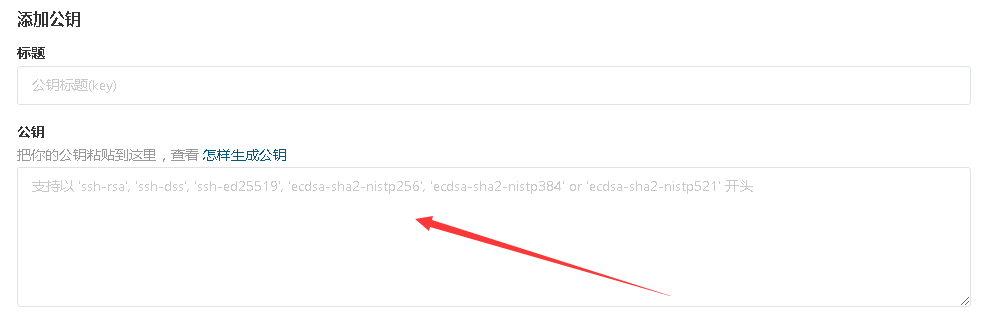
六、根据刚才第五步中提示的密钥存放路径,找到id_rsa.pub,用记事本打开,全选复制;
七、登录你的码云,配置公钥: 传送;把刚才复制的公钥粘贴到大框里,标题会自动取邮箱名,不爽就自己换啊~
八、在仓库里建排除文件:touch .gitignore, C#项目专用排除文件,客官闲的蛋疼的话可以去研究里面的用法,对其增删改查:
# Visual Studio

# User-specific files
*.suo
*.user
*.userosscache
*.sln.docstates

# User-specific files (MonoDevelop/Xamarin Studio)
*.userprefs

# Build results
[Dd]ebug/
[Dd]ebugPublic/
[Rr]elease/
[Rr]eleases/
[Xx]64/
[Xx]86/
[Bb]uild/
bld/
[Bb]in/
[Oo]bj/

# Visual Studio 2015 cache/options directory
.vs/
# Uncomment if you have tasks that create the project's static files in wwwroot
#wwwroot/

# MSTest test Results
[Tt]est[Rr]esult*/
[Bb]uild[Ll]og.*

# NUNIT
*.VisualState.xml
TestResult.xml

# Build Results of an ATL Project
[Dd]ebugPS/
[Rr]eleasePS/
dlldata.c

# DNX
project.lock.json
artifacts/

*_i.c
*_p.c
*_i.h
*.ilk
*.meta
*.obj
*.pch
*.pdb
*.pgc
*.pgd
*.rsp
*.sbr
*.tlb
*.tli
*.tlh
*.tmp
*.tmp_proj
*.log
*.vspscc
*.vssscc
.builds
*.pidb
*.svclog
*.scc

# Chutzpah Test files
_Chutzpah*

# Visual C++ cache files
ipch/
*.aps
*.ncb
*.opendb
*.opensdf
*.sdf
*.cachefile
*.VC.db
*.VC.VC.opendb

# Visual Studio profiler
*.psess
*.vsp
*.vspx
*.sap

# TFS 2012 Local Workspace
$tf/

# Guidance Automation Toolkit
*.gpState

# ReSharper is a .NET coding add-in
_ReSharper*/
*.[Rr]e[Ss]harper
*.DotSettings.user

# JustCode is a .NET coding add-in
.JustCode

# TeamCity is a build add-in
_TeamCity*

# DotCover is a Code Coverage Tool
*.dotCover

# NCrunch
_NCrunch_*
.*crunch*.local.xml
nCrunchTemp_*

# MightyMoose
*.mm.*
AutoTest.Net/

# Web workbench (sass)
.sass-cache/

# Installshield output folder
[Ee]xpress/

# DocProject is a documentation generator add-in
DocProject/buildhelp/
DocProject/Help/*.HxT
DocProject/Help/*.HxC
DocProject/Help/*.hhc
DocProject/Help/*.hhk
DocProject/Help/*.hhp
DocProject/Help/Html2
DocProject/Help/html

# Click-Once directory
publish/

# Publish Web Output
*.[Pp]ublish.xml
*.azurePubxml
*.publishproj
*.pubxml
PublishProfiles/
PublishScripts/

# NuGet Packages
*.nupkg
# The packages folder can be ignored because of Package Restore
**/packages/*
# except build/, which is used as an MSBuild target.
!**/packages/build/
# Uncomment if necessary however generally it will be regenerated when needed
#!**/packages/repositories.config
# NuGet v3's project.json files produces more ignoreable files
*.nuget.props
*.nuget.targets

# Microsoft Azure Build Output
csx/
*.build.csdef

# Microsoft Azure Emulator
ecf/
rcf/

# Windows Store app package directory
AppPackages/
BundleArtifacts/
Package.StoreAssociation.xml
_pkginfo.txt

# Visual Studio cache files
# files ending in .cache can be ignored
*.[Cc]ache
# but keep track of directories ending in .cache
!*.[Cc]ache/

# Others
ClientBin/
[Ss]tyle[Cc]op.*
~$*
*~
*.dbmdl
*.dbproj.schemaview
*.pfx
*.publishsettings
orleans.codegen.cs

# RIA/Silverlight projects
Generated_Code/

# Backup & report files from converting an old project file
# to a newer Visual Studio version. Backup files are not needed,
# because we have git ;-)
_UpgradeReport_Files/
Backup*/
UpgradeLog*.XML
UpgradeLog*.htm

# SQL Server files
*.mdf
*.ldf

# Business Intelligence projects
*.rdl.data
*.bim.layout
*.bim_*.settings

# Microsoft Fakes
FakesAssemblies/

# GhostDoc plugin setting file
*.GhostDoc.xml

# Node.js Tools for Visual Studio
.ntvs_analysis.dat

# Visual Studio 6 build log
*.plg

# Visual Studio 6 workspace options file
*.opt

# Visual Studio LightSwitch build output
**/*.HTMLClient/GeneratedArtifacts
**/*.DesktopClient/GeneratedArtifacts
**/*.DesktopClient/ModelManifest.xml
**/*.Server/GeneratedArtifacts
**/*.Server/ModelManifest.xml
_Pvt_Extensions

# LightSwitch generated files
GeneratedArtifacts/
ModelManifest.xml

# Paket dependency manager
.paket/paket.exe
paket-files/

# FAKE - F# Make
.fake/

.DS_Store
九、把本地文件推上去:
------git add . //添加所有文件,不包括排除文件中的;
------git commit -m '我的第一次'
------git remote add origin 你的远程仓库链接 ↓ //本地仓库与远程仓库建立不可告人的关系
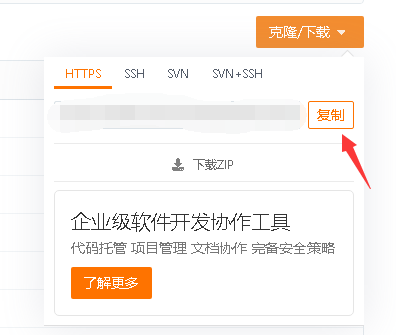
------git push -u origin master //推送当前分支(master)到远程仓库(必须是空仓状态,否则请先 空仓)
十、没有了,自己读进度条吧~
