OkHttp的基本使用:
1.同步请求:
OkHttpClient mOkHttpClient = new OkHttpClient();
//创建请求Request
final Request request = new Request.Builder()
        .url("http://www.baidu.com")
        .build();
Call call = mOkHttpClient.newCall(request);

Response mResponse=call.execute();//创建okHttpClient对象
OkHttpClient mOkHttpClient = new OkHttpClient();
final Request request = new Request.Builder()
.url("http://www.baidu.com")
.build();
Call call = mOkHttpClient.newCall(request);
call.enqueue(new Callback() {
@Override
public void onFailure(Call call, IOException e) {
...
}
@Override
public void onResponse(Call call, Response response) throws IOException {
...
}
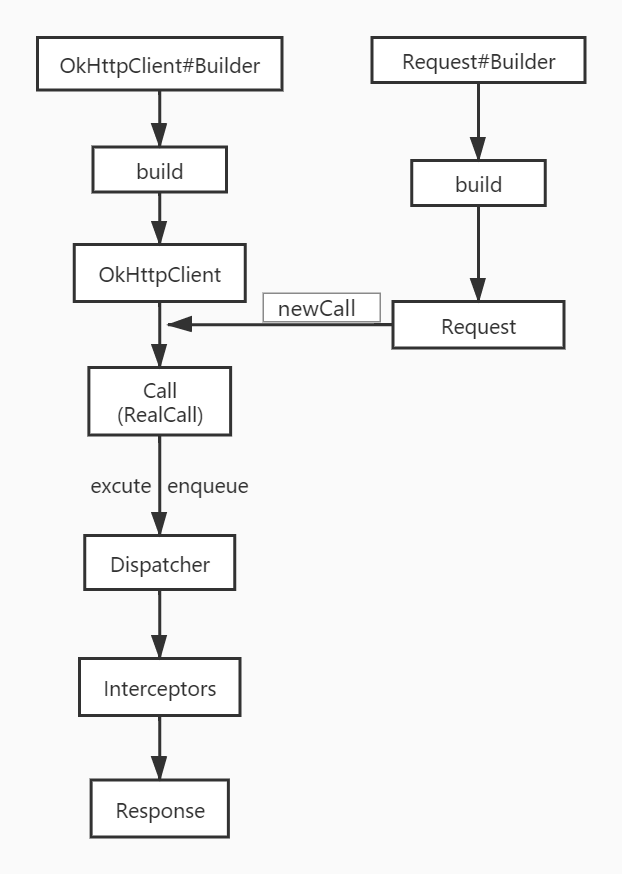
});OkHttp请求流程图
分发器
分发器的作用主要是理解下面的三个问题:
Q1: 如何决定将请求放入ready队列还是running队列?
Q2: 将请求从ready队列移动到running队列的条件是什么?
Q3: 分发器线程池的工作行为?
先通过源码了解一下发起一个请求的执行情况:
当调用OkHttpClient的newCall()方法返回一个call时,实际上是调用了RealCall的newRealCall()方法,该方法封装了一个RealCall对象并返回供用户进行同步或异步调用
/**
 * Prepares the {@code request} to be executed at some point in the future.
 */
@Override public Call newCall(Request request) {
  return RealCall.newRealCall(this, request, false /* for web socket */);
}
看一下RealCall中的异步请求的源码,最终是调用了Dispatcher的enqueue方法
@Override public void enqueue(Callback responseCallback) {
  synchronized (this) {
    if (executed) throw new IllegalStateException("Already Executed");
    executed = true;
  }
  captureCallStackTrace();
  eventListener.callStart(this);
  client.dispatcher().enqueue(new AsyncCall(responseCallback));
}当我们通过Builder创建一个OkHttpClient实例时,会在Builder的构造函数中创建一个Dispatcher实例对象并赋值给OkHttpClient中的dispatcher属性final Dispatcher dispatcher;
public Builder() {
  dispatcher = new Dispatcher();
Builder(OkHttpClient okHttpClient) {
this.dispatcher = okHttpClient.dispatcher;接下来我们进入Dispatcher的源码了解一下分发器的属性、功能
public final class Dispatcher {
  private int maxRequests = 64;//可以同时存在的最大异步请求数量
  private int maxRequestsPerHost = 5;//可以同时存在的对同一域名(主机)异步请求的数量
  private @Nullable Runnable idleCallback;//闲置任务(没有请求时可以执行一些闲置任务)

  /** Executes calls. Created lazily. */
  private @Nullable ExecutorService executorService;//异步请求使用的线程池

  /** Ready async calls in the order they'll be run. */
  //等待执行的异步请求队列
  private final Deque<AsyncCall> readyAsyncCalls = new ArrayDeque<>();

  /** Running asynchronous calls. Includes canceled calls that haven't finished yet. */
  //正在执行的异步请求队列
  private final Deque<AsyncCall> runningAsyncCalls = new ArrayDeque<>();

  /** Running synchronous calls. Includes canceled calls that haven't finished yet. */
  //正在执行的同步请求队列
  private final Deque<RealCall> runningSyncCalls = new ArrayDeque<>();

  public Dispatcher(ExecutorService executorService) {
    this.executorService = executorService;//异步请求使用的线程池
  }

  public Dispatcher() {
  }
下面看一下Dispatcher里的异步请求的代码
synchronized void enqueue(AsyncCall call) {
  if (runningAsyncCalls.size() < maxRequests && runningCallsForHost(call) < maxRequestsPerHost) {
    runningAsyncCalls.add(call);
    executorService().execute(call);
  } else {
    readyAsyncCalls.add(call);
  }
}
这里回答了第一个问题,主要是理解 maxRequests 和 maxRequestsPerHost 这两个属性值的意思答了第
maxRequests 可以同时存在的最大异步请求数量:举个例子。比如一个应用可以同时向高德地图发起位置请求(高德地图在这里就相当于一个域名,主机,服务器),向微信、QQ发起用户个人信息的请求......等等这些向不同域名请求的数量不能超过 maxRequests个(默认设置是64个),这个数目用户也可以自己设置
maxRequestsPerHost 同时存在的对同一域名的最大请求数量:还是上面的例子,这里是指一个应用同时仅仅向高德地图发起的异步请求数量不能超过 maxRequestsPerHost 个(默认是5个),这个数目用户也可以自己设置
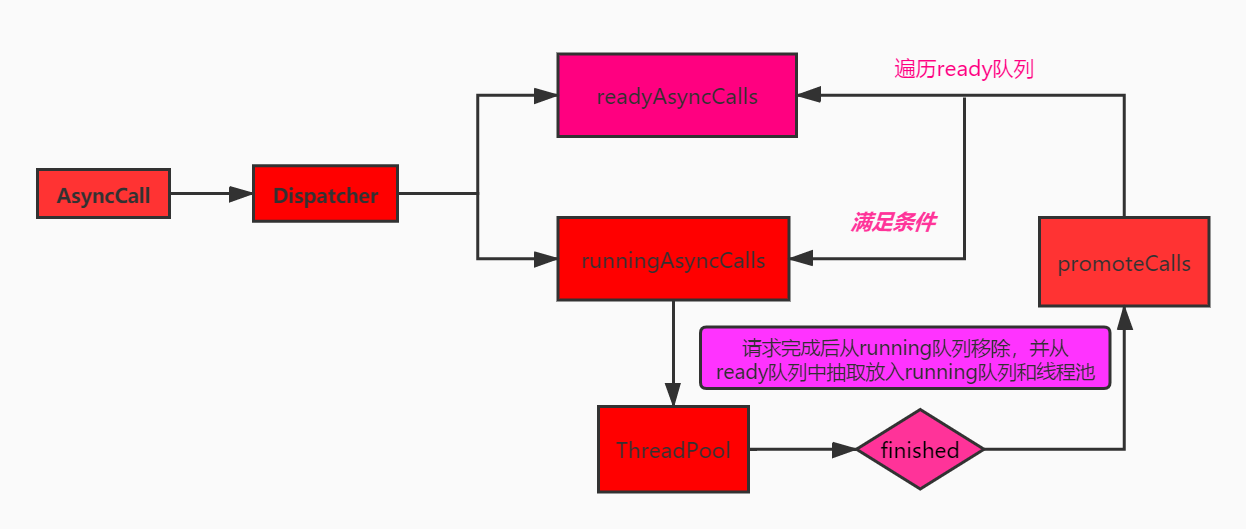
通过代码逻辑可以知道:只有同时满足以下两个条件才会将请求加入 running队列,否则加入ready队列
1. 正在执行的异步请求数量小于 maxRequest(系统设置的最大请求数)
2. 正在执行的对同一主机(域名)的请求不能超过 maxRequestsPerHost(设置的最大请求数)
怎么讲请求从ready 队列移动到 running 队列,不管是同步请求还是异步请求,当一个请求执行完成后,都会调用 Dispatcher 的 finished 方法来重新调配请求
同步请求的执行源码(RealCall.java实现):
@Override public Response execute() throws IOException {
  synchronized (this) {
    if (executed) throw new IllegalStateException("Already Executed");
    executed = true;
  }
  captureCallStackTrace();
  eventListener.callStart(this);
  try {
    client.dispatcher().executed(this);
    Response result = getResponseWithInterceptorChain();//执行请求
    if (result == null) throw new IOException("Canceled");
    return result;
  } catch (IOException e) {
    ...
  } finally {//请求执行完成后,在finally中调用 finished 方法
    client.dispatcher().finished(this);
  }
}
异步请求的执行:通过上面的分析可以知道,异步请求最终会通过分发器加入线程池
所以我们进入AsyncCall中看一下具体执行的代码,AsyncCall是RealCall的一个内部类
final class AsyncCall extends NamedRunnable {AsyncCall 继承自NamedRunnable,NamedRunnable 就是一个Runnable,在run方法中调用其excute方法,excute在NamedRunnable中是一个抽象方法,而AsyncCall 实现了该方法,进入AsyncCall 的excute方法
@Override protected void execute() {
    boolean signalledCallback = false;
    try {
      Response response = getResponseWithInterceptorChain();//执行请求
      ......
    } catch (IOException e) {
      ......
    } finally {//同样是在finally中最后调用finished方法
      client.dispatcher().finished(this);
    }
  }
}
下面进入 Dispatcher 的 finished方法
/** Used by {@code AsyncCall#run} to signal completion. */
void finished(AsyncCall call) {//异步请求
  finished(runningAsyncCalls, call, true);
}

/** Used by {@code Call#execute} to signal completion. */
void finished(RealCall call) {//同步请求
  finished(runningSyncCalls, call, false);
}
private <T> void finished(Deque<T> calls, T call, boolean promoteCalls) {
int runningCallsCount;//正在执行着的同步请求和异步请求的总和
Runnable idleCallback;
synchronized (this) {//每次执行完一个请求后便会将其从正在执行的队列里移除
if (!calls.remove(call)) throw new AssertionError("Call wasn't in-flight!");
if (promoteCalls) promoteCalls();//只有异步任务才会执行 promoteCalls
runningCallsCount = runningCallsCount();
idleCallback = this.idleCallback;
}
if (runningCallsCount == 0 && idleCallback != null) {
idleCallback.run();//没有任务执行则执行闲置任务
}
}private void promoteCalls() {
//正在执行的异步任务数量大于或等于64,直接返回
if (runningAsyncCalls.size() >= maxRequests) return; // Already running max capacity.
//等待队列为空,直接返回
if (readyAsyncCalls.isEmpty()) return; // No ready calls to promote.
//遍历等待队列
for (Iterator<AsyncCall> i = readyAsyncCalls.iterator(); i.hasNext(); ) {
AsyncCall call = i.next();
//如果等待队列中的任务向同一主机(域名)发送的请求数小于 5 个就将该请求移入running队列
if (runningCallsForHost(call) < maxRequestsPerHost) {
i.remove();
runningAsyncCalls.add(call);
executorService().execute(call);
}
if (runningAsyncCalls.size() >= maxRequests) return; // Reached max capacity.
}
}可以看到 promoteCalls 方法是在请求(仅仅在异步请求时)结束后对请求进行重新调配
至此,分发器Dispatcher的任务分析完毕,下面做一个小小的总结:
1.对于同步请求,分发器只是将其加入了running队列对请求任务做一个记录
2.对于异步请求来说,分发器负责对请求任务进行调配,将任务放入线程池
接下来通过一张图来表示分发器 Dispatcher 对异步任务的调度情况