

前言
最近项目中设计到修改密码功能,设计输入密码安全性校验与加密传输,就做一下总结,可供参考。
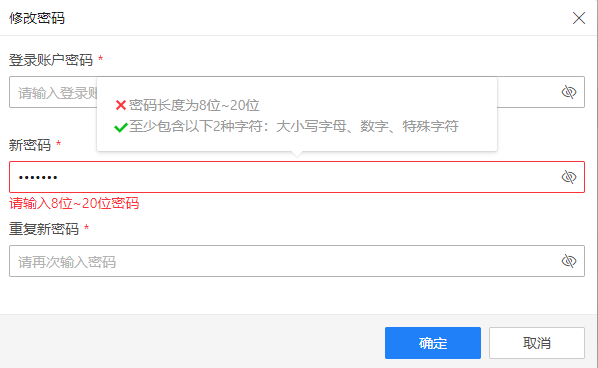
基本实现效果如下,当密码输入框聚焦后,弹出输入密码强度提示,随着输入的变化,会自动校验当前密码的安全级别,当全部满足校验规则时,再将密码加密后,传给后端。
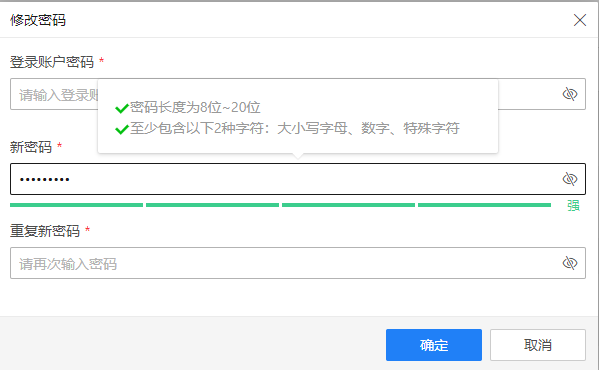
实时校验实现方法
整体dialog搭建
<el-dialog title="修改密码" :area="600" :visible="changePasswordVisible" @close="close">
    <el-popover ref="popover" v-model="popShow" trigger="manual" placement="top" width="400">
      <div class="pwd-rule">
        <svg
          v-if="pwdSizeRule"
          t="1571050280880"
          class="icon"
          viewBox="0 0 1024 1024"
          version="1.1"
          xmlns="http://www.w3.org/2000/svg"
          p-id="5360"
          width="16"
          height="16"
        >
          <path
            d="M843.693959 293.609061 425.255869 712.056362 186.145026 472.947566 66.579883 592.504522 425.255869 951.165158 963.260126 413.174204Z"
            p-id="5361"
            fill="#02BF0F"
          ></path>
        </svg>
        <svg
          v-else
          t="1571050217123"
          class="icon"
          viewBox="0 0 1024 1024"
          version="1.1"
          xmlns="http://www.w3.org/2000/svg"
          p-id="4414"
          width="16"
          height="16"
        >
          <path
            d="M832 742.4 601.6 512 825.6 288 736 198.4 512 422.4 281.6 192 192 281.6 422.4 512 198.4 736 288 825.6 512 601.6 742.4 832Z"
            p-id="4415"
            fill="#FA3239"
          ></path>
        </svg>
        <span>{{ PWD_SIZE_RULE }}</span>
      </div>
      <div class="pwd-rule">
        <svg
          v-if="pwdCharRule"
          t="1571050280880"
          class="icon"
          viewBox="0 0 1024 1024"
          version="1.1"
          xmlns="http://www.w3.org/2000/svg"
          p-id="5360"
          width="16"
          height="16"
        >
          <path
            d="M843.693959 293.609061 425.255869 712.056362 186.145026 472.947566 66.579883 592.504522 425.255869 951.165158 963.260126 413.174204Z"
            p-id="5361"
            fill="#02BF0F"
          ></path>
        </svg>
        <svg
          v-else
          t="1571050217123"
          class="icon"
          viewBox="0 0 1024 1024"
          version="1.1"
          xmlns="http://www.w3.org/2000/svg"
          p-id="4414"
          width="16"
          height="16"
        >
          <path
            d="M832 742.4 601.6 512 825.6 288 736 198.4 512 422.4 281.6 192 192 281.6 422.4 512 198.4 736 288 825.6 512 601.6 742.4 832Z"
            p-id="4415"
            fill="#FA3239"
          ></path>
        </svg>
        <span>{{ PWD_TYPE_RULE }}</span>
      </div>
    </el-popover>
    <el-form ref="form" :model="form" :rules="rules" label-width="120px" label-position="top">
      <el-form-item label="登录账户密码" prop="oldPwd">
        <el-input
          v-model="form.oldPwd"
          v-popover:popover
          :type="isShowOldPwd ? 'text' : 'password'"
          placeholder="请输入登录账户密码"
        >
          <i
            slot="suffix"
            class="el-input__icon"
            :class="isShowOldPwd ? 'h-icon-password_visible' : 'h-icon-password_unvisible'"
            @mousedown="isShowOldPwd = !isShowOldPwd"
            @mouseup="isShowOldPwd = !isShowOldPwd"
          ></i>
        </el-input>
      </el-form-item>

      <el-form-item
        label="新密码"
        prop="newPwd"
        :style="{ 'margin-bottom': `${form.newPwd ? '4px' : ''}` }"
      >
        <el-input
          v-model="form.newPwd"
          v-popover:popover
          :type="isShowNewPwd ? 'text' : 'password'"
          placeholder="请输入新密码"
          @focus="popShow = true"
          @blur="popShow = false"
        >
          <i
            slot="suffix"
            class="el-input__icon"
            :class="isShowNewPwd ? 'h-icon-password_visible' : 'h-icon-password_unvisible'"
            @mousedown="isShowNewPwd = !isShowNewPwd"
            @mouseup="isShowNewPwd = !isShowNewPwd"
          ></i>
        </el-input>
       <div class="pwd-level" v-show="!!form.newPwd && !newPwdError">
            <div class="level-process">
                <span v-for="(item, index) in 4" class="level-process-block" :style="{background:`${index>level?`#EDEFF4`:styleColor[level]}`}" :key="index"></span>
            </div>
            <div class="level-tip" :style="{color:tipsColor[level]}">{{tipsText[level]}}</div>
        </div>
      </el-form-item>
      <el-form-item label="重复新密码" prop="confirmPwd">
        <el-input
          v-model="form.confirmPwd"
          :type="isShowConfirmPwd ? 'text' : 'password'"
          placeholder="请再次输入密码"
        >
          >
          <i
            slot="suffix"
            class="el-input__icon"
            :class="isShowConfirmPwd ? 'h-icon-password_visible' : 'h-icon-password_unvisible'"
            @mousedown="isShowConfirmPwd = !isShowConfirmPwd"
            @mouseup="isShowConfirmPwd = !isShowConfirmPwd"
          ></i>
        </el-input>
      </el-form-item>
    </el-form>
    <div slot="footer" class="dialog-footer">
      <el-button type="primary" @click="handleChange">
        确定
      </el-button>
      <el-button @click="close">
        取消
      </el-button>
    </div>
  </el-dialog>
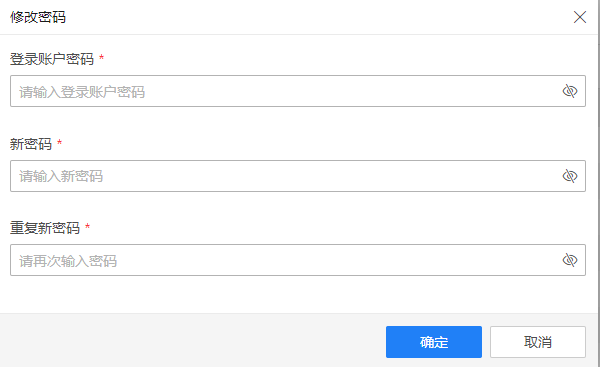
当输入聚焦时,弹出上册el-popover,提示密码输入要求,当开始输入时,实时校验密码是否满足要求。下面主要列出输入新密码部分实时校验逻辑实现。
<script>
import {
  OLDPWD_EMPTY_ERROR,
  OLD_PWD_EMPTY,
  NEWPWD_EMPTY_ERROR,
  NEW_PWD_EMPTY,
  CONFIRMPWD_EMPTY_ERROR,
  CONFIRM_PWD_EMPTY,
  NOT_EQUAL_ERROR,
  PWD_CHAR_ERROR,
  PWD_SIZE_ERROR,
  PWD_RULE_ERROR,
  PWD_TYPE_RULE,
  PWD_SIZE_RULE,
  PWD_CHANGE_SUCCESS,
  NEW_OLD_EQUAL
} from './constant.js'

export default {
  name: 'EitsModPwd',
  model: {
    prop: 'changePasswordVisible',
    event: 'changeVisiblePwd'
  },
  props: {
    changePasswordVisible: Boolean,
  },
  data() {
    const validateNewPwd = (rule, value, callback) => {
      this.pwdSizeRule = this.checkPwdSize(value)
      this.pwdCharRule = this.checkPwdChar(value)
      // eslint-disable-next-line no-control-regex
      if (value.match(/[^\x00-\xff]/)) {
        this.newPwdError = true
        callback(PWD_CHAR_ERROR)
      } else {
        this.newPwdError = false
        callback()
      }
    }
    return {
    tipsColor: ["#FE5332", "#FF952C", "#FFCC00", "#3BCD8D"],
            tipsText: ["危险", "弱", "中", "强"],
            styles: ["danger", "warning", "proper", "strong"],
            styleColor: ["#FE5332", "#FF952C", "#FFCC00", "#3BCD8D"],

      OLD_PWD_EMPTY: OLD_PWD_EMPTY,
      NEWPWD_EMPTY_ERROR: NEWPWD_EMPTY_ERROR,
      NEW_PWD_EMPTY: NEW_PWD_EMPTY,
      CONFIRMPWD_EMPTY_ERROR: CONFIRMPWD_EMPTY_ERROR,
      CONFIRM_PWD_EMPTY: CONFIRM_PWD_EMPTY,
      NOT_EQUAL_ERROR: NOT_EQUAL_ERROR,
      PWD_CHAR_ERROR: PWD_CHAR_ERROR,
      PWD_SIZE_ERROR: PWD_SIZE_ERROR,
      PWD_RULE_ERROR: PWD_RULE_ERROR,
      PWD_TYPE_RULE: PWD_TYPE_RULE,
      PWD_SIZE_RULE: PWD_SIZE_RULE,
      PWD_CHANGE_SUCCESS: PWD_CHANGE_SUCCESS,
      NEW_OLD_EQUAL: NEW_OLD_EQUAL,
      form: {
        oldPwd: '',
        newPwd: '',
        confirmPwd: ''
      },
      rules: {
        newPwd: [
          { required: true, message: NEWPWD_EMPTY_ERROR, trigger: 'blur + change' },
          { validator: validateNewPwd, trigger: 'blur + change' },
          { validator: validateNewPwd2, trigger: 'blur' }
        ]
      },
      isShowOldPwd: false,
      isShowNewPwd: false,
      isShowConfirmPwd: false,
      oldPwdError: false,
      newPwdError: false,
      confirmPwdError: false,
      pwdSizeRule: false,
      pwdCharRule: false,
      popShow: false
    }
  },
   computed: {
        level () {
            return getPwdRank(this.form.newPwd);
        }
    }
  methods: {
     /**
     * @desc 校验密码长度方法
     */
    checkPwdSize: pwd => pwd.length >= 8 && pwd.length <= 20,
     /**
     * @desc 校验密码规范方法
     */
    checkPwdChar: pwd => {
      let record = 0
      ;/(?=[\x21-\x7e]+)[^A-Za-z0-9]/g.test(pwd) && record++
      ;/[a-z]/g.test(pwd) && record++
      ;/[A-Z]/g.test(pwd) && record++
      ;/[0-9]/g.test(pwd) && record++
      return !(record < 2)
    }
  }
}
</script>

<style lang="scss" scoped>


.pwd-level {
    position: relative;
    height: 20px;
    line-height: 20px;
    width: calc(100%);
    display: flex;
    justify-content: space-between;
    .level-process {
        position: relative;
        width: calc(100% - 32px);
        height: 4px;
        margin-top: 8px;
        display: flex;
        align-items: center;
        span.level-process-block {
            position: relative;
            height: 4px;
            margin-right: 3px;
            background: #EDEFF4;
            flex: 1;
        }
    }
    .level-tip {
        position:relative;
        width: 25px;
        text-align: center;
        font-size: 12px;
    }
}
.pwd-rule {
  svg,
  span {
    vertical-align: middle;
  }
}
</style>
其中引入说明部分如下:
export const OLDPWD_EMPTY_ERROR = '登录账户密码不能为空'

export const OLD_PWD_EMPTY = '请商户如登录账户密码'

export const NEWPWD_EMPTY_ERROR = '请输入新密码'

export const NEW_PWD_EMPTY = '请输入新密码'

export const CONFIRMPWD_EMPTY_ERROR = '请再次输入密码'

export const CONFIRM_PWD_EMPTY = '请再次输入密码'

export const NOT_EQUAL_ERROR = '两次输入密码不一致'

export const PWD_CHAR_ERROR = '密码只能包含数字字母特殊字符'

export const PWD_SIZE_ERROR = '请输入8位~20位密码'

export const PWD_RULE_ERROR = '至少包含以下2种字符:大小写字母、数字、特殊字符'

export const PWD_TYPE_RULE = '至少包含以下2种字符:大小写字母、数字、特殊字符'

export const PWD_SIZE_RULE = '密码长度为8位~20位'

export const PWD_CHANGE_SUCCESS = '密码修改成功,请重新登录'

export const NEW_OLD_EQUAL = '新密码不能是当前登录密码'
实时监测密码强度实现方法
 /**
 * @desc 当只输入一种种字符类型,密码强度为危险,校验不通过
         当只输入两种字符,两种字符分别为字母或数字,则密码强度为弱,其他两种的组合,则强度为中
         当输入密码有三种字符组合,则密码强度为强
 */
getPwdRank = (szPwd, szUser = '') => {
  let iRank = 0
  szPwd.match(/[a-z]/g) && iRank++
  szPwd.match(/[A-Z]/g) && iRank++
  szPwd.match(/[0-9]/g) && iRank++
  szPwd.match(/[^a-zA-Z0-9]/g) && iRank++
  iRank = iRank > 3 ? 3 : iRank
  if (
    szPwd.length < 8 ||
    iRank === 1 ||
    szPwd === szUser ||
    szPwd ===
      szUser
        .split('')
        .reverse()
        .join('')
  ) {
    iRank = 0
  }
  if (iRank === 2) {
    if (
      (szPwd.match(/[0-9]/g) && szPwd.match(/[a-z]/g)) ||
      (szPwd.match(/[0-9]/g) && szPwd.match(/[A-Z]/g))
    ) {
      iRank = 1
    }
  }
  return iRank
}
到此密码实时校验部分已完成,保证用户输入的密码的安全级别能达到要求。
密码加密实现
这里主要采用CryptoJS类库的SHA256加密方式 首先下载CryptoJS类库:npm install crypto-js,在方法中引入
import CryptoJS from 'crypto-js'
这里对保存密码和验证密码,用了两种方式,保证其传输安全性
/**
 * SHA256加密方法,用于验证密码
 * @param password 密码
 * @param salt 加密的盐
 * @param vCode 挑战码
 * @returns {String}  加密后密码
 */
pwdHashEncrypt = (password, salt, vCode) => {
  return CryptoJS.SHA256(CryptoJS.SHA256(password + salt).toString() + vCode).toString()
}
/**
 * 通用用户密码SHA256加密方法,用于保存密码
 * @param password 密码
 * @param salt 加密的盐
 * @returns {String}  加密后密码
 */
pwdHashEncryptSave = (password, salt) => {
  return CryptoJS.SHA256(password + salt).toString()
}
salt为16为随机数,vCode挑战码通过后端接口获取
const salt = this.randomn(16).toString()
/**
 * @author liujie22
 * @desc 获取16位随机数
 */
randomn(n) {
  return parseInt((Math.random() + 1) * Math.pow(10, n - 1))
},
到此,密码完成加密。至于SHA256的算法的详解,待下一次内容。
