

COVER:blog.csdn.net/dilemma17/a… 一个完整的httpGET请求测试配置文件:
<?xml version="1.0" encoding="UTF-8"?>
<jmeterTestPlan version="1.2" properties="4.0" jmeter="4.0 r1823414">
<hashTree>
<TestPlan guiclass="TestPlanGui" testclass="TestPlan" testname="万达健康测试服测试" enabled="true">
<stringProp name="TestPlan.comments"></stringProp>
<boolProp name="TestPlan.functional_mode">false</boolProp>
<boolProp name="TestPlan.tearDown_on_shutdown">true</boolProp>
<boolProp name="TestPlan.serialize_threadgroups">false</boolProp>
<elementProp name="TestPlan.user_defined_variables" elementType="Arguments" guiclass="ArgumentsPanel" testclass="Arguments" testname="User Defined Variables" enabled="true">
<collectionProp name="Arguments.arguments"/>
</elementProp>
<stringProp name="TestPlan.user_define_classpath"></stringProp>
</TestPlan>
<hashTree>
<ThreadGroup guiclass="ThreadGroupGui" testclass="ThreadGroup" testname="Thread Group1" enabled="true">
<stringProp name="ThreadGroup.on_sample_error">continue</stringProp>
<elementProp name="ThreadGroup.main_controller" elementType="LoopController" guiclass="LoopControlPanel" testclass="LoopController" testname="Loop Controller" enabled="true">
<boolProp name="LoopController.continue_forever">false</boolProp>
<stringProp name="LoopController.loops">1</stringProp>
</elementProp>
<stringProp name="ThreadGroup.num_threads">1</stringProp>
<stringProp name="ThreadGroup.ramp_time">1</stringProp>
<boolProp name="ThreadGroup.scheduler">false</boolProp>
<stringProp name="ThreadGroup.duration"></stringProp>
<stringProp name="ThreadGroup.delay"></stringProp>
</ThreadGroup>
<hashTree>
<HTTPSamplerProxy guiclass="HttpTestSampleGui" testclass="HTTPSamplerProxy" testname="HTTP Request" enabled="true">
<elementProp name="HTTPsampler.Arguments" elementType="Arguments" guiclass="HTTPArgumentsPanel" testclass="Arguments" testname="User Defined Variables" enabled="true">
<collectionProp name="Arguments.arguments"/>
</elementProp>
<stringProp name="HTTPSampler.domain">218.80.250.99</stringProp>
<stringProp name="HTTPSampler.port">80</stringProp>
<stringProp name="HTTPSampler.protocol">http</stringProp>
<stringProp name="HTTPSampler.contentEncoding">utf-8</stringProp>
<stringProp name="HTTPSampler.path">/sichuan-user-te/api/token/code?code=888888&mobile=13800000001</stringProp>
<stringProp name="HTTPSampler.method">GET</stringProp>
<boolProp name="HTTPSampler.follow_redirects">false</boolProp>
<boolProp name="HTTPSampler.auto_redirects">true</boolProp>
<boolProp name="HTTPSampler.use_keepalive">true</boolProp>
<boolProp name="HTTPSampler.DO_MULTIPART_POST">false</boolProp>
<stringProp name="HTTPSampler.embedded_url_re"></stringProp>
<stringProp name="HTTPSampler.connect_timeout"></stringProp>
<stringProp name="HTTPSampler.response_timeout"></stringProp>
</HTTPSamplerProxy>
<hashTree>
<HeaderManager guiclass="HeaderPanel" testclass="HeaderManager" testname="HTTP Header Manager" enabled="true">
<collectionProp name="HeaderManager.headers">
<elementProp name="" elementType="Header">
<stringProp name="Header.name">header-check-skip</stringProp>
<stringProp name="Header.value">true</stringProp>
</elementProp>
<elementProp name="" elementType="Header">
<stringProp name="Header.name">version</stringProp>
<stringProp name="Header.value">1.0</stringProp>
</elementProp>
</collectionProp>
</HeaderManager>
<hashTree/>
</hashTree>
<ResultCollector guiclass="ViewResultsFullVisualizer" testclass="ResultCollector" testname="View Results Tree" enabled="true">
<boolProp name="ResultCollector.error_logging">false</boolProp>
<objProp>
<name>saveConfig</name>
<value class="SampleSaveConfiguration">
<time>true</time>
<latency>true</latency>
<timestamp>true</timestamp>
<success>true</success>
<label>true</label>
<code>true</code>
<message>true</message>
<threadName>true</threadName>
<dataType>true</dataType>
<encoding>false</encoding>
<assertions>true</assertions>
<subresults>true</subresults>
<responseData>false</responseData>
<samplerData>false</samplerData>
<xml>false</xml>
<fieldNames>true</fieldNames>
<responseHeaders>false</responseHeaders>
<requestHeaders>false</requestHeaders>
<responseDataOnError>false</responseDataOnError>
<saveAssertionResultsFailureMessage>true</saveAssertionResultsFailureMessage>
<assertionsResultsToSave>0</assertionsResultsToSave>
<bytes>true</bytes>
<sentBytes>true</sentBytes>
<threadCounts>true</threadCounts>
<idleTime>true</idleTime>
<connectTime>true</connectTime>
</value>
</objProp>
<stringProp name="filename"></stringProp>
</ResultCollector>
<hashTree/>
</hashTree>
</hashTree>
</hashTree>
</jmeterTestPlan>
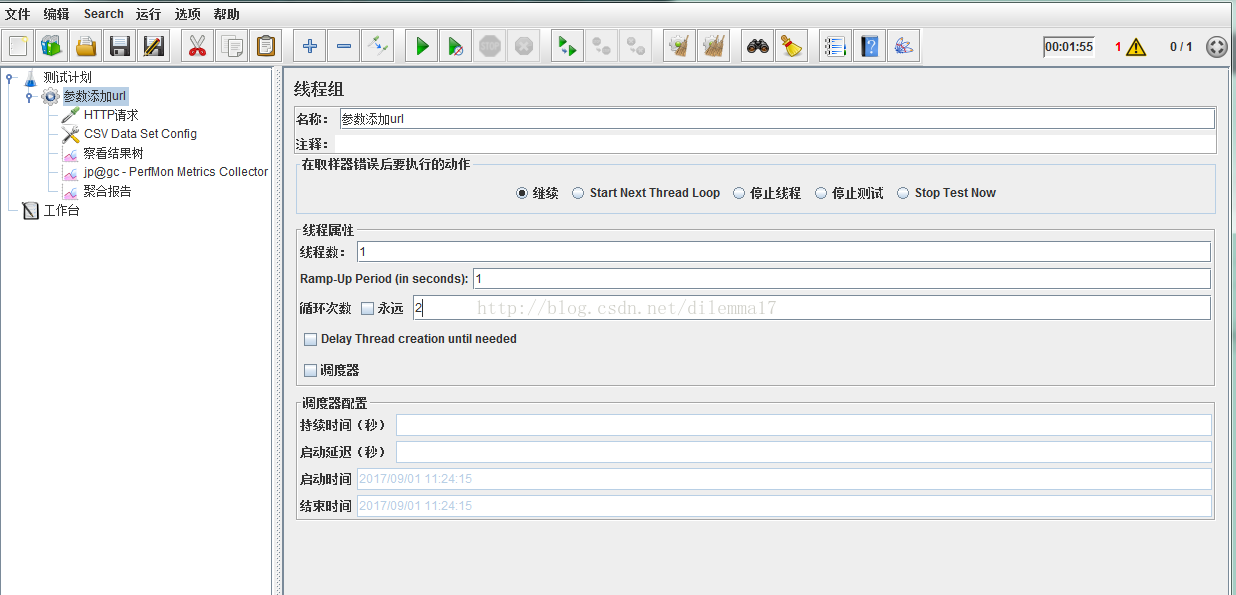
1.创建一个线程,这里我创建了一个线程,在1s内,循环2次,因为我有两个url都要让请求到
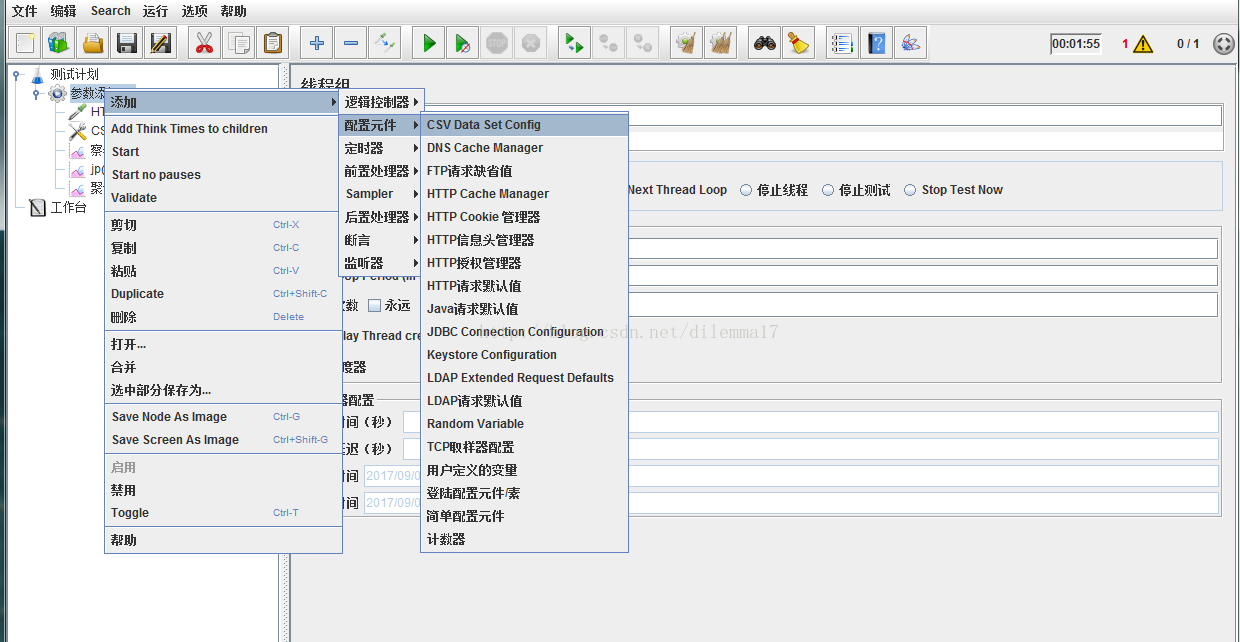
2.添加 CSV Data Set Config
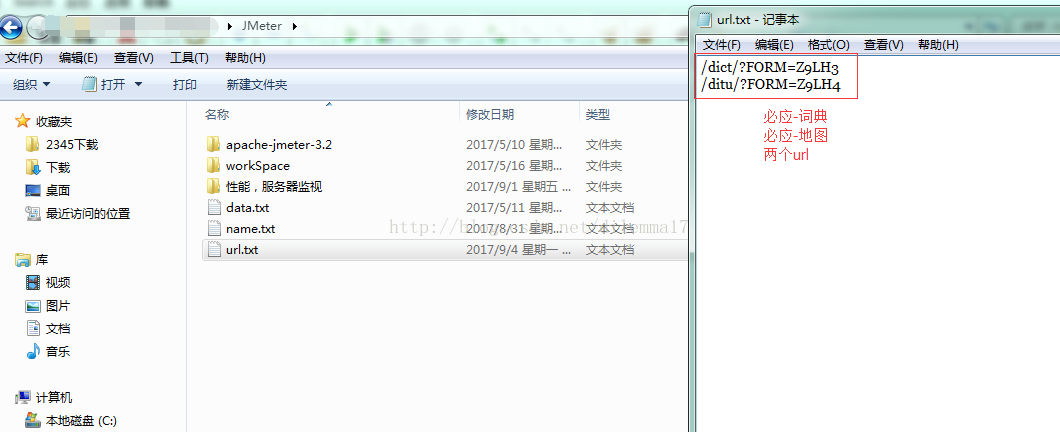
然后在 文本编辑需要通过参数化的url
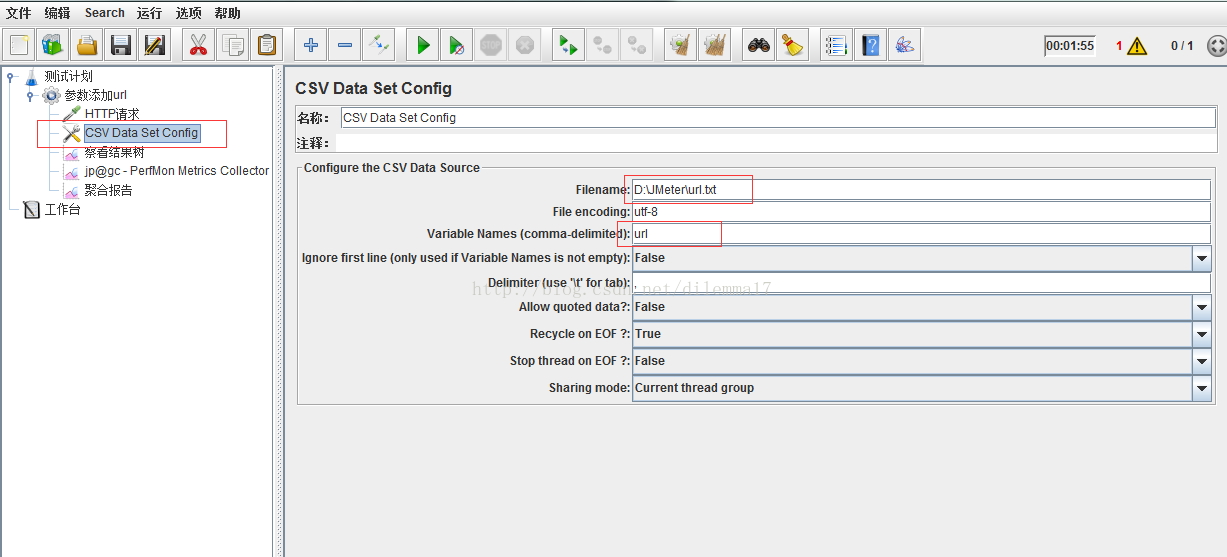
在CSV Data Set Config页面,进行一些简单的设置
Filename 这里跟的是文本的路径
File encoding 这里是文本的编码格式
Varianle Names 这是文本的名字(重要,后面要用)
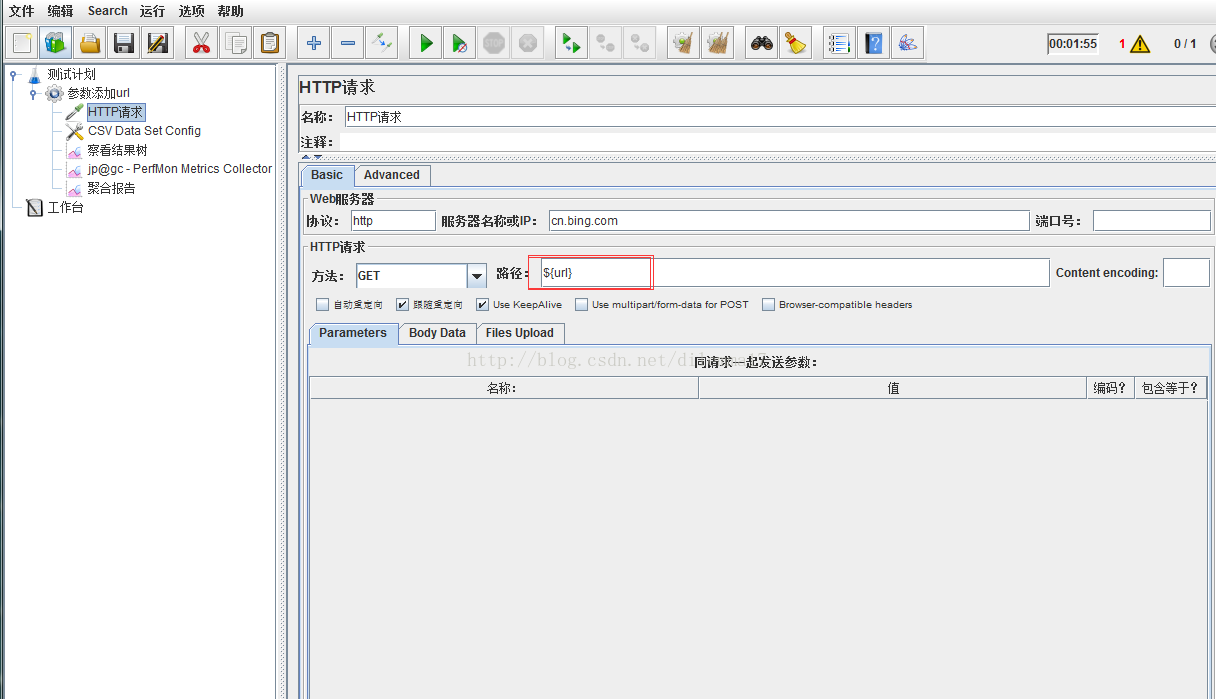
然后添加hppt请求
在路径 那里用${url},大括号内就是上面Variable Names-->url
3.该做的都做好了,最后一步就是添加 查看结果树,看是否成功
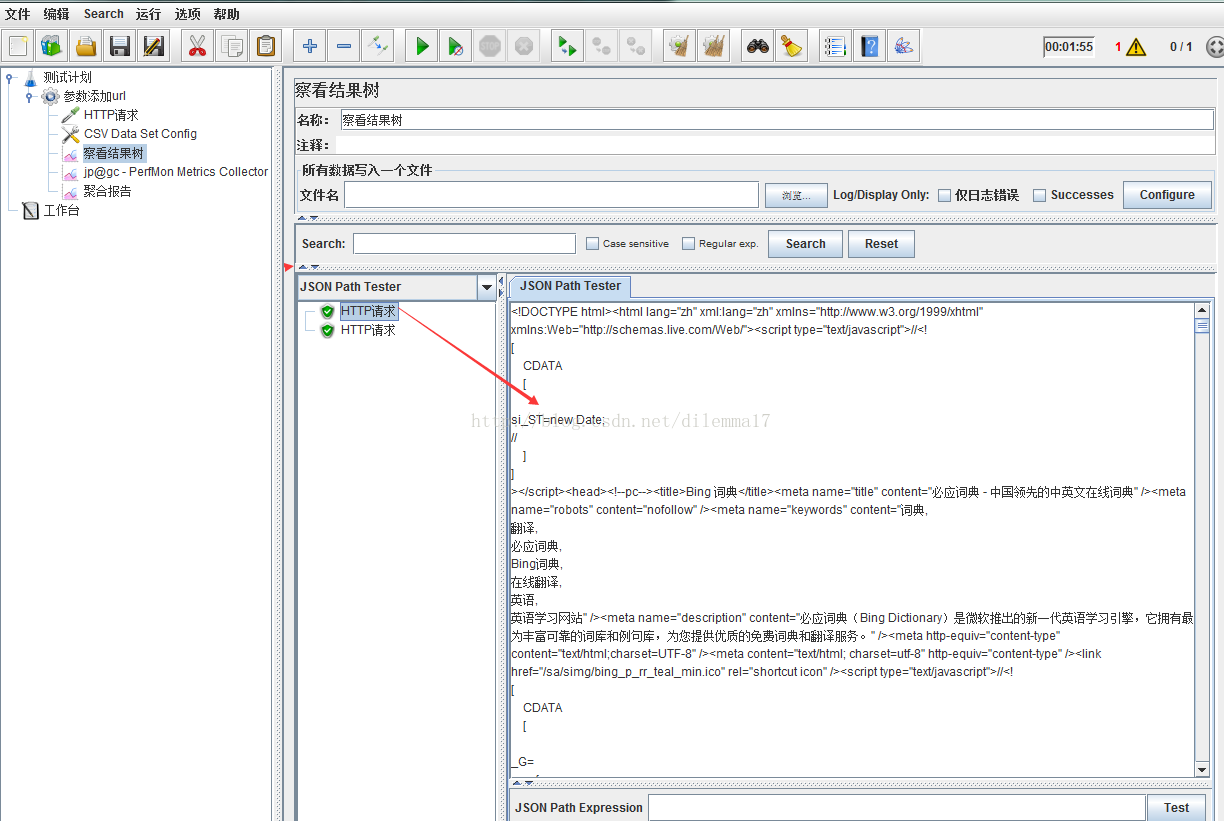
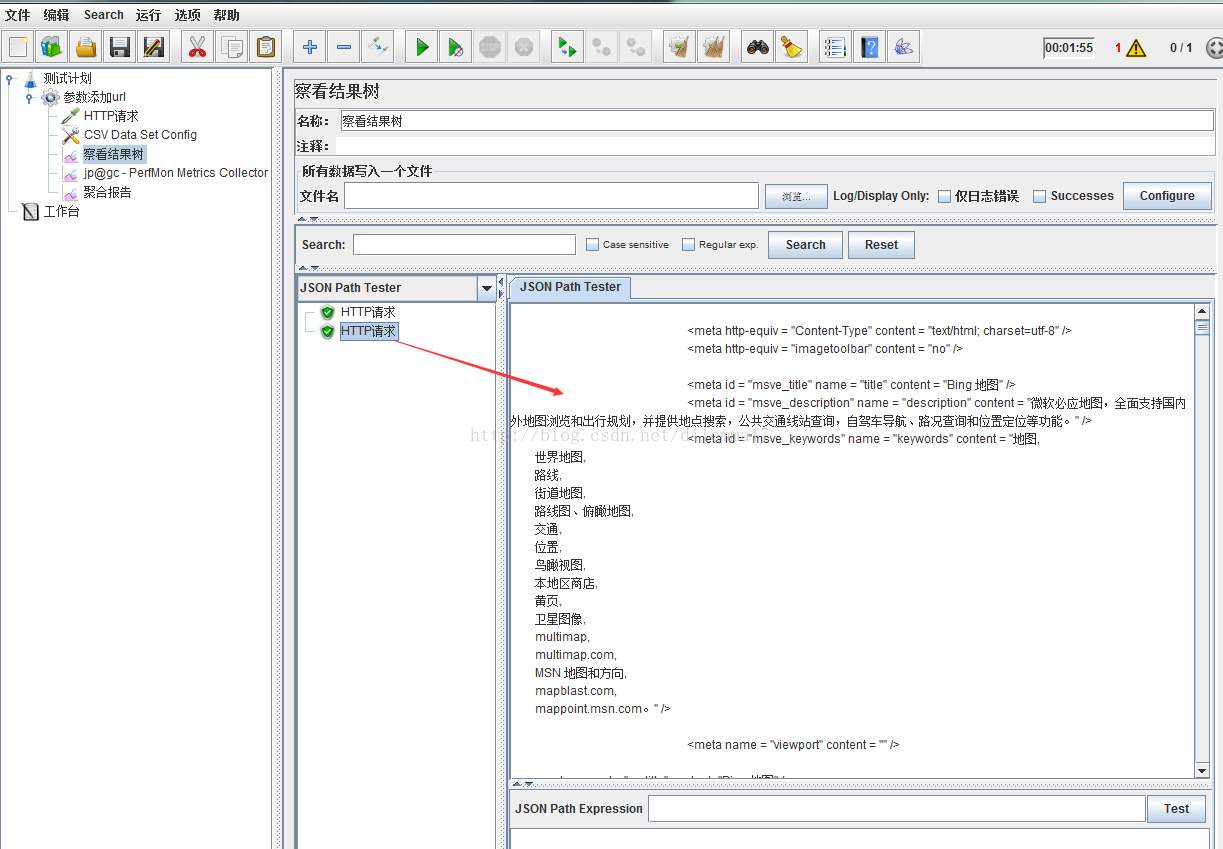
可以看到在文本添加的两个必应词典和必应地图的url,都已请求成功
