1. vm.$refs
- 类型:Object
- 只读
- 是一个对象,持有已经注册过ref的所有子组件。
2. ref
- 预期:string字符串
ref被用来给元素或者子组件注册引用信息。引用信息将会注册在父组件的$refs对象上。如果在普通的DOM元素上使用,引用指向的就是DOM元素;如果用在子组件上,引用就指向组件实例:
//DOM元素 vm.$refs.p
<p ref="p">岂可修</p>

//子组件 vm.$refs.child
<child-component ref="child"></child-component>
当v-for用于元素或组件的时候,引用信息将是包含DOM节点或组件实例的数组。
关于ref注册时间的important说明:因为ref本身是作为渲染结果被创建的,在初始渲染的时候你不能访问它们---它们还不存在!$refs也不是响应式的,因此你不应该试图用它在模板中做数据绑定。
-
参考:子组件refs
-
代码:
<div >
	<input type="text" ref="input1" id="input1" />
	<button @click="add">添加<button>
</div>
<script src="../js/vue.js"></script>
<script type="text/javascript">
	let Vuepro = new Vue({
        el:'#app',
        methods:{
            add(){
                this.$refs.input1.value = "24";//this.$refs.input1 减少获取dom节点的消耗
                console.log(this.$refs.input1)//<input type="text" id="input1" />
            	console.log(doucment.getElementById(input1))//<input type="text" id="input1" />
            }
        }
	})

</script>
如上代码,ref被用来给元素子组件注册引用信息。引用信息将会注册在父组件的$refs对象上。如果在普通的DOM元素上使用,引用指向的额就是DOM元素;如果用在子组件上,引用就指向组件实例。
在上面的代码中,input的引用信息为input1,$refs是所有注册过的ref的一个集合,
console.log(this.$refs.input1)//<input type="text" id="input1" />
console.log(doucment.getElementById(input1))//<input type="text" id="input1" />
这两种方法获得的都是DOM节点,而$refs相对document.getElementById的方法,会减少获取DOM节点的消耗。
3. 子组件引用
尽管有prop和事件,但是有时仍然需要在js中直接访问子组件。为此可以使用ref为子组件指定一个引用ID。例如:<div id="parent">
<user-profile ref="profile"></user-profile>
</div>
let parent = new Vue({el: '#parent'})
//访问子组件实例
let child = parent.$refs.profile
当ref和v-for一起使用的时候,获取到的引用会是一个数组,包含和循环是数据源对应的子组件。
注意:$refs只在组件渲染完成后才填充,并且他是非响应式的。他仅仅是一个操作子组件的应急方案,所以我们应当避免在模板或计算属性中使用$refs。
<body>
    <div >
        <input type="text" ref="input1" id="input1" />
        <button @click="add">添加<button>
        <my-component ref="com"></my-component>
    </div>
    <script src="../js/vue.js"></script>
    <script type="text/javascript">
    	Vue.component('my-component',{
            template:'<div class="inner">我是一个全局组件</div>'
    	})
        let Vuepro = new Vue({
            el:'#app',
            methods:{
                add(){
                    this.$refs.input1.value = "24";//this.$refs.input1 减少获取dom节点的消耗
                    console.log(this.$refs.input1)//<input type="text" id="input1" />
                    console.log(doucment.getElementById(input1))//<input type="text" id="input1" />
                }
            }
        })
    </script>
</body>
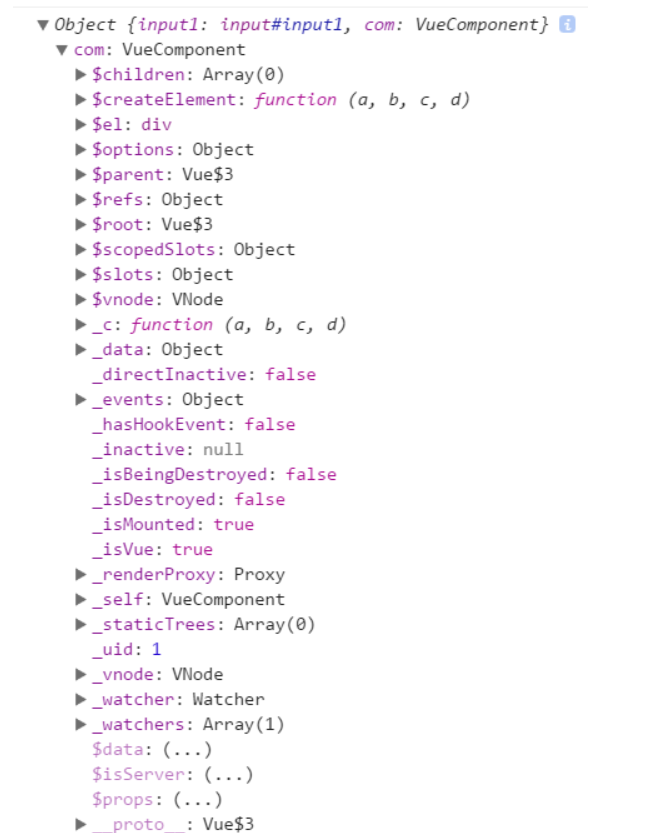
ref和v-for一起的情况:
<body>
    <div >
        <input type="text" ref="input1" id="input1" />
        <button @click="add">添加<button>
        <ul v-for="item in list">
        	<li ref="item">姓名:{{item.name}};年龄{{item.age}}</li>
        </ul>
        <my-component ref="com"></my-component>
    </div>
    <script src="../js/vue.js"></script>
    <script type="text/javascript">
    	Vue.component('my-component',{
            template:'<div class="inner">我是一个全局组件</div>'
    	})
        let Vuepro = new Vue({
            el:'#app',
            data:{
                list:[
                    {name:'lily',age:14},
                    {name:'lucy',age:23},
                    {name:'lulu',age:24}
                ]
            },
            mounted():{
                console.log(this.$refs)
            }
            methods:{
                add(){
                    this.$refs.input1.value = "24";//this.$refs.input1 减少获取dom节点的消耗
                    console.log(this.$refs.input1)//<input type="text" id="input1" />
                    console.log(doucment.getElementById(input1))//<input type="text" id="input1" />
                }
            }
        })
    </script>
</body>
li里面的ref无法读取item里面的值,即item.name或被直接读取为字符串“item.name”,此时的$refs:
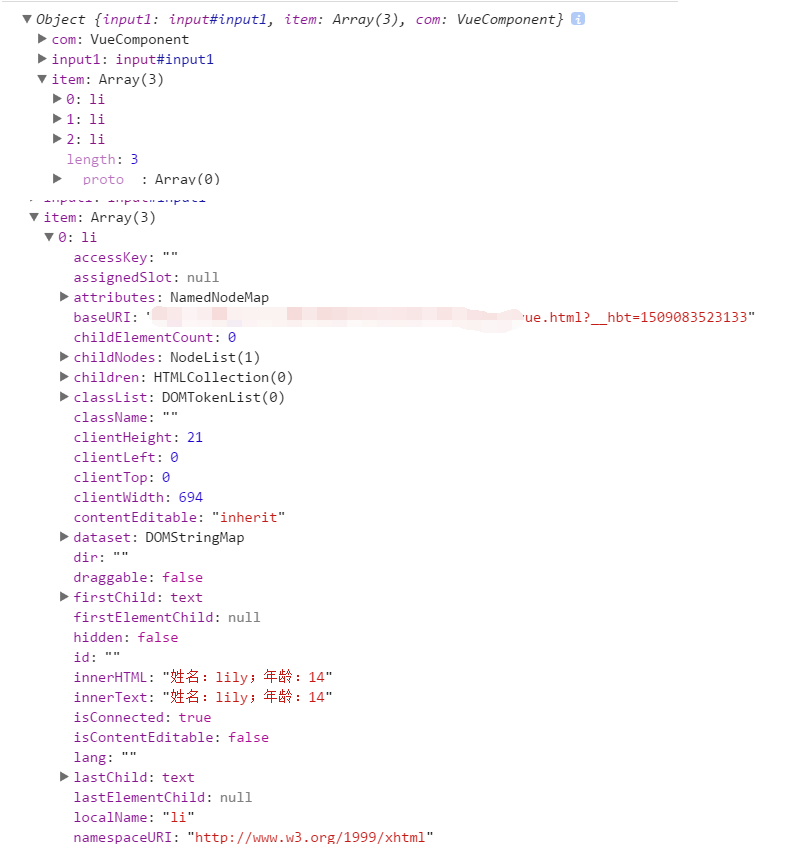
这样就比较方便获取DOM,方便操作DOM。