背景
新公司之前的项目还没做前后台分离,利用没项目的这段时间,先搞一个后台管理系统,熟悉熟悉业务,项目是基于vue+elementUI,虽然接触过一段时间vue,但是没干过后台管理这种活啊,在此记录一下在做的过程中学习到的一些知识点,方便日后查阅。
效果
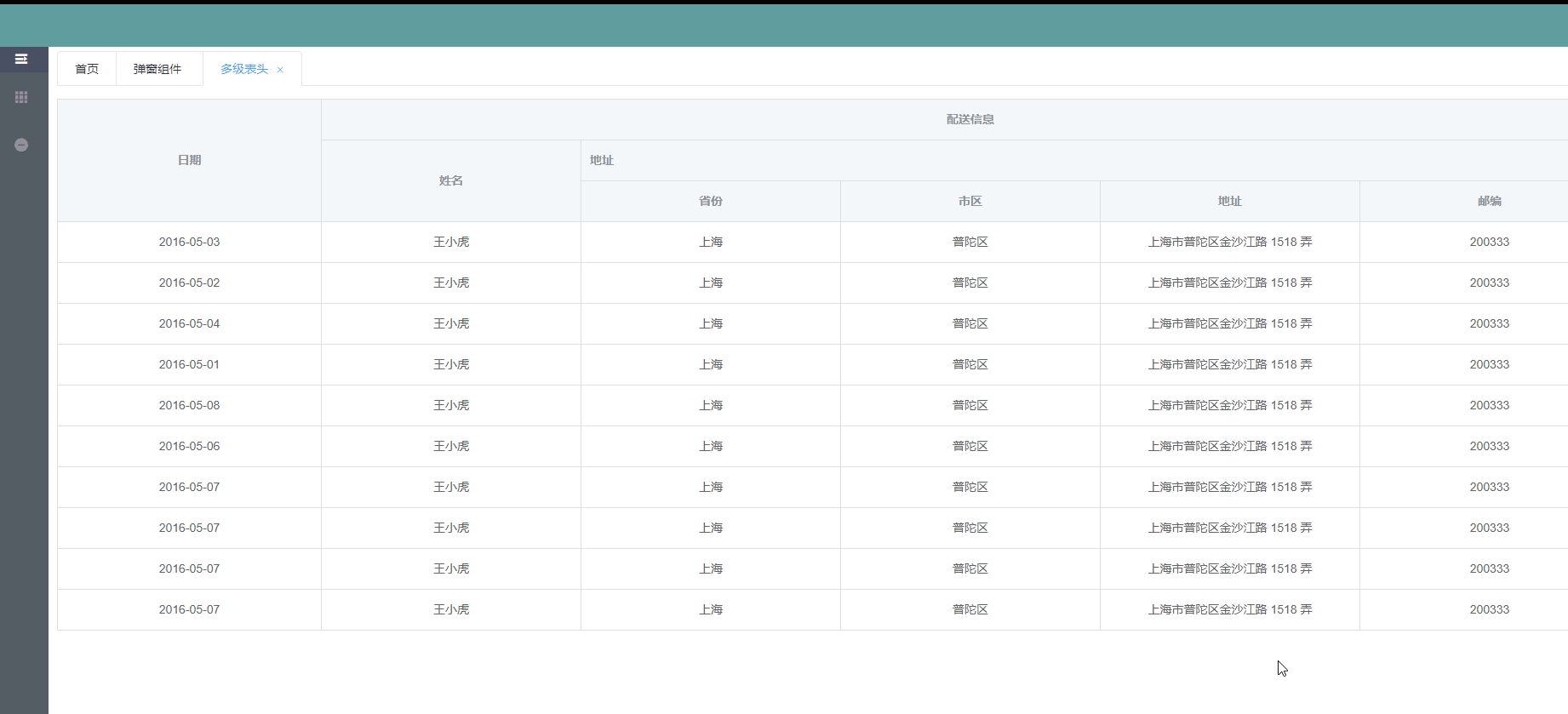
实现
1.页面区域划分
想要的效果
点击左侧选项,右侧RightContent.vue中显示不同的页面
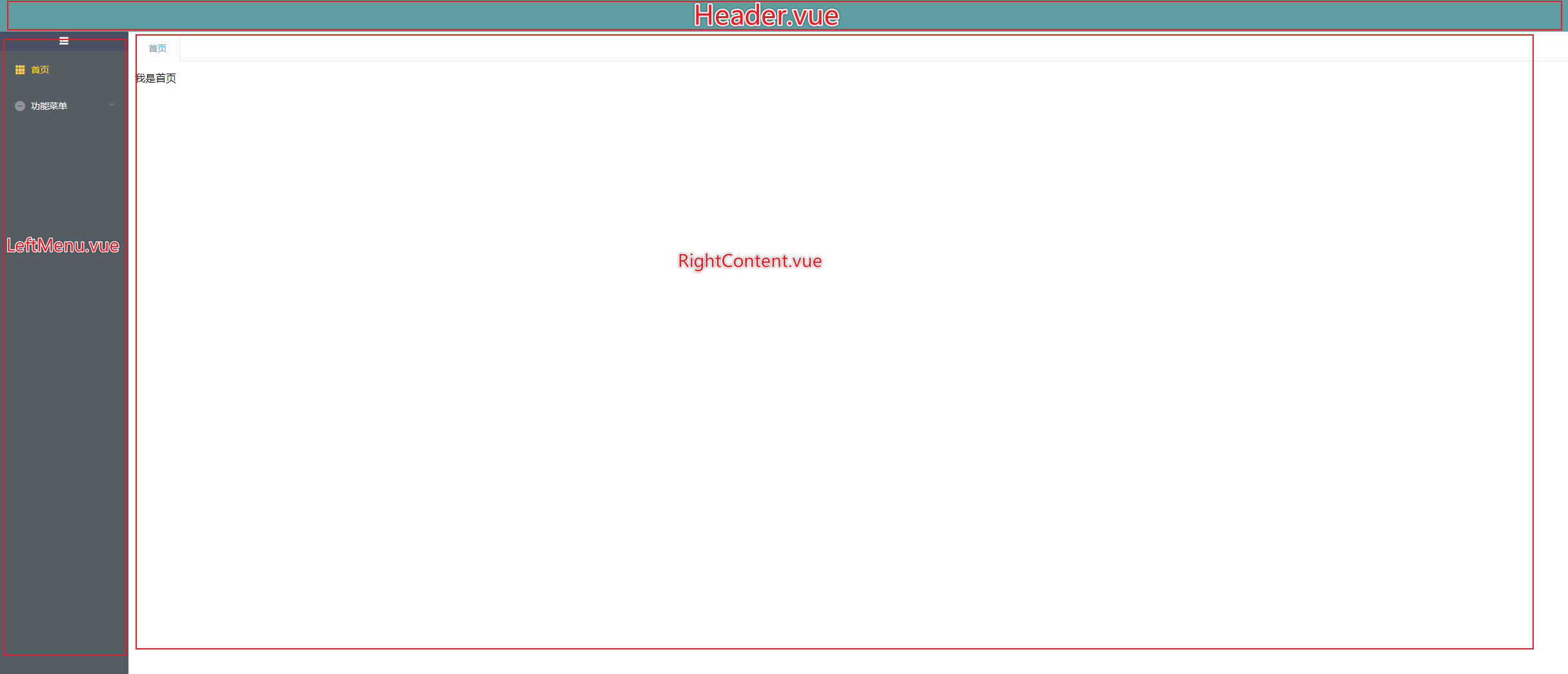
Home.vue
<template>
    <div class="home">
        <Header></Header>
        <div class="main">
            <LeftMenu></LeftMenu>
            <RightContent></RightContent>
        </div>
    </div>
</template>
import LeftMenu from '@/components/admin/common/LeftMenu.vue';
import RightContent from '@/components/admin/common/RightContent.vue';
import Header from '@/components/admin/common/Header.vue';

export default {
    name: 'home',
    components: {
        LeftMenu,
        RightContent,
        Header,
    },
    data() {
        return {
        };
    },
    created() {
        // 拿到默认的路由对象,保存全局变量
        this.initTabList();
    },
    computed: {
        // 当前所在模块
        menuModule() {
            return this.$store.state.menuModule;
        },
        // 标签栈
        tabList() {
            return this.$store.state.tabList;
        },
    },
    methods: {
        /**
        *@description: 保存默认的当前模块的首页的路由对象
        *@param{}
        *@return:
        */
        initTabList() {
            // console.log(this.$route.path);
            // 获取匹配到的路由对象
            const firstRoute = this.$router.options.routes.filter(item => item.name === this.menuModule)[0];
            // 循环该路由对象的children
            const { redirect } = firstRoute;
            if (firstRoute && redirect) {
                const saveRoute = firstRoute.children.filter(item => item.path === redirect)[0];
                if (saveRoute) {
                    this.tabList.push(saveRoute);
                    this.$store.commit('tabList', this.tabList);
                }
            }
        },

    },
};
</script>
2.路由实现
路由这里要单独说一下,因为之前使用路由的时候基本没遇到过这种路由之间有多层嵌套的,我需要的效果是点击侧边栏后右侧内容区域就要变,所以想到了页面变化可以通过嵌套路由来解决,在RightContent.vue内部使用router-view匹配路由即可。
RightContent.vue中router-view对应的路由思路
    /index --->首页
    /menu  --->功能
       /menu/page1 -->功能1
       /menu/page2 --->功能2
RightContent.vue
<template>
    <div class="right-content">
        <div class="content-item">
            <el-tabs v-model="activeTabsName" type="card" closable @tab-remove="removeTab"  @tab-click="tabClick">
                <el-tab-pane
                    v-for="(item) in tabList"
                    :key="item.path"
                    :label="item.name"
                    :name="item.name"
                >
                    // 在这里匹配左侧的路由
                    <router-view></router-view>
                </el-tab-pane>
            </el-tabs>
        </div>
    </div>
</template>

<script>
export default {
    name: 'RightContent',
    components: {
    },
    computed: {
        // 标签路由栈
        tabList() {
            return this.$store.state.tabList;
        },
        // 当前被激活的tab标签
        activeTabsName: {
            get() {
                return this.$store.state.activeTabsName;
            },
            set(val) {
                this.$store.commit('activeTabsName', val);
            },
        },
        // 当前标签的下标
        activeIndex() {
            let temIndex = null;
            this.tabList.forEach((item, index) => {
                if (item.name === this.activeTabsName) {
                    temIndex = index;
                }
            });
            return temIndex;
        },
    },
    data() {
        return {
        };
    },
    methods: {
        /**
        *@description:移除标签的方法
        *@param{String} 要删除的标签
        *@return: null
        */
        removeTab(targetName) {
            const tabs = this.tabList;
            let activeName = this.activeTabsName;
            if (activeName === targetName) {
                tabs.forEach((tab, index) => {
                    if (tab.name === targetName) {
                        const nextTab = tabs[index + 1] || tabs[index - 1];
                        if (nextTab) {
                            activeName = nextTab.name;
                        }
                    }
                });
                this.$store.commit('activeTabsName', activeName);
                this.$store.commit('tabList', tabs.filter(tab => tab.name !== targetName));
                this.tabClick();
            } else {
                this.$store.commit('tabList', tabs.filter(tab => tab.name !== targetName));
            }
        },

        /**
        *@description: 标签页点击方法
        *@param{}
        *@return:
        */
        tabClick() {
            // 当前路由和被选中的路由不相等的时候触发
            const { path } = this.tabList[this.activeIndex];
            if (this.$route.path !== path) this.$router.push(path);
        },
    },
};
</script>
router.js
import Vue from 'vue';
import Router from 'vue-router';
import Index from '@/components/admin/home/Index.vue';
import TableLevel from '@/components/admin/home/TableLevel.vue';
import Home from './views/Home.vue';
import Alarm from './views/Alarm.vue';
import Patch from './views/Patch.vue';

Vue.use(Router);
const router = new Router({
    mode: 'history',
    base: process.env.BASE_URL,
    routes: [
        {
            path: '/',
            name: 'home',
            component: Home,
            showMenu: true,
            redirect: '/index',
            meta: {
                icon: 'el-icon-location',
            },
            children: [
                {
                    path: '/index',
                    name: '首页',
                    component: Index,
                    showMenu: true,
                    meta: {
                        icon: 'el-icon-s-grid',
                    },
                },
                {
                    path: '/funmenu',
                    name: '功能菜单',
                    component: Patch,
                    showMenu: true,
                    meta: {
                        icon: 'el-icon-remove',
                    },
                    children: [
                        {
                            path: '/funmenu/table',
                            name: '表格组件',
                            showMenu: true,
                            meta: {
                                icon: 'el-icon-s-marketing',
                            },
                            component: Patch,
                            children: [
                                {
                                    path: '/funmenu/table/level',
                                    name: '多级表头',
                                    component: TableLevel,
                                    showMenu: true,
                                    meta: {
                                        icon: 'el-icon-s-data',
                                    },
                                },
                            ],
                        },
                        {
                            path: '/funmenu/pop',
                            name: '弹窗组件',
                            showMenu: true,
                            component: Alarm,
                            meta: {
                                icon: 'el-icon-bell',
                            },
                        },
                    ],
                },
            ],
        },
    ],
});

export default router;
3.导航栏实现
左侧导航栏使用 element 的NavMenu导航菜单组件模板,直接复制代码,因为当菜单栏有层级嵌套的时候,里面应该是一个循环组件,所以这里将导航栏拆分为了两个组件,LeftMenu.vue和MenuNav.vue
1.LeftMenu.vue
 <template>
    <div class="left-menu" :class="{fold: isCollapse===true}">
        <div class="menu-content">
            <el-menu  :default-active="$route.path" class="el-menu-vertical-demo"
                      @open="handleOpen"
                      @close="handleClose"
                      :collapse="isCollapse"
                      background-color="#545c64"
                      @select="select"
                      text-color="#fff"
                      active-text-color="#ffd04b"
                      ref="leftNavigation">
                <div class="menu-toggle" @click.prevent="control">
                    <i class="el-icon-s-fold" v-show="!isCollapse" title="收起"></i>
                    <i class="el-icon-s-unfold" v-show="isCollapse" title="展开"></i>
                </div>
                <template v-for="(item,index)  in $router.options.routes">
                    <template v-if="item.name === menuModule">
                        <MenuNav :key="index" :menuData="item.children"></MenuNav>
                    </template>
                </template>
            </el-menu>
        </div>
    </div>
</template>

<script>
import MenuNav from '@/components/admin/common/MenuNav.vue';
import debounce from '@/common/debounce';

export default {
    name: 'leftMenu',
    data() {
        return {
            de: null,
        };
    },
    computed: {
        // 侧边导航栏是否打开
        isCollapse() {
            return this.$store.state.isCollapse;
        },
        // 标签路由栈
        tabList() {
            return this.$store.state.tabList;
        },
        // 当前被激活的tab标签
        activeTabsName() {
            return this.$store.state.activeTabsName;
        },
        // 当前所在的模块
        menuModule() {
            return this.$store.state.menuModule;
        },
    },
    components: {
        MenuNav,
    },
    mounted() {
        // FIXME 暂时注释
        // this.initLeftMenu();
        // 初始化展示首页
        this.select(this.$route.path);
    },
    methods: {
        // 判断要打开的父级路由
        initLeftMenu() {
            // 获取所有的路由对象,循环子菜单,分级成菜单树展示
            // 获取当前路由
            let elSubmenu = null;
            let needOpenSubmenu = false;
            const curRoute = this.$route.path;
            const allRoutes = this.$router.options.routes;
            for (let i = 0; i < allRoutes.length; i += 1) {
                const { children } = allRoutes[i];
                // 如果有子路由
                if (children) {
                    // 循环子路由 如果子路由和当前路由相等的直接退出循环
                    for (let j = 0; i < children.length; j += 1) {
                        // console.log('进来了');
                        if (children[j].path === curRoute) break;
                        // 如果该菜单下还有子菜单
                        if (children[j].children) {
                            const grandChild = children[j].children;
                            for (let z = 0; z < grandChild[z].length; z += 1) {
                                if (grandChild[z].path === curRoute) {
                                    elSubmenu = j;
                                    needOpenSubmenu = true;
                                    break;
                                }
                            }
                        }
                    }
                }
            }
            if (this.$refs.leftNavigation && needOpenSubmenu) {
                this.$refs.leftNavigation.open(elSubmenu); // 打开子菜单
            }
        },

        /**
        *@description: FIXME选中路由跳转
        *@param{}
        *@return:
        */
        select(index) {
            // 路由不相等的时候push(解决路由相等时报错问题)
            if (this.$route.path !== index) this.$router.push(index);
            // 当前选中的标签被选中
            this.$store.commit('activeTabsName', this.$route.name);
            // 判断之前路由栈里没有此路由对象,否则不入栈
            if (this.tabList.every(item => item.path !== this.$route.path)) {
                this.tabList.push(this.$route);
                this.$store.commit('tabList', this.tabList);
            }
        },

        /**
        *@description: FIXME打开菜单
        */
        handleOpen() {
            // console.log('打开菜单');
        },

        /**
        *@description: FIXME关闭菜单
        */
        handleClose() {
            // console.log('菜单关闭');
        },
        /**
        *@description: 执行控制方法的时候加入节流或防抖
        *@param{}
        *@return:
        */
        control() {
            debounce('leftmenu', () => {
                this.$store.commit('isCollapse', !this.isCollapse);
            }, 300, true);
        },
    },
};
</script>
2.MenuNav.vue(内部循环组件)
<template>
    <fragment>
        <template v-for="(itemss,indexss) in menuData">
            <!-- 一级菜单 -->
            <el-submenu :index="indexss+''"  :key="indexss"  v-if="itemss.showMenu && itemss.children">
                <!-- 一级菜单标题 -->
                <template slot="title">
                    <i :class="itemss.meta.icon"></i>
                    <span slot="title">{{itemss.name}}</span>
                </template>
                <template v-for="(term,indext) in itemss.children">
                    <!-- 二级菜单没有子路由的时候 -->
                    <el-menu-item
                        :key="term.path"
                        :index="term.path+''"
                        v-if="term.showMenu && !term.children"
                        :class="$route.path===term.path?'is-active':''">
                        <i :class="term.meta.icon"></i>
                        <span slot="title">{{term.name}}</span>
                    </el-menu-item>
                    <!-- 二级菜单有子路由的时候,递归循环自身 -->
                    <MenuNav v-else :key="indext" :menuData="[...term]"></MenuNav>
                </template>
            </el-submenu>
            <el-menu-item
                :key="indexss"
                :index="itemss.path+''"
                v-if="itemss.showMenu && !itemss.children"
                :class="$route.path===itemss.path?'is-active':''">
                <i :class="itemss.meta.icon"></i>
                <span slot="title">{{itemss.name}}</span>
            </el-menu-item>
        </template>
    </fragment>
</template>

<script>
export default {
    name: 'MenuNav',
    props: ['menuData'],
    components: {},
    data() {
        return {
        };
    },
    computed: {},
    watch: {
    },
    created() {},
    mounted() {
        // console.log(this.menuData);
    },
    destroyed() {},
    methods: {},
};
</script>
项目git地址(持续更新中~)
ps:直接复制上面代码应该是不能运行的,最好从git上拉代码运行一下,避免有些部分缺胳膊少腿的