自己动手实践,就会更加深刻的理解
前言中,在将Vue以及其一些方法整合之后,再来看看第二个问题:渲染深层次的对象属性,例如 name.firstName
01、编译函数
在上一节中,我们的编译函数如下:
    function compiler(template, data) {
      const childNodes = template.childNodes;
      for (const childNode of childNodes) {
        const type = childNode.nodeType;
        switch (type) {
          case 1: // 元素节点,递归
            compiler(childNode, data);
            break;
          case 3: // 文本节点, 判断是否有mustache{{}}
            let txt = childNode.nodeValue;
            txt = txt.replace(regMustache, function (_, g) {
              // 此函数的第0个参数为匹配到的内容,例如 {{name}}
              // 第n个参数为第n组内容,例如 name
              return data[g.trim()];
            })
            childNode.nodeValue = txt;
            break;
          default: break;
        }
      }
    }
其中第14行,通过 data[g.trim()]的方法获取属性值。如今,需要获取层级属性,只需遍历路径,依次拿到属性值即可。 因此构建一个新的函数 getValueByPath(data,path)。
02、getValueByPath
/**
 * 获取大括号内部变量的值
 * @param {*} data 对象
 * @param {string} path 路径
 */
function getValueByPath(data, path) {
  const paths = path.split('.');
  let res = data;
  for (const path of paths) {
    res = res[path];
  }
  return res;
}
03、效果图
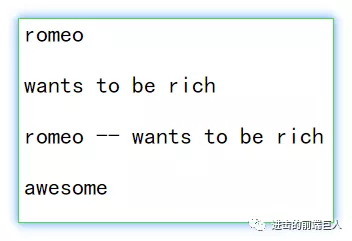
HTML结构如下
  <header id="root">
    <p>{{name}}</p>
    <p>{{message}}</p>
    <p>{{name}} -- {{message}}</p>
    <p>{{deep.firstLevel.secondLevel}}</p>
  </header>
渲染结果:
源代码在github上,请点击阅读原文查看~
感兴趣的话就关注我的公众号~