

OAuth(授权)
三方登入主要基于OAuth 2.0。OAuth协议为用户资源的授权提供了一个安全的、开放而又简易的标准。与以往的授权方式不同之处是OAUTH的授权不会使第三方触及到用户的帐号信息(如用户名与密码),即第三方无需使用用户的用户名与密码就可以申请获得该用户资源的授权,因此OAUTH是安全的。
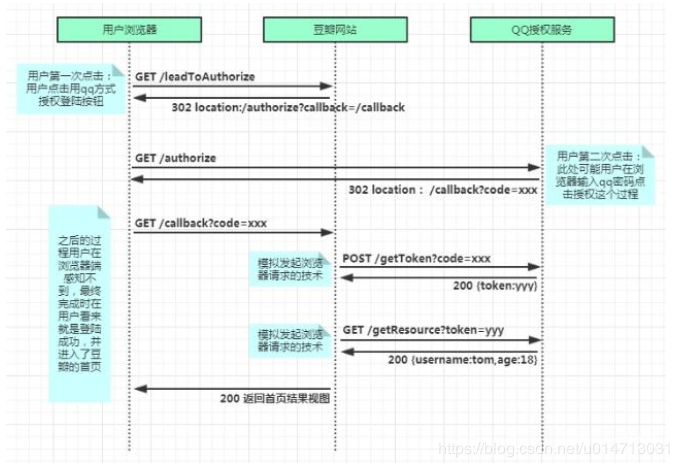
实际应用
这里介绍在前端使用vue,后端使用koa的前后端分离环境下github作为第三方登录的情况
github配置
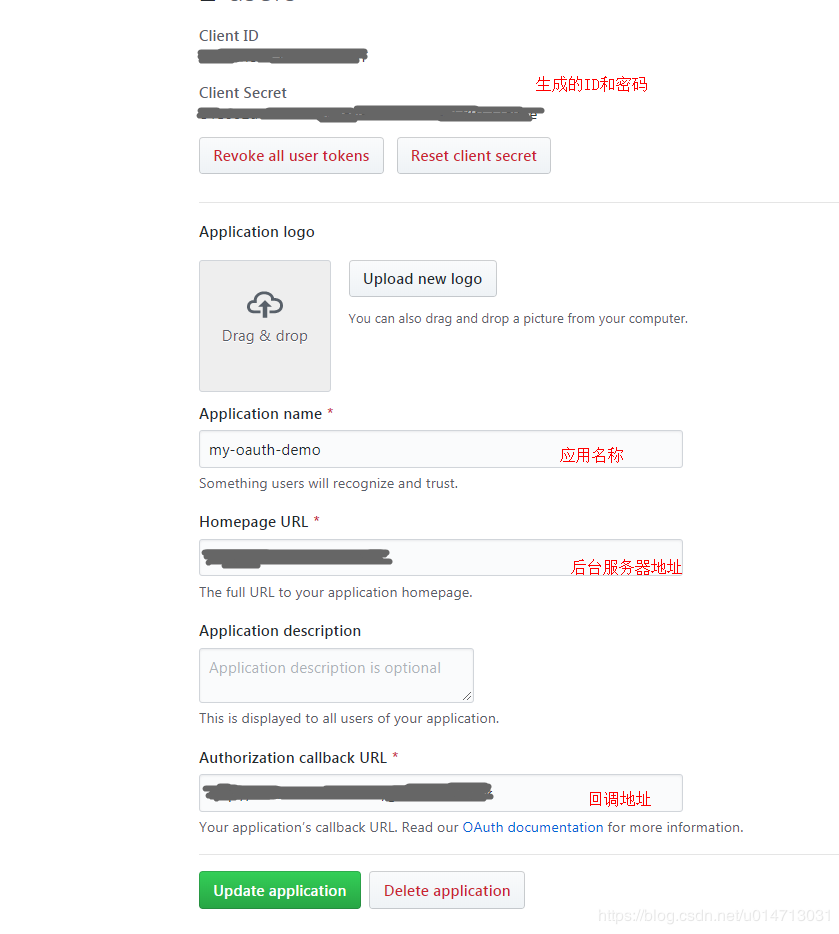
首先进入github -> settings -> Developer settings -> GitHub Apps -> OAuth Apps ->点击New OAuth App,进入如下界面
vue下的代码
   login(){
            this.$axios({
                method: 'get',
                url: '/test/github/login',
                params: {
                    path: 'http://localhost:8080'+this.$route.fullPath
                }
            }).then((res)=>{
                console.log(res)
                window.location.href=res.data;
            })
          }
前端向后台请求,并带上当前地址(方便后续跳转回来)。后台返回认证地址及参数,使用window.location.href进行跳转。
koa下的实现
const config={
    client_id:'xxxx',    //github生成的ID及密码
    client_secret:'xxxxxxx'
};
let redirectPath='http://localhost:8080/'
router.get('/github/login',async (ctx)=>{
    if(ctx.query.path) redirectPath=ctx.query.path
    var dataStr=(new Date()).valueOf();
    //重定向到认证接口,并配置参数
    var path="https://github.com/login/oauth/authorize";
    path+='?client_id='+config.client_id;
    //将地址及参数返回前端
    ctx.body=path;
});
//认证后的github回调
router.get('/github/callback',async (ctx)=>{
    console.log('callback...')
    const code=ctx.query.code;    //返回的授权码
    const params={
        client_id:config.client_id,
        client_secret: config.client_secret,
        code:code
    }
    //使用这个授权码,向 GitHub 请求令牌
    let res=await axios.post('https://github.com/login/oauth/access_token', params)
    const access_token=querystring.parse(res.data).access_token
    //再通过令牌获取用户信息
    res=await axios.get('https://api.github.com/user?access_token=' + access_token)
    // console.log('userAccess:', res.data)
     // ctx.body = res.data
    ctx.cookies.set('user',res.data.login)  //用户名称
    ctx.cookies.set('icon',res.data.avatar_url)  //用户图片
    ctx.redirect(redirectPath)  //重定向到请求页面
})
后端通过一系列的请求获取到用户信息,将其通过cookies的形式返回到前端界面(当然也可以通过参数的形式) 至此前后端就完整的完成了一次github的第三方登录。

