

谷粒商城分布式基础篇十
商城概念
基本信息—分类
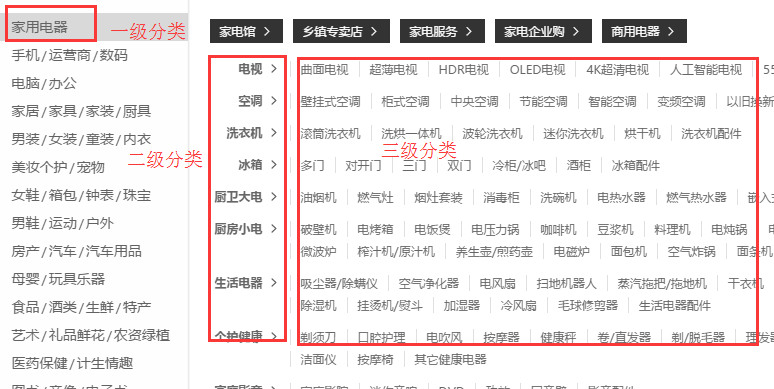
一般情况可以分为两级或者三级。咱们的项目一共分为三级,即一级分类、二级分类、三级分类。
比如:家用电器是一级分类,电视是二级分类,那么超薄电视就是三级分类。
数据库结构

基本信息—平台属性
平台属性和平台属性值

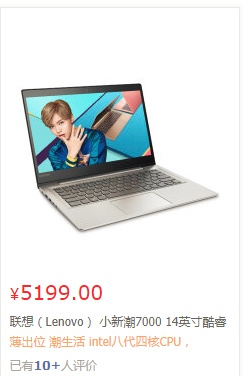
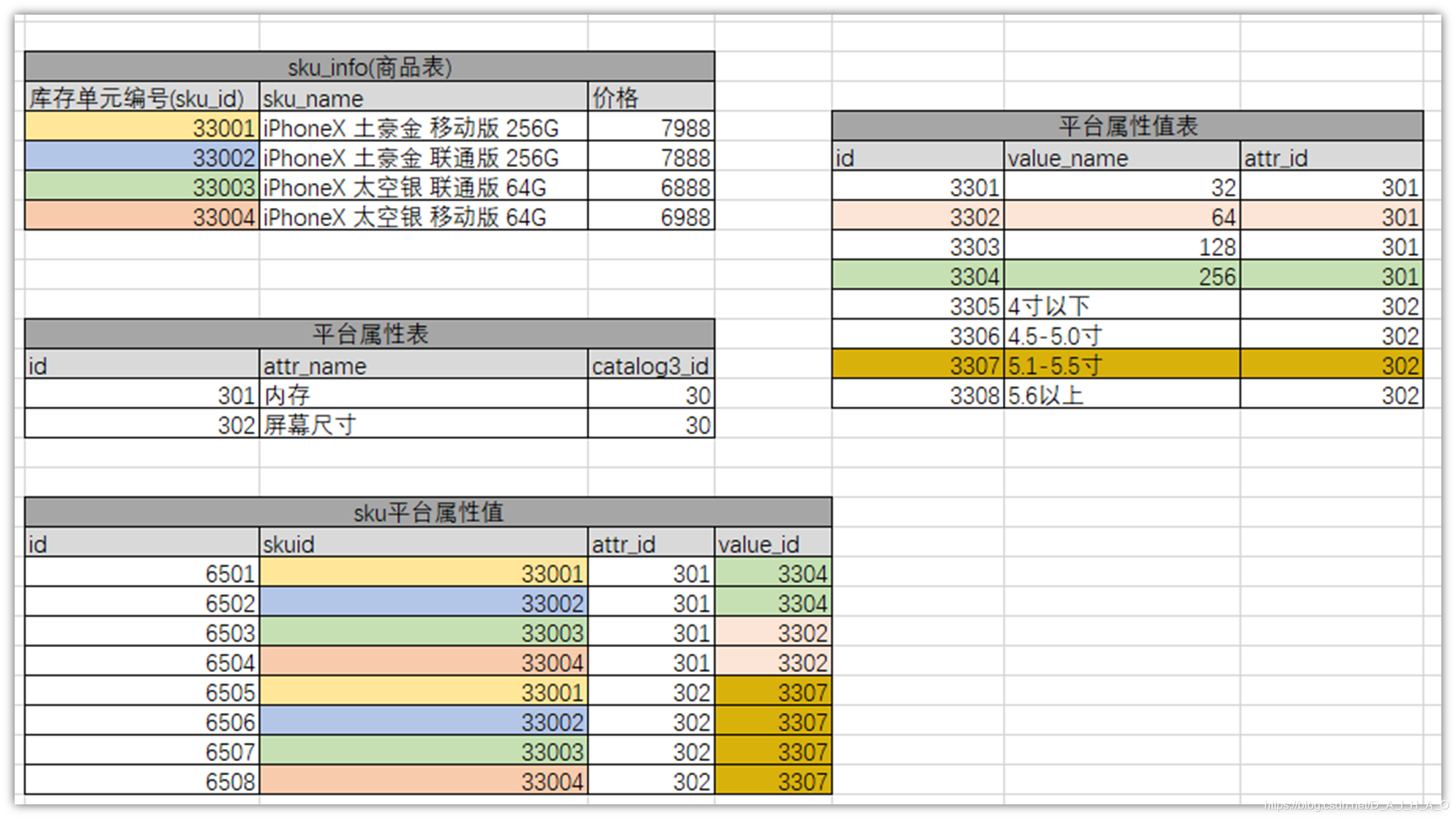
平台属性和平台属性值主要用于商品的检索,每个三级分类对应的属性都不同。

比如电脑整机的一级分类下,有笔记本、游戏本、台式机、一体机的二级分类。
笔记本这个二级分类又包含了处理器、屏幕尺寸、内存容量、硬盘容量、显卡类别这些属性。
那么针对联想某个型号的笔记本,它作为笔记本这种分类,每个分类属性都有对应的值,cpu(属性)是i7(属性值)的,内存(属性)是8G(属性值)的,屏幕尺寸(属性)是14寸(属性值)的。
基本信息—销售属性
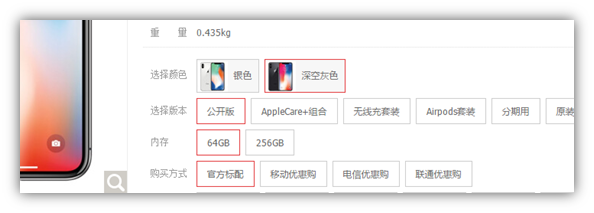
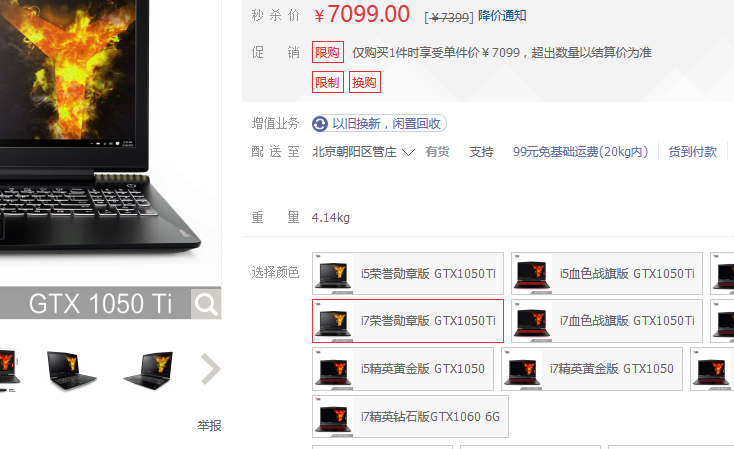
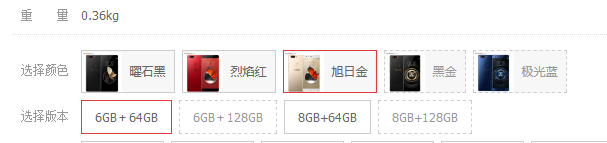
销售属性,就是商品详情页右边,可以通过销售属性来定位一组spu下的哪款sku。可以让当前的商品详情页,跳转到自己的“兄弟”商品。
销售属性与平台属性
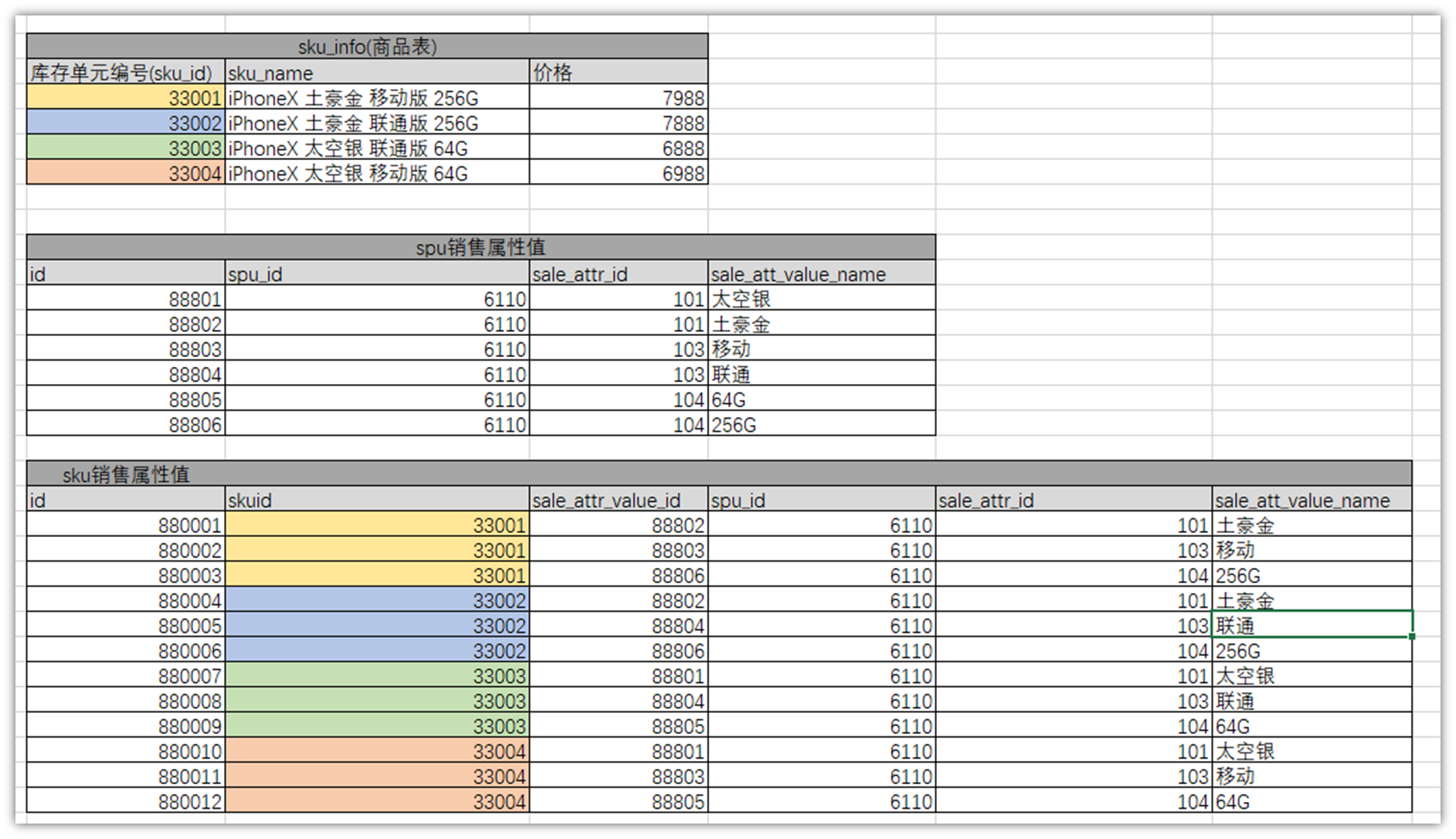
一般每种商品的销售属性不会太多,大约1-4种。整个电商的销售属性种类也不会太多,大概10种以内。比如:颜色、尺寸、版本、套装等等。不同销售属性的组合也就构成了一个spu下多个sku的结构。
销售属性与平台属性的关系
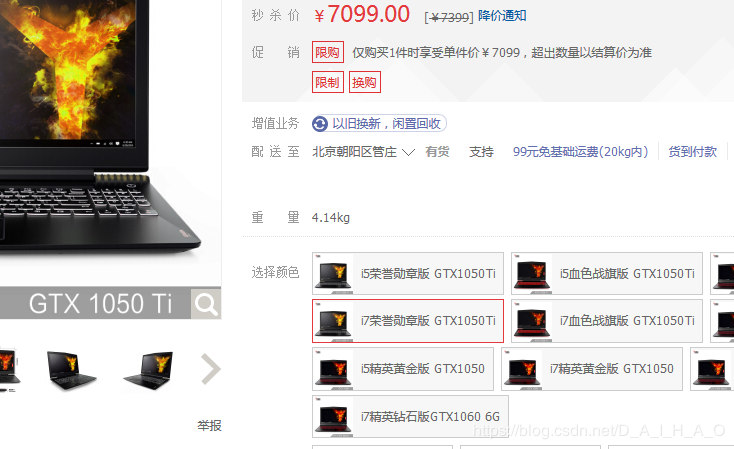
平台属性, 就是之前分类下面,辅助搜索的,类似于条件的属性。

销售属性,就是商品详情页右边,可以通过销售属性来定位一组spu下的哪款sku。可以让当前的商品详情页,跳转到自己的“兄弟”商品。
一般每种商品的销售属性不会太多,大约1-4种。整个平台的属性种类也不会太多,大概10种以内。比如:颜色、尺寸、版本、套装等等。
基本信息—spu与 sku
SPU(Standard Product Unit):标准化产品单元。是商品信息聚合的最小单位,是一组可复用、易检索的标准化信息的集合,该集合描述了一个产品的特性。
SKU=Stock Keeping Unit(库存量单位)。即库存进出计量的基本单元,可以是以件,盒,托盘等为单位。SKU这是对于大型连锁超市DC(配送中心)物流管理的一个必要的方法。现在已经被引申为产品统一编号的简称,每种产品均对应有唯一的SKU号。
比如,咱们购买一台iPhoneX手机,iPhoneX手机就是一个SPU,但是你购买的时候,不可能是以iPhoneX手机为单位买的,商家也不可能以iPhoneX为单位记录库存。必须要以什么颜色什么版本的iPhoneX为单位。比如,你购买的是一台银色、128G内存的、支持联通网络的iPhoneX ,商家也会以这个单位来记录库存数。那这个更细致的单位就叫库存单元(SKU)。
首先通过检索搜索出来的商品列表中,每个商品都是一个sku。每个sku都有自己独立的库存数。也就是说每一个商品详情展示都是一个sku。
那spu又是干什么的呢?
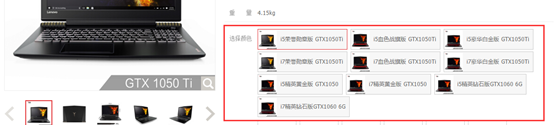
如上图,一般的电商系统你点击进去以后,都能看到这个商品关联了其他好几个类似的商品,而且这些商品很多的信息都是共用的,比如商品图片,海报、销售属性等。
那么系统是靠什么把这些sku识别为一组的呢,那是这些sku都有一个公用的spu信息。而它们公共的信息,都放在spu信息下。
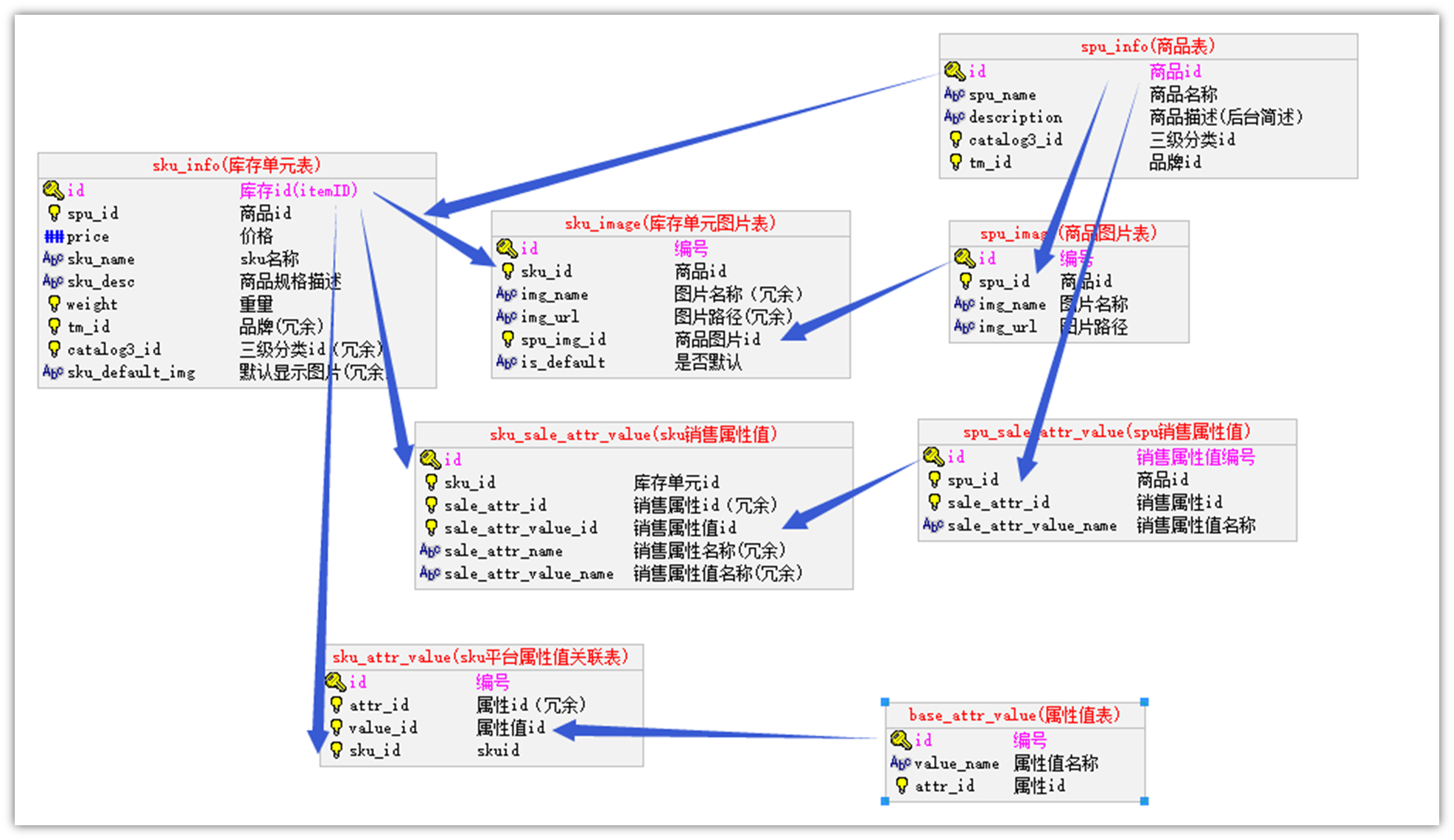
所以,sku与spu的结构如下:
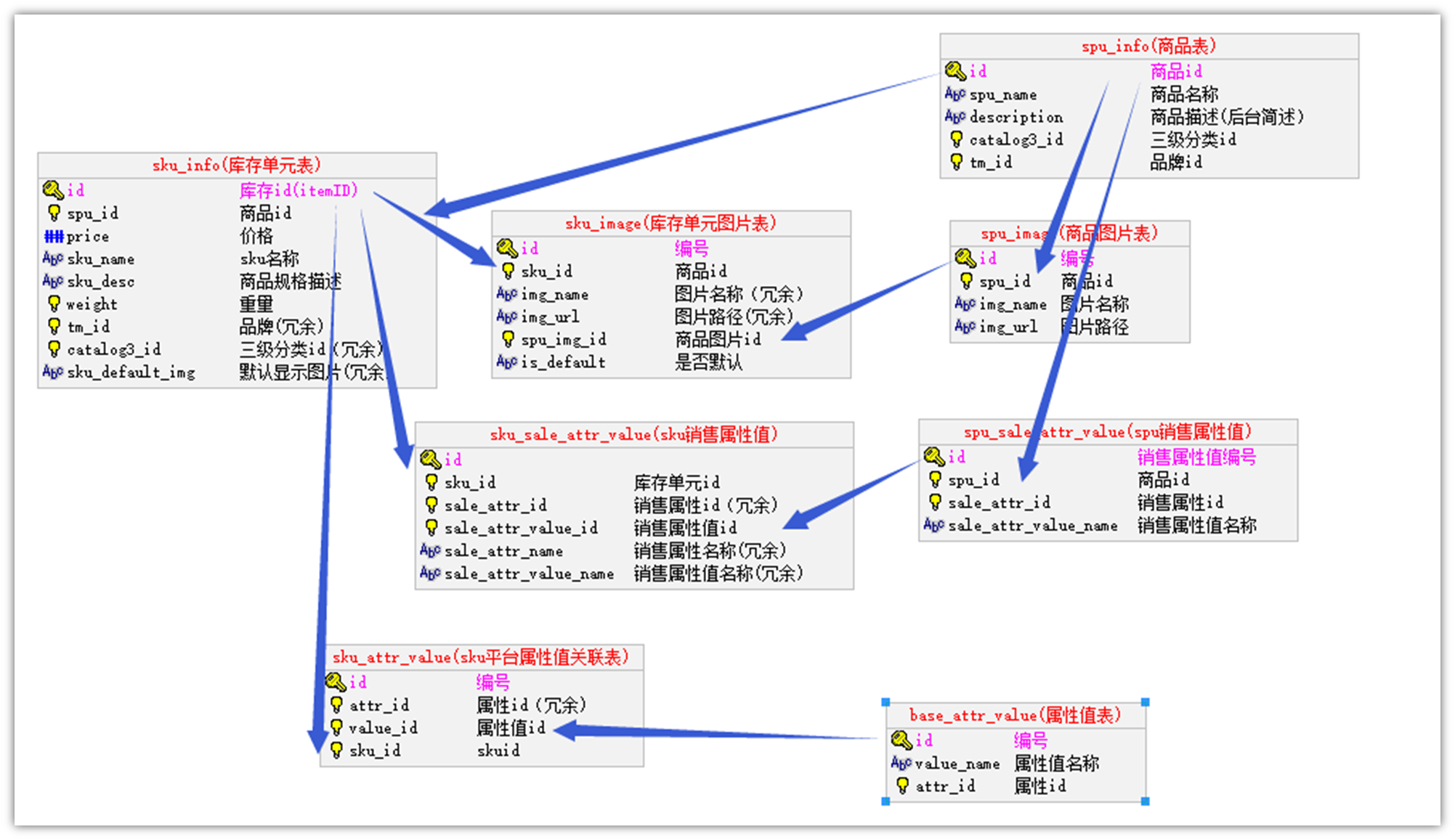
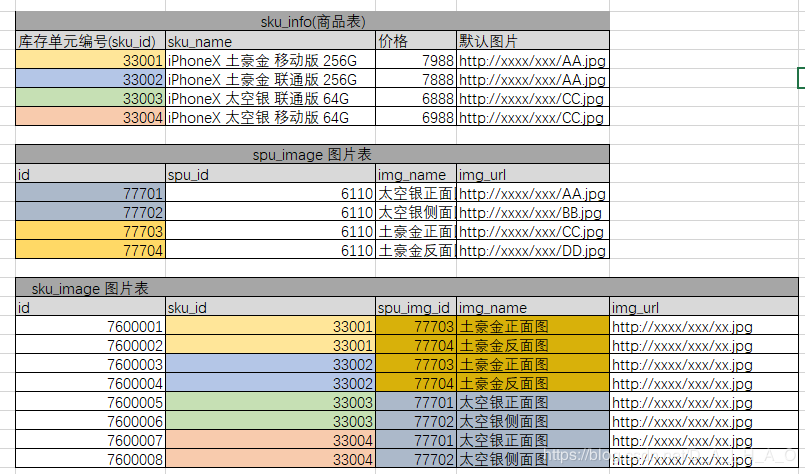
图中有两个图片信息表,其中spu_image表示整个spu相关下的所有图片信息,而sku_image表示这个spu下的某个sku使用的图片。sku_image中的图片是从spu_image中选取的。
但是由于一个spu下的所有sku的海报都是一样,所以只存一份spu_poster就可以了。
pms数据模型
根据以上的需求,以此将关联的数据库表结构设计为如下:
数据示例:
属性分组
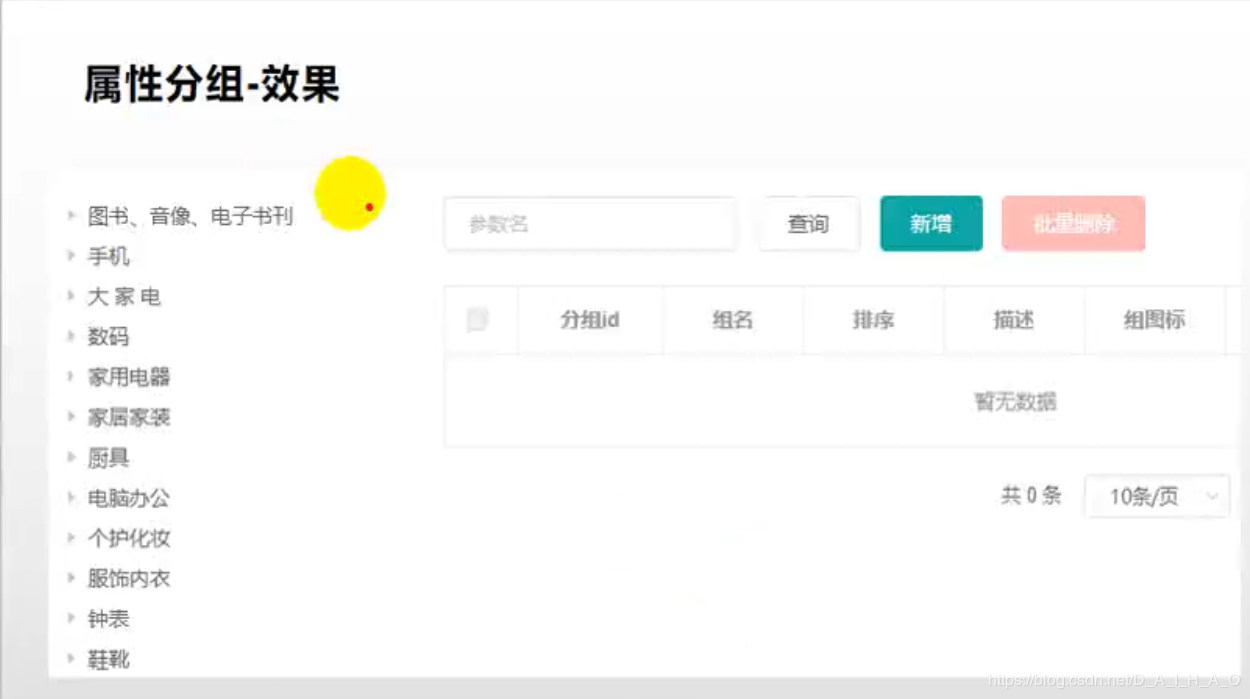
前端组件抽取
src\views\modules\common\category.vue 将分类树形抽取成一个组件
<template>
  <div>
    <el-input placeholder="输入关键字进行过滤" v-model="filterText"></el-input>
    <el-tree
      :data="menus"
      :props="defaultProps"
      node-key="catId"
      ref="menuTree"
      @node-click="nodeclick"
      :filter-node-method="filterNode"
      :highlight-current = "true"
    ></el-tree>
  </div>
</template>

<script>
//这里可以导入其他文件(比如:组件,工具js,第三方插件js,json文件,图片文件等等)
//例如:import 《组件名称》 from '《组件路径》';

export default {
  //import引入的组件需要注入到对象中才能使用
  components: {},
  props: {},
  data() {
    //这里存放数据
    return {
      filterText: "",
      menus: [],
      expandedKey: [],
      defaultProps: {
        children: "children",
        label: "name"
      }
    };
  },
  //计算属性 类似于data概念
  computed: {},
  //监控data中的数据变化
  watch: {
    filterText(val) {
      this.$refs.menuTree.filter(val);
    }
  },
  //方法集合
  methods: {
    //树节点过滤
    filterNode(value, data) {
      if (!value) return true;
      return data.name.indexOf(value) !== -1;
    },
    getMenus() {
      this.$http({
        url: this.$http.adornUrl("/product/category/list/tree"),
        method: "get"
      }).then(({ data }) => {
        this.menus = data.data;
      });
    },
    nodeclick(data, node, component) {
      console.log("子组件category的节点被点击", data, node, component);
      //向父组件发送事件;
      this.$emit("tree-node-click", data, node, component);
    }
  },
  //生命周期 - 创建完成(可以访问当前this实例)
  created() {
    this.getMenus();
  },
  //生命周期 - 挂载完成(可以访问DOM元素)
  mounted() {},
  beforeCreate() {}, //生命周期 - 创建之前
  beforeMount() {}, //生命周期 - 挂载之前
  beforeUpdate() {}, //生命周期 - 更新之前
  updated() {}, //生命周期 - 更新之后
  beforeDestroy() {}, //生命周期 - 销毁之前
  destroyed() {}, //生命周期 - 销毁完成
  activated() {} //如果页面有keep-alive缓存功能,这个函数会触发
};
</script>
<style scoped>

</style>
父子组件交互
父子组件传递数据:子组件给父组件传递数据,事件机制;子组件给父组件发送一个事件,携带上数据。 this.$emit("事件名",携带的数据...)
使用子组件
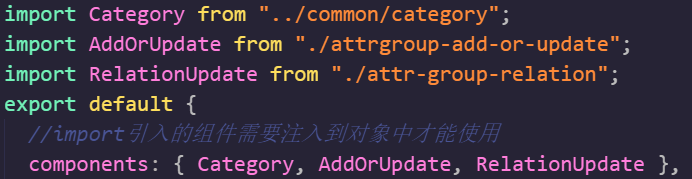
<template>
  <el-row :gutter="20">
    <el-col :span="6">
     <!-- 子组件分类树形节点被点击 回调treenodeclick-->
      <category @tree-node-click="treenodeclick"></category>
    </el-col>
    <el-col :span="18">
      <div class="mod-config">
        <el-form :inline="true" :model="dataForm" @keyup.enter.native="getDataList()">
          <el-form-item>
            <el-input v-model="dataForm.key" placeholder="参数名" clearable></el-input>
          </el-form-item>
          <el-form-item>
            <el-button @click="getDataList()">查询</el-button>
            <el-button type="success" @click="getAllDataList()">查询全部</el-button>
            <el-button
              v-if="isAuth('product:attrgroup:save')"
              type="primary"
              @click="addOrUpdateHandle()"
            >新增</el-button>
            <el-button
              v-if="isAuth('product:attrgroup:delete')"
              type="danger"
              @click="deleteHandle()"
              :disabled="dataListSelections.length <= 0"
            >批量删除</el-button>
          </el-form-item>
        </el-form>
        <el-table
          :data="dataList"
          border
          v-loading="dataListLoading"
          @selection-change="selectionChangeHandle"
          style="width: 100%;"
        >
          <el-table-column type="selection" header-align="center" align="center" width="50"></el-table-column>
          <el-table-column prop="attrGroupId" header-align="center" align="center" label="分组id"></el-table-column>
          <el-table-column prop="attrGroupName" header-align="center" align="center" label="组名"></el-table-column>
          <el-table-column prop="sort" header-align="center" align="center" label="排序"></el-table-column>
          <el-table-column prop="descript" header-align="center" align="center" label="描述"></el-table-column>
          <el-table-column prop="icon" header-align="center" align="center" label="组图标"></el-table-column>
          <el-table-column prop="catelogId" header-align="center" align="center" label="所属分类id"></el-table-column>
          <el-table-column
            fixed="right"
            header-align="center"
            align="center"
            width="150"
            label="操作"
          >
            <template slot-scope="scope">
              <el-button type="text" size="small" @click="relationHandle(scope.row.attrGroupId)">关联</el-button>
              <el-button
                type="text"
                size="small"
                @click="addOrUpdateHandle(scope.row.attrGroupId)"
              >修改</el-button>
              <el-button type="text" size="small" @click="deleteHandle(scope.row.attrGroupId)">删除</el-button>
            </template>
          </el-table-column>
        </el-table>
        <el-pagination
          @size-change="sizeChangeHandle"
          @current-change="currentChangeHandle"
          :current-page="pageIndex"
          :page-sizes="[10, 20, 50, 100]"
          :page-size="pageSize"
          :total="totalPage"
          layout="total, sizes, prev, pager, next, jumper"
        ></el-pagination>
        <!-- 弹窗, 新增 / 修改 -->
        <add-or-update v-if="addOrUpdateVisible" ref="addOrUpdate" @refreshDataList="getDataList"></add-or-update>

        <!-- 修改关联关系 -->
        <relation-update v-if="relationVisible" ref="relationUpdate" @refreshData="getDataList"></relation-update>
      </div>
    </el-col>
  </el-row>
</template>

<script>
/**
 * 父子组件传递数据
 * 1)、子组件给父组件传递数据,事件机制;
 *    子组件给父组件发送一个事件,携带上数据。
 * // this.$emit("事件名",携带的数据...)
 */
//这里可以导入其他文件(比如:组件,工具js,第三方插件js,json文件,图片文件等等)
//例如:import 《组件名称》 from '《组件路径》';
import Category from "../common/category";
import AddOrUpdate from "./attrgroup-add-or-update";
import RelationUpdate from "./attr-group-relation";
export default {
  //import引入的组件需要注入到对象中才能使用
  components: { Category, AddOrUpdate, RelationUpdate },
  props: {},
  data() {
    return {
      catId: 0,
      dataForm: {
        key: ""
      },
      dataList: [],
      pageIndex: 1,
      pageSize: 10,
      totalPage: 0,
      dataListLoading: false,
      dataListSelections: [],
      addOrUpdateVisible: false,
      relationVisible: false
    };
  },
  activated() {
    this.getDataList();
  },
  methods: {
    //处理分组与属性的关联
    relationHandle(groupId) {
      this.relationVisible = true;
      this.$nextTick(() => {
        this.$refs.relationUpdate.init(groupId);
      });
    },
    //感知树节点被点击
    treenodeclick(data, node, component) {
      if (node.level == 3) {
        this.catId = data.catId;
        this.getDataList(); //重新查询
      }
    },
    getAllDataList(){
      this.catId = 0;
      this.getDataList();
    },
    // 获取数据列表
    getDataList() {
      this.dataListLoading = true;
      this.$http({
        url: this.$http.adornUrl(`/product/attrgroup/list/${this.catId}`),
        method: "get",
        params: this.$http.adornParams({
          page: this.pageIndex,
          limit: this.pageSize,
          key: this.dataForm.key
        })
      }).then(({ data }) => {
        if (data && data.code === 0) {
          this.dataList = data.page.list;
          this.totalPage = data.page.totalCount;
        } else {
          this.dataList = [];
          this.totalPage = 0;
        }
        this.dataListLoading = false;
      });
    },
    // 每页数
    sizeChangeHandle(val) {
      this.pageSize = val;
      this.pageIndex = 1;
      this.getDataList();
    },
    // 当前页
    currentChangeHandle(val) {
      this.pageIndex = val;
      this.getDataList();
    },
    // 多选
    selectionChangeHandle(val) {
      this.dataListSelections = val;
    },
    // 新增 / 修改
    addOrUpdateHandle(id) {
      this.addOrUpdateVisible = true;
      this.$nextTick(() => {
        this.$refs.addOrUpdate.init(id);
      });
    },
    // 删除
    deleteHandle(id) {
      var ids = id
        ? [id]
        : this.dataListSelections.map(item => {
            return item.attrGroupId;
          });
      this.$confirm(
        `确定对[id=${ids.join(",")}]进行[${id ? "删除" : "批量删除"}]操作?`,
        "提示",
        {
          confirmButtonText: "确定",
          cancelButtonText: "取消",
          type: "warning"
        }
      ).then(() => {
        this.$http({
          url: this.$http.adornUrl("/product/attrgroup/delete"),
          method: "post",
          data: this.$http.adornData(ids, false)
        }).then(({ data }) => {
          if (data && data.code === 0) {
            this.$message({
              message: "操作成功",
              type: "success",
              duration: 1500,
              onClose: () => {
                this.getDataList();
              }
            });
          } else {
            this.$message.error(data.msg);
          }
        });
      });
    }
  }
};
</script>
<style scoped>
</style>
获取分类属性分组
请求
GET /product/attrgroup/list/{catelogId}
请求参数
{
   page: 1,//当前页码
   limit: 10,//每页记录数
   sidx: 'id',//排序字段
   order: 'asc/desc',//排序方式
   key: '华为'//检索关键字
}
分页数据
响应数据
{
	"msg": "success",
	"code": 0,
	"page": {
		"totalCount": 0,
		"pageSize": 10,
		"totalPage": 0,
		"currPage": 1,
		"list": [{
			"attrGroupId": 0, //分组id
			"attrGroupName": "string", //分组名
			"catelogId": 0, //所属分类
			"descript": "string", //描述
			"icon": "string", //图标
			"sort": 0 //排序
			"catelogPath": [2,45,225] //分类完整路径
		}]
	}
}
controller
    /**
     * 列表
     */
    @RequestMapping("/list/{catelogId}")
    public R list(@RequestParam Map<String,Object> params,@PathVariable("catelogId") Long catelogId) {

        PageUtils page = attrGroupService.queryPage(params,catelogId);

        return R.ok().put("page", page);
    }
serviceImpl
    @Override
    public PageUtils queryPage(Map<String, Object> params, Long catelogId) {
        String key = (String) params.get("key");
        //select * from pms_attr_group where catelog_id=? and (attr_group_id=key or attr_group_name like %key%)
        QueryWrapper<AttrGroupEntity> wrapper = new QueryWrapper<AttrGroupEntity>();
        if(!StringUtils.isEmpty(key)){
            wrapper.and((obj)->{
                obj.eq("attr_group_id",key).or().like("attr_group_name",key);
            });
        }

        if( catelogId == 0){
            IPage<AttrGroupEntity> page = this.page(new Query<AttrGroupEntity>().getPage(params),
                    wrapper);
            return new PageUtils(page);
        }else {
            wrapper.eq("catelog_id",catelogId);
            IPage<AttrGroupEntity> page = this.page(new Query<AttrGroupEntity>().getPage(params),
                    wrapper);
            return new PageUtils(page);
        }

    }
新增分组
前端组件
src\views\modules\product\attrgroup-add-or-update.vue 组件
<template>
  <el-dialog
    :title="!dataForm.id ? '新增' : '修改'"
    :close-on-click-modal="false"
    :visible.sync="visible"
    @closed="dialogClose"
  >
    <el-form
      :model="dataForm"
      :rules="dataRule"
      ref="dataForm"
      @keyup.enter.native="dataFormSubmit()"
      label-width="120px"
    >
      <el-form-item label="组名" prop="attrGroupName">
        <el-input v-model="dataForm.attrGroupName" placeholder="组名"></el-input>
      </el-form-item>
      <el-form-item label="排序" prop="sort">
        <el-input v-model="dataForm.sort" placeholder="排序"></el-input>
      </el-form-item>
      <el-form-item label="描述" prop="descript">
        <el-input v-model="dataForm.descript" placeholder="描述"></el-input>
      </el-form-item>
      <el-form-item label="组图标" prop="icon">
        <el-input v-model="dataForm.icon" placeholder="组图标"></el-input>
      </el-form-item>
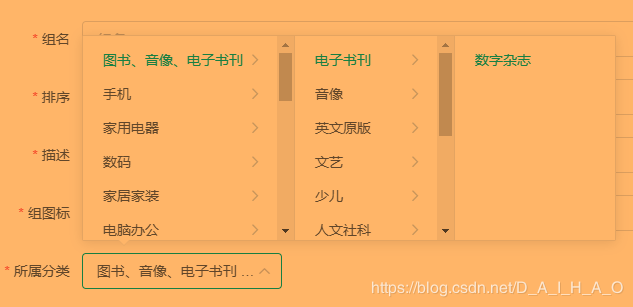
      <el-form-item label="所属分类" prop="catelogId">
        <!-- <el-input v-model="dataForm.catelogId" placeholder="所属分类id"></el-input> @change="handleChange" -->
        <!-- <el-cascader filterable placeholder="试试搜索:手机" v-model="catelogPath" :options="categorys"  :props="props"></el-cascader> -->
        <!-- :catelogPath="catelogPath"自定义绑定的属性,可以给子组件传值 -->
        <category-cascader :catelogPath.sync="catelogPath"></category-cascader>
      </el-form-item>
    </el-form>
    <span slot="footer" class="dialog-footer">
      <el-button @click="visible = false">取消</el-button>
      <el-button type="primary" @click="dataFormSubmit()">确定</el-button>
    </span>
  </el-dialog>
</template>

<script>
import CategoryCascader from '../common/category-cascader'
export default {
  data() {
    return {
      props:{
        value:"catId",
        label:"name",
        children:"children"
      },
      visible: false,
      categorys: [],
      catelogPath: [],
      dataForm: {
        attrGroupId: 0,
        attrGroupName: "",
        sort: "",
        descript: "",
        icon: "",
        catelogId: 0
      },
      dataRule: {
        attrGroupName: [
          { required: true, message: "组名不能为空", trigger: "blur" }
        ],
        sort: [{ required: true, message: "排序不能为空", trigger: "blur" }],
        descript: [
          { required: true, message: "描述不能为空", trigger: "blur" }
        ],
        icon: [{ required: true, message: "组图标不能为空", trigger: "blur" }],
        catelogId: [
          { required: true, message: "所属分类id不能为空", trigger: "blur" }
        ]
      }
    };
  },
  components:{CategoryCascader},

  methods: {
    dialogClose(){
      this.catelogPath = [];
    },
    getCategorys(){
      this.$http({
        url: this.$http.adornUrl("/product/category/list/tree"),
        method: "get"
      }).then(({ data }) => {
        this.categorys = data.data;
      });
    },
    init(id) {
      this.dataForm.attrGroupId = id || 0;
      this.visible = true;
      this.$nextTick(() => {
        this.$refs["dataForm"].resetFields();
        if (this.dataForm.attrGroupId) {
          this.$http({
            url: this.$http.adornUrl(
              `/product/attrgroup/info/${this.dataForm.attrGroupId}`
            ),
            method: "get",
            params: this.$http.adornParams()
          }).then(({ data }) => {
            if (data && data.code === 0) {
              this.dataForm.attrGroupName = data.attrGroup.attrGroupName;
              this.dataForm.sort = data.attrGroup.sort;
              this.dataForm.descript = data.attrGroup.descript;
              this.dataForm.icon = data.attrGroup.icon;
              this.dataForm.catelogId = data.attrGroup.catelogId;
              //查出catelogId的完整路径
              this.catelogPath =  data.attrGroup.catelogPath;
            }
          });
        }
      });
    },
    // 表单提交
    dataFormSubmit() {
      this.$refs["dataForm"].validate(valid => {
        if (valid) {
          this.$http({
            url: this.$http.adornUrl(
              `/product/attrgroup/${
                !this.dataForm.attrGroupId ? "save" : "update"
              }`
            ),
            method: "post",
            data: this.$http.adornData({
              attrGroupId: this.dataForm.attrGroupId || undefined,
              attrGroupName: this.dataForm.attrGroupName,
              sort: this.dataForm.sort,
              descript: this.dataForm.descript,
              icon: this.dataForm.icon,
              catelogId: this.catelogPath[this.catelogPath.length-1]
            })
          }).then(({ data }) => {
            if (data && data.code === 0) {
              this.$message({
                message: "操作成功",
                type: "success",
                duration: 1500,
                onClose: () => {
                  this.visible = false;
                  this.$emit("refreshDataList");
                }
              });
            } else {
              this.$message.error(data.msg);
            }
          });
        }
      });
    }
  },
  created(){
    this.getCategorys();
  }
};
</script>
src\views\modules\common\category-cascader.vue
<template>
<!--
使用说明:
1)、引入category-cascader.vue
2)、语法:<category-cascader :catelogPath.sync="catelogPath"></category-cascader>
    解释:
      catelogPath:指定的值是cascader初始化需要显示的值,应该和父组件的catelogPath绑定;
          由于有sync修饰符,所以cascader路径变化以后自动会修改父的catelogPath,这是结合子组件this.$emit("update:catelogPath",v);做的
      -->
  <div>
    <el-cascader
      filterable
      clearable
      placeholder="试试搜索:手机"
      v-model="paths"
      :options="categorys"
      :props="setting"
    ></el-cascader>
  </div>
</template>

<script>
//这里可以导入其他文件(比如:组件,工具js,第三方插件js,json文件,图片文件等等)
//例如:import 《组件名称》 from '《组件路径》';

export default {
  //import引入的组件需要注入到对象中才能使用
  components: {},
  //接受父组件传来的值
  props: {
    catelogPath: {
      type: Array,
      default(){
        return [];
      }
    }
  },
  data() {
    //这里存放数据
    return {
      setting: {
        value: "catId",
        label: "name",
        children: "children"
      },
      categorys: [],
      paths: this.catelogPath
    };
  },
  watch:{
    catelogPath(v){
      this.paths = this.catelogPath;
    },
    paths(v){
      this.$emit("update:catelogPath",v);
      //还可以使用pubsub-js进行传值
      this.PubSub.publish("catPath",v);
    }
  },
  //方法集合
  methods: {
    getCategorys() {
      this.$http({
        url: this.$http.adornUrl("/product/category/list/tree"),
        method: "get"
      }).then(({ data }) => {
        this.categorys = data.data;
      });
    }
  },
  //生命周期 - 创建完成(可以访问当前this实例)
  created() {
    this.getCategorys();
  }
};
</script>
<style scoped>
</style>
使用子组件
修改分组
回显无法选择三级分类
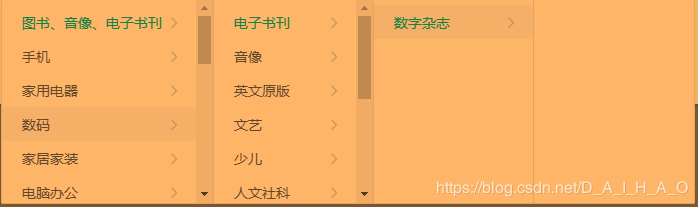
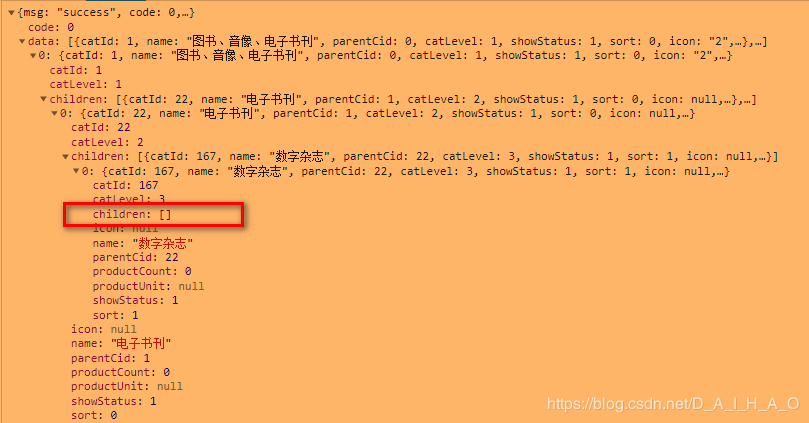
@JsonInclude(JsonInclude.Include.NON_EMPTY)
@TableField(exist = false)
private List<CategoryEntity> children;
效果:
新增和修改自动生成的controller无需修改...... (后面crud跳过......)
