

因为要加一个推送的包而将flutter版本从1.9升级到了1.12,发现高德地图黑屏了;之前也有朋友建议写一写地图相关,趁着这次修复就写一下地图相关
效果展示
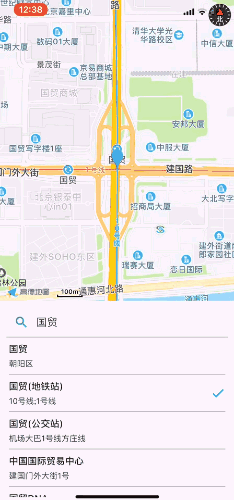
版本
flutter在不断迭代中,大版本会有breaking change,第三方包也同样
flutter: 1.12 amap_all_fluttify: ^0.13.1+1
之前用的是amap_map_fluttify
amap_location_fluttify
amap_search_fluttify这三个包,flutter升到1.12后,这几个依赖有点问题,就采用了这个系列作者的一个all in包 amap_all_fluttify;
code
import 'package:amap_all_fluttify/amap_all_fluttify.dart';
...
AmapController _controller;
...
AmapView(
  zoomLevel: 16.0,
  rotateGestureEnabled: false,
  onMapCreated: (controller) async {
  // 等待用户授权
  if (await requestPermission()) {
    // 初始位置周边信息
    var myPoiList = await AmapSearch.searchAround(_myLocation, city: _cityCode);
    await Future.forEach(myPoiList, (item) async {
      String title = await item.title;
      String address = await item.address;
      LatLng location = await item.latLng;
      setState(() {
        _poiTitleList.add([title, address, location]);
      });
    });
  }
  }
)

...

// 输入地点搜索周边
TextField(
  decoration: InputDecoration(
    hintText: '搜索地点',
    prefixIcon: Icon(Icons.search, color: COMMONColors.green,),
  ),
  onSubmitted: (value) async {
    _poiTitleList = [];
    final poiList = await AmapSearch.searchKeyword(value, city: _cityName);
    await Future.forEach(poiList, (item) async {
      String title = await item.title;
      String address = await item.address;
      LatLng location = await item.latLng;
      setState(() {
        _poiTitleList.add([title, address, location]);
      });
    });
  }
)

...

// 列表展示周边信息
SingleChildScrollView(
child: Column(
 crossAxisAlignment: CrossAxisAlignment.start,
 children: List.generate(_poiTitleList?.length, (int index) {
   return InkWell(
     onTap: () {
       // 第二次点击即选取此坐标
       if (_tapIndex == index) {
         Navigator.pop(context, '{"cityCode": "$_cityCode", "location": "$_latLngNew"}');
       } else {
         setState(() {
           _tapIndex = index;
           _latLngNew = _poiTitleList[index][2];
         });
         // 设置中心点为选中的坐标
         _controller.setCenterCoordinate(_poiTitleList[index][2].latitude, _poiTitleList[index][2].longitude);
         _controller.clearMarkers();
         _controller.addMarker(MarkerOption(
           latLng: _poiTitleList[index][2],
           iconUri: Uri.parse('images/marker.png'),
           imageConfig: createLocalImageConfiguration(context),
         ));
       }
     },
     child: Padding(
       padding: EdgeInsets.only(top: 8, left: 4, right: 4),
       child: Column(
         crossAxisAlignment: CrossAxisAlignment.start,
         children: <Widget>[
          ...
          Text(
            _poiTitleList[index][0],
            softWrap: false,
            overflow: TextOverflow.ellipsis,
            style: TextStyle(fontWeight: FontWeight.w500)
          )
          ...
          _tapIndex == index ? Icon(Icons.done, color: COMMONColors.green,) : Container()
          ...
         ],
       ),
     ),
   );
 })
)
