1,a标签的用法
-
a标签的属性:
href,target,download,rel=noopener -
作用:
跳转到外部页面,或内部的锚点以及跳转到邮箱或电话等。 -
href属性值
网址(三种形式)
<a href="https://google.com"></a>
<a href="http://google.com></a>
<a href="//google.com"></a>
路径
<a href="/a/b/c.html"></a> 路径最前的/代表协议的根目录而非计算机的根目录
index.html 直接输入文件夹内的文件名
./index.html 是在根目录中寻找文件
伪协议
javascript:代码;执行带段代码
<a href="javascript:;"></a> 当代码元素为空时点击之后无任何动作
<a href="mailto:邮箱"></a> 可自动发出邮箱
<a href="tel:手机号"></a> 会创建一个电话的链接,如果是在手机上可以呼出拨号的界面
id
_blanck 新窗口中打开链接 _top 在顶层的窗口打开,如果说当前窗口是顶层窗口,其功能等同于 _self _parent 在父级frame加载,若是没有父级frame,等同于 _self _self 在本页面中打开链接 -
a的download属性值
作用:不是打开页面,而是下载页面
问题:不是所有浏览器都支持,尤其是手机浏览器可能是不支持
2,img标签的用法
-
作用:
发出get请求,展示一张图片 -
href属性
alt,height,width,srcalt属性
在链接的图片加载失败时,显示alt中的内容height,width属性
高度和宽度src属性
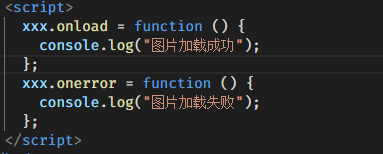
链接一张图片onload,onerror用来判断图片是否加载成功
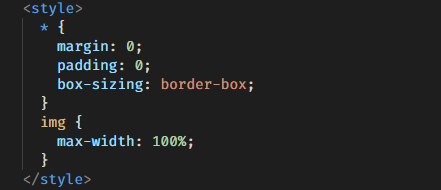
响应式
3,tab标签的用法
 <table>
      <thead>
          <tr>
              <th>科目</th>
              <th>小明</th>
              <th>小花</th>
          </tr>
      </thead>
      <tbody>
         <tr>
              <th> 语文</th>
              <td>98</td>
              <td>78</td>
         </tr>
         <tr>
              <th> 英语</th>
              <td>98</td>
              <td>78</td>
         </tr>
      </tbody>
      <tfoot>
          <tr>
              <th>合计</th>
              <td>196</td>
              <td>156</td>
          </tr>
      </tfoot>
 </table>
代码预览效果
| 科目 | 小明 | 小花 |
|---|---|---|
| 语文 | 98 | 78 |
| 英语 | 98 | 78 |
| 合计 | 196 | 156 |
4,感悟
不忘初心,砥砺前行!