

什么是URL?
统一资源定位符(Uniform Resource Locator,缩写:URL;或称统一资源定位器、定位地址、URL地址,俗称网页地址或简称网址)是因特网上标准的资源的地址(Address),如同在网络上的门牌。
一个完整的URL
在百度上搜索
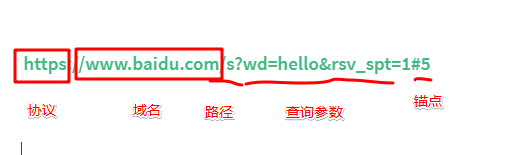
协议(protocol)
ip (internet protocol)
如何来定位一个设备,那么这个设备至少有一个IP
如何查看IP ip138.com可以查到外网ip
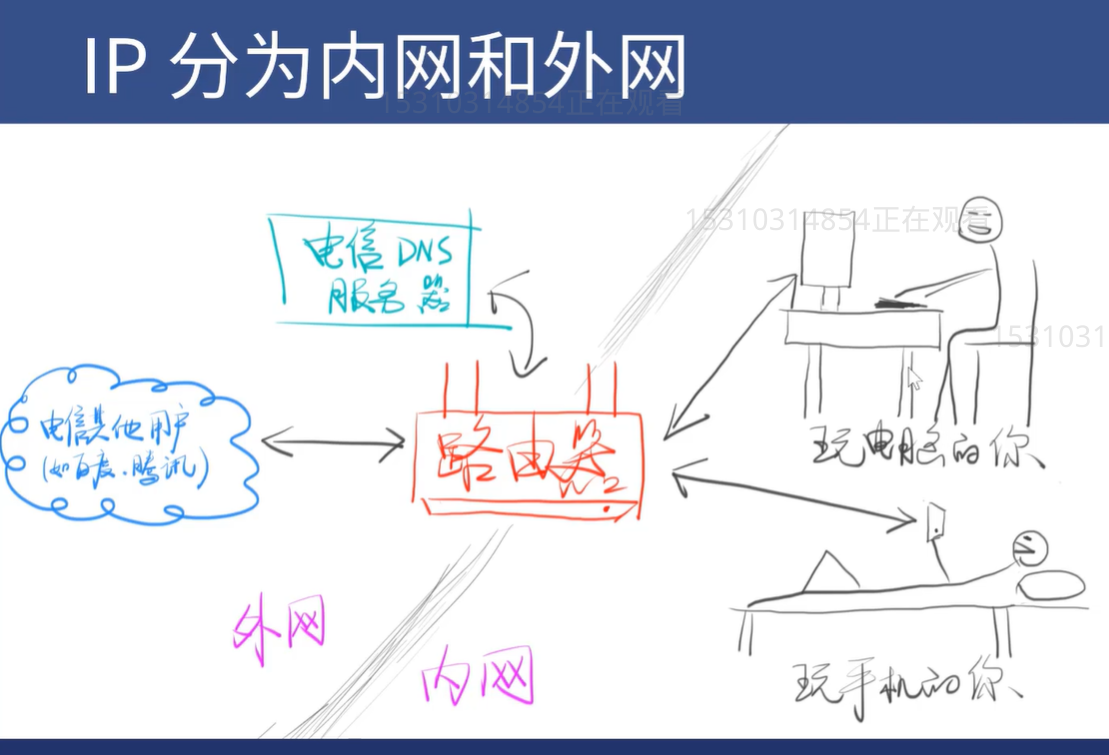
内网IP
在路由器会在家创建一个内网 内网中设备使用内网IP,一般来说这个IP格式都是192.168.xxx
然后路由器会给每个内网的设备分配一个不同的内网IP,如电脑是192.168.1.2手机是192.168.1.3依次类推
路由器的功能
- 现在路由器有两个ip,一个外网IP,一个内网IP,
- 内网的设备是可以相互访问的,但是不能直接访问外网
- 外网的设备是可以相互访问的,但是不能直接访问内网
- 外网设备想要把内容送到内网,也必须通过路由器
- 也就是说内网和外网就像两个隔空的空间,无法互通,唯一的联通点就是路由器
- 所以路由器也被称为网关
三个特殊的IP
- 127.0.0.1表示自己
- localhost通过hosts指向自己
- host可以使任何字符串替代localhost
hosts 文件在哪?
在 Windows 系统中,hosts 位于 C:\Windows\System32\drivers\etc\hosts 。在 macOS / Linux系统中,hosts 位于 /etc/hosts
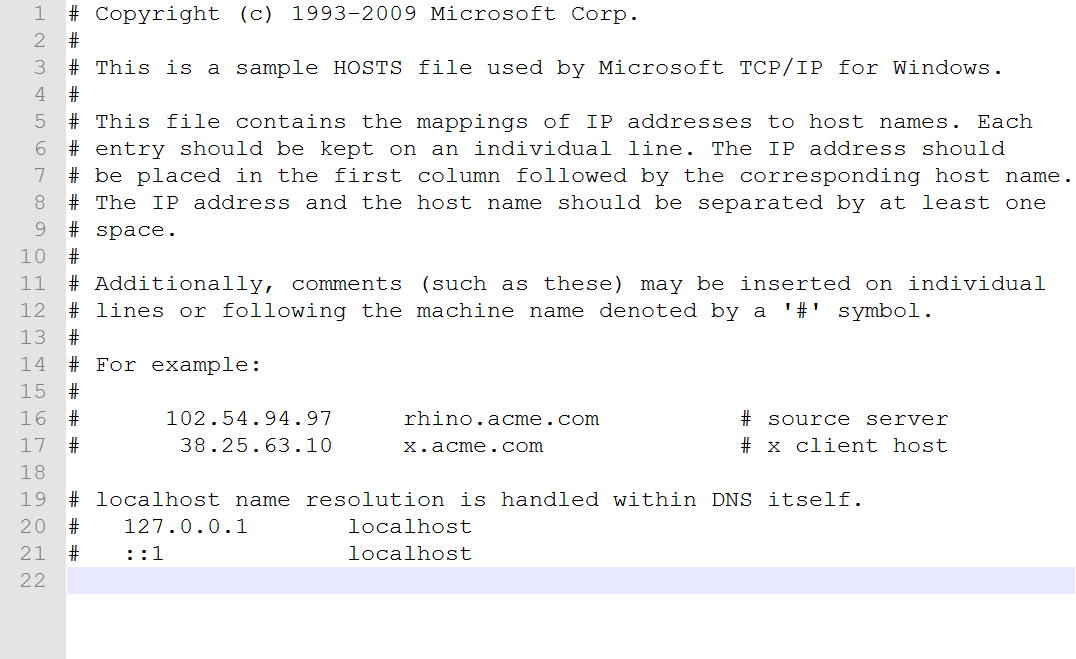
127.0.0.1 xxx
xxx就可以替代localhost
端口
一台机器要提供很多服务
- 提供HTTP服务,使用的是80端口
- 提供HTTPS服务,最好使用的是433端口
- 要提供ftp服务,最好使用是是21端口
一共65535个端口
规则
0到1023(2^10-1)号端口是留给系统使用的 你只有拥有了管理员权限后,才能使用这个1024个端口
其他端口可以给普通用户使用
比如http-server默认使用8080端口
一个端口如果被占用,你就只能换一个端口
域名
qq.com
域名就是对IP的别称,
如何查看域名对应的IP,可以使用ping命令
查看baidu的IP
ping baidu.com
一个域名可以对应不同的IP,叫做均衡负载,防止一台机器扛不住。 一个IP可以对应不同的域名 这个叫共享主机
域名和IP是这么对应起来的?
是通过 DNS,
什么是DNS?
DNS英文全称domain name system
是互联网的一项服务。它作为将域名和IP地址相互映射的一个分布式数据库,能够使人更方便地访问互联网。DNS使用TCP和UDP端口53。
当你向输入chrome输入某个域名
- chrome浏览器会向电信提供DNS服务器,询问这个域名对应什么ip
- 电信会回答一个IP
- 然后chrome 才向对应ip的80/433端口发送请求
- 请求内容是查看xxx的首页
wwww
www.xxx.com和xxx.com是同一个域名吗?
其实不是,那他们是什么关系呢?\
- com是顶级域名`
- xxx.com 是二级域名
- www.xx.com是三级域名
- 它们是父子关系,他们有可能不是一家公司
www.是多余的吗?是的非常多余
如何请求不同的页面
路径可以做到
同一个页面,不同的内容
通过查询参数
同一个内容,不同的锚点
锚点看起来有中文,实际上不能有中文
锚点是无法在Network面板看到的
因为锚点不会给服务器
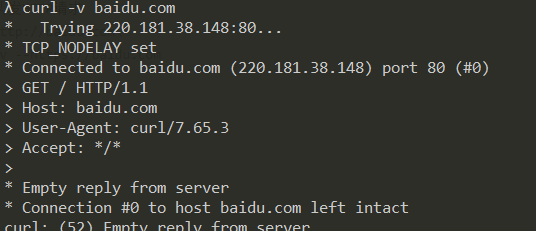
CURL命令 用curl可以发HTTP请求 curl -v baidu.com\
ALPN, offering h2
* ALPN, offering http/1.1
* successfully set certificate verify locations:
* CAfile: C:/Users/Administrator/cmder/vendor/git-for-windows/mingw64/ssl/certs/ca-bundle.crt
CApath: none
* TLSv1.3 (OUT), TLS handshake, Client hello (1):
* TLSv1.3 (IN), TLS handshake, Server hello (2):
* TLSv1.2 (IN), TLS handshake, Certificate (11):
* TLSv1.2 (IN), TLS handshake, Server key exchange (12):
* TLSv1.2 (IN), TLS handshake, Server finished (14):
* TLSv1.2 (OUT), TLS handshake, Client key exchange (16):
* TLSv1.2 (OUT), TLS change cipher, Change cipher spec (1):
* TLSv1.2 (OUT), TLS handshake, Finished (20):
* TLSv1.2 (IN), TLS handshake, Finished (20):
* SSL connection using TLSv1.2 / ECDHE-RSA-AES128-GCM-SHA256
* ALPN, server accepted to use http/1.1
* Server certificate:
* subject: C=CN; ST=beijing; L=beijing; OU=service operation department; O=Beijing Baidu Netcom Science Technology Co., Ltd; CN=baidu.com
* start date: May 9 01:22:02 2019 GMT
* expire date: Jun 25 05:31:02 2020 GMT
* subjectAltName: host "www.baidu.com" matched cert's "*.baidu.com"
* issuer: C=BE; O=GlobalSign nv-sa; CN=GlobalSign Organization Validation CA - SHA256 - G2
* SSL certificate verify ok.
> GET / HTTP/1.1
> Host: www.baidu.com
> User-Agent: curl/7.65.3
> Accept: */*
>
* Mark bundle as not supporting multiuse
< HTTP/1.1 200 OK
< Accept-Ranges: bytes
< Cache-Control: private, no-cache, no-store, proxy-revalidate, no-transform
< Connection: keep-alive
< Content-Length: 2443
< Content-Type: text/html
< Date: Wed, 29 Apr 2020 14:00:46 GMT
< Etag: "58860411-98b"
< Last-Modified: Mon, 23 Jan 2017 13:24:33 GMT
< Pragma: no-cache
< Server: bfe/1.0.8.18
< Set-Cookie: BDORZ=27315; max-age=86400; domain=.baidu.com; path=/
<
<!DOCTYPE html>
<!--STATUS OK--><html> <head><meta http-equiv=content-type content=text/html;charset=utf-8><meta http-equiv=X-UA-Compatible content=IE=Edge><meta content=always name=referrer><link rel=stylesheet type=text/css href=https://ss1.bdstatic.com/5eN1bjq8AAUYm2zgoY3K/r/www/cache/bdorz/baidu.min.css><title>百度一下,你就知道</title></head> <body link=#0000cc> <div id=wrapper> <div id=h
ead> <div class=head_wrapper> <div class=s_form> <div class=s_form_wrapper> <div id=lg> <img hidefocus=true src=//www.baidu.com/img/bd_logo1.png width=270 height=129> </div> <form id=form name=f action=//www.baidu.com/s class=fm> <input type=hidden name=bdorz_come value=1> <input type=hidden name=ie value=utf-8> <input type=hidden name=f value=8> <input type=hidden name=rsv_bp value=1> <input type=hidden name=rsv_idx value=1> <input type=hidden name=tn value=baidu><span class="bg s_ipt_wr"><input id=kw name=wd class=s_ipt value maxlength=255 autocomplete=off autofocus=autofocus></span><span class="bg s_btn_wr"><input type=submit id=su value=百度一下 class="bg s_btn" autofocus></span> </form> </div> </div> <div id=u1> <a href=http://news.baidu.com nam
e=tj_trnews class=mnav>新闻</a> <a href=https://www.hao123.com name=tj_trhao123 class=mnav>hao123</a> <a href=http://map.baidu.com name=tj_trmap class=mnav>地图</a> <a href=http://v.baidu.co
m name=tj_trvideo class=mnav>视频</a> <a href=http://tieba.baidu.com name=tj_trtieba class=mnav>贴吧</a> <noscript> <a href=http://www.baidu.com/bdorz/login.gif?login&tpl=mn&u=http%3
A%2F%2Fwww.baidu.com%2f%3fbdorz_come%3d1 name=tj_login class=lb>登录</a> </noscript> <script>document.write('<a href="http://www.baidu.com/bdorz/login.gif?login&tpl=mn&u='+ encodeURIComponen
t(window.location.href+ (window.location.search === "" ? "?" : "&")+ "bdorz_come=1")+ '" name="tj_login" class="lb">登录</a>');
</script> <a href=//www.baidu.com/more/ name=tj_briicon class=bri style="display: block;">更多产品</a> </div> </div> </div> <div id=ftCon> <div id=ftConw> <p id=lh> <a href=h
ttp://home.baidu.com>关于百度</a> <a href=http://ir.baidu.com>About Baidu</a> </p> <p id=cp>©2017 Baidu <a href=http://www.baidu.com/duty/>使用百度前必读</a> <a href=htt
p://jianyi.baidu.com/ class=cp-feedback>意见反馈</a> 京ICP证030173号 <img src=//www.baidu.com/img/gs.gif> </p> </div> </div> </div> </body> </html>
* Connection #0 to host www.baidu.com left intact
url会被CURL工具重写,先请求DNS获得IP
先进行TCP连接,TCP连接成功后,开始发送HTTP请求
请求内容看一眼
响应内容看一眼
响应结束后,关闭TCP连接
真正结束
资料参考饥人谷

