

适配
说到适配我在这里主要讲述android中的两大需要适配的模块,第一视图适配,第二权限适配,今天从两方面入手彻底解决适配问题
视图适配
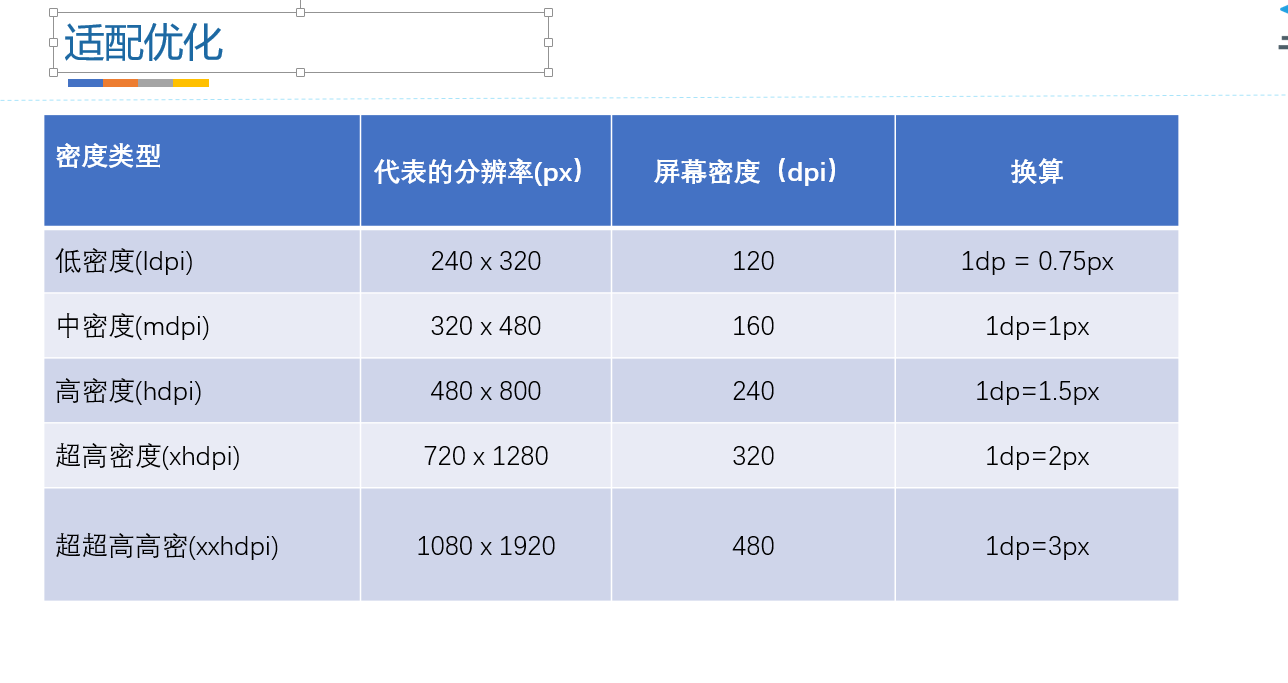
密度无关像素(dp) vs dpi
- 含义:density-independent pixel,叫dp或dip,与终端上的实际物理像素点无关
- 单位:dp,可以保证在不同屏幕像素密度的设备上显示相同的效果,是安卓特有的长度单位。
- 场景例子:假如同样都是画一条长度是屏幕一半的线,如果使用px作为计量单位,那么在480x800分辨率手机上设置应为240px;在320x480的手机上应设置为160px,二者设置就不同了;如果使用dp为单位,在这两种分辨率下,160dp都显示为屏幕一半的长度。
- dp与px的转换:px = density * dp
- px = dp * (dpi / 160) 宽高比 density = dpi / 160
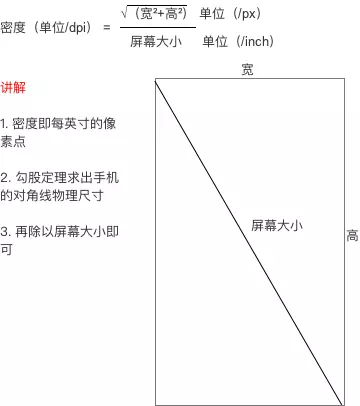
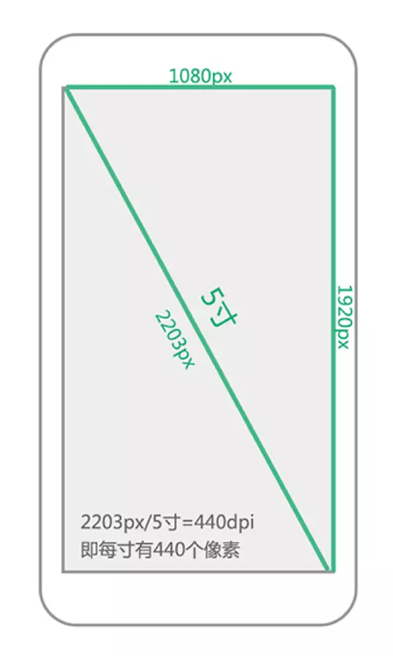
由此我们可以看出屏幕适配和我们手机的尺寸和屏幕的密度有着不可分开的关系,android各大手机厂商,对于屏幕的密度这一块可能是买点的原因,常常不准,所以谷歌为我们提供的dp也不是很好用
,但是对于宽高比相同的手机上适配是没有问题的
我推荐的适配方案:
头条适配方案(可解决90%的问题):
- dp与px的转换:px = density * dp
- px = dp * (dpi / 160) 宽高比 density = dpi / 160
其实原理很简单denstiy 改成一个活得变量,每一部手机都从新计算这个值
限定符适配:这种是最精准的适配方案
package com.example.androidtest;

import java.io.File;
import java.io.FileNotFoundException;
import java.io.FileOutputStream;
import java.io.PrintWriter;

public class MakeXml {
    private final static String rootPath = "D:\\layoutroot\\values-{0}x{1}\\";

    private final static float dw = 320f;
    private final static float dh = 480f;

    private final static String WTemplate = "{1}px\n";
    private final static String HTemplate = "{1}px\n";

    public static void main(String[] args) {
        makeString(320, 480);
        makeString(480,800);
        makeString(480, 854);
        makeString(540, 960);
        makeString(600, 1024);
        makeString(720, 1184);
        makeString(720, 1196);
        makeString(720, 1280);
        makeString(768, 1024);
        makeString(800, 1280);
        makeString(1080, 1812);
        makeString(1080, 1920);
        makeString(1440, 2560);
    }

    public static void makeString(int w, int h) {

        StringBuffer sb = new StringBuffer();
        sb.append("\n");
        sb.append("");
        float cellw = w / dw;
        System.out.println("w= " + w + " , h= " + h + " , cellw= " + cellw + " , dw= " + dw);
        for (int i = 1; i < 320; i++) {
            sb.append(WTemplate.replace("{0}", i + "").replace("{1}",
                    change(cellw * i) + ""));
            System.out.println("i = " + i + " , cellw*i = " + cellw *i);
        }
        sb.append(WTemplate.replace("{0}", "320").replace("{1}", w + ""));
        sb.append("");

        StringBuffer sb2 = new StringBuffer();
        sb2.append("\n");
        sb2.append("");
        float cellh = h / dh;
        for (int i = 1; i < 480; i++) {
            sb2.append(HTemplate.replace("{0}", i + "").replace("{1}",
                    change(cellh * i) + ""));
        }
        sb2.append(HTemplate.replace("{0}", "480").replace("{1}", h + ""));
        sb2.append("");

        String path = rootPath.replace("{0}", h + "").replace("{1}", w + "");
        File rootFile = new File(path);
        if (!rootFile.exists()) {
            rootFile.mkdirs();
        }
        File layxFile = new File(path + "lay_x.xml");
        File layyFile = new File(path + "lay_y.xml");
        try {
            PrintWriter pw = new PrintWriter(new FileOutputStream(layxFile));
            pw.print(sb.toString());
            pw.close();
            pw = new PrintWriter(new FileOutputStream(layyFile));
            pw.print(sb2.toString());
            pw.close();
        } catch (FileNotFoundException e) {
            e.printStackTrace();
        }

    }

    public static float change(float a) {
        int temp = (int) (a * 100);
        return temp / 100f;
    }

}
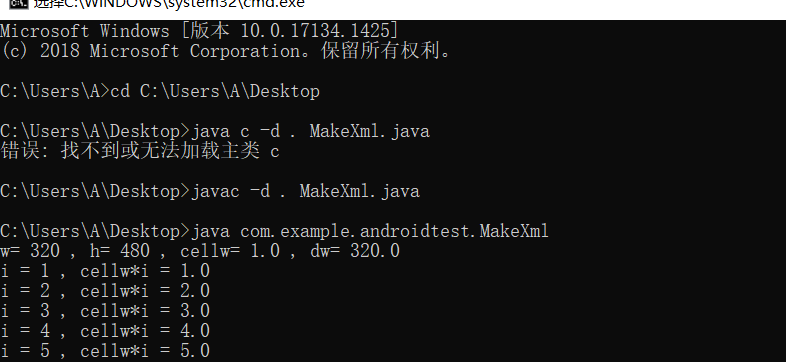
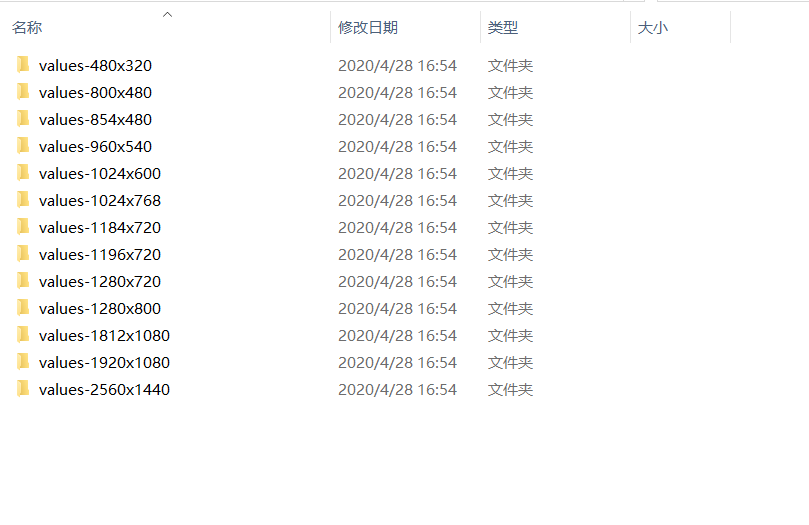
使用命令行执行java程序,把生成的values 放入app\main\res
独立比例像素(sp)
- 含义:scale-independent pixel,叫sp或sip
- 单位:sp,字体大小专用单位
- Android开发时用此单位设置文字大小,可根据字体大小首选项进行缩放;
- 推荐使用12sp、14sp、18sp、22sp作为字体大小,不推荐使用奇数和小数,容易造成精度丢失,12sp以下字体太小
sp 与 dp 的区别
- dp只跟屏幕的像素密度有关;
- sp和dp很类似但唯一的区别是,Android系统允许用户自定义文字尺寸大小(小、正常、大、超大等等),当文字尺寸是“正常”时1sp=1dp=0.00625英寸,而当文字尺寸是“大”或“超大”时,1sp>1dp=0.00625英寸。类似我们在windows里调整字体尺寸以后的效果——窗口大小不变,只有文字大小改变
布局组件的适配
- 使用密度无关像素指定尺寸dp
- 使用相对布局或线性布局,不要使用绝对布局
- 使用wrap_content、match_parent、权重
- 使用minWidth、minHeight、lines等属性
- dimens使用
刘海屏
google官方刘海屏适配方案
- https://developer.android.com/reference/android/view/DisplayCutout
各大厂商的方案
- 华为: https://devcentertest.huawei.com/consumer/cn/devservice/doc/50114
- OPPO:https://open.oppomobile.com/service/message/detail?id=61876
- vivo: https://dev.vivo.com.cn/doc/document/info?id=103
折叠屏
权限适配
6.0动态获取权限
lNormal Permissions
lDangerous Permission
查看命令
- adb shell pm list permissions -d -g //查看所有权限
- 全部申请下来
- 百度地图
- 还得写一遍
