第四章:synchronized的特性
可重入特性
目标
了解什么是可重入了解可重入的原理
什么是可重入
一个线程可以多次执行synchronized,重复获取同一把锁。
synchronized是可重入锁,内部锁对象中会有一个计数器记录线程获取几次锁啦,在执行完同步代码块时,计数器的数量会-1,直到计数器的数量为0,就释放这个锁。
package ReentrantLock;

/**
 * @author Jack
 * @date 2020/4/26-9:32
 */
public class Demo {
    public static void main(String[] args) throws InterruptedException {
        Runnable run = new MyThread();
        Thread thread1 = new Thread(run, "thread1");
        Thread thread2 = new Thread(run, "thread2");

        thread1.start();
        thread2.start();
    }
}

class MyThread implements Runnable {

    @Override
    public void run() {

        synchronized (MyThread.class) {
            System.out.println(Thread.currentThread().getName());
            System.out.println("同步代码块1");

            //同步代码块的嵌套
            synchronized (MyThread.class) {
                System.out.println(Thread.currentThread().getName());
                System.out.println("同步代码块2");
                System.out.println("---------------------");
            }
        }
    }
}

//同一线程多次执行synchronized,拿到同一把锁,锁的获取针对的是线程,线程获取锁,锁的重入和调用什么对象的什么方法是没有关系的,主要是看线程
可重入原理
synchronized的锁对象中有一个**计数器(recursions变量)**会记录线程获得几次锁.
可重入的好处
-
可以避免死锁
-
可以让我们更好的来封装代码
不可中断特性
目标
学习synchronized不可中断特性学习Lock的可中断特性
什么是不可中断
中断是指的多线程情况下,在同步的场景下,线程的状态的改变;
一个线程获得锁后,另一个线程想要获得锁,必须处于阻塞或等待状态,如果第一个线程不释放锁,第二个线程会一直阻塞或等待,不可被中断。
synchronized不可中断演示
synchronized是不可中断,处于阻塞状态的线程会一直等待锁。
package cannotInterupt;

/**
 * @author Jack
 * @date 2020/4/26-10:08
 */
public class Demo {
    private static Object obj = new Object();

    public static void main(String[] args) throws InterruptedException {


        Runnable run = () -> {

            //在Runnable中定义同步代码块
            synchronized (obj) {
                System.out.println(Thread.currentThread().getName() + "进入了同步代码块");
                try {
                    Thread.sleep(9000000);
                } catch (InterruptedException e) {
                    e.printStackTrace();
                }

            }
        };

        //先开启一个线程执行同步代码块,并且保证该线程不退出同步代码块
        Thread thread1 = new Thread(run, "thread1");
        thread1.start();

        //后开启一个新线程2执行同步代码块(处于阻塞状态)
        Thread.sleep(5);
        Thread thread2 = new Thread(run, "thread2");
        thread2.start();

        //线程2中断前的状态:
        Thread.sleep(100);//先让Thread2跑一会儿再输出他的状态
        System.out.println("线程2中断前的状态:" + thread2.getState());

        //停止线程2,观察会发生什么
        System.out.println("停止线程2");
        thread2.interrupt();
        System.out.println("线程2中断成功:" + thread2.isInterrupted());

        //观察线程1和线程2 的状态是怎么样的?
        System.out.println("线程1的状态 " + thread1.getState());
        System.out.println("线程2中断后的的状态:" + thread2.getState());

    }
}
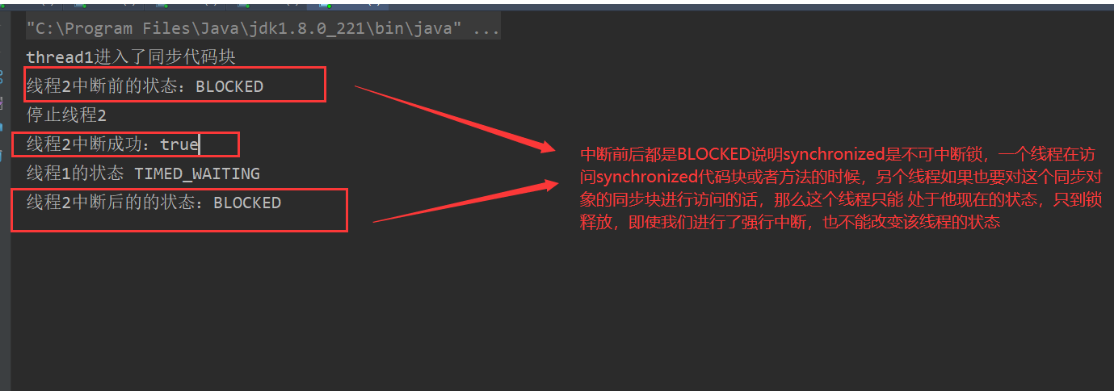
我们的线程2一直(从调用Interutpt()方法前后)处于BLOCKED状态的,从程序的指示灯可以看出来,这也就说明了synchronized是不可中断的, 如果使用 synchronized ,如果A不释放,B将一直等下去,B这种等待是不能被中断,这就是synchronized的不可中断性质;
Lock和Synchronized在中断特性的差别:
ReentrantLock不可中断演示
package atomic.lockInterupt;

import java.util.concurrent.locks.Lock;
import java.util.concurrent.locks.ReentrantLock;

/**
 * @author Jack
 * @date 2020/4/26-18:51
 */
//演示Lock的可中断可不可中断
public class Demo {
    private static Lock lock = new ReentrantLock();

    public static void main(String[] args) {
        try {
            testLock();
        } catch (InterruptedException e) {
            e.printStackTrace();
        }

    }

    public static void testLock() throws InterruptedException {
        Runnable run = () -> {
            try {
                lock.lock();
                System.out.println(Thread.currentThread().getName() + "获取锁,执行!");
                Thread.sleep(50000);
            } catch (InterruptedException e) {
                e.printStackTrace();
            } finally {
                lock.unlock();
            }
        };

        Thread thread1 = new Thread(run, "thread1");
        thread1.start();
        //让thread1先跑起来
        Thread.sleep(1000);

        Thread thread2 = new Thread(run, "thread2");
        thread2.start();

        //让Thread2先跑一段时间,然后再去对thread2进行操作获取thread2的状态并且去尝试中断               //thread2,sleep()操作系统的角度上讲我们可以认为是使线程进入了阻塞状态
        Thread.sleep(500);
        System.out.println("thread2停止前的状态" + thread2.getState());
        thread2.interrupt();
        System.out.println("停止线程thread2" + thread2.isInterrupted());
        System.out.println("thread2停止后的状态是:" + thread2.getState());
    }


}
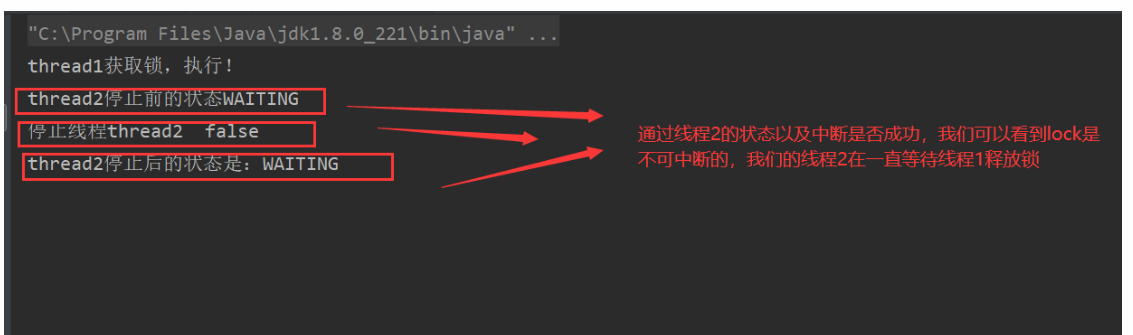
thread2的WAITING状态一直不能被改变;
ReentrantLock可中断演示
package atomic.lockInterupt;

import java.util.concurrent.TimeUnit;
import java.util.concurrent.locks.Lock;
import java.util.concurrent.locks.ReentrantLock;

/**
 * @author Jack
 * @date 2020/4/26-18:51
 */
//演示Lock的可中断可不可中断
public class Demo02 {
    private static Lock lock = new ReentrantLock();

    public static void main(String[] args) {
        try {
            testLock();
        } catch (InterruptedException e) {
            e.printStackTrace();
        }

    }

    public static void testLock() throws InterruptedException {
        Runnable run = () -> {
            //flag==false表示还没有线程获取到锁,获取到锁之后我们的flag将会变为true;
            boolean flag = false;

            try {
                // Acquires the lock if it is free within the given waiting time and the
                // current thread has not been {@linkplain Thread#interrupt interrupted}.
                flag = lock.tryLock(3, TimeUnit.SECONDS);
                if (flag) {
                    System.out.println(Thread.currentThread().getName() + "获取锁,执行锁中的代码!");
                    Thread.sleep(50000);
                } else {
                    System.out.println(Thread.currentThread().getName() + "线程没有获取到锁,执行其他的代码");
                    System.out.println(Thread.currentThread().getName() + " 3s之后,当前的状态是" + (Thread.currentThread().getState()));
                }
            } catch (InterruptedException e) {
                e.printStackTrace();
            } finally {
                if (flag) {
                    lock.unlock();
                    flag = false;
                }
            }
        };

        Thread thread1 = new Thread(run, "thread1");
        thread1.start();
        //让thread1先跑起来
        Thread.sleep(1000);

        Thread thread2 = new Thread(run, "thread2");
        thread2.start();
        Thread.sleep(500);
        System.out.println("500ms之后,thread2当前的状态是" + thread2.getState());

        Thread.sleep(5000);
        System.out.println("thread2停止后的状态是:" + thread2.getState());
    }


}
总结:
不可中断是指,当一个线程获得锁后,另一个线程一直处于阻塞或等待状态,前一个线程不释放锁,后一个线程会一直阻塞或等待,不可被中断。
synchronized属于不可被中断
Lock的lock方法是不可中断的
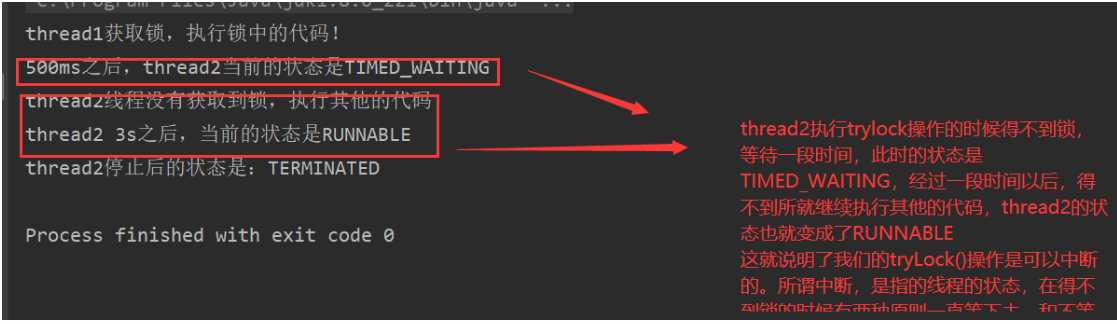
Lock的tryLock方法是可中断的
Java Thread.Sleep()暂停当前线程
Thread.sleep()被用来暂停当前线程的执行,会通知线程调度器把当前线程在指定的时间周期内置为wait状态。当wait时间结束,线程状态重新变为Runnable并等待CPU的再次调度执行。所以线程sleep的实际时间取决于线程调度器,而这是由操作系统来完成的。
在windows环境下,进程调度是抢占式的。一个进程在运行态时调用sleep(),进入等待态,睡眠结束以后,并不是直接回到运行态,而是进入就绪队列,要等到其他进程放弃时间片后才能重新进入运行态。所以sleep(1000),在1000ms以后,线程不一定会被唤醒。sleep(0)可以看成一个运行态的进程产生一个中断,由运行态直接转入就绪态**(Runnable,注意Running也是Runnable中的一种)**。这样做是给其他就绪态进程使用时间片的机会。总之,还是操作系统中运行态、就绪态和等待态相互转化的问题。
线程的状态问题:
在Thread类的内部有一个枚举类,标志了线程的6种状态,
     */
    public enum State {
        /**
         * Thread state for a thread which has not yet started.
         */
        NEW,

        /**
         * Thread state for a runnable thread.  A thread in the runnable
         * state is executing in the Java virtual machine but it may
         * be waiting for other resources from the operating system
         * such as processor.
         */
        RUNNABLE,

        /**
         * Thread state for a thread blocked waiting for a monitor lock.
         * A thread in the blocked state is waiting for a monitor lock
         * to enter a synchronized block/method or
         * reenter a synchronized block/method after calling
         * {@link Object#wait() Object.wait}.
            调用了wait()方法之后从waiting状态——>尝试获取锁失败——>BLOCKING

         */
        BLOCKED,

        /**
         * Thread state for a waiting thread.
         * A thread is in the waiting state due to calling one of the
         * following methods:
         * <ul>
         *   <li>{@link Object#wait() Object.wait} with no timeout</li>
         *   <li>{@link #join() Thread.join} with no timeout</li>
         *   <li>{@link LockSupport#park() LockSupport.park}</li>
         * </ul>
         *
         * <p>A thread in the waiting state is waiting for another thread to
         * perform a particular action.
         *
         * For example, a thread that has called <tt>Object.wait()</tt>
         * on an object is waiting for another thread to call
         * <tt>Object.notify()</tt> or <tt>Object.notifyAll()</tt> on
         * that object. A thread that has called <tt>Thread.join()</tt>
         * is waiting for a specified thread to terminate.
         */
        WAITING,

        /**
         * Thread state for a waiting thread with a specified waiting time.
         * A thread is in the timed waiting state due to calling one of
         * the following methods with a specified positive waiting time:
         * <ul>
         *   <li>{@link #sleep Thread.sleep}</li>
         *   <li>{@link Object#wait(long) Object.wait} with timeout</li>
         *   <li>{@link #join(long) Thread.join} with timeout</li>
         *   <li>{@link LockSupport#parkNanos LockSupport.parkNanos}</li>
         *   <li>{@link LockSupport#parkUntil LockSupport.parkUntil}</li>
         * </ul>
         */
        TIMED_WAITING,

        /**
         * Thread state for a terminated thread.
         * The thread has completed execution.
         */
        TERMINATED;
    }
-
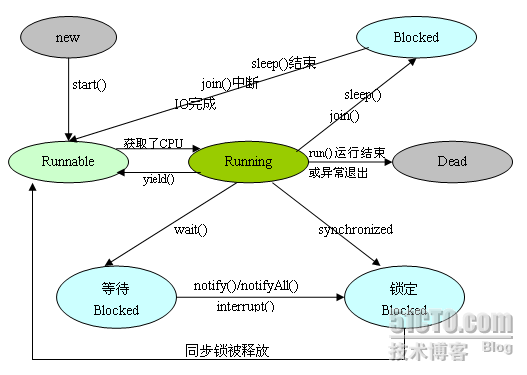
新建状态(New):新创建了一个线程对象。
-
就绪状态(Runnable):线程对象创建后,其他线程调用了该对象的start()方法。该状态的线程位于可运行线程池中,变得可运行,等待获取CPU的使用权。
-
运行状态(Running):就绪状态的线程获取了CPU,执行程序代码。
-
阻塞状态(Blocked):阻塞状态是线程因为某种原因放弃CPU使用权,暂时停止运行。直到线程进入就绪状态,才有机会转到运行状态。阻塞的情况分三种: (一)、等待阻塞:运行的线程执行wait()方法,JVM会把该线程放入等待池中。 (二)、同步阻塞:运行的线程在获取对象的同步锁时,若该同步锁被别的线程占用,则JVM会把该线程放入锁池中。 (三)、其他阻塞:运行的线程执行sleep()或join()方法,或者发出了I/O请求时,JVM会把该线程置为阻塞状态。当sleep()状态超时、join()等待线程终止或者超时、或者I/O处理完毕时,线程重新转入就绪状态。
个人并不是很理解这种关于阻塞的描述,这种描述应该是更多的从操作系统的角度描述的,并没有涉及到WAITING TIMED WAITING等状态,我希望从Java的角度来理解线程的多种状态,以上资料作为参考即可,Java中定义的六种线程状态其实就是我们的操作系统中的这几个状态,本质上这些东西都应该是一样的才对,只是站在不同的角度上而已
-
死亡状态(Dead):线程执行完了或者因异常退出了run()方法,该线程结束生命周期。