

本周工作概述
- 修改可以提交patch的代码
- 继续分析machine模块,具体到pc_piix,分析其如何增强对PCI设备寻址空间的支持
About Patch
上周在对于tracing的研究中,我们找到了两个贡献的方向:
- Add tracepoints. All functions that are named something_helper, and all functions mentioned in MemoryRegionOps are good candidates.
- Convert DPRINTF() calls to tracepoints.
并且在/hw/virtio/virtio-crypto.c找到可以修改的DPRINTF(),于是本周对于源码进行了如下的修改:
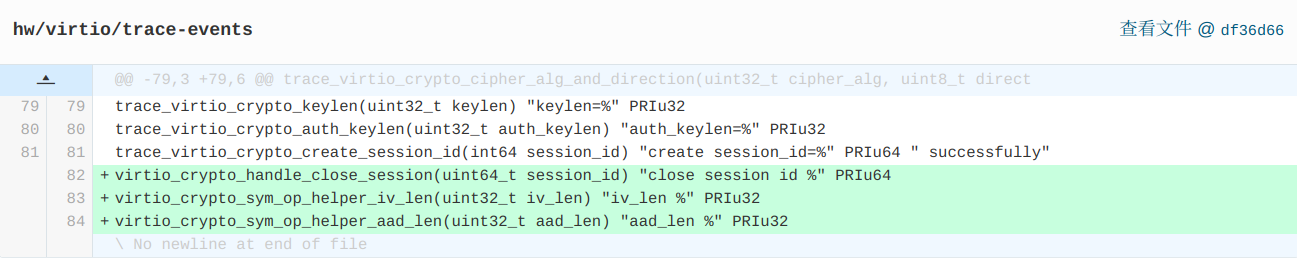
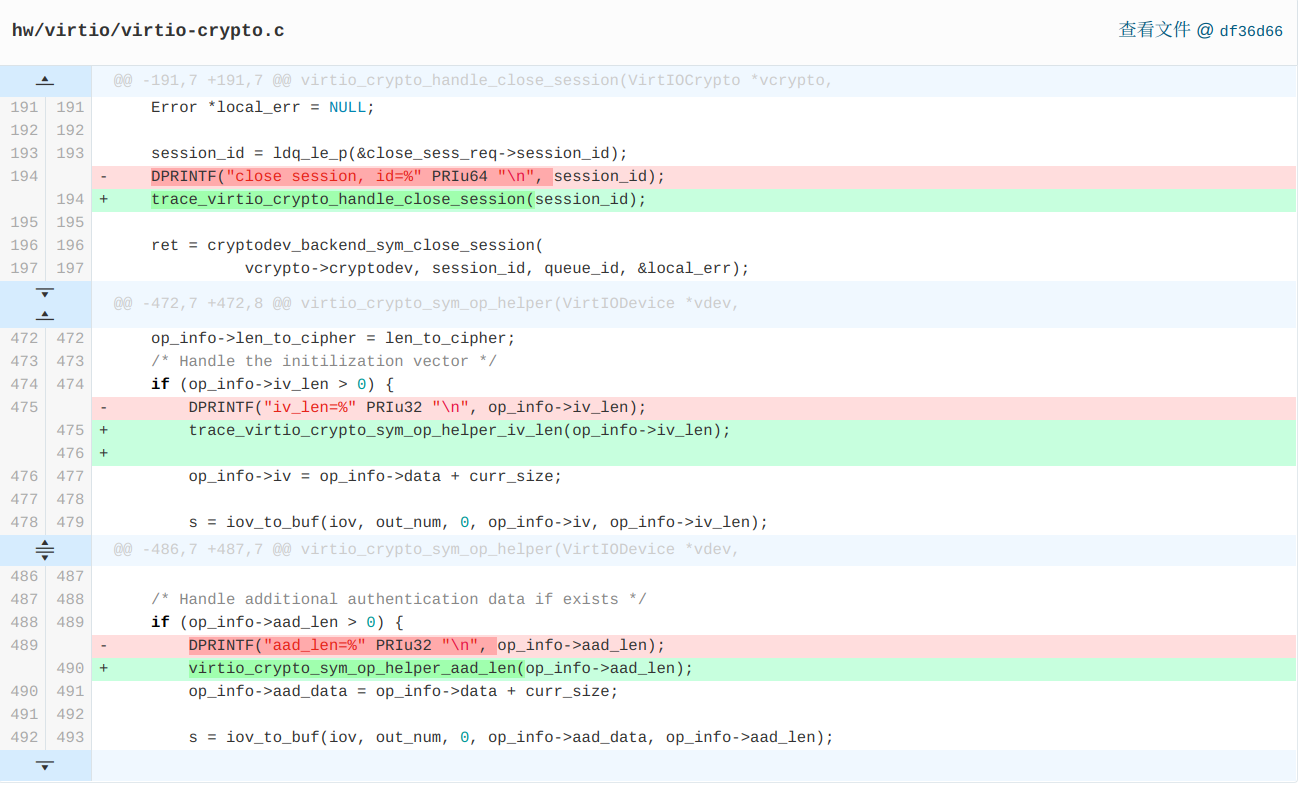
即,将本文件中的第5~7个调试相关的DPRINTF修改为了调用tracepoints
代码修改后经本地测试通过,由组内的其它成员完成持续集成测试和patch的提交。
machine module
在提交patch之后我们继续分析之前的machine模块
void machine_run_board_init(MachineState *machine)
If the machine supports the valid_cpu_types check and the user specified a CPU with -cpu followed by the name of the cpu, qemu will check as follows to ensure that the user CPU is supported:
if (machine_class->valid_cpu_types && machine->cpu_type) {
        ObjectClass *class = object_class_by_name(machine->cpu_type);
        int i;

        for (i = 0; machine_class->valid_cpu_types[i]; i++) {
            if (object_class_dynamic_cast(class,
                                          machine_class->valid_cpu_types[i])) {
                /* The user specificed CPU is in the valid field, we are
                 * good to go.
                 */
                break;
            }
        }

        if (!machine_class->valid_cpu_types[i]) {
            /* The user specified CPU is not valid */
            error_report("Invalid CPU type: %s", machine->cpu_type);
            error_printf("The valid types are: %s",
                         machine_class->valid_cpu_types[0]);
            for (i = 1; machine_class->valid_cpu_types[i]; i++) {
                error_printf(", %s", machine_class->valid_cpu_types[i]);
            }
            error_printf("\n");

            exit(1);
        }
    }
As the code showing above, when qemu finds the cpu user has chosen is not valid, errors will be reported.
In the above codes, MachineClass and machine structures are used again, which we have been analyzed 2 weeks ago.
所有的配置和检查信息结束之后,进入对于特定machine_class的初始化参数配置阶段:
machine_class->init(machine);
在我们的参数里没有指定machine_class,qemu会采用默认的pc-i440fx-5.0,于是便进入到了hw/i386/pc_piix.c文件中的static void pc_init1(MachineState *machine, const char *host_type, const char *pci_type)函数
进行局部变量初始化之后,开始配置ram的大小。
为了更好地理解这部分代码的背景和作用,我找到了实现max-ram-below-4g参数的相关patch:
gitlab.freedesktop.org/spice/qemu/…
This is a pc & q35 only machine opt.
If you add enough PCI devices then all mmio for them will not fit below 4G which may not be the layout the user wanted. This allows you to increase the below 4G address space that PCI devices can use (aka decrease ram below 4G) and therefore in more cases not have any mmio that is above 4G.
For example using "-machine pc,max-ram-below-4g=2G" on the command line will limit the amount of ram that is below 4G to 2G.
Note: this machine option cannot be used to increase the amount of ram below 4G.
下面部分内容十分感谢组内向阳曦同学的帮助。同时借此机会恶补了一下操作系统和计算机组成原理的知识。
首先我们需要对ram的大小进行计算。x86是32位寻址的方式,这意味着其无法访问4G以上的内存空间。但是特殊情况下可以通过PAE物理地址扩展的技术使从总线看来可以访问高于4G的地址:
我们知道,IO设备通过PCI总线与主板连接:
PCI是Peripheral Component Interconnect(外设部件互连标准)的缩写,它是目前个人电脑中使用最为广泛的接口,几乎所有的主板产品上都带有这种插槽。PCI插槽也是主板带有最多数量的插槽类型,在目前流行的台式机主板上,ATX结构的主板一般带有5~6个PCI插槽,而小一点的MATX主板也都带有2~3个PCI插槽,可见其应用的广泛性。
而通过PCI连接主板后,系统便可可以通过直接对内存进读写来控制IO,这种规范叫做MMIO:
MMIO(Memory-mapped I/O)即内存映射I/O,它是PCI规范的一部分,I/O设备被放置在内存空间而不是I/O空间。从处理器的角度看,内存映射I/O后系统设备访问起来和内存一样。这样访问AGP/PCI-E显卡上的帧缓存,BIOS,PCI设备就可以使用读写内存一样的汇编指令完成,简化了程序设计的难度和接口的复杂性。
于是,当target machine上有很多PCI设备时,会导致给PCI设备分配到的内存空间地址高于4G,这会使得32位的PCI设备异常,所以我们需要将其经过MMIO之后的地址空间限制在4G以下。
为了达到这个目标,我们需要限制给ram分配的内存大小。我们可以这样想象:32位的x86将4G以上和4G以下的地址空间分为两个部分管理,4G以下的地址空间通过正常的寻址方式进行寻址,而4G以上地址空间则通过前面提到的PAE方式进行寻址。而为了使PCI设备能够分配到4G以下的地址空间,我们需要降低ram在4G地址空间之下的空间占用大小,比如将其限制为2G,这样就能够使得PCI设备的MMIO不出错。
现在我们来看这段代码:
if (!x86ms->max_ram_below_4g) {
    x86ms->max_ram_below_4g = 0xe0000000; /* default: 3.5G */
}
lowmem = x86ms->max_ram_below_4g;
if (machine->ram_size >= x86ms->max_ram_below_4g) {
    if (pcmc->gigabyte_align) {
        if (lowmem > 0xc0000000) {
            lowmem = 0xc0000000;
        }
        if (lowmem & (1 * GiB - 1)) {
            warn_report("Large machine and max_ram_below_4g "
                        "(%" PRIu64 ") not a multiple of 1G; "
                        "possible bad performance.",
                        x86ms->max_ram_below_4g);
        }
    }
}

if (machine->ram_size >= lowmem) {
    x86ms->above_4g_mem_size = machine->ram_size - lowmem;
    x86ms->below_4g_mem_size = lowmem;
} else {
    x86ms->above_4g_mem_size = 0;
    x86ms->below_4g_mem_size = machine->ram_size;
}
首先,在默认的32位地址分配策略中,低于4G的空间分配3.5G,即max_ram_below_4g = 3.5G
如果用户设置的ram的总大小大于3.5G,为了将地址按照1G对齐,qemu采取的策略是给4G以下的内存空间分配3G,其余分配到4G以上的内存空间去,即源码中以下部分:
if (!x86ms->max_ram_below_4g) {
        x86ms->max_ram_below_4g = 0xe0000000; /* default: 3.5G */
}
lowmem = x86ms->max_ram_below_4g;
if (machine->ram_size >= x86ms->max_ram_below_4g) {
    if (pcmc->gigabyte_align) {
        if (lowmem > 0xc0000000) {
            lowmem = 0xc0000000;
        }
        if (lowmem & (1 * GiB - 1)) {
        warn_report("Large machine and max_ram_below_4g "
                    "(%" PRIu64 ") not a multiple of 1G; "
                    "possible bad performance.",
                    x86ms->max_ram_below_4g);
        }
    }
}
以上部分判断了若4G以下的内存空间还没有分配,则按照默认的策略分配,即安排3.5G的空间。之后将这个大小记在lowmem变量中。之后判断如果target machine的ram_size大于max_ram_below_4g,即需要4G以上的地址空间,且需要按1G对齐内存,则将lowmem改为3G
接下来判断是否对齐,即若用户声明需要地址对齐,但由于内存大小限制无法对齐,给出WARNING。这里使用的判断是对齐的方式非常巧妙,若地址对齐,则1G以下(0-29位)应均为0,此时和做与运算,得到的结果应该为0,否则极为没有对齐。
最后,根据用户的设置分配4G以上的地址空间大小:
if (machine->ram_size >= lowmem) {
    x86ms->above_4g_mem_size = machine->ram_size - lowmem;
    x86ms->below_4g_mem_size = lowmem;
} else {
    x86ms->above_4g_mem_size = 0;
    x86ms->below_4g_mem_size = machine->ram_size;
}
- 若设定的ram大小大于目前
lowmem,需要给4G以上地址空间分配大小,大小为machine->ram_size - lowmem - 若设定ram小于目前
lowmem,则将所有ram空间分配到小于4G的地址空间即可
下周我们将继续分析pc_piix的初始化行为中的x86_cpus_init(x86ms, pcmc->default_cpu_version)
