生命周期函数:(每个组件都存在生命周期函数)
理论:
- init初始化阶段:constructor(state props)
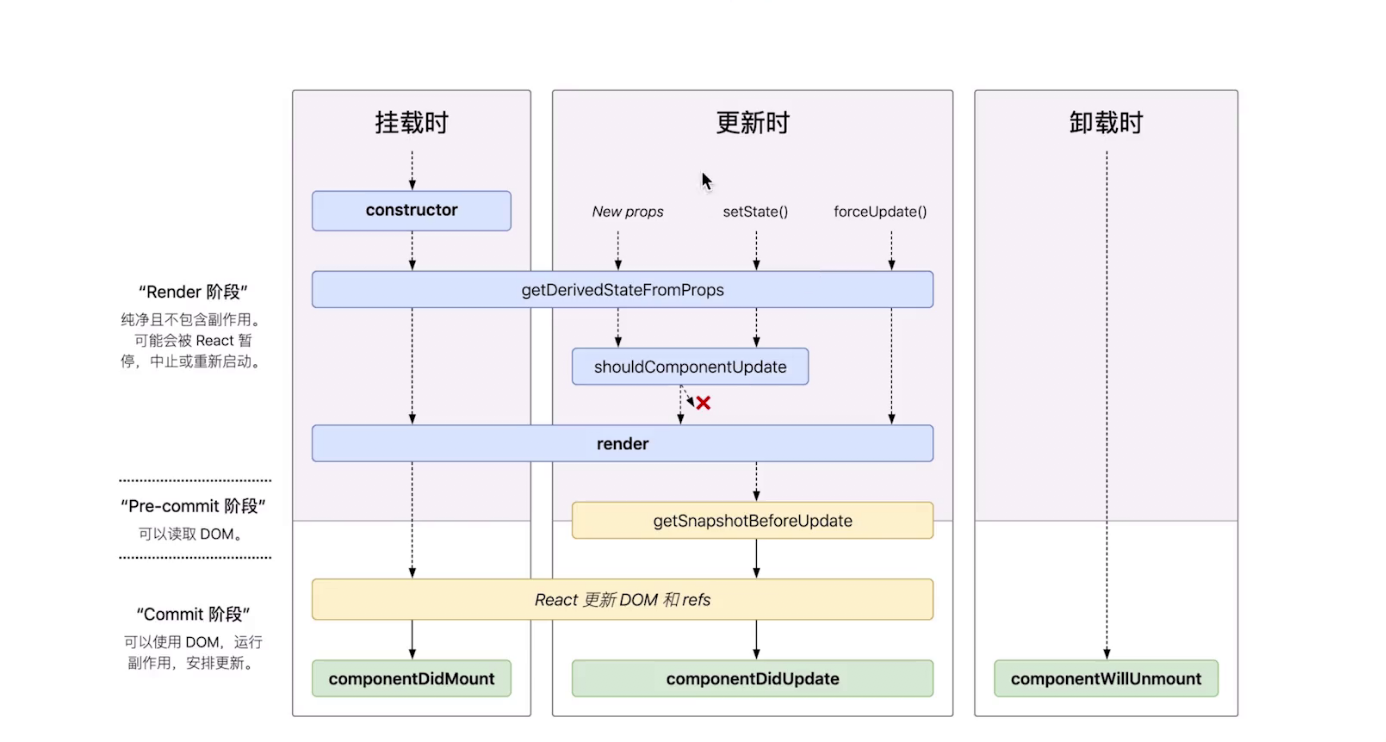
- mounting(挂载):componentWillMount(在组件即将被挂载到页面的时刻自动执行) => render => componentDidMount(组件被挂载到页面之后,自动被执行) dom更新时,只有render会被执行[在index里使用React.StrictMode,会被render两次]
- updation:(1)shouldComponentUpdate(组件被更新之前,会被自动执行==>返回一个布尔值[false:不更新,true:更新]);(2)componentWillUpdate 组件被更新之前,它会被自动执行(在shouldComponentUpdate之后执行==>若shouldComponentUpdate返回true则执行,否则不执行)(3)render ==> 重新渲染(4)componentDidUpdate 组件更新完成之后,会被执行(5)componentWillReceiveProps:(有props的时候才会执行 )当一个组件从父组件接收参数,只要父组件的render函数被【重新】执行了,子组件的这个生命周期函数就会被执行【注意:* (1)如果这个组件第一次存在于父组件中,不会执行* (2)如果这个组件之前已经存在于父组件中,才会执行】
- unmounting:componentWillUnmount 当这个组件即将被从页面中剔除的时候,会被执行
实际应用:
- shouldComponentUpdate:判断组件是否被真正更新 提升子组件性能
- componentDidMount:ajax数据的获取
Redux
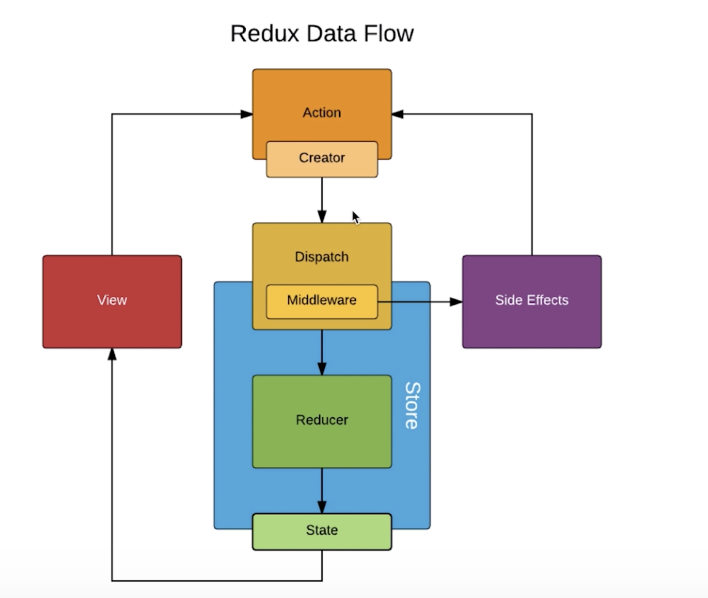
三大原则
- store必须是唯一的
- 只有store能改变自己的内容(并不是在reducer更新的==>是拿到reducer的数据更新自己)
- reducer必须是纯函数(纯函数:给固定的输入。就一定有固定的输出,而且不会有任何的副作用 若存在date或ajax则不是固定输出。不含副作用:不会对传入参数进行修改)
核心api
- createStore:是生成一个 store 对象
- store.dispatch:可以触发传入的action
- store.getState:使得state数据与store里的数据同步
- store.subscribe:在Store更新时执行一些操作(组件去订阅store ,只要store发生改变就会自动执行该函数)
使用chrome的redux插件
import { createStore, compose,applyMiddleware } from 'redux';
import saga from './saga'
const sagaMiddleware = createSagaMiddleware()

const composeEnhancers =  typeof window === 'object' && window.__REDUX_DEVTOOLS_EXTENSION_COMPOSE__
? window.__REDUX_DEVTOOLS_EXTENSION_COMPOSE__({})    : compose;


const enhancer = composeEnhancers(  // applyMiddleware(thunk)
 applyMiddleware(sagaMiddleware)  // other store enhancers if any
);

sagaMiddleware.run(saga)
创建store:
const store = createStore( reducer, enhancer //redux中间件);reducer
import { DELETE_TODO_IT } from './actionTypes';
const defaultState = {  inputValue: '',  list: [],};

export default (state = defaultState, action) => {
if (action.type === CHANGE_INPUT_VALUE) {
 //深拷贝    const newState = JSON.parse(JSON.stringify(state));
  newState.inputValue = action.value;
 return newState;  }
}actionCreate:
export const initListAction = (data) =>({ type:INIT_LIST_VALUE, data})// 使用了thunk之后 才可以使用函数式返回
export const getToDoList = ()=>{
return (dispatch)=>{
axios.get('https://.../api/todolist').then(res=>
{ const data = res.data
const action = initListAction(data)
dispatch(action)
})
}}使用中间件redux-saga
import { takeEvery, put } from 'redux-saga/effects'
import { GET_INIT_LIST } from './actionTypes'
import { initListAction } from './actionCreators'
import axios from 'axios'
function* getInitList() {
try {
const res = yield axios.get('https://.../api/todolist')
 const data = res.data
 const action = initListAction(data)
yield put(action) //等待处理完成
} catch (error) {
 console.log(error);
}
}
// takeEvery:捕抓每一个action的类型
function* mySage() {
 yield takeEvery(GET_INIT_LIST, getInitList)
}
export default mySage
react-redux
index.js:
import {Provider} from 'react-redux' <Provider store={store}>
<App/>
</Provider>存在的副作用
- 绑定事件
- 网络请求
- 访问dom
副作用的时机
- Mount之后 componentDidMount
- 2.Update之后 componentDidUpdate
- 3.Unmount之前 componentWillUnmount
Hook
hooks的优势
- 方便复用状态逻辑 custom hooks
- 副作用的关注点分离
- 函数组件无this问题
useEffect
实现一个hook
function useSize() {
const [size, setSize] = useState({
    width: document.documentElement.clientWidth,
    height: document.documentElement.clientHeight,
});
 useEffect(() => {
  window.addEventListener('resize', onResize, false);
    return () => {
        window.removeEventListener('resize', onResize, false);
      };
    }, []);
    const onResize = useCallback(() => {
        setSize({
            width: document.documentElement.clientWidth,
            height: document.documentElement.clientHeight,
        });
    }, []);
    return size
}
function useCount(defaultCount) {
     const [count, setCount] = useState(() => {
        return defaultCount || 0; //延迟初始化 只会执行一次
     });
    const it = useRef();
    useEffect(() => {
     it.current = setInterval(() => {
        setCount((count) => count + 1);
     }, 1000);  }, []);
    useEffect(() => {
        if (count >= 10) clearInterval(it.current);  });
        return [count, setCount];
}
function useCounter(count) {
    const size = useSize()
    return <h1>{count},{size.width}x{size.height}</h1>; //hook可以返回jsx
}
function App(props) {
const [count, setCount] = useCount(0);
const Counter = useCounter(count);
const size = useSize()
return (
<div>
<button onClick={() => { setCount(count + 1);}}> add </button>
<p>click:({count})</p>
{Counter},{size.width}x{size.height}
</div> );
}errorBoundary 错误边界
捕获组件报错(componentDidCatch):
constructor(props) {
    super(props);
    this.state = {
    hasError: false,
    };
}
componentDidCatch() {
    console.log('componentDidCatch');
    this.setState(() => {
        return {
            hasError: true
         };
     });
}
lazy & Suspense
lazy 是 react 提供的组件懒加载的能力:React.lazy接受一个函数,这个函数内部调用import()动态导入。它必须返回一个Promise,该Promise需要resolve一个defalut export的React组件。
const About = lazy(() => import(/* webpackChunkName: "about" */ './About.jsx'));实现一个lazy加载的component:
 render() {
    if (this.state.hasError) {
      return <div>error</div>;
    }
    else {
     return (
        <div>
            <Suspense fallback={<div>loading</div>}>
                 <About></About>
            </Suspense>
        </div>
      );
    }
}}
Context
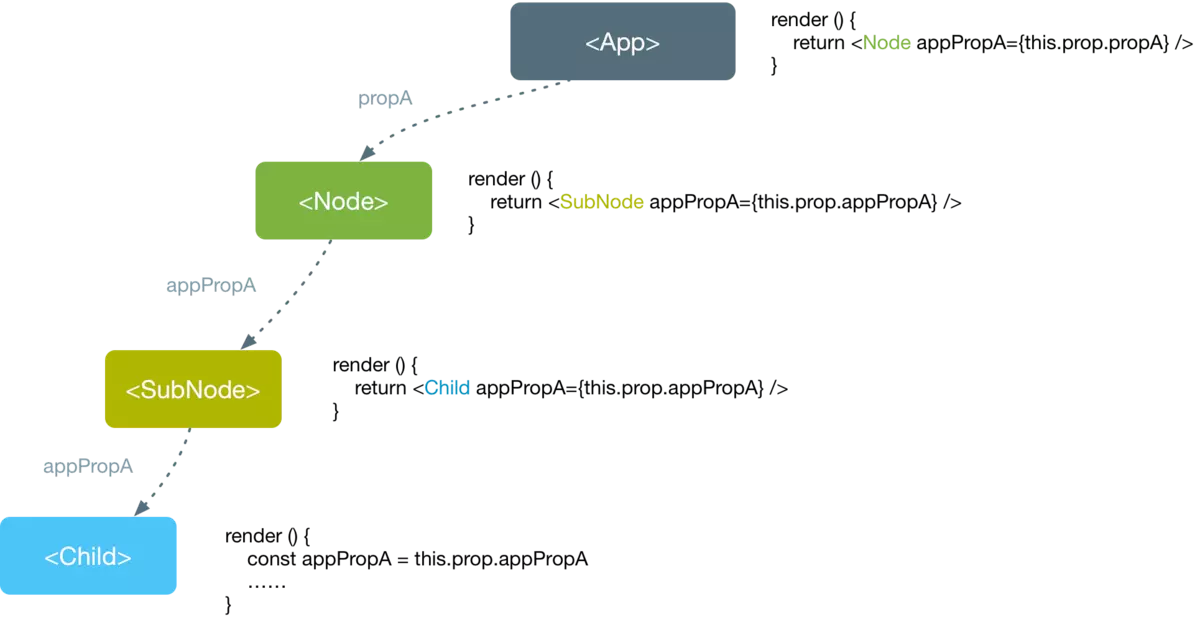
Context提供了一种方式,能够让数据在组件🌲中传递而不必一级一级手动传递
provider & consumer:
 render() {
    const { battery, online } = this.state;
    return (
         <BatteryContext.Provider value={battery}>
             <OnlineContext.Provider value={online}>
                <button onClick={() => this.setState({ battery: battery - 1 })}>add</button>
                <button onClick={() => this.setState({ online: !online })}> switch</button>
                <Middle />
             </OnlineContext.Provider>
         </BatteryContext.Provider>    );
}}

class Middle extends Component {  render() {    return <Leaf />;  }}
看起来没有那么优美的consumer
class Leaf extends Component {render() {
     return (
         <BatteryContext.Consumer>
            {(battery) => (
                <OnlineContext.Consumer>{(online) => (
                     <h1> battery:{battery},Online:{String(online)} </h1>
                   )}
                </OnlineContext.Consumer>
            )}
        </BatteryContext.Consumer>
    );
 }}
createContext:
创建一个context对象: 组件会向组件所处的树中距离最近的那个Provider进行匹配context。当组件所处的树没有匹配到Provider (不使用Provider组件) 时,defaultValue参数才会生效。
cont TextContext = React.createContext(defaultValue);
看起来比较优雅的comsumer
const BatteryContext = createContext();
const OnlineContext = createContext();

class Leaf extends Component {
    static contextType = BatteryContext;
    render() {
        const battery = this.context
        return (
            <h1>battery:{battery}</h1>
        );
     }
}
memo:控制何时重新渲染组件
组件仅在它的 props 发生改变的时候进行重新渲染。通常来说,在组件树中 React 组件,只要有变化就会走一遍渲染流程。但是通过 PureComponent 和 React.memo(),我们可以仅仅让某些组件进行渲染。
const Foo2 = memo(function Foo2(props) {
    console.log('foo2 render');
    return <div>{props.person.age}</div>  //防止无意义的重新渲染
    }
)
const Foo2 = React.memo(props => {
return <div>Foo2</div>;
});
由于 React.memo() 是一个高阶组件,你可以使用它来包裹一个已有的 functional component
const Foo1 = props => <div>this is foo1</div>;
const Foo2 = React.memo(Foo1);
PureComponent
引用:https://www.jianshu.com/p/c41bbbc20e65
PureComponent通过prop和state的浅比较来实现shouldComponentUpdate,某些情况下可以用PureComponent提升性能
浅比较(shallowEqual)
即react源码中的一个函数,然后根据下面的方法进行是不是PureComponent的判断,帮我们做了本来应该我们在shouldComponentUpdate中做的事情
if (this._compositeType === CompositeTypes.PureClass) {
  shouldUpdate = !shallowEqual(prevProps, nextProps) || ! shallowEqual(inst.state, nextState);
}
Component的处理方式
  shouldComponentUpdate(nextProps, nextState) {
    return (nextState.person !== this.state.person);
  }
来说一个🌰:
class IndexPage extends PureComponent{
  this.state = {
      arr:['1']
    };
 changeState = () => {
    let { arr } = this.state;
    arr.push('2');
    console.log(arr);
    // ["1", "2"]
    // ["1", "2", "2"]
    // ["1", "2", "2", "2"]
    // ....
    this.setState({
      arr
    })
  };
render() {
    console.log('render');
    return (
      <div>
        <button onClick={this.changeState}>点击</button>
      </div>
    <div>
        {this.state.arr.map((item) => {
              return item;
            })
        }
        </div>    );
  }}
这个组件是继承自PureComponent,初始化依旧是输出constructor和render,但是当点击按钮时,界面上没有变化,也没有输出render,证明没有渲染。
可以从下面的注释中看到,每点击一次按钮,我们想要修改的arr的值已经改变,而这个值将去修改this.state.arr,但因为在PureComponent中浅比较这个数组的引用没有变化,所以没有渲染,this.state.arr也没有更新。在this.setState()以后,值是在render的时候更新的。
Component的时候,初始化依旧是输出constructor和render。当点击按钮时,界面上出现了变化,即我们打印处理的arr的值输出,而且每点击一次按钮都会输出一次render,证明已经重新渲染,this.state.arr的值已经更新,所以我们能在界面上看到这个变化。✨用扩展运算符产生新数组,使this.state.arr的引用发生了变化。初始化的时候输出constructor和render后,每次点击按钮都会输出render,界面也会变化。不管该组件是继承自Component还是PureComponent。
changeState = () => {
    let { arr } = this.state;
    this.setState({
      arr: [...arr, '2']
})PureComponent:不仅会影响本身,同时也会影响子组件==>
PureComponent最佳情况是展示组件
useEffect
✨默认情况下,它在第一次渲染之后和每次更新之后都会执行
没有使用useEffect的class:
class App extends Component {
    state = {
        count: 0,
        size:{
            width:document.documentElement.clientWidth,
            height:document.documentElement.clientHeight
        }
    };
最好使用类属性的方法声明 可以确保this的指向!! 或使用:@bind() ==>最好的方案
onResize = () => {
this.setState({
size:{
width:document.documentElement.clientWidth,
height:document.documentElement.clientHeight
}
})
}; componentDidMount() {
document.title = this.state.count;
window.addEventListener('resize', this.onResize, false);
}
componentWillUnmount() {
window.removeEventListener('resize', this.onResize, false);
}
componentDidUpdate() {
document.title = this.state.count;
}
render() {
const { count,size } = this.state;
return (
<div> <button onClick={() => {
this.setState({ count: count + 1 }); }}> add </button>
<p>click:({count})</p>
<h5>{size.width} {size.height}</h5>
</div>
);
}
}使用useState & useEffect:
  const [count, setCount] = useState(() => {
    console.log('init count');
    return props.defaultCount || 0; //延迟初始化 只会执行一次
 });
const [size, setSize] = useState({
width: document.documentElement.clientWidth,
height: document.documentElement.clientHeight,
});
const onResize = ()=>{
setSize({
width: document.documentElement.clientWidth,
height: document.documentElement.clientHeight,
})
}useEffect:分开处理不同的事件 互不干扰
  useEffect(() => {
    console.log('count',count);
  },[count]);//size的改变并不会触发该useEffect
视图销毁之前执行 有两种情况:1. 重新渲染 2. 组件卸载
  useEffect(() => {
     window.addEventListener('resize', onResize, false);
     return ()=>{
        window.removeEventListener('resize', onResize, false);
     }
},[]);//避免重复绑定与解绑 只会执行一次
🐶other:
被async包裹的函数会返回一个promise对象,但是effect hook应当return nothing or a clean up function,因此会收到警告⚠️。所以async只能间接使用:
useEffect(() => {
    const getData = async () => {
      const result = await axios(
        'https://...',
      );
      setData(result.data);
    };
    getData();  }, []);
useCallback:
useCallback本质上是添加了一层依赖检查。它解决了每次渲染都不同的问题,我们可以使函数本身只在需要的时候才改变。
  const onClick = useCallback(() => {
    console.log('click');
    // setClickCount((clickCount)=>clickCount + 1)
    console.log(couterRef.current);
    couterRef.current.speck(); //利用ref去获取组件的值
}, [couterRef]); //等价于usecallback
在useEffect里请求数据⚠️
引用:www.jianshu.com/p/7813d0c2a…
const useDataApi = (initialUrl, initialData) => {
  const [data, setData] = useState(initialData);
  const [url, setUrl] = useState(initialUrl);
  const [isLoading, setIsLoading] = useState(false);
  const [isError, setIsError] = useState(false);
  useEffect(() => {
    const fetchData = async () => {
      setIsError(false);
      setIsLoading(true);
      try {
        const result = await axios(url);
        setData(result.data);
      } catch (error) {
        setIsError(true);
      }
      setIsLoading(false);
    };
    fetchData();
  }, [url]);
  return [{ data, isLoading, isError }, setUrl];
};
function App() {
  const [query, setQuery] = useState('redux');
  const [{ data, isLoading, isError }, doFetch] = useDataApi(
    'https://hn.algolia.com/api/v1/search?query=redux',
    { hits: [] },
  );
  return (<div>...</div>)
}
useReducer:
参考:www.jianshu.com/p/14e429e29…
useReducer 接受一个 reducer 函数作为参数,reducer 接受两个参数一个是 state 另一个是 action 。然后返回一个状态 count 和 dispath,count 是返回状态中的值,而 dispatch 是一个可以发布事件来更新 state 的。
import React,{useReducer} from 'react'

export default function ReducerDemo() {
    const [count, dispath] = useReducer((state,action)=> {
        //...
    }, 0);
    return (
        <div>
            <h1 className="title">{count}</h1>
        </div>
    )
}
👀一个🌰:
import React,{useReducer} from 'react'

export default function ReducerDemo() {
    const [count, dispath] = useReducer((state,action)=> {
       switch(action){
           case 'add':
                return state + 1;
            case 'sub':
                return state - 1;
            default:
                return state;
       }
    }, 0);
    return (
        <div>
            <h1 className="title">{count}</h1>
            <button className="btn is-primary"
                onClick={()=> dispath('add')}
                >Increment</button>
            <button className="btn is-warnning"
                onClick={()=> dispath('sub')}
                >Decrement</button>
        </div>
    )
}关于state:不能再原有的state上进行修改,需要重新copy一个。(Immutable:每次都返回一个newState)
✨对action的理解:
用来表示触发的行为,一个常规的Action对象通常有type和payload(可选)组成:
- type: 本次操作的类型,也是 reducer 条件判断的依据。(用type来表示具体的行为类型(登录、登出、添加用户、删除用户等)
- payload: 提供操作附带的数据信息(如增加书籍,可以携带具体的book信息)
    const action = {
        type: 'addBook',
        payload: {
            book: {
                bookId,
                bookName,
                author,
            }
        }
    }
    function bookReducer(state, action) {
        switch(action.type) {
            // 添加一本书
            case 'addBook':
                const { book } = action.payload;
                return {
                    ...state,
                    books: {
                        ...state.books,
                        [book.bookId]: book,
                    }
                };
            case 'sub':
                // ....
            default:
                return state;
        }
    }
实现一个useReducer版的login:
参考:www.jianshu.com/p/566f0d79c…
const initState = {
        name: '',
        pwd: '',
        isLoading: false,
        error: '',
        isLoggedIn: false,
 }
    function loginReducer(state, action) {
        switch(action.type) {
            case 'login':
                return {
                    ...state,
                    isLoading: true,
                    error: '',
                }
            case 'success':
                return {
                    ...state,
                    isLoggedIn: true,
                    isLoading: false,
                }
            case 'error':
                return {
                    ...state,
                    error: action.payload.error,
                    name: '',
                    pwd: '',
                    isLoading: false,
                }
            default:
                return state;
        }
    }
   function LoginPage() {
        const [state, dispatch] = useReducer(loginReducer, initState);
        const { name, pwd, isLoading, error, isLoggedIn } = state;
        const login = (event) => {
            event.preventDefault();
            dispatch({ type: 'login' });
            login({ name, pwd })
                .then(() => {
                    dispatch({ type: 'success' });
                })
                .catch((error) => {
                    dispatch({
                        type: 'error'
                        payload: { error: error.message }
                    });
                });
        }
        return (
            //  返回页面JSX Element
        )
    }
使用reducer的场景:
state是一个数组或者对象state变化很复杂,经常一个操作需要修改很多state- 希望构建自动化测试用例来保证程序的稳定性
- 需要在深层子组件里面去修改一些状态
- 应用程序比较大,希望UI和业务能够分开维护
useContext
Context的作用就是对它所包含的组件树提供全局共享数据的一种技术1.创建需要共享的context
const ThemeContext = React.createContext('light');
2.使用 Provider 提供 ThemeContext 的值,Provider所包含的子树都可以直接访问ThemeContext的值
class App extends React.Component {
  render() {
    return (
      <ThemeContext.Provider value="dark">
        <Toolbar />
      </ThemeContext.Provider>
    );
  }
}
3.Toolbar 组件并不需要透传 ThemeContext
function Toolbar(props) {
  return (
    <div>
      <ThemedButton />
    </div>
  );
}
4.使用共享 Context
function ThemedButton(props) {
  const theme = useContext(ThemeContext);
  render() {
    return <Button theme={theme} />;
  }
}
useContext版login
引用:www.jianshu.com/p/eddb25cda…
 // 定义初始化值
    const initState = {
        name: '',
        pwd: '',
        isLoading: false,
        error: '',
        isLoggedIn: false,
    }
    // 定义state[业务]处理逻辑 reducer函数
    function loginReducer(state, action) {
        switch(action.type) {
            case 'login':
                return {
                    ...state,
                    isLoading: true,
                    error: '',
                }
            case 'success':
                return {
                    ...state,
                    isLoggedIn: true,
                    isLoading: false,
                }
            case 'error':
                return {
                    ...state,
                    error: action.payload.error,
                    name: '',
                    pwd: '',
                    isLoading: false,
                }
            default:
                return state;
        }
    }
    // 定义 context函数
    const LoginContext = React.createContext();
    function LoginPage() {
        const [state, dispatch] = useReducer(loginReducer, initState);
        const { name, pwd, isLoading, error, isLoggedIn } = state;
        const login = (event) => {
            event.preventDefault();
            dispatch({ type: 'login' });
            login({ name, pwd })
                .then(() => {
                    dispatch({ type: 'success' });
                })
                .catch((error) => {
                    dispatch({
                        type: 'error'
                        payload: { error: error.message }
                    });
                });
        }
        // 利用 context 共享dispatch
        return (
            <LoginContext.Provider value={{dispatch}}>
                <...>
                <LoginButton />
            </LoginContext.Provider>
        )
    }
    function LoginButton() {
        // 子组件中直接通过context拿到dispatch,触发reducer操作state
        const dispatch = useContext(LoginContext);
        const click = () => {
            if (error) {
                // 子组件可以直接 dispatch action
                dispatch({
                    type: 'error'
                    payload: { error: error.message }
                });
            }
        }
    }
可以看到在useReducer结合useContext,通过context把dispatch函数提供给组件树中的所有组件使用,而不用通过props添加回调函数的方式一层层传递。
使用Context相比回调函数的优势:
- 对比回调函数的自定义命名,Context的Api更加明确,我们可以更清晰的知道哪些组件使用了dispatch、应用中的数据流动和变化。这也是React一直以来单向数据流的优势。
- 更好的性能:如果使用回调函数作为参数传递的话,因为每次render函数都会变化,也会导致子组件rerender。【当然我们可以使用useCallback解决这个问题,但相比
useCallbackReact官方更推荐使用useReducer,因为React会保证dispatch始终是不变的,不会引起consumer组件的rerender。】
总结:
- 页面
state很简单:可以直接使用useState - 页面
state比较复杂(state是一个对象或者state非常多散落在各处):userReducer - 页面组件层级比较深,并且需要子组件触发
state的变化:useReducer + useContext