案例1.地图上鼠标移到点标记显示信息,移除隐藏信息
效果图
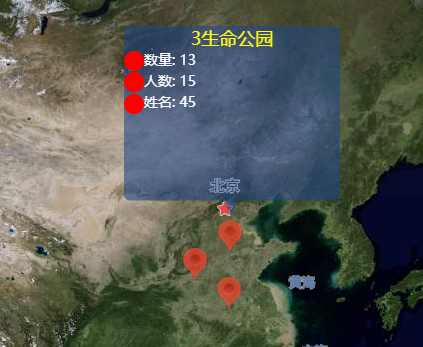
实现
<!DOCTYPE html>
<html lang="en">
<head>
<meta charset="UTF-8">
<meta name="viewport" content="width=device-width, initial-scale=1.0">
<meta http-equiv="X-UA-Compatible" content="ie=edge">
<title>Document</title>
<style>
html, body,
height: 100%;
width: 100%;
}
.amap-info{
width: 216px;
height: 189px;
background: url(./img/tip_box.png) no-repeat;
}
.amap-info>div{
top: 0;
width: 100%;
height: 100%;
}
.title{
font-size: 18px;
color:
text-align: center;
}
.info-text .raduis{
display: inline-block;
width: 20px;
height: 20px;
text-align: center;
vertical-align: middle;
border-radius: 50%;
background: red;
}
.info-text{
color:
font-size: 14px;
}
</style>
</head>
<body>
<div id="container" class="map" tabindex="0"></div>
</body>
<script type="text/javascript" src="https://webapi.amap.com/maps?v=1.4.15&key=您申请的key值"></script>
<script>
var map = new AMap.Map('container', {
zoom: 4,
center: [102.342785, 35.312316],
resizeEnable: true,
})
var satelliteLayer = new AMap.TileLayer.Satellite() // 卫星图层
map.add(satelliteLayer) // 添加卫星图层,不添加就是标准图层(如果要两个一起(卫星图层和标准图层)可以点击事件触发map.add(satelliteLayer)删除用map.remove(satelliteLayer))
var citys = [
{lnglat: [116.218446, 34.676622], name: '1生命公园', num: 10, count: 15, cou: 45},
{lnglat: [113.223446, 36.686622], name: '2生命公园', num: 12, count: 15, cou: 45},
{lnglat: [116.232446, 38.666622], name: '3生命公园', num: 13, count: 15, cou: 45}
]
var mass = new AMap.MassMarks(citys, {
opacity: 0.8,
zIndex: 111,
cursor: 'pointer',
style: { // mass.setStyle(style)
url: './img/locatino_small.png', // 定位图标
anchor: new AMap.Pixel(6, 6),
size: new AMap.Size(25, 34)
}
})
mass.setMap(map)
mass.on('mouseover', e => { // AMap.event.addListener(mass, 'mouseover', e => {})
infoWindow = new AMap.InfoWindow({
isCustom: true, // 使用自定义窗体
content: `
<div class="title">${e.data.name}</div>
<div class="info-text">
<div class="raduis"></div>数量: ${e.data.num}
</div>
<div class="info-text">
<div class="raduis"></div>人数: ${e.data.count}
</div>
<div class="info-text">
<div class="raduis"></div>姓名: ${e.data.cou}
</div>
`,
offset: new AMap.Pixel(8, -200) // 弹窗偏移位置(弹窗位置会根据content内容变动,先把内容写完再调试弹窗位置细节)
})
infoWindow.open(map, [e.data.lnglat.lng, e.data.lnglat.lat])
})
mass.on('mouseout', e => {
if (infoWindow) infoWindow.close() // 关闭弹窗
})
</script>
</html>
去除高德地图logo下标和版本号
.amap-logo{
  display: none !important;
}
.amap-copyright{
  opacity:0;
}