Mac环境MySQL安装
1. MySQL安装
1.1 软件下载
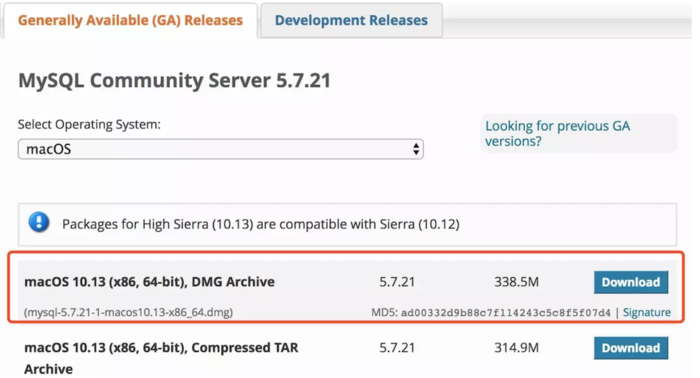

1.2 解压及安装
tar -zxvf mysql-5.7.21-macos10.13-x86_64.tar.gz
sudo mv mysql-5.7.21-macos10.13-x86_64 /usr/local
sudo ln -s /usr/local/mysql-5.7.21-macos10.13-x86_64 /usr/local/mysql
#
vim /etc/profile
export PATH=/usr/local/mysql/bin:$PATH
source /etc/profile
1.3 配置
vim /etc/my.cnf
#version: MySQL5.7.21

[mysqld]
basedir=/usr/local/mysql
datadir=/data1/mysql_3306
socket=/tmp/mysql3306.sock

port = 3306
user = mysql
server_id=2552553306

#report-host = 127.0.0.1
#report-port = 3306
skip-external-locking
sql_mode = "STRICT_TRANS_TABLES,NO_ENGINE_SUBSTITUTION,NO_ZERO_DATE,NO_ZERO_IN_DATE,ERROR_FOR_DIVISION_BY_ZERO,NO_AUTO_CREATE_USER"
autocommit = 1
explicit_defaults_for_timestamp = 1
max_allowed_packet = 32M
event_scheduler = 1
character_set_server = utf8
collation_server = utf8_general_ci
transaction_isolation = REPEATABLE-READ


# connection #
# interactive_timeout = 1800
# wait_timeout = 1800
# lock_wait_timeout = 1800
# skip_name_resolve = 1
# max_connections = 512
# max_connect_errors = 1000000

#thread pool
##thread_handling = pool-of-threads
##thread_pool_oversubscribe = 10
#
# log settings #
log_error = error.log
slow_query_log = 1
slow_query_log_file = mysql-slow
log_queries_not_using_indexes = 1
log_slow_admin_statements = 1
log_slow_slave_statements = 1
log_throttle_queries_not_using_indexes = 10
long_query_time = 2
min_examined_row_limit = 100
binlog-rows-query-log-events = 1
log-bin-trust-function-creators = 1

expire-logs-days = 30
#initialize_insecure = 0
##read_only = 1
log-slave-updates = 1
gtid_mode = ON
enforce_gtid_consistency = ON

log-bin=mysql-bin
relay-log=relay-bin
binlog_format = ROW
sync_binlog = 1
binlog_rows_query_log_events = 1
#relay_log_recovery = 1
#slave_skip_errors = ddl_exist_errors
#slave-rows-search-algorithms = 'INDEX_SCAN,HASH_SCAN'

#query_cache_type = 0
#query_cache_size = 0

table_definition_cache = 4096
table_open_cache = 4096
table_open_cache_instances = 64

skip-name-resolve
skip-slave-start
back_log = 100
max_connections = 1000
max_connect_errors = 100000
max_allowed_packet = 16M
binlog_cache_size = 16M
binlog_stmt_cache_size = 16M
max_heap_table_size = 256M
tmp_table_size = 256M
thread_cache_size = 256
ft_min_word_len = 4
thread_stack = 192K
long_query_time = 2
tmpdir = /tmp

key_buffer_size = 64M
sort_buffer_size = 16M
read_buffer_size = 16M
join_buffer_size = 16M
read_rnd_buffer_size = 16M
bulk_insert_buffer_size = 16M
default_tmp_storage_engine = InnoDB
# innodb settings #
innodb_page_size = 16384
innodb_buffer_pool_size = 1G
innodb_buffer_pool_instances = 16
innodb_buffer_pool_load_at_startup = 1
innodb_buffer_pool_dump_at_shutdown = 1
innodb_lru_scan_depth = 4096
innodb_lock_wait_timeout = 120
innodb_io_capacity = 10000
innodb_io_capacity_max = 20000
innodb_flush_method = O_DIRECT
innodb_file_format = Barracuda
innodb_file_format_max = Barracuda
innodb_undo_logs = 128
innodb_undo_tablespaces = 3
innodb_flush_neighbors = 0
#innodb_log_file_size = 512M
#innodb_log_files_in_group = 3
innodb_log_file_size = 256M
innodb_log_files_in_group = 2
innodb_log_buffer_size = 16M
innodb_purge_threads = 4
innodb_large_prefix = 1
innodb_thread_concurrency = 32
innodb_print_all_deadlocks = 1
innodb_strict_mode = 1
innodb_sort_buffer_size = 67108864
innodb_write_io_threads = 16
innodb_read_io_threads = 16
innodb_file_per_table = 1
innodb_stats_persistent_sample_pages = 64
innodb_autoinc_lock_mode = 2
innodb_online_alter_log_max_size=32G
innodb_open_files=32768

#[mysqld-5.7]
# new innodb settings #
loose_innodb_numa_interleave=1
innodb_buffer_pool_dump_pct = 40
innodb_page_cleaners = 16
innodb_undo_log_truncate = 1
innodb_max_undo_log_size = 2G
innodb_purge_rseg_truncate_frequency = 128
# new replication settings #
slave-parallel-type = LOGICAL_CLOCK
slave-parallel-workers = 16
slave_preserve_commit_order=1
slave_transaction_retries=128
# other change settings #
binlog_gtid_simple_recovery=1
log_timestamps=system
show_compatibility_56=on

[mysql]
no-auto-rehash
prompt = "\\u@\\h : \\d > "
default-character-set=utf8
socket = /tmp/mysql3306.sock

[mysqld_safe]
log-error=/data1/mysql_3306/mysqld.err
pid-file=/data1/mysql_3306/mysqld.pid
#malloc-lib=/usr/lib64/libjemalloc.so.1
说明: 配置没有优化,参考网上MySQL5.7配置只是把内存调小了。
innodb_buffer_pool_size = 16G
innodb_log_file_size = 512M
innodb_log_files_in_group = 3
1.4 初始化
切换到root用户进行初始化。
sudo su - root
#bin/mysqld --initialize --user=mysql --basedir=/usr/local/mysql --datadir=/usr/local/mysql/data
#bin/mysqld --initialize-insecure --user=mysql --basedir=/usr/local/mysql --datadir=/usr/local/mysql/data
bin/mysqld --initialize-insecure --user=mysql --basedir=/usr/local/mysql --datadir=/data1/mysql_3306
cp /etc/my.cnf /data1/mysql_3306/my3306.cnf

#修改属性
sudo chown -R mysql /data1/mysql_3306
1.5 启动
cd /usr/local/mysql && ./bin/mysqld_safe --defaults-file=/data1/mysql_3306/my3306.cnf &
1.6 授权
create user admin@'localhost';
GRANT ALL PRIVILEGES ON *.* TO 'admin'@'localhost' IDENTIFIED BY '123456' with grant option;
GRANT ALL PRIVILEGES ON *.* TO 'admin'@'127.0.0.1' IDENTIFIED BY '123456' with grant option;
GRANT SELECT, PROCESS, REPLICATION CLIENT,SUPER ON *.* TO 'db_monitor'@'127.0.0.1' IDENTIFIED BY '123456';
GRANT SUPER,REPLICATION CLIENT, REPLICATION SLAVE ON *.* TO 'repl'@'10.%' IDENTIFIED 'repl123';
flush privileges;
select user,host,authentication_string from mysql.user;
2. Redis安装
wget 'http://download.redis.io/releases/redis-4.0.14.tar.gz' .

tar -zxvf redis-4.0.14.tar.gz
cd redis-4.0.14
make -j 8 MALLOC=jemalloc
make test
sudo make install PREFIX=/usr/local/redis-4.0.14
find src/* -perm 755 -print  |xargs -I {}  sudo /bin/cp -r {} /usr/local/redis-4.0.14/bin/  #mac
#find src/ -perm 755 -print | xargs -I /bin/cp {} /usr/local/redis-4.0.14/bin/  #linux
/bin/cp README.md redis.conf utils /usr/local/redis-4.0.14/
/bin/cp runtest* sentinel.conf /usr/local/redis-4.0.14/
#vim /usr/local/redis-4.0.14/utils/redis_init_script
3. Mongo安装
#待补充