前言 本篇文章主要介绍 Spring IoC 容器怎么加载 bean 的定义元信息。
下图是一个大致的流程图:
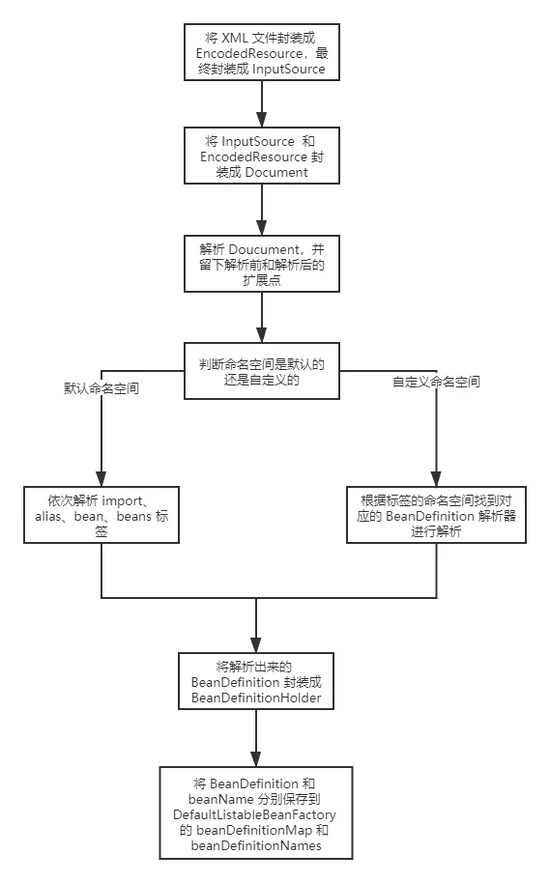
第一次画图,画的有点烂。:joy:
正文 首先定义一个简单的 POJO,如下:
public class User {
private Long id;
private String name;

public Long getId() {
	return id;
}

public void setId(Long id) {
	this.id = id;
}

public String getName() {
	return name;
}

public void setName(String name) {
	this.name = name;
}

@Override
public String toString() {
	return "User{" +
			"id=" + id +
			", name='" + name + '\'' +
			'}';
}
} 再编写一个 XML 文件。
<bean id="user" class="com.leisurexi.ioc.domain.User">
	<property name="id" value="1"/>
	<property name="name" value="leisurexi"/>
</bean>
@Test public void test(){ DefaultListableBeanFactory beanFactory = new DefaultListableBeanFactory(); XmlBeanDefinitionReader reader = new XmlBeanDefinitionReader(beanFactory); reader.loadBeanDefinitions("META-INF/spring-bean.xml"); User user = beanFactory.getBean("user", User.class); System.out.println(user); } 上面这段代码比较简单,无非就是声明 bean 工厂,然后通过指定的 XML 文件加载 bean 的定义元信息,最后通过 bean 工厂获取 bean 。
DefaultListableBeanFactory 首先我们来了解一下 DefaultListableBeanFactory ,下面是该类的类图及层次结构。
AliasRegistry: 定义对 alias 的简单增删改等操作。 SimpleAliasRegistry: 主要使用 map 作为 alias 的缓存,并对接口 AliasRegistry 进行实现。 SingletonBeanRegistry: 定义了对单例 bean 的注册及获取。 BeanFactory: 定义获取单个 bean 及 bean 的各种属性。 DefaultSingletonBeanRegistry: 对接口 SingletonBeanRegistry 各函数的实现。 HierarchicalBeanFactory: 继承 BeanFactory ,也就是在 BeanFactory 定义的功能的基础上增加了对 parentBeanFactory 的支持。 BeanDefinitionRegistry: 定义了对 BeanDefinition 的各种增删改操作。 FactoryBeanRegistrySupport: 在 DefaultSingletonBeanRegistry 基础上增加了对 FactoryBean 的特殊处理功能。 ConfigurableBeanFactory: 提供配置 BeanFactory 的各种方法。 ListableBeanFactory: 继承 BeanFactory 提供了获取多个 bean 的各种方法。 AbstractBeanFactory: 综合 FactoryBeanRegistrySupport 和 ConfigurableBeanFactory 的功能。 AutowireCapableBeanFactory: 提供创建 bean 、自动注入、初始化以及应用 bean 的后处理器。 AbstractAutowireCapableBeanFactory: 综合 AbstractBeanFactory 并对接口 AutowireCapableBeanFactory 进行实现。 ConfigurableListableBeanFactory: BeanFactory 配置清单,指定忽略类型及接口等。 DefaultListableBeanFactory: 综合上面所有功能,主要是对 bean 注册后的处理。 可以看到上面的接口大多数是定义了一些功能或在父接口上扩展了一些功能, DefaultListableBeanFactory 实现了所有接口,大多数默认情况下我们所使用的 beanFactory 就是 DefaultListableBeanFactory 。
1.AbstractBeanDefinitionReader#loadBeanDefinitions 方法 public int loadBeanDefinitions(String location, @Nullable Set actualResources) throws BeanDefinitionStoreException { // 获取 resourceLoader,这边是 PathMatchingResourcePatternResolver ResourceLoader resourceLoader = getResourceLoader(); if (resourceLoader == null) { throw new BeanDefinitionStoreException("Cannot load bean definitions from location [" + location + "]: no ResourceLoader available"); } // 判断 resourceLoader 是否是 ResourcePatternResolver,我们这边是符合的 if (resourceLoader instanceof ResourcePatternResolver) { // Resource pattern matching available. try { // 根据路径获取所欲符合的配置文件并封装成 Resource 对象 Resource[] resources = ((ResourcePatternResolver) resourceLoader).getResources(location); // 根据 Resource 加载 bean definition,并返回数量,见下面详解 int count = loadBeanDefinitions(resources); if (actualResources != null) { Collections.addAll(actualResources, resources); } if (logger.isTraceEnabled()) { logger.trace("Loaded " + count + " bean definitions from location pattern [" + location + "]"); } return count; } catch (IOException ex) { throw new BeanDefinitionStoreException( "Could not resolve bean definition resource pattern [" + location + "]", ex); } } else { // Can only load single resources by absolute URL. // 只能通过绝对路径加载单个资源 Resource resource = resourceLoader.getResource(location); // 根据 Resource 加载 bean definition,并返回数量,见下面详解 int count = loadBeanDefinitions(resource); if (actualResources != null) { actualResources.add(resource); } if (logger.isTraceEnabled()) { logger.trace("Loaded " + count + " bean definitions from location [" + location + "]"); } return count; } } 上面方法主要是将资源文件转换为 Resource 对象,然后调用 loadBeanDefinitions(Resource...) 加载 BeanDefinition 。
public int loadBeanDefinitions(Resource... resources) throws BeanDefinitionStoreException { Assert.notNull(resources, "Resource array must not be null"); int count = 0; for (Resource resource : resources) { // 加载 BeanDefinition,见下文详解 count += loadBeanDefinitions(resource); } return count; } 该方法主要就是遍历 resources 然后调用 XmlBeanDefinitionReader#loadBeanDefinitions(Resource) 。
2.XmlBeanDefinitionReader#loadBeanDefinitions public int loadBeanDefinitions(Resource resource) throws BeanDefinitionStoreException { // 将 Resource 封装成 EncodedResource,也就是对资源指定编码和字符集 return loadBeanDefinitions(new EncodedResource(resource)); }
public int loadBeanDefinitions(EncodedResource encodedResource) throws BeanDefinitionStoreException { Assert.notNull(encodedResource, "EncodedResource must not be null"); if (logger.isTraceEnabled()) { logger.trace("Loading XML bean definitions from " + encodedResource); } // 当前正在加载的 EncodedResource Set currentResources = this.resourcesCurrentlyBeingLoaded.get(); if (currentResources == null) { currentResources = new HashSet<>(4); this.resourcesCurrentlyBeingLoaded.set(currentResources); } // 如果当前 EncodedResource 以及存在,代表出现了循环加载,抛出异常 if (!currentResources.add(encodedResource)) { throw new BeanDefinitionStoreException( "Detected cyclic loading of " + encodedResource + " - check your import definitions!"); } try { // 获取 Resource 的输入流 InputStream inputStream = encodedResource.getResource().getInputStream(); try { // 将 inputStream 封装成 org.xml.sax.InputSource InputSource inputSource = new InputSource(inputStream); // 如果 encodedResource 的编码不为空,设置 inputSource 的编码 if (encodedResource.getEncoding() != null) { inputSource.setEncoding(encodedResource.getEncoding()); } // 加载 BeanDefinition (方法以 do 开头,真正处理的方法) return doLoadBeanDefinitions(inputSource, encodedResource.getResource()); } finally { // 关闭流 inputStream.close(); } } catch (IOException ex) { throw new BeanDefinitionStoreException( "IOException parsing XML document from " + encodedResource.getResource(), ex); } finally { // 当前资源以及加载完毕,从 currentResources 中移除 currentResources.remove(encodedResource); if (currentResources.isEmpty()) { this.resourcesCurrentlyBeingLoaded.remove(); } } } 上面主要将 Resource 封装成 EncodedResource ,也就是制定资源的编码和字符集。然后获取 Resource 的输入流 InputStream ,并封装成 InputSource 设置其编码,最终调用 doLoadBeanDefinitions 开始真正的加载流程。
3.XmlBeanDefinitionReader#doLoadBeanDefinitions protected int doLoadBeanDefinitions(InputSource inputSource, Resource resource) throws BeanDefinitionStoreException { try { // 根据 inputSource 和 resource 加载 XML 文件,并封装成 Document,见下文详解 Document doc = doLoadDocument(inputSource, resource); // 用 doc 去解析和注册 bean definition,见下文详解 int count = registerBeanDefinitions(doc, resource); if (logger.isDebugEnabled()) { logger.debug("Loaded " + count + " bean definitions from " + resource); } return count; } catch (BeanDefinitionStoreException ex) { throw ex; } catch (SAXParseException ex) { throw new XmlBeanDefinitionStoreException(resource.getDescription(), "Line " + ex.getLineNumber() + " in XML document from " + resource + " is invalid", ex); } catch (SAXException ex) { throw new XmlBeanDefinitionStoreException(resource.getDescription(), "XML document from " + resource + " is invalid", ex); } catch (ParserConfigurationException ex) { throw new BeanDefinitionStoreException(resource.getDescription(), "Parser configuration exception parsing XML from " + resource, ex); } catch (IOException ex) { throw new BeanDefinitionStoreException(resource.getDescription(), "IOException parsing XML document from " + resource, ex); } catch (Throwable ex) { throw new BeanDefinitionStoreException(resource.getDescription(), "Unexpected exception parsing XML document from " + resource, ex); } } 上面代码抛开异常处理,逻辑非常简单,就是用 inputSource 和 resource 加载 XML 文件,并封装成 Document 对象,然后去注册 BeanDefinition 。
4.XmlBeanDefinitionReader#doLoadDocument protected Document doLoadDocument(InputSource inputSource, Resource resource) throws Exception { return this.documentLoader.loadDocument(inputSource, getEntityResolver(), this.errorHandler, getValidationModeForResource(resource), isNamespaceAware()); }
// 获取 XML 文件的验证模式 protected int getValidationModeForResource(Resource resource) { // 如果手动指定了验证模式则使用指定的验证模式 int validationModeToUse = getValidationMode(); if (validationModeToUse != VALIDATION_AUTO) { return validationModeToUse; } // 如果未指定则使用自动检测,其实就是判断文件是否包含 DOCTYPE,如果 int detectedMode = detectValidationMode(resource); if (detectedMode != VALIDATION_AUTO) { return detectedMode; } // Hmm, we didn't get a clear indication... Let's assume XSD, // since apparently no DTD declaration has been found up until // detection stopped (before finding the document's root tag). // 如果没有找到验证,默认使用 XSD 模式,因为 DTD 已经不维护了 return VALIDATION_XSD; }
// DefaultDocumentLoader.java // 这里就是使用 DocumentLoader 去加载 XML 文件。首先创建 DocumentBuilderFactory,再通过 DocumentBuilderFactory 创建 DocumentBuilder,进而解析 inputSource 来返回 Document 对象 public Document loadDocument(InputSource inputSource, EntityResolver entityResolver, ErrorHandler errorHandler, int validationMode, boolean namespaceAware) throws Exception {
DocumentBuilderFactory factory = createDocumentBuilderFactory(validationMode, namespaceAware);
if (logger.isTraceEnabled()) {
	logger.trace("Using JAXP provider [" + factory.getClass().getName() + "]");
}
DocumentBuilder builder = createDocumentBuilder(factory, entityResolver, errorHandler);
return builder.parse(inputSource);
} detectValidationMode() 方法其实就是读取文件内容,判断是否包含 DOCTYPE ,如果包含就是 DTD 否则就是 XSD。
获取 XML 配置文件的验证模式。XML 文件的验证模式是用来保证 XML 文件的正确性,常见的验证模式有 DTD 和 XSD。
DTD XML 格式示例:
STD XML 格式示例:
5.XmlBeanDefinitionReader#registerBeanDefinitions public int registerBeanDefinitions(Document doc, Resource resource) throws BeanDefinitionStoreException { // 获取 DefaultBeanDefinitionDocumentReader BeanDefinitionDocumentReader documentReader = createBeanDefinitionDocumentReader(); // 获取注册中心,再靠注册中心获取注册之前以及注册过的 BeanDefinition 数量 int countBefore = getRegistry().getBeanDefinitionCount(); // 解析并注册 BeanDefinition,见下文详情 documentReader.registerBeanDefinitions(doc, createReaderContext(resource)); // 获取注册过后 BeanDefinition 数量减去注册之前的数量,得到的就是本次注册的数量 return getRegistry().getBeanDefinitionCount() - countBefore; } 这里的 getRegistry() 方法返回的就是 DefaultListableBeanFactory ,因为就只有它实现了 BeanDefinitionRegistry 接口。
DefaultListableBeanFactory 中定义了存放 BeanDefinition 的缓存,所以 getBeanDefinitionCount() 方法返回的就是 beanDefinitionMap 的数量。
// 存放 BeanDefinition 的缓存,key 为 bean 的名称,value 就是其 BeanDefinition private final Map<String, BeanDefinition> beanDefinitionMap = new ConcurrentHashMap<>(256); 6.DefaultBeanDefinitionDoucumentReader#registerBeanDefinitions public void registerBeanDefinitions(Document doc, XmlReaderContext readerContext) { this.readerContext = readerContext; // 提取 root,注册 BeanDefinition (理论上 Spring 的配置文件,root 都应该是 beans 标签) doRegisterBeanDefinitions(doc.getDocumentElement()); }
protected void doRegisterBeanDefinitions(Element root) { // Any nested elements will cause recursion in this method. In // order to propagate and preserve default-* attributes correctly, // keep track of the current (parent) delegate, which may be null. Create // the new (child) delegate with a reference to the parent for fallback purposes, // then ultimately reset this.delegate back to its original (parent) reference. // this behavior emulates a stack of delegates without actually necessitating one. BeanDefinitionParserDelegate parent = this.delegate; // 专门处理解析 this.delegate = createDelegate(getReaderContext(), root, parent); // 校验 root 节点的命名空间是否为默认的命名空间 (默认命名空间http://www.springframework.org/schema/beans) if (this.delegate.isDefaultNamespace(root)) { // 处理 profile 属性 String profileSpec = root.getAttribute(PROFILE_ATTRIBUTE); if (StringUtils.hasText(profileSpec)) { String[] specifiedProfiles = StringUtils.tokenizeToStringArray( profileSpec, BeanDefinitionParserDelegate.MULTI_VALUE_ATTRIBUTE_DELIMITERS); // We cannot use Profiles.of(...) since profile expressions are not supported // in XML config. See SPR-12458 for details. // 校验当前节点的 profile 是否符合当前环境定义的,如果不是则直接跳过,不解析该节点下的内容 if (!getReaderContext().getEnvironment().acceptsProfiles(specifiedProfiles)) { if (logger.isDebugEnabled()) { logger.debug("Skipped XML bean definition file due to specified profiles [" + profileSpec + "] not matching: " + getReaderContext().getResource()); } return; } } } // 解析前处理,留给子类实现 preProcessXml(root); // 解析注册 BeanDefinition,见下文详解 parseBeanDefinitions(root, this.delegate); // 解析后处理,留给子类实现 postProcessXml(root);
this.delegate = parent;
} profile 主要是用于多环境开发,例如:
集成到 Web 环境时,在 web.xml 中加入以下代码:
Spring.profiles.active dev preProcessXml() 和 postProcessXml() 采用的 模板方法模式 ,子类可以继承 DefaultBeanDefinitionDoucumentReader 来重写这两个方法,这也是解析前后的扩展点。7.DefaultBeanDefinitionDoucumentReader#parseBeanDefinitions protected void parseBeanDefinitions(Element root, BeanDefinitionParserDelegate delegate) { // 校验 root 节点的命名空间是否为默认的命名空间,这里为什么再次效验,因为调用解析前调用了preProcessXml() 方法,可能会对节点做修改 if (delegate.isDefaultNamespace(root)) { NodeList nl = root.getChildNodes(); for (int i = 0; i < nl.getLength(); i++) { Node node = nl.item(i); if (node instanceof Element) { Element ele = (Element) node; if (delegate.isDefaultNamespace(ele)) { // 默认命名空间节点的处理,例如 parseDefaultElement(ele, delegate); } else { // 自定义命名空间节点的处理,例如 context:compoent-scan/、aop:aspectj-autoproxy delegate.parseCustomElement(ele); } } } } else { // 自定义命名空间节点的处理 delegate.parseCustomElement(root); } }
private void parseDefaultElement(Element ele, BeanDefinitionParserDelegate delegate) { // 对 import 标签的处理 if (delegate.nodeNameEquals(ele, IMPORT_ELEMENT)) { importBeanDefinitionResource(ele); } // 对 alias 标签的处理 else if (delegate.nodeNameEquals(ele, ALIAS_ELEMENT)) { processAliasRegistration(ele); } // 对 bean 标签的处理 else if (delegate.nodeNameEquals(ele, BEAN_ELEMENT)) { processBeanDefinition(ele, delegate); } // 对 beans 标签的处理 else if (delegate.nodeNameEquals(ele, NESTED_BEANS_ELEMENT)) { doRegisterBeanDefinitions(ele); } } 上面 parseDefaultElement 方法中对 bean 标签的处理方法 processBeanDefinition 最为重要,下面来着重分析一下。
7-1.DefaultBeanDefinitionDocumentReader#processBeanDefinition protected void processBeanDefinition(Element ele, BeanDefinitionParserDelegate delegate) { // 将 ele 解析成 BeanDefinitionHolder,见下面详解 BeanDefinitionHolder bdHolder = delegate.parseBeanDefinitionElement(ele); if (bdHolder != null) { // 若存在默认标签下的子节点下不再有自定义属性,需要再次对自定义标签再进行解析(基本不用,不做深入分析) bdHolder = delegate.decorateBeanDefinitionIfRequired(ele, bdHolder); try { // Register the final decorated instance. // 注册最终的 BeanDefinition BeanDefinitionReaderUtils.registerBeanDefinition(bdHolder, getReaderContext().getRegistry()); } catch (BeanDefinitionStoreException ex) { getReaderContext().error("Failed to register bean definition with name '" + bdHolder.getBeanName() + "'", ele, ex); } // Send registration event. // 发出响应事件,通知相关监听器,这个 bean 已经注册完 getReaderContext().fireComponentRegistered(new BeanComponentDefinition(bdHolder)); } } 上面代码主要步骤如下:
将 Element 解析成 BeanDefinitionHolder 。 若存在默认标签下的子节点下有自定义属性,需要再次对自定义标签再进行解析。 注册 BeanDefinition 。 发出响应事件,通知相关监听器,这个 bean 已经注册完,具体详情可以查看 ReaderEventListener#componentRegistered() 方法。可以通过以下方式去注册这个监听器:
7-1-1.BeanDefinitionParseDelegate#parseBeanDefinitionElement public BeanDefinitionHolder parseBeanDefinitionElement(Element ele) { // 解析元素,封装成 BeanDefinitionHolder return parseBeanDefinitionElement(ele, null); }
public BeanDefinitionHolder parseBeanDefinitionElement(Element ele, @Nullable BeanDefinition containingBean) { // 获取 id 属性 String id = ele.getAttribute(ID_ATTRIBUTE); // 获取 name 属性 String nameAttr = ele.getAttribute(NAME_ATTRIBUTE); List aliases = new ArrayList<>(); // 将 name 属性所有的名称按照逗号或者分号(,;)分割成数组放入别名集合 aliases if (StringUtils.hasLength(nameAttr)) { String[] nameArr = StringUtils.tokenizeToStringArray(nameAttr, MULTI_VALUE_ATTRIBUTE_DELIMITERS); aliases.addAll(Arrays.asList(nameArr)); } // beanName 默认使用 id String beanName = id; // 没有指定 id 属性 && 指定了 name 属性 if (!StringUtils.hasText(beanName) && !aliases.isEmpty()) { // 如果没有指定id,beanName 等于第一个别名,剩下的依然作为别名使用 beanName = aliases.remove(0); if (logger.isTraceEnabled()) { logger.trace("No XML 'id' specified - using '" + beanName + "' as bean name and " + aliases + " as aliases"); } }
if (containingBean == null) {
    // 验证 beanName 和 aliases 是否在同一个 <beans> 下已经存在
	checkNameUniqueness(beanName, aliases, ele);
}
// 将元素解析成 GenericBeanDefinition
AbstractBeanDefinition beanDefinition = parseBeanDefinitionElement(ele, beanName, containingBean);
if (beanDefinition != null) {
    // 如果不存在 beanName 会根据 Spring 的命名规则生成一个
	if (!StringUtils.hasText(beanName)) {
		try {
			if (containingBean != null) {
				beanName = BeanDefinitionReaderUtils.generateBeanName(
						beanDefinition, this.readerContext.getRegistry(), true);
			}
			else {
				beanName = this.readerContext.generateBeanName(beanDefinition);
				// Register an alias for the plain bean class name, if still possible,
				// if the generator returned the class name plus a suffix.
				// This is expected for Spring 1.2/2.0 backwards compatibility.
				String beanClassName = beanDefinition.getBeanClassName();
				if (beanClassName != null &&
						beanName.startsWith(beanClassName) && beanName.length() > beanClassName.length() &&
				!this.readerContext.getRegistry().isBeanNameInUse(beanClassName)) {
						aliases.add(beanClassName);
				}
			}
			if (logger.isTraceEnabled()) {
				logger.trace("Neither XML 'id' nor 'name' specified - " +
						"using generated bean name [" + beanName + "]");
			}
		}
		catch (Exception ex) {
			error(ex.getMessage(), ele);
			return null;
		}
	}
	String[] aliasesArray = StringUtils.toStringArray(aliases);
    // 用 beanDefinition 和 beanName 以及 aliasesArray 构建 BeanDefinitionHolder
	return new BeanDefinitionHolder(beanDefinition, beanName, aliasesArray);
}
return null;
}
public AbstractBeanDefinition parseBeanDefinitionElement( Element ele, String beanName, @Nullable BeanDefinition containingBean) {
this.parseState.push(new BeanEntry(beanName));

String className = null;
// 获取 class 属性
if (ele.hasAttribute(CLASS_ATTRIBUTE)) {
	className = ele.getAttribute(CLASS_ATTRIBUTE).trim();
}
String parent = null;
// 获取 parent 属性
if (ele.hasAttribute(PARENT_ATTRIBUTE)) {
	parent = ele.getAttribute(PARENT_ATTRIBUTE);
}

try {
    // 创建用于承载属性的 AbstractBeanDefinition 类型的 GenericBeanDefinition
	AbstractBeanDefinition bd = createBeanDefinition(className, parent);
	// 解析默认 bean 的各种属性,见下方 parseBeanDefinitionAttributes 方法详解
	parseBeanDefinitionAttributes(ele, beanName, containingBean, bd);
    // 提取 description
	bd.setDescription(DomUtils.getChildElementValueByTagName(ele, DESCRIPTION_ELEMENT));
	// 解析元数据,见下方 parseMetaElements 方法详解
	parseMetaElements(ele, bd);
    // 解析 lookup-method 属性,很少使用,不具体介绍
	parseLookupOverrideSubElements(ele, bd.getMethodOverrides());
    // 解析 replaced-method 属性,很少使用,不具体介绍
	parseReplacedMethodSubElements(ele, bd.getMethodOverrides());
	// 解析 constructot-arg 属性,见下方 parseConstructorArgElements 方法详解
	parseConstructorArgElements(ele, bd);
    // 解析 property 属性,见下方 parsePropertyElements 方法详解
	parsePropertyElements(ele, bd);
    // 解析 qualifier 属性,见下方 parseQualifierElements 方法详解
	parseQualifierElements(ele, bd);

	bd.setResource(this.readerContext.getResource());
	bd.setSource(extractSource(ele));

	return bd;
}
catch (ClassNotFoundException ex) {
	error("Bean class [" + className + "] not found", ele, ex);
}
catch (NoClassDefFoundError err) {
	error("Class that bean class [" + className + "] depends on not found", ele, err);
}
catch (Throwable ex) {
	error("Unexpected failure during bean definition parsing", ele, ex);
}
finally {
	this.parseState.pop();
}

return null;
} 上面代码主要将 bean 标签,解析为 BeanDefinitionHolder 返回,主要步骤如下:
解析 id 、 name 属性,将 name 按照 , 或者 ; 分割作为别名 ( alias )。 解析剩下的属性,并封装成 GenericBeanDefinition 。 调用 parseBeanDefinitionAttributes 方法解析 bean 标签的所有属性。 调用 parseMetaElements 方法解析元数据信息。 调用 parseLookupOverrideSubElements 方法解析 lookup-method 子标签。 调用 parseReplacedMethodSubElements 方法解析 replaced-method 子标签。 调用 parseConstructorArgElements 方法解析 constructor-arg 子标签。 调用 parsePropertyElements 方法解析 property 子标签。 调用 parseQualifierElements 方法解析 qualifier 子标签。 判断 beanName 是否存在,不存在会根据 Spring 的命名规则生成一个。 使用 beanDefinition 、 beanName 、 aliasesArray 构建 BeanDefinitionHolder 返回。 我们这边可以简单看一下 BeanDefinitionHolder 的属性,如下:
public class BeanDefinitionHolder implements BeanMetadataElement {
// bean 的定义元信息
private final BeanDefinition beanDefinition;
// bean 的名称
private final String beanName;
// bean 的别名数组
@Nullable
private final String[] aliases;

...省略其它代码
} BeanDefinitionHolder 其实就是对 BeanDefinition 的包装。
parseBeanDefinitionAttributes public AbstractBeanDefinition parseBeanDefinitionAttributes(Element ele, String beanName, @Nullable BeanDefinition containingBean, AbstractBeanDefinition bd) { // 解析 singleton 属性 if (ele.hasAttribute(SINGLETON_ATTRIBUTE)) { // singleton 属性已经不支持了,使用了会直接抛出异常,请使用 scope 属性替代 error("Old 1.x 'singleton' attribute in use - upgrade to 'scope' declaration", ele); } // 解析 scope 属性 else if (ele.hasAttribute(SCOPE_ATTRIBUTE)) { bd.setScope(ele.getAttribute(SCOPE_ATTRIBUTE)); } else if (containingBean != null) { // Take default from containing bean in case of an inner bean definition. bd.setScope(containingBean.getScope()); } // 解析 abstract 属性 if (ele.hasAttribute(ABSTRACT_ATTRIBUTE)) { bd.setAbstract(TRUE_VALUE.equals(ele.getAttribute(ABSTRACT_ATTRIBUTE))); } // 解析 lazy 属性 String lazyInit = ele.getAttribute(LAZY_INIT_ATTRIBUTE); // 若没有设置或者设置成其他字符都会被设置为默认值 false if (isDefaultValue(lazyInit)) { lazyInit = this.defaults.getLazyInit(); } bd.setLazyInit(TRUE_VALUE.equals(lazyInit)); // 解析 autowire 属性 String autowire = ele.getAttribute(AUTOWIRE_ATTRIBUTE); bd.setAutowireMode(getAutowireMode(autowire)); // 解析 depends-on 属性 if (ele.hasAttribute(DEPENDS_ON_ATTRIBUTE)) { String dependsOn = ele.getAttribute(DEPENDS_ON_ATTRIBUTE); bd.setDependsOn(StringUtils.tokenizeToStringArray(dependsOn, MULTI_VALUE_ATTRIBUTE_DELIMITERS)); } // 解析 autowire-candidate 属性 String autowireCandidate = ele.getAttribute(AUTOWIRE_CANDIDATE_ATTRIBUTE); if (isDefaultValue(autowireCandidate)) { String candidatePattern = this.defaults.getAutowireCandidates(); if (candidatePattern != null) { String[] patterns = StringUtils.commaDelimitedListToStringArray(candidatePattern); bd.setAutowireCandidate(PatternMatchUtils.simpleMatch(patterns, beanName)); } } else { bd.setAutowireCandidate(TRUE_VALUE.equals(autowireCandidate)); } // 解析 primary 属性 if (ele.hasAttribute(PRIMARY_ATTRIBUTE)) { bd.setPrimary(TRUE_VALUE.equals(ele.getAttribute(PRIMARY_ATTRIBUTE))); } // 解析 init-mehtod 属性 if (ele.hasAttribute(INIT_METHOD_ATTRIBUTE)) { String initMethodName = ele.getAttribute(INIT_METHOD_ATTRIBUTE); bd.setInitMethodName(initMethodName); } // 如果 beans 标签指定了 default-init-method 属性,则会给所有此标签下的 bean 都指定该 init-method else if (this.defaults.getInitMethod() != null) { bd.setInitMethodName(this.defaults.getInitMethod()); bd.setEnforceInitMethod(false); } // 解析 destory-method 属性 if (ele.hasAttribute(DESTROY_METHOD_ATTRIBUTE)) { String destroyMethodName = ele.getAttribute(DESTROY_METHOD_ATTRIBUTE); bd.setDestroyMethodName(destroyMethodName); } // 如果 beans 标签指定了 default-destory-method 属性,则会给所有此标签下的 bean 都指定该 destory-method else if (this.defaults.getDestroyMethod() != null) { bd.setDestroyMethodName(this.defaults.getDestroyMethod()); bd.setEnforceDestroyMethod(false); } // 解析 factory-method 属性 if (ele.hasAttribute(FACTORY_METHOD_ATTRIBUTE)) { bd.setFactoryMethodName(ele.getAttribute(FACTORY_METHOD_ATTRIBUTE)); } // 解析 factory-bean 属性 if (ele.hasAttribute(FACTORY_BEAN_ATTRIBUTE)) { bd.setFactoryBeanName(ele.getAttribute(FACTORY_BEAN_ATTRIBUTE)); }
return bd;
} 上面方法完成了对所有 bean 标签属性的解析。值得注意的地方是如果同时指定了 bean 标签的 init-method 和 beans 标签的 default-init-method 属性,那么优先使用前者, destory-mehtod 标签也是一样。
大家可以去看一下 AbstractBeanDefinition 中定义的属性就一目了然了,这里限于篇幅原因就不展示了。
parseMetaElements 这里先回顾一下元数据 meta 属性的使用。
这个属性并不会体现在 user 的属性当中,而是一个额外的声明,当需要使用里面的信息时可以通过 BeanDefinition#getAttribute(key) 来获取。
public void parseMetaElements(Element ele, BeanMetadataAttributeAccessor attributeAccessor) { // 获取所有子节点 NodeList nl = ele.getChildNodes(); for (int i = 0; i < nl.getLength(); i++) { Node node = nl.item(i); // 提取 meta if (isCandidateElement(node) && nodeNameEquals(node, META_ELEMENT)) { Element metaElement = (Element) node; String key = metaElement.getAttribute(KEY_ATTRIBUTE); String value = metaElement.getAttribute(VALUE_ATTRIBUTE); // 使用 key、value 构造 BeanMetadataAttribute BeanMetadataAttribute attribute = new BeanMetadataAttribute(key, value); attribute.setSource(extractSource(metaElement)); // 记录信息 attributeAccessor.addMetadataAttribute(attribute); } } } parseConstructorArgElements public void parseConstructorArgElements(Element beanEle, BeanDefinition bd) { // 获取所有子节点 NodeList nl = beanEle.getChildNodes(); for (int i = 0; i < nl.getLength(); i++) { Node node = nl.item(i); // 提取 constructor-arg if (isCandidateElement(node) && nodeNameEquals(node, CONSTRUCTOR_ARG_ELEMENT)) { // 解析 constructor-arg parseConstructorArgElement((Element) node, bd); } } } // public void parseConstructorArgElement(Element ele, BeanDefinition bd) { // 提取 index 属性 String indexAttr = ele.getAttribute(INDEX_ATTRIBUTE); // 提取 type 属性 String typeAttr = ele.getAttribute(TYPE_ATTRIBUTE); // 提取 name 属性 String nameAttr = ele.getAttribute(NAME_ATTRIBUTE); // index 不为空 if (StringUtils.hasLength(indexAttr)) { try { // 转换为 int 类型 int index = Integer.parseInt(indexAttr); if (index < 0) { error("'index' cannot be lower than 0", ele); } else { try { this.parseState.push(new ConstructorArgumentEntry(index)); // 解析属性值,见下面详解 Object value = parsePropertyValue(ele, bd, null); // 使用 ConstructorArgumentValues.ValueHolder 类型来封装解析出来的元素 ConstructorArgumentValues.ValueHolder valueHolder = new ConstructorArgumentValues.ValueHolder(value); // 如果 type 不为空,设置 ValueHolder 的 type if (StringUtils.hasLength(typeAttr)) { valueHolder.setType(typeAttr); } // 如果 name 不为空,设置 ValueHolder 的 name if (StringUtils.hasLength(nameAttr)) { valueHolder.setName(nameAttr); } valueHolder.setSource(extractSource(ele)); // 判断 index 是否重复,重复则抛出异常 if (bd.getConstructorArgumentValues().hasIndexedArgumentValue(index)) { error("Ambiguous constructor-arg entries for index " + index, ele); } // 将 index 和 valueHolder 以 key-value的形式 添加到 BeanDefinition 的 ConstructorArgumentValues 当中 else { bd.getConstructorArgumentValues().addIndexedArgumentValue(index, valueHolder); } } finally { this.parseState.pop(); } } } catch (NumberFormatException ex) { error("Attribute 'index' of tag 'constructor-arg' must be an integer", ele); } } else { try { // 这里就是 constructor-arg 标签中没有指定 index 属性 this.parseState.push(new ConstructorArgumentEntry()); Object value = parsePropertyValue(ele, bd, null); ConstructorArgumentValues.ValueHolder valueHolder = new ConstructorArgumentValues.ValueHolder(value); if (StringUtils.hasLength(typeAttr)) { valueHolder.setType(typeAttr); } if (StringUtils.hasLength(nameAttr)) { valueHolder.setName(nameAttr); } valueHolder.setSource(extractSource(ele)); // 将 valueHolder 添加 BeanDefinition 的 GenericArgumentValue 中 // 这里和上面的 IndexedArgumentValue 类似,只不过上面是 Map,这里是 List bd.getConstructorArgumentValues().addGenericArgumentValue(valueHolder); } finally { this.parseState.pop(); } } } 上面代码首先提取 constructor-arg 标签中必要的属性 ( index 、 type 、 name )。
如果指定了 index 属性: 解析 constructor-arg 的子元素。 使用 ConstructorArgumentsValues.ValueHolder 类型来封装解析出来的元素。 将 type 、 name 和 index 属性一并封装在 ConstructorArgumentsValues.ValueHolder 类型中,并添加到当前 BeanDefinition 的 ConstructorArgumentValues 中的 LinkedHashMap 类型的属性 indexedArgumentValues 中。 如果有指定 index 属性: 解析 constructor-arg 的子元素。 使用 ConstructorArgumentsValues.ValueHolder 类型来封装解析出来的元素。 将 type 、 name 和 index 属性一并封装在 ConstructorArgumentsValues.ValueHolder 类型中,并添加到当前 BeanDefinition 的 ConstructorArgumentValues 中的 ArrayList 类型的属性 genericArgumentValues 中。 parsePropertyValue public Object parsePropertyValue(Element ele, BeanDefinition bd, @Nullable String propertyName) { String elementName = (propertyName != null ? " element for property '" + propertyName + "'" : " element");
// Should only have one child element: ref, value, list, etc.
// 获取所有子节点,例如 list、map等
NodeList nl = ele.getChildNodes();
Element subElement = null;
for (int i = 0; i < nl.getLength(); i++) {
	Node node = nl.item(i);
    // 跳过 description 或者 meta 不处理
	if (node instanceof Element && !nodeNameEquals(node, DESCRIPTION_ELEMENT) &&
			!nodeNameEquals(node, META_ELEMENT)) {
		// Child element is what we're looking for.
		if (subElement != null) {
			error(elementName + " must not contain more than one sub-element", ele);
		}
		else {
			subElement = (Element) node;
		}
	}
}
// 提取 ref 属性
boolean hasRefAttribute = ele.hasAttribute(REF_ATTRIBUTE);
// 提取 value 属性
boolean hasValueAttribute = ele.hasAttribute(VALUE_ATTRIBUTE);
// 如果同时有 ref 和 value 属性 || 有 ref 或 value 属性同时又有子元素,抛出异常
if ((hasRefAttribute && hasValueAttribute) ||
		((hasRefAttribute || hasValueAttribute) && subElement != null)) {
	error(elementName +
			" is only allowed to contain either 'ref' attribute OR 'value' attribute OR sub-element", ele);
}
// 只有 ref 属性,使用 RuntimeBeanReference 封装对应的 ref 名称 (该 ref 值指向另一个 bean 的 beanName)
// RuntimeBeanReference 起到占位符的作用, ref 指向的 beanName 将在运行时被解析成真正的 bean 实例引用
if (hasRefAttribute) {
	String refName = ele.getAttribute(REF_ATTRIBUTE);
	if (!StringUtils.hasText(refName)) {
		error(elementName + " contains empty 'ref' attribute", ele);
	}
	RuntimeBeanReference ref = new RuntimeBeanReference(refName);
	ref.setSource(extractSource(ele));
	return ref;
}
// 只有 value 属性,使用 TypedStringValue 封装
else if (hasValueAttribute) {
	TypedStringValue valueHolder = new TypedStringValue(ele.getAttribute(VALUE_ATTRIBUTE));
	valueHolder.setSource(extractSource(ele));
	return valueHolder;
}
else if (subElement != null) {
    // 解析子元素
	return parsePropertySubElement(subElement, bd);
}
else {
	// Neither child element nor "ref" or "value" attribute found.
    // 没有子元素,也没有 ref 和 value,直接抛出异常
	error(elementName + " must specify a ref or value", ele);
	return null;
}
}
public Object parsePropertySubElement(Element ele, @Nullable BeanDefinition bd) { return parsePropertySubElement(ele, bd, null); }
public Object parsePropertySubElement(Element ele, @Nullable BeanDefinition bd, @Nullable String defaultValueType) { // 校验是否为默认的命名空间,如果不是则走解析自定义节点代码 if (!isDefaultNamespace(ele)) { return parseNestedCustomElement(ele, bd); } // 解析 bean 节点 else if (nodeNameEquals(ele, BEAN_ELEMENT)) { BeanDefinitionHolder nestedBd = parseBeanDefinitionElement(ele, bd); if (nestedBd != null) { nestedBd = decorateBeanDefinitionIfRequired(ele, nestedBd, bd); } return nestedBd; } // 解析 ref 节点 else if (nodeNameEquals(ele, REF_ELEMENT)) { // A generic reference to any name of any bean. String refName = ele.getAttribute(BEAN_REF_ATTRIBUTE); boolean toParent = false; if (!StringUtils.hasLength(refName)) { // A reference to the id of another bean in a parent context. refName = ele.getAttribute(PARENT_REF_ATTRIBUTE); toParent = true; if (!StringUtils.hasLength(refName)) { error("'bean' or 'parent' is required for element", ele); return null; } } if (!StringUtils.hasText(refName)) { error(" element contains empty target attribute", ele); return null; } RuntimeBeanReference ref = new RuntimeBeanReference(refName, toParent); ref.setSource(extractSource(ele)); return ref; } // 解析 idref 节点 else if (nodeNameEquals(ele, IDREF_ELEMENT)) { return parseIdRefElement(ele); } // 解析 value 节点 else if (nodeNameEquals(ele, VALUE_ELEMENT)) { return parseValueElement(ele, defaultValueType); } // 解析 null 节点 else if (nodeNameEquals(ele, NULL_ELEMENT)) { // It's a distinguished null value. Let's wrap it in a TypedStringValue // object in order to preserve the source location. TypedStringValue nullHolder = new TypedStringValue(null); nullHolder.setSource(extractSource(ele)); return nullHolder; } // 解析 array 节点 else if (nodeNameEquals(ele, ARRAY_ELEMENT)) { return parseArrayElement(ele, bd); } // 解析 list 节点 else if (nodeNameEquals(ele, LIST_ELEMENT)) { return parseListElement(ele, bd); } // 解析 set 节点 else if (nodeNameEquals(ele, SET_ELEMENT)) { return parseSetElement(ele, bd); } // 解析 map 节点 else if (nodeNameEquals(ele, MAP_ELEMENT)) { return parseMapElement(ele, bd); } // 解析 props 节点 else if (nodeNameEquals(ele, PROPS_ELEMENT)) { return parsePropsElement(ele); } // 未知属性,抛出异常 else { error("Unknown property sub-element: [" + ele.getNodeName() + "]", ele); return null; } } 从上面的代码来看,对构造函数中属性元素的解析,步骤如下:
略过 description 或者 meta 。 提取 constructor-arg 上的 ref 和 value 属性,以便于根据规则验证正确性。其规则为在 constructor-arg 上不存在一下情况: 同时存在 ref 和 value 属性。 存在 ref 或者 value 属性,并且又有子元素。 parsePropertyElements public void parsePropertyElements(Element beanEle, BeanDefinition bd) { // 获取所有子节点 NodeList nl = beanEle.getChildNodes(); for (int i = 0; i < nl.getLength(); i++) { Node node = nl.item(i); if (isCandidateElement(node) && nodeNameEquals(node, PROPERTY_ELEMENT)) { // 解析 property 节点 parsePropertyElement((Element) node, bd); } } }
// 这里是解析 property 标签, public void parsePropertyElement(Element ele, BeanDefinition bd) { // 获取 name 属性 String propertyName = ele.getAttribute(NAME_ATTRIBUTE); // name 为空,抛出异常 if (!StringUtils.hasLength(propertyName)) { error("Tag 'property' must have a 'name' attribute", ele); return; } this.parseState.push(new PropertyEntry(propertyName)); try { // 出现两个 name 相同的抛出异常 if (bd.getPropertyValues().contains(propertyName)) { error("Multiple 'property' definitions for property '" + propertyName + "'", ele); return; } // 解析属性值,跟构造器解析一样,查看上方代码 Object val = parsePropertyValue(ele, bd, propertyName); // 用 name 和 val 封装成 PropertyValue PropertyValue pv = new PropertyValue(propertyName, val); // 解析元数据,跟 beans 标签内的 meta 一样 parseMetaElements(ele, pv); pv.setSource(extractSource(ele)); // 添加到 BeanDefiniton 的 PropertyValues 属性中 bd.getPropertyValues().addPropertyValue(pv); } finally { this.parseState.pop(); } } 上面方法主要是遍历 property 节点,然后解析属性值封装成 PropertyValue 添加到 BeanDefinition 的 PropertyValues 中。
注意: property 节点类似于 POJO 中的 set 方法, bean 中的属性必需有 set 方法否则会抛出异常。
parseQualifierElements public void parseQualifierElements(Element beanEle, AbstractBeanDefinition bd) { // 获取子节点 NodeList nl = beanEle.getChildNodes(); for (int i = 0; i < nl.getLength(); i++) { Node node = nl.item(i); if (isCandidateElement(node) && nodeNameEquals(node, QUALIFIER_ELEMENT)) { // 解析 qualifier 节点 parseQualifierElement((Element) node, bd); } } }
public void parseQualifierElement(Element ele, AbstractBeanDefinition bd) { // 提取 type String typeName = ele.getAttribute(TYPE_ATTRIBUTE); // type 为空抛出异常 if (!StringUtils.hasLength(typeName)) { error("Tag 'qualifier' must have a 'type' attribute", ele); return; } this.parseState.push(new QualifierEntry(typeName)); try { AutowireCandidateQualifier qualifier = new AutowireCandidateQualifier(typeName); qualifier.setSource(extractSource(ele)); // 提取 value String value = ele.getAttribute(VALUE_ATTRIBUTE); // value 不为空,设置到 AutowireCandidateQualifier 的 attribute 中 if (StringUtils.hasLength(value)) { qualifier.setAttribute(AutowireCandidateQualifier.VALUE_KEY, value); } // 获取子节点 NodeList nl = ele.getChildNodes(); for (int i = 0; i < nl.getLength(); i++) { Node node = nl.item(i); // 如果是有 attribute 节点,进行解析,提取值放入到 AutowireCandidateQualifier 的MetadataAttribute 中 if (isCandidateElement(node) && nodeNameEquals(node, QUALIFIER_ATTRIBUTE_ELEMENT)) { Element attributeEle = (Element) node; String attributeName = attributeEle.getAttribute(KEY_ATTRIBUTE); String attributeValue = attributeEle.getAttribute(VALUE_ATTRIBUTE); if (StringUtils.hasLength(attributeName) && StringUtils.hasLength(attributeValue)) { BeanMetadataAttribute attribute = new BeanMetadataAttribute(attributeName, attributeValue); attribute.setSource(extractSource(attributeEle)); qualifier.addMetadataAttribute(attribute); } else { error("Qualifier 'attribute' tag must have a 'name' and 'value'", attributeEle); return; } } } // 设置 BeanDefinition 的 qualifier bd.addQualifier(qualifier); } finally { this.parseState.pop(); } } 对于 qualifier 元素的获取,我们大多数接触的更多是注解的形式,在使用 Spring 框架中进行自动注入时,Spring 容器中匹配的候选 Bean 必需有且只有一个。如果存在多个类型相同的 Bean ,且按照类型注入时,Spirng 允许通过 Qualifier 指定注入 Bean 的名称,这样歧义就消除了。
7-1-2.BeanDefinitionReaderUtils#registerBeanDefinition public static void registerBeanDefinition( BeanDefinitionHolder definitionHolder, BeanDefinitionRegistry registry) throws BeanDefinitionStoreException {
// Register bean definition under primary name.
// 获取 beanName
String beanName = definitionHolder.getBeanName();
// 以 key-value 的形式注册,key 为 beanName,value 为 BeanDefinition。见下文详解
registry.registerBeanDefinition(beanName, definitionHolder.getBeanDefinition());

// Register aliases for bean name, if any.
// 注册 bean 的别名
String[] aliases = definitionHolder.getAliases();
if (aliases != null) {
	for (String alias : aliases) {
        // 以 key-value 的形式注册 bean 的别名,key 为别名,value 为 beanName。见下文详解
		registry.registerAlias(beanName, alias);
	}
}
}
// DefaultListableBeanFactory.java public void registerBeanDefinition(String beanName, BeanDefinition beanDefinition) throws BeanDefinitionStoreException {
Assert.hasText(beanName, "Bean name must not be empty");
Assert.notNull(beanDefinition, "BeanDefinition must not be null");

if (beanDefinition instanceof AbstractBeanDefinition) {
	try {
		// 验证 Bean 的格式是否正确
		((AbstractBeanDefinition) beanDefinition).validate();
	}
	catch (BeanDefinitionValidationException ex) {
		throw new BeanDefinitionStoreException(beanDefinition.getResourceDescription(), beanName,
				"Validation of bean definition failed", ex);
	}
}

BeanDefinition existingDefinition = this.beanDefinitionMap.get(beanName);
// 这里判断 BeanDefinition 是否存在
if (existingDefinition != null) {
	// 这里就是如果 Bean 定义以及存在,判断是否可以覆盖,默认是可以的
	// Spring Boot 2.1开始这里会手动设置 allowBeanDefinitionOverriding 的值为 false
	if (!isAllowBeanDefinitionOverriding()) {
		throw new BeanDefinitionOverrideException(beanName, beanDefinition, existingDefinition);
	}
	else if (existingDefinition.getRole() < beanDefinition.getRole()) {
		// e.g. was ROLE_APPLICATION, now overriding with ROLE_SUPPORT or ROLE_INFRASTRUCTURE
		if (logger.isInfoEnabled()) {
			logger.info("Overriding user-defined bean definition for bean '" + beanName +
					"' with a framework-generated bean definition: replacing [" +
					existingDefinition + "] with [" + beanDefinition + "]");
		}
	}
	else if (!beanDefinition.equals(existingDefinition)) {
		if (logger.isDebugEnabled()) {
			logger.debug("Overriding bean definition for bean '" + beanName +
					"' with a different definition: replacing [" + existingDefinition +
					"] with [" + beanDefinition + "]");
		}
	}
	else {
		if (logger.isTraceEnabled()) {
			logger.trace("Overriding bean definition for bean '" + beanName +
					"' with an equivalent definition: replacing [" + existingDefinition +
					"] with [" + beanDefinition + "]");
		}
	}
    // 将 beanName 和 BeanDefinition 以 key-value 形式放入beanDefinitionMap 缓存中
	this.beanDefinitionMap.put(beanName, beanDefinition);
}
else {
	// bean 是否已经开始创建
	if (hasBeanCreationStarted()) {
		// Cannot modify startup-time collection elements anymore (for stable iteration)
		synchronized (this.beanDefinitionMap) {
            // 将 beanName 和 BeanDefinition 以 key-value 形式放入beanDefinitionMap 缓存中
			this.beanDefinitionMap.put(beanName, beanDefinition);
			// 这里将 beanDefinitionNames 写时复制一份,类似于 CopyOnWriteArrayList
			List<String> updatedDefinitions = new ArrayList<>(this.beanDefinitionNames.size() + 1);
			updatedDefinitions.addAll(this.beanDefinitionNames);
			updatedDefinitions.add(beanName);
			this.beanDefinitionNames = updatedDefinitions;
			// 从单例 Bean 注册名称列表中删除当前 beanName
			removeManualSingletonName(beanName);
		}
	}
    // bean 不在创建状态中
	else {
		// Still in startup registration phase
		this.beanDefinitionMap.put(beanName, beanDefinition);
		// 因为 ConcurrentHashMap 是无序的,这里将 beanName 放入 ArrayList,记录注册顺序
		this.beanDefinitionNames.add(beanName);
		// 从单例 Bean 注册名称列表中删除当前 beanName
		removeManualSingletonName(beanName);
	}
	this.frozenBeanDefinitionNames = null;
}
// 如果存在相同的 beanName 的 BeanDefinition,或者 beanName 已经存在单例对象,则将该 beanName 对应的缓存信息、单例对象清除,因为这些对象都是由老的 BeanDefinition 创建的,需要被覆盖掉。再用新的 BeanDefinition 来创建这些缓存和单例对象
if (existingDefinition != null || containsSingleton(beanName)) {
	resetBeanDefinition(beanName);
}
}
// SimpleAliasRegistry.java public void registerAlias(String name, String alias) { Assert.hasText(name, "'name' must not be empty"); Assert.hasText(alias, "'alias' must not be empty"); synchronized (this.aliasMap) { // 如果别名和 beanName 相同,从缓存中移除 if (alias.equals(name)) { this.aliasMap.remove(alias); if (logger.isDebugEnabled()) { logger.debug("Alias definition '" + alias + "' ignored since it points to same name"); } } else { String registeredName = this.aliasMap.get(alias); // 如果别名以及注册过,直接返回 if (registeredName != null) { if (registeredName.equals(name)) { // An existing alias - no need to re-register return; } // 如果不允许覆盖,抛出异常 if (!allowAliasOverriding()) { throw new IllegalStateException("Cannot define alias '" + alias + "' for name '" + name + "': It is already registered for name '" + registeredName + "'."); } if (logger.isDebugEnabled()) { logger.debug("Overriding alias '" + alias + "' definition for registered name '" + registeredName + "' with new target name '" + name + "'"); } } // 检查 name 和 alias 是否存在循环引用。例如 A 的别名为 B,B的别名为A checkForAliasCircle(name, alias); // 将 alias 和 name 以 key-value 对放入到 aliasMap 中,进行缓存 this.aliasMap.put(alias, name); if (logger.isTraceEnabled()) { logger.trace("Alias definition '" + alias + "' registered for name '" + name + "'"); } } } } 上面代码有两个变量比较重要 beanDefinitionMap 和 beanDefinitionNames ,下面代码是这两个属性在 DefaultListableBeanFactory 中的定义:
/** Map of bean definition objects, keyed by bean name. / // 缓存 BeanDefinition 的 Map,key 为 beanName,value 为 BeanDefinition private final Map<String, BeanDefinition> beanDefinitionMap = new ConcurrentHashMap<>(256); // 保存 BeanDefinition 的注册顺序,保存的是 beanName /* List of bean definition names, in registration order. */ private volatile List beanDefinitionNames = new ArrayList<>(256); 如果 BeanDefinition 是 AbstractBeanDefinition 类型,验证 Bean 的格式是否正确。
这次效验主要是对于 AbstractBeanDefinition 属性中的 methodOverrides 的校验,校验 methodOverrides 是否与 工厂方法 并存或者 methodOverrides 中的方法根本不存在。
判断该 beanName 的 BeanDefinition 是否已经注册过;如果存在判断是否允许覆盖,允许的话直接替换,不允许直接抛出异常。
默认的情况下是允许的,但是在 Spring Boot 2.1 开始这里会手动的设置为不允许。
beanName 对应的 BeanDefinition 以前没有注册过,判断 bean 是否已经开始创建;如果在创建中对 beanDefinitionMap 进行加锁 (这里虽然 beanDefinitionMap 是线程安全的 ConcurrentHashMap ,单个操作是线程安全的但多个操作不是,所以这里手动加锁),然后将 beanName 和 BeanDefinition 以 key-value 形式放入 beanDefinitionMap 缓存中,然后写时复制一份 beanDefinitionNames ,将 beaName 缓存进去,记录 bean 的注册顺序;如果不在创建直接将 BeanDefinition 和 beanName 分别放入 beanDefinitionMap 和 beanDefinitionNames 中。
最后判断如果 BeanDefinition 已经注册过,或者 beanName 已经存在单例对象,则将该 beanName 对应的缓存信息、单例对象清除,因为这些对象都是由老的 BeanDefinition 创建的,需要被覆盖掉。再用新的 BeanDefinition 来创建这些缓存和单例对象。
总结 本文主要介绍了通过 XML 文件的方式注册 Bean ,我们可以重新梳理一下思路:
解析 XML 文件,构建成 AbstractBeanDefinition (GenericBeanDefinition) 对象来存放所有解析出来的属性。
将 AbstractBeanDefinition 、 beanName 、 aliasesArray 构建成 BeanDefinitionHolder 对象。
最后通过 BeanDefinitionHolder 将 beanName 和 BeanDefinition 注册到 DefaultListableBeanFactory 中,也就是保存起来。
上文提到的两个比较重要的属性 beanDefinitionNames 和 beanDefinitionMap ,在后面都会多次用到,可以重点关注一下。