数据劫持
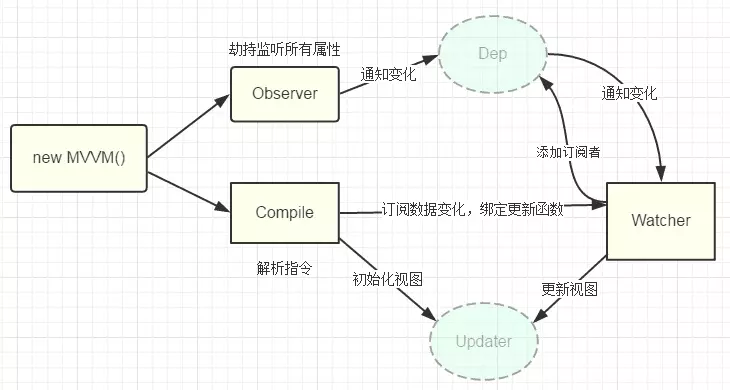
一张来源于网络的图:
-
1、实现一个数据监听器Observer,能够对数据对象的所有属性进行监听,如有变动可拿到最新值并通知订阅者
-
2、实现一个指令解析器Compile,对每个元素节点的指令进行扫描和解析,根据指令模板替换数据,以及绑定相应的更新函数
-
3、实现一个Watcher,作为连接Observer和Compile的桥梁,能够订阅并收到每个属性变动的通知,执行指令绑定的相应回调函数,从而更新视图
首先实现Observer和Watcher
为了便于理解,先解释数据劫持部分,文档解析和更新事件先用模拟方式。首先,初版Observer方法如下:
var data = { name: 'sly' }
observe(data)
let name = data.name // -> get value
data.name = 'yyy' // -> change value

function observe(obj) {
  // 判断类型
  if (!obj || typeof obj !== 'object') {
    return
  }
  Object.keys(obj).forEach(key => {
    defineReactive(obj, key, obj[key])
  })
}

function defineReactive(obj, key, val) {
  // 递归子属性
  observe(val)
  Object.defineProperty(obj, key, {
    enumerable: true,
    configurable: true,
    get: function reactiveGetter() {
      console.log('get value')
      return val
    },
    set: function reactiveSetter(newVal) {
      console.log('change value')
      val = newVal
    }
  })
}
以上代码简单的实现了如何监听数据的 set 和 get 的事件,下面是一段模板文档,模拟解析到类似文档就需要给name添加发布订阅者了
<div>{{name}}</div>
再通过Dep进行解耦
class Dep {
  constructor() {
    this.subs = []
  }
  addSub(watcher) {
    this.subs.push(watcher)
  }
  //移除订阅者实例对象
  removeSub (watcher) {
    remove(this.subs, watcher)
  }
  notify() {
    this.subs.forEach(watcher => {
      watcher.update()
    })
  }
}
// 全局属性,通过该属性配置 Watcher
Dep.target = null

function update(value) {
  document.querySelector('div').innerText = value
}

class Watcher {
  constructor(obj, key, cb) {
    // 将 Dep.target 指向自己
    Dep.target = this
    this.cb = cb
    this.obj = obj
    this.key = key
    // 然后触发属性的 getter 添加监听
    this.value = obj[key]
    // 最后将 Dep.target 置空
    Dep.target = null
  }
  update() {
    // 获得新值
    this.value = this.obj[this.key]
    // 调用 update 方法更新 Dom
    this.cb(this.value)
  }
}
var data = { name: 'sly' }
observe(data)
// 暂时模拟解析到 `{{name}}` 触发的操作,后通过compile实现
new Watcher(data, 'name', update)
// update Dom innerText
data.name = 'yyy'
接下来,对 defineReactive 函数进行改造
function defineReactive(obj, key, val) {
  // 递归子属性
  observe(val)
  let dp = new Dep()
  Object.defineProperty(obj, key, {
    enumerable: true,
    configurable: true,
    get: function reactiveGetter() {
      console.log('get value')
      // 将 Watcher 添加到订阅
      if (Dep.target) {
        dp.addSub(Dep.target)
      }
      return val
    },
    set: function reactiveSetter(newVal) {
      console.log('change value')
      val = newVal
      // 执行 watcher 的 update 方法
      dp.notify()
    }
  })
}
以上便实现简单的数据劫持,并在变化的时候通过Dep通知相关订阅者更新视图。到此相信对数据响应部分已经有了初步认识,接下来实现Compile
Compile的实现
Compile的作用就是解析模板,遇到变量绑定部分,将其替换为数据,并绑定更新函数,当数据变化时及时更新模板,一样盗用网络图一用:
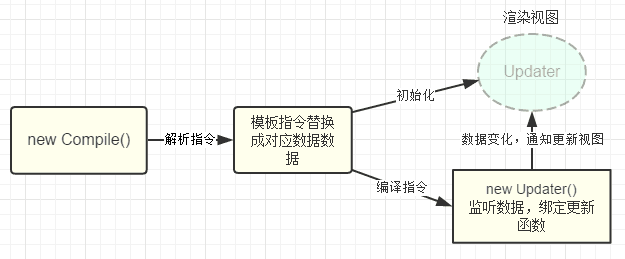
因为遍历解析的过程有多次操作dom节点,为提高性能和效率,会先将跟节点el转换成文档碎片fragment进行解析编译操作,解析完成,再将fragment添加回原来的真实dom节点中
class Compile{
    constructor(el,vm) {
        this.$vm = vm;
        this.$el = this.isElementNode(el) ? el : document.querySelector(el);

        if (this.$el) {
            this.$fragment = this.node2Fragment(this.$el);
            this.init();
            this.$el.appendChild(this.$fragment);
        }
    }
    init() { this.compileElement(this.$fragment); }
    node2Fragment: function(el) {
        var fragment = document.createDocumentFragment(), child;
        // 将原生节点拷贝到fragment
        while (child = el.firstChild) {
            fragment.appendChild(child);
        }
        return fragment;
    }
    compileElement: function(el) {
        var childNodes = el.childNodes, me = this;
        [].slice.call(childNodes).forEach(function(node) {
            var text = node.textContent;
            var reg = /\{\{(.*)\}\}/;    // 表达式文本
            // 按元素节点方式编译
            if (me.isElementNode(node)) {
                me.compile(node);
            } else if (me.isTextNode(node) && reg.test(text)) {
                me.compileText(node, RegExp.$1);
            }
            // 遍历编译子节点
            if (node.childNodes && node.childNodes.length) {
                me.compileElement(node);
            }
        });
    }
    compile: function(node) {
        var nodeAttrs = node.attributes, me = this;
        [].slice.call(nodeAttrs).forEach(function(attr) {
            // 规定:指令以 v-xxx 命名
            // 如 <span v-text="content"></span> 中指令为 v-text
            var attrName = attr.name;    // v-text
            if (me.isDirective(attrName)) {
                var exp = attr.value; // content
                var dir = attrName.substring(2);    // text
                if (me.isEventDirective(dir)) {
                    // 事件指令, 如 v-on:click
                    compileUtil.eventHandler(node, me.$vm, exp, dir);
                } else {
                    // 普通指令
                    compileUtil[dir] && compileUtil[dir](node, me.$vm, exp);
                }
                node.removeAttribute(attrName);
            }
        });
    }
    compileText(node, exp) {
        compileUtil.text(node, this.$vm, exp);
    },

    isDirective(attr) {
        return attr.indexOf('v-') == 0;
    },

    isEventDirective(dir) {
        return dir.indexOf('on') === 0;
    },

    isElementNode(node) {
        return node.nodeType == 1;
    },

    isTextNode(node) {
        return node.nodeType == 3;
    }
}
视图更新函数:
let updater = {
    textUpdater: function(node, value) {
        node.textContent = typeof value == 'undefined' ? '' : value;
    },

    htmlUpdater: function(node, value) {
        node.innerHTML = typeof value == 'undefined' ? '' : value;
    },

    classUpdater: function(node, value, oldValue) {
        var className = node.className;
        className = className.replace(oldValue, '').replace(/\s$/, '');

        var space = className && String(value) ? ' ' : '';

        node.className = className + space + value;
    },

    modelUpdater: function(node, value, oldValue) {
        node.value = typeof value == 'undefined' ? '' : value;
    }
};
指令处理CompileUtil部分代码:
// 指令处理集合
let compileUtil = {
    text: function(node, vm, exp) {
        this.bind(node, vm, exp, 'text');
    },

    html: function(node, vm, exp) {
        this.bind(node, vm, exp, 'html');
    },

    model: function(node, vm, exp) {
        this.bind(node, vm, exp, 'model');

        var me = this,
            val = this._getVMVal(vm, exp);
        node.addEventListener('input', function(e) {
            var newValue = e.target.value;
            if (val === newValue) {
                return;
            }

            me._setVMVal(vm, exp, newValue);
            val = newValue;
        });
    },

    class: function(node, vm, exp) {
        this.bind(node, vm, exp, 'class');
    },

    bind: function(node, vm, exp, dir) {
        var updaterFn = updater[dir + 'Updater'];

        updaterFn && updaterFn(node, this._getVMVal(vm, exp));

        new Watcher(vm, exp, function(value, oldValue) {
            updaterFn && updaterFn(node, value, oldValue);
        });
    },

    // 事件处理
    eventHandler: function(node, vm, exp, dir) {
        var eventType = dir.split(':')[1],
            fn = vm.$options.methods && vm.$options.methods[exp];

        if (eventType && fn) {
            node.addEventListener(eventType, fn.bind(vm), false);
        }
    },

    _getVMVal: function(vm, exp) {
        var val = vm;
        exp = exp.split('.');
        exp.forEach(function(k) {
            val = val[k];
        });
        return val;
    },

    _setVMVal: function(vm, exp, value) {
        var val = vm;
        exp = exp.split('.');
        exp.forEach(function(k, i) {
            // 非最后一个key,更新val的值
            if (i < exp.length - 1) {
                val = val[k];
            } else {
                val[k] = value;
            }
        });
    }
};
这里总结起来就是,
- 通过递归遍历每个节点及子节点,区分文本节点和node节点,分开处理
- 文本节点:会根据正则匹配绑定的指令类型,也就是上面的dir,拼接update,添加订阅者
- node节点:上面代码只是匹配了指令为v-bind,v-on:click以及v-class等这些,vue中的简写如@click和:key并未考虑。
以上