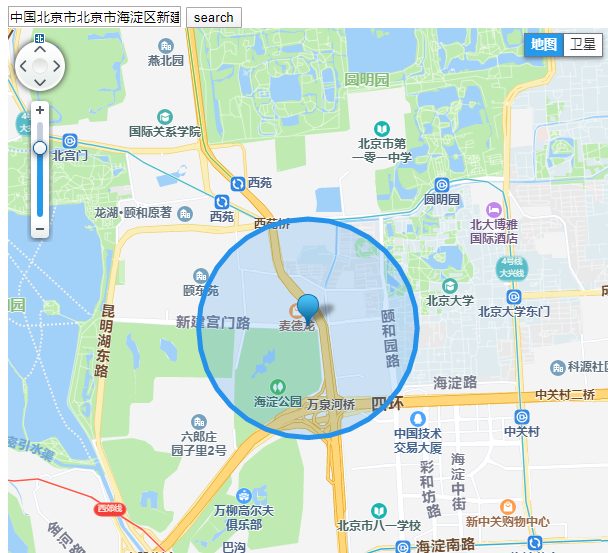
由于只用了腾讯位置服务,目前只写了腾讯地图的DEMO,有拖拽和搜索功能,详细的还是要去看官网案例lbs.qq.com/webservice_…
<!DOCTYPE html><html lang="en"><head><meta http-equiv="Content-Type" content="text/html; charset=utf-8" /><meta name="viewport" content="width=device-width, initial-scale=1.0, minimum-scale=1.0, maximum-scale=1.0, user-scalable=no"/><title>腾讯位置服务DEMO</title><script charset="utf-8" src="https://map.qq.com/api/js?v=2.exp&key=SQWBZ-ZIN6P-CS6DZ-L475V-BL2WV-SAFCD"></script><script> var geocoder = null; function init(){ var center=new qq.maps.LatLng(39.982163,116.306070); var map=new qq.maps.Map(document.getElementById("container"),{ center:center, zoom:14 }); //地址和经纬度之间进行转换服务 geocoder = new qq.maps.Geocoder(); //设置服务请求成功的回调函数 geocoder.setComplete(function(result) { map.setCenter(result.detail.location); var marker = new qq.maps.Marker({ map: map, position: result.detail.location }); //点击Marker会弹出反查结果 qq.maps.event.addListener(marker, 'click', function() { alert("坐标地址为: " + result.detail.location); }); }); //若服务请求失败,则运行以下函数 geocoder.setError(function() { alert("出错了,请输入正确的地址!!!"); }); var circle=new qq.maps.Circle({ map:map, center:center, radius:800, //圆圈的半径 strokeWeight:5, //圆圈的边框 draggable: true, //是否可以拖拽 }); var marker = new qq.maps.Marker({ position: center, map: map }); marker.setDraggable(true) // 拖拽circle和marker同时动 start qq.maps.event.addListener(marker, "dragend",()=> { var loc = marker.getPosition(); map.setCenter(loc); new qq.maps.Geocoder({complete: res=>{ console.log(res); console.log(res.detail.address) document.getElementById("address").value = res.detail.address; }}).getAddress(loc); }); qq.maps.event.addListener(marker, "dragging", () => { // 监听鼠标拖拽结束的事件 var loc = marker.getPosition(); circle.setCenter(loc); }); // 拖拽circle和marker同时动 end } function codeAddress() { var address = document.getElementById("address").value; //对指定地址进行解析 geocoder.getLocation(address); } </script></head><body onload="init()"> <div> <input id="address" type="textbox" value="陕西省西安市"> <button onclick="codeAddress()">search</button> </div><div id="container" style="width:600px;height:600px;"></div></body></html>