

MediaProvider是什么?
MediaProvider继承自ContentProvider,而ContentProvider内容提供器可以帮助应用程序管理对自身存储的数据的访问,以及对其他应用程序存储的数据的访问,并提供与其他应用程序共享数据的方法。因此,谷歌针对图片视频音频这类多媒体文件设计了MediaProvider.
- MediaProvider: 使用SQLite数据库存储图片、视频、音频、文档等多媒体文件的信息,并提供获取详细的接口.
- APP:通过FileSystem存取文件,同时以扫描/广播形式更新MediaProvider.
p.s. 存储的数据库路径为/data/data/com.android.providers.media/databases
概括下几个关键类的作用
- MediaScannerReceiver/MediaReceiver:多媒体扫描广播接收者,继承 BroadcastReceiver,主要响应APP发送的广播命令,并开启MediaScannerService 执行扫描工作。
- MediaScannerService/MediaService:多媒体扫描服务,继承 Service,主要是处理 APP 发送的请求,要用到 Framework 中的 MediaScanner 来共同完成具体扫描工作,并获取媒体文件的 metadata,最后将数据写入或删除 MediaProvider 提供的数据库中。
- MediaProvider:多媒体内容提供者,继承 ContentProvider,主要是负责操作数据库,并提供给别的程序 insert、query、delete、update 等操作。
下面分别梳理android 9和10版本的MediaProvider的流程.
android 9 (android P)
如何使用MediaScannerService
从 Android 自带的 Dev Tools 中的 MediaScannerActivity 入手,看看它是如何扫描多媒体。 /development/apps/Development/src/com/android/development/MediaScannerActivity.java
- 注册扫描开始和结束的广播,用来展示扫描状态;
- 在点击事件startScan中,发送了 ACTION_MEDIA_MOUNTED 广播。由MediaScannerReceiver接收.
扫描入口MediaScannerReceiver.java
查看/packages/providers/MediaProvider/AndroidManifest.xml,可以知道MediaScannerReceiver主要监听以下广播.
<receiver android:name="MediaScannerReceiver">
55             <intent-filter>
56                 <action android:name="android.intent.action.BOOT_COMPLETED" />
57                 <action android:name="android.intent.action.LOCALE_CHANGED" />
58             </intent-filter>
59             <intent-filter>
60                 <action android:name="android.intent.action.MEDIA_MOUNTED" />
61                 <data android:scheme="file" />
62             </intent-filter>
63             <intent-filter>
64                 <action android:name="android.intent.action.MEDIA_UNMOUNTED" />
65                 <data android:scheme="file" />
66             </intent-filter>
67             <intent-filter>
68                 <action android:name="android.intent.action.MEDIA_SCANNER_SCAN_FILE" />
69                 <data android:scheme="file" />
70             </intent-filter>
71         </receiver>
- ACTION_BOOT_COMPLETED // 开机完成广播.只能由系统发送.此时会把内部卷标(“internal”)和外部卷标(“external”)都扫描一下;
- ACTION_LOCALE_CHANGED // 区域改变广播.只能由系统发送.
- ACTION_MEDIA_MOUNTED // 磁盘挂载完成广播.只扫描外部卷标
- ACTION_MEDIA_SCANNER_SCAN_FILE //指定扫描某个文件的广播
MediaScannerReceiver收到广播之后,收集整理数据随即就去启动 MediaScannerService.
public void onReceive(Context context, Intent intent) {
37          final String action = intent.getAction();
38          final Uri uri = intent.getData();
39          if (Intent.ACTION_BOOT_COMPLETED.equals(action)) {
40              // Scan internal only. //开机扫描内部存储区域
41              scan(context, MediaProvider.INTERNAL_VOLUME);
42          } else if (Intent.ACTION_LOCALE_CHANGED.equals(action)) {
43              scanTranslatable(context);//当所在地区发生改变之后,对数据进行区域更新等操作.处理系统语言变换
44          } else {
45              if (uri.getScheme().equals("file")) {
46                  // handle intents related to external storage
47                  String path = uri.getPath();
48                  String externalStoragePath = Environment.getExternalStorageDirectory().getPath();
49                  String legacyPath = Environment.getLegacyExternalStorageDirectory().getPath();
50
51                  try {
52                      path = new File(path).getCanonicalPath();
53                  } catch (IOException e) {
54                      Log.e(TAG, "couldn't canonicalize " + path);
55                      return;
56                  }
57                  if (path.startsWith(legacyPath)) {
58                      path = externalStoragePath + path.substring(legacyPath.length());
59                  }
60
61                  Log.d(TAG, "action: " + action + " path: " + path);
62                  if (Intent.ACTION_MEDIA_MOUNTED.equals(action)) {
63                      // scan whenever any volume is mounted //扫描外部分区,其实就是SD卡(分内部sd卡和外置sd卡)
64                      scan(context, MediaProvider.EXTERNAL_VOLUME);
65                  } else if (Intent.ACTION_MEDIA_SCANNER_SCAN_FILE.equals(action) &&
66                          path != null && path.startsWith(externalStoragePath + "/")) {
67                      scanFile(context, path);//扫描外部存储器上的一个媒体文件
68                  }
69              }
70          }
71      }
// 扫描内部或者外部存储,根据volume进行区分
private void scan(Context context, String volume) {
74          Bundle args = new Bundle();
75          args.putString("volume", volume);
76          context.startService(// 启动MediaScannerService,后面scanFile scanTranslatable类似.
77                  new Intent(context, MediaScannerService.class).putExtras(args));
78      }
79
// 扫描单个文件,不可以是文件夹
80      private void scanFile(Context context, String path) {
81          Bundle args = new Bundle();
82          args.putString("filepath", path);
83          context.startService(
84                  new Intent(context, MediaScannerService.class).putExtras(args));
85      }
86
// 扫描可转换语言的多媒体
87      private void scanTranslatable(Context context) {
88          final Bundle args = new Bundle();
89          args.putBoolean(MediaStore.RETRANSLATE_CALL, true);
90          context.startService(new Intent(context, MediaScannerService.class).putExtras(args));
91      }
扫描的时机为以下几点:
- Intent.ACTION_BOOT_COMPLETED.equals(action) 6.0 中接到设备重启的广播,对 Internal 和 External 扫描,而 9.0 中只对 Internal 扫描。
- Intent.ACTION_LOCALE_CHANGED.equals(action) 9.0 相比 6.0 增加了系统语言发生改变时的广播,用于进行扫描可以转换语言的多媒体。
- uri.getScheme().equals("file") 6.0 和 9.0 处理的一致,都是先过滤 scheme 为 "file" 的 Intent,再通过下面两个 action 对 External 进行扫描:
- Intent.ACTION_MEDIA_MOUNTED.equals(action) 插入外部存储时扫描 scan()。
- Intent.ACTION_MEDIA_SCANNER_SCAN_FILE.equals(action) && path != null && path.startsWith(externalStoragePath + "/") 扫描外部存储中的单个文件 scanFile()。 注意:不支持扫描外部存储中的文件夹,需要遍历文件夹中文件,使用扫描单个文件的方式。
核心类MediaScannerService.java
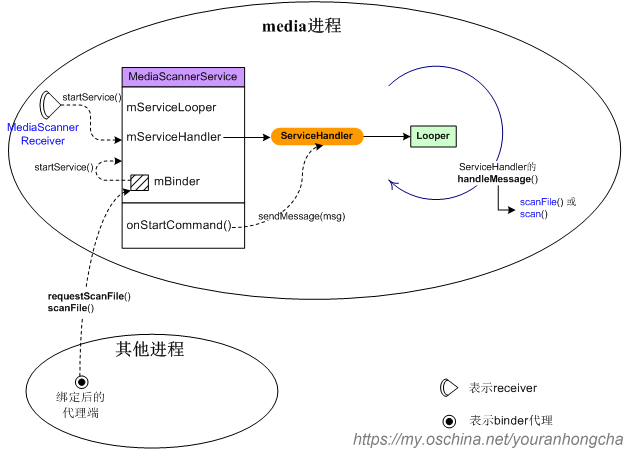
MediaScannerService负责扫描媒体文件,然后将扫描得到的信息插入到媒体数据库中。 MediaScannerService 继承 Service,并实现 Runnable 工作线程。通过 ServiceHandler 这个 Handler 把主线程需要大量计算的工作放到工作线程中。
onCreate() 中启动工作线程
97      @Override
98      public void onCreate() {
// 获取电源锁,防止扫描过程中系统休眠
99          PowerManager pm = (PowerManager)getSystemService(Context.POWER_SERVICE);
100          mWakeLock = pm.newWakeLock(PowerManager.PARTIAL_WAKE_LOCK, TAG);
101          StorageManager storageManager = (StorageManager)getSystemService(Context.STORAGE_SERVICE);
102          mExternalStoragePaths = storageManager.getVolumePaths();// 获取外部存储路径
103
104          // Start up the thread running the service.  Note that we create a
105          // separate thread because the service normally runs in the process's
106          // main thread, which we don't want to block.
107          Thread thr = new Thread(null, this, "MediaScannerService");
108          thr.start();// 启动最重要的工作线程,该线程也是个消息泵线程
109      }
每当用户需要扫描媒体文件时,基本上都是在向这个消息泵里发送 Message,并在处理 Message 时完成真正的 scan 动作。请注意,创建 Thread 时传入的第二个参数就是 MediaScannerService 自身,也就是说线程的主要行为其实就是 MediaScannerService 的 run() 方法.
151      @Override
152      public void run() {
153          // reduce priority below other background threads to avoid interfering
154          // with other services at boot time.
// 设置优先级.将优先级降低到其他后台线程之下,以避免在启动时干扰其他服务。
155          Process.setThreadPriority(Process.THREAD_PRIORITY_BACKGROUND +
156                  Process.THREAD_PRIORITY_LESS_FAVORABLE);
157          Looper.prepare();
158
159          mServiceLooper = Looper.myLooper();
// mServiceHandler发送消息的handler
160          mServiceHandler = new ServiceHandler();
161
162          Looper.loop();
163      }
第一种向工作线程发送消息的方式
调用 startService(),并在 MediaScannerService 的 onStartCommand() 方法里 sendMessage()。 比如,和 MediaScannerService 配套提供的 MediaScannerReceiver,当它收到类似 ACTION_BOOT_COMPLETED 这样的系统广播时,就会调用自己的 scan() 或 scanFile() 方法,里面的 startService() 动作会导致走到 service 的 onStartCommand(),并进一步发送消息.
111      @Override
112      public int onStartCommand(Intent intent, int flags, int startId) {
113          while (mServiceHandler == null) {
114              synchronized (this) {
115                  try {
116                      wait(100);
117                  } catch (InterruptedException e) {
118                  }
119              }
120          }
121
122          if (intent == null) {
123              Log.e(TAG, "Intent is null in onStartCommand: ",
124                  new NullPointerException());
125              return Service.START_NOT_STICKY;
126          }
127
128          Message msg = mServiceHandler.obtainMessage();
129          msg.arg1 = startId;
130          msg.obj = intent.getExtras();
131          mServiceHandler.sendMessage(msg);
132
133          // Try again later if we are killed before we can finish scanning.
134          return Service.START_REDELIVER_INTENT;
135      }
第二种向工作线程发送消息的方式
先直接或间接 bindService(),绑定成功后会得到一个 IMediaScannerService 接口,而后外界再通过该接口向 MediaScannerService 发起命令,请求其扫描特定文件或目录。
IMediaScannerService 接口只提供了两个接口方法: void requestScanFile(String path, String mimeType, in IMediaScannerListener listener); void scanFile(String path, String mimeType); 处理这两种请求的实体是服务内部的 mBinder 对象.
183      private final IMediaScannerService.Stub mBinder =
184              new IMediaScannerService.Stub() {
185          public void requestScanFile(String path, String mimeType, IMediaScannerListener listener) {
186              if (false) {
187                  Log.d(TAG, "IMediaScannerService.scanFile: " + path + " mimeType: " + mimeType);
188              }
189              Bundle args = new Bundle();
190              args.putString("filepath", path);
191              args.putString("mimetype", mimeType);
192              if (listener != null) {
193                  args.putIBinder("listener", listener.asBinder());
194              }
// 说到底还是在调用 startService()
195              startService(new Intent(MediaScannerService.this,
196                      MediaScannerService.class).putExtras(args));
197          }
198
199          public void scanFile(String path, String mimeType) {
200              requestScanFile(path, mimeType, null);
201          }
202      };
具体处理消息
具体处理消息泵线程里的消息时,执行的是 ServiceHandler 的 handleMessage() 方法.
private final class ServiceHandler extends Handler {
205          @Override
206          public void handleMessage(Message msg) {
207              Bundle arguments = (Bundle) msg.obj;
208              if (arguments == null) {
209                  Log.e(TAG, "null intent, b/20953950");
210                  return;
211              }
212              String filePath = arguments.getString("filepath");
213
214              try {
215                  if (filePath != null) {// 扫描单个文件
216                      IBinder binder = arguments.getIBinder("listener");
217                      IMediaScannerListener listener =
218                              (binder == null ? null : IMediaScannerListener.Stub.asInterface(binder));
219                      Uri uri = null;
220                      try {
221                          uri = scanFile(filePath, arguments.getString("mimetype"));// 扫描单个文件
222                      } catch (Exception e) {
223                          Log.e(TAG, "Exception scanning file", e);
224                      }
225                      if (listener != null) {
226                          listener.scanCompleted(filePath, uri);
227                      }
228                  } else if (arguments.getBoolean(MediaStore.RETRANSLATE_CALL)) {// 切换语言
229                      ContentProviderClient mediaProvider = getBaseContext().getContentResolver()
230                          .acquireContentProviderClient(MediaStore.AUTHORITY);
231                      mediaProvider.call(MediaStore.RETRANSLATE_CALL, null, null);
232                  } else {// 扫描内部或外部
233                      String volume = arguments.getString("volume");
234                      String[] directories = null;
235
236                      if (MediaProvider.INTERNAL_VOLUME.equals(volume)) {
237                          // scan internal media storage 内部存储扫描目录
238                          directories = new String[] {
239                                  Environment.getRootDirectory() + "/media",
240                                  Environment.getOemDirectory() + "/media",
241                                  Environment.getProductDirectory() + "/media",
242                          };
243                      }
244                      else if (MediaProvider.EXTERNAL_VOLUME.equals(volume)) {
245                          // scan external storage volumes 外部存储扫描目录
246                          if (getSystemService(UserManager.class).isDemoUser()) {
247                              directories = ArrayUtils.appendElement(String.class,
248                                      mExternalStoragePaths,
249                                      Environment.getDataPreloadsMediaDirectory().getAbsolutePath());
250                          } else {
251                              directories = mExternalStoragePaths;
252                          }
253                      }
254
255                      if (directories != null) {
256                          if (false) Log.d(TAG, "start scanning volume " + volume + ": "
257                                  + Arrays.toString(directories));
258                          scan(directories, volume);// 扫描指定路径
259                          if (false) Log.d(TAG, "done scanning volume " + volume);
260                      }
261                  }
262              } catch (Exception e) {
263                  Log.e(TAG, "Exception in handleMessage", e);
264              }
265
266              stopSelf(msg.arg1);// 扫描结束,MediaScannerService完成本次使命,可以stop自身了
267          }
268      }
看下scanFile和scan 方法.
165      private Uri scanFile(String path, String mimeType) {
166          String volumeName = MediaProvider.EXTERNAL_VOLUME;
167
168          try (MediaScanner scanner = new MediaScanner(this, volumeName)) {
169              // make sure the file path is in canonical form
170              String canonicalPath = new File(path).getCanonicalPath();
171              return scanner.scanSingleFile(canonicalPath, mimeType);// 后面分析scanSingleFile
172          } catch (Exception e) {
173              Log.e(TAG, "bad path " + path + " in scanFile()", e);
174              return null;
175          }
176      }

	private void scan(String[] directories, String volumeName) {
66          Uri uri = Uri.parse("file://" + directories[0]);
67          // don't sleep while scanning
68          mWakeLock.acquire();
69
70          try {
71              ContentValues values = new ContentValues();
72              values.put(MediaStore.MEDIA_SCANNER_VOLUME, volumeName);
		// 通过 insert 这个特殊的 uri,让 MeidaProvider 做一些准备工作
73              Uri scanUri = getContentResolver().insert(MediaStore.getMediaScannerUri(), values);
74  		//发送 扫描开始的广播。
75              sendBroadcast(new Intent(Intent.ACTION_MEDIA_SCANNER_STARTED, uri));
76
77              try {
78                  if (volumeName.equals(MediaProvider.EXTERNAL_VOLUME)) {
79                      openDatabase(volumeName);// 打开数据库文件
80                  }
81  		//创建MediaScanner,调用scanDirectories扫描目标文件夹。
82                  try (MediaScanner scanner = new MediaScanner(this, volumeName)) {
83                      scanner.scanDirectories(directories);
84                  }
85              } catch (Exception e) {
86                  Log.e(TAG, "exception in MediaScanner.scan()", e);
87              }
88  // 通过 delete 这个 uri,让 MeidaProvider 做一些清理工作
89              getContentResolver().delete(scanUri, null, null);
90
91          } finally {//发送扫描完成的广播。
92              sendBroadcast(new Intent(Intent.ACTION_MEDIA_SCANNER_FINISHED, uri));
93              mWakeLock.release();
94          }
95      }
scanFile() 或 scan() 才是实际进行扫描的地方,扫描动作中主要借助的是 MediaScanner,它是打通 Java 层和 C++ 层的关键,扫描动作最终会调用到 MediaScanner的某个 native 函数,于是程序流程开始走到 C++ 层.下一节来分析MediaScanner.
MediaScanner分析(Java层到c++层)
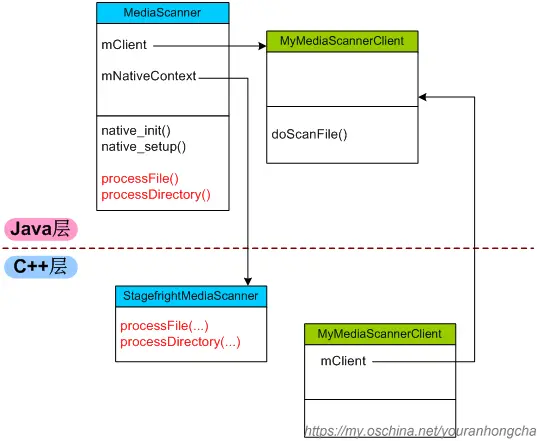
MediaScanner有两个 native 函数:native_init() 和 native_setup(),以及两个重要成员变量:一个是mClient成员,另一个是 mNativeContext.
/frameworks/base/media/java/android/media/MediaScanner.java
public class MediaScanner implements AutoCloseable {
    static {
        System.loadLibrary("media_jni");
        native_init();    // 将java层和c++层联系起来
    }
    ...
    private long mNativeContext;
    ...
    public MediaScanner(Context c, String volumeName) {
        native_setup();// 对应JNI的android_media_MediaScanner_native_setup
        ...
    }
    ...
    // 一开始就具有明确的mClient对象
    private final MyMediaScannerClient mClient = new MyMediaScannerClient();
    ...
}
MediaScanner 类加载之时,就会同时加载动态链接库“media_jni”,并调用 native_init() 将 Java 层和 C++ 层联系起来。
/frameworks/base/media/jni/android_media_MediaScanner.cpp
372  // This function gets a field ID, which in turn causes class initialization.
373  // It is called from a static block in MediaScanner, which won't run until the
374  // first time an instance of this class is used.
375  static void
376  android_media_MediaScanner_native_init(JNIEnv *env)
377  {
378      ALOGV("native_init");
// Java 层 MediaScanner 类
379      jclass clazz = env->FindClass(kClassMediaScanner);
380      if (clazz == NULL) {
381          return;
382      }
383
// Java 层 mNativeContext 对象(long 类型)保存在 JNI 层 fields.context 对象中
384      fields.context = env->GetFieldID(clazz, "mNativeContext", "J");
385      if (fields.context == NULL) {
386          return;
387      }
388  }

390  static void
391  android_media_MediaScanner_native_setup(JNIEnv *env, jobject thiz)
392  {
393      ALOGV("native_setup");
// 创建 native 层的 MediaScanner 对象,StagefrightMediaScanner(frameworks/av/ 中定义)
394      MediaScanner *mp = new StagefrightMediaScanner;
395
396      if (mp == NULL) {
397          jniThrowException(env, kRunTimeException, "Out of memory");
398          return;
399      }
400
// 为 Java 层 MediaScanner 的 mNativeContext 域赋值.
// 将 mp 指针保存在 Java 层 MediaScanner 类 mNativeContext 对象中.
401      env->SetLongField(thiz, fields.context, (jlong)mp);
402  }
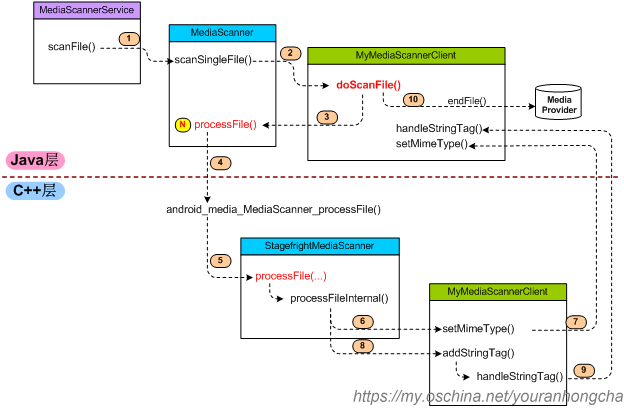
每当 C++ 层执行扫描动作时,还会再创建一个 MyMediaScannerClient 对象,这个对象和 Java 层的同名类对应。如下图所示:
接上文继续分析scanSingleFile 和scanDirectories.
scanSingleFile 和scanDirectories
先看scanSingleFile。
/frameworks/base/media/java/android/media/MediaScanner.java
1397      // this function is used to scan a single file
1398      public Uri scanSingleFile(String path, String mimeType) {
1399          try {
// 在扫描之前把上次扫描获取的数据库信息取出遍历并检测是否丢失,如果丢失,则从数据库中删除。
1400              prescan(path, true);
1401
1402              File file = new File(path);
1403              if (!file.exists() || !file.canRead()) {
1404                  return null;
1405              }
1406
1407              // lastModified is in milliseconds on Files.
1408              long lastModifiedSeconds = file.lastModified() / 1000;
1409
// mClient 类型为 MyMediaScannerClient.
1410              // always scan the file, so we can return the content://media Uri for existing files
1411              return mClient.doScanFile(path, mimeType, lastModifiedSeconds, file.length(),
1412                      false, true, MediaScanner.isNoMediaPath(path));
1413          } catch (RemoteException e) {
1414              Log.e(TAG, "RemoteException in MediaScanner.scanFile()", e);
1415              return null;
1416          } finally {
1417              releaseResources();
1418          }
1419      }
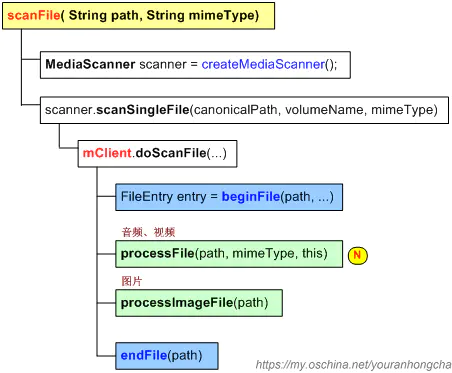
// 看下doScanFile
public Uri doScanFile(String path, String mimeType, long lastModified,
        long fileSize, boolean isDirectory, boolean scanAlways, boolean noMedia) {
    try {
        FileEntry entry = beginFile(path, mimeType, lastModified,
                fileSize, isDirectory, noMedia);
        ...

        // rescan for metadata if file was modified since last scan
        if (entry != null && (entry.mLastModifiedChanged || scanAlways)) {
            if (noMedia) {
                result = endFile(entry, false, false, false, false, false);
            } else {
                ...
                // we only extract metadata for audio and video files
                if (isaudio || isvideo) {// 音视频
// native 函数processFile
                    mScanSuccess = processFile(path, mimeType, this);
                }

                if (isimage) {// 图片
                    mScanSuccess = processImageFile(path);
                }
                ...
                result = endFile(entry, ringtones, notifications, alarms, music, podcasts);
            }
        }
    } catch (RemoteException e) {
        Log.e(TAG, "RemoteException in MediaScanner.scanFile()", e);
    }
    ...
    return result;
}
再看scanDirectories
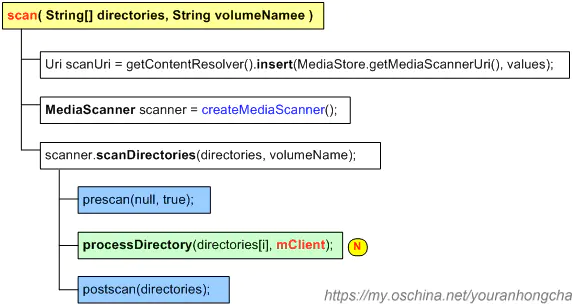
1353      public void scanDirectories(String[] directories) {
1354          try {
1355              long start = System.currentTimeMillis();
1356              prescan(null, true);// 扫描前预准备
1357              long prescan = System.currentTimeMillis();
1358
1359              if (ENABLE_BULK_INSERTS) {
1360                  // create MediaInserter for bulk inserts
1361                  mMediaInserter = new MediaInserter(mMediaProvider, 500);
1362              }
1363
1364              for (int i = 0; i < directories.length; i++) {
// native 函数,调用它来对目标文件夹进行扫描
1365                  processDirectory(directories[i], mClient);
1366              }
1367
1368              if (ENABLE_BULK_INSERTS) {
1369                  // flush remaining inserts
1370                  mMediaInserter.flushAll();
1371                  mMediaInserter = null;
1372              }
1373
1374              long scan = System.currentTimeMillis();
1375              postscan(directories);// 扫描后处理
1376              long end = System.currentTimeMillis();
...
1395      }
继续往c++层看
/frameworks/base/media/java/android/media/MediaScanner.java
1901      private native void processDirectory(String path, MediaScannerClient client);
1902      private native boolean processFile(String path, String mimeType, MediaScannerClient client);
MediaScanner中调用的processFile()对应于C + +层的android_media_MediaScanner_processFile(), processDirectory()对应于C + +层的android_media_MediaScanner_processDirectory()。 路径:/frameworks/base/media/jni/android_media_MediaScanner.cpp
238  static void
239  android_media_MediaScanner_processDirectory(
240          JNIEnv *env, jobject thiz, jstring path, jobject client)
241  {
242      ALOGV("processDirectory");
243      MediaScanner *mp = getNativeScanner_l(env, thiz);
244      if (mp == NULL) {
245          jniThrowException(env, kRunTimeException, "No scanner available");
246          return;
247      }
248
249      if (path == NULL) {
250          jniThrowException(env, kIllegalArgumentException, NULL);
251          return;
252      }
253
254      const char *pathStr = env->GetStringUTFChars(path, NULL);
255      if (pathStr == NULL) {  // Out of memory
256          return;
257      }
258
259      MyMediaScannerClient myClient(env, client);
260      MediaScanResult result = mp->processDirectory(pathStr, myClient);
261      if (result == MEDIA_SCAN_RESULT_ERROR) {
262          ALOGE("An error occurred while scanning directory '%s'.", pathStr);
263      }
264      env->ReleaseStringUTFChars(path, pathStr);
265  }
266
267  static jboolean
268  android_media_MediaScanner_processFile(
269          JNIEnv *env, jobject thiz, jstring path,
270          jstring mimeType, jobject client)
271  {
272      ALOGV("processFile");
273
274      // Lock already hold by processDirectory
// mp指向的其实就是StagefrightMediaScanner
275      MediaScanner *mp = getNativeScanner_l(env, thiz);
	...
298
// 构造了一个局部的(C++层次)MyMediaScannerClient对象,
// 构造myClient时传入的client参数来自于Java层调用processFile()时传入的那个(Java层次)MyMediaScannerClient对象。
// 这个对象会记录在C++层MyMediaScannerClient的mClient域中.
299      MyMediaScannerClient myClient(env, client);
// 调用的就是StagefrightMediaScanner::processFile
300      MediaScanResult result = mp->processFile(pathStr, mimeTypeStr, myClient);
	...
308      return result != MEDIA_SCAN_RESULT_ERROR;
309  }
StagefrightMediaScanner::processFile()
/frameworks/av/media/libstagefright/StagefrightMediaScanner.cpp
58  MediaScanResult StagefrightMediaScanner::processFile(
59          const char *path, const char *mimeType,
60          MediaScannerClient &client) {
61      ALOGV("processFile '%s'.", path);
62
63      client.setLocale(locale());
64      client.beginFile();
// 再看processFileInternal
65      MediaScanResult result = processFileInternal(path, mimeType, client);
66      ALOGV("result: %d", result);
67      if (mimeType == NULL && result != MEDIA_SCAN_RESULT_OK) {
68          ALOGW("media scan failed for %s", path);
69          client.setMimeType("application/octet-stream");
70      }
71      client.endFile();
72      return result;
73  }
74
75  MediaScanResult StagefrightMediaScanner::processFileInternal(
76          const char *path, const char * /* mimeType */,
77          MediaScannerClient &client) {
78      const char *extension = strrchr(path, '.');
79
80      if (!extension) {
81          return MEDIA_SCAN_RESULT_SKIPPED;
82      }
83
// 看文件的扩展名是不是属于多媒体文件扩展名
/*static const char *kValidExtensions[] = {
39          ".mp3", ".mp4", ".m4a", ".3gp", ".3gpp", ".3g2", ".3gpp2",
40          ".mpeg", ".ogg", ".mid", ".smf", ".imy", ".wma", ".aac",
41          ".wav", ".amr", ".midi", ".xmf", ".rtttl", ".rtx", ".ota",
42          ".mkv", ".mka", ".webm", ".ts", ".fl", ".flac", ".mxmf",
43          ".avi", ".mpeg", ".mpg", ".awb", ".mpga", ".mov",
44          ".m4v", ".oga"
45      };*/
84      if (!FileHasAcceptableExtension(extension)) {
85          return MEDIA_SCAN_RESULT_SKIPPED;
86      }
87
// 获取文件的元数据
88      sp<MediaMetadataRetriever> mRetriever(new MediaMetadataRetriever);
89
90      int fd = open(path, O_RDONLY | O_LARGEFILE);
91      status_t status;
92      if (fd < 0) {
93          // couldn't open it locally, maybe the media server can?
94          sp<IMediaHTTPService> nullService;
95          status = mRetriever->setDataSource(nullService, path);
96      } else {
97          status = mRetriever->setDataSource(fd, 0, 0x7ffffffffffffffL);
98          close(fd);
99      }
100
101      if (status) {
102          return MEDIA_SCAN_RESULT_ERROR;
103      }
104
105      const char *value;
106      if ((value = mRetriever->extractMetadata(
107                      METADATA_KEY_MIMETYPE)) != NULL) {
// 关键函数setMimeType
108          status = client.setMimeType(value);
109          if (status) {
110              return MEDIA_SCAN_RESULT_ERROR;
111          }
112      }
113
114      struct KeyMap {
115          const char *tag;
116          int key;
117      };
118      static const KeyMap kKeyMap[] = {
119          { "tracknumber", METADATA_KEY_CD_TRACK_NUMBER },
120          { "discnumber", METADATA_KEY_DISC_NUMBER },
121          { "album", METADATA_KEY_ALBUM },
122          { "artist", METADATA_KEY_ARTIST },
123          { "albumartist", METADATA_KEY_ALBUMARTIST },
124          { "composer", METADATA_KEY_COMPOSER },
125          { "genre", METADATA_KEY_GENRE },
126          { "title", METADATA_KEY_TITLE },
127          { "year", METADATA_KEY_YEAR },
128          { "duration", METADATA_KEY_DURATION },
129          { "writer", METADATA_KEY_WRITER },
130          { "compilation", METADATA_KEY_COMPILATION },
131          { "isdrm", METADATA_KEY_IS_DRM },
132          { "date", METADATA_KEY_DATE },
133          { "width", METADATA_KEY_VIDEO_WIDTH },
134          { "height", METADATA_KEY_VIDEO_HEIGHT },
135      };
136      static const size_t kNumEntries = sizeof(kKeyMap) / sizeof(kKeyMap[0]);
137
138      for (size_t i = 0; i < kNumEntries; ++i) {
139          const char *value;
140          if ((value = mRetriever->extractMetadata(kKeyMap[i].key)) != NULL) {
// 关键函数addStringTag。该函数仅调用handleStringTag(name, value);
// /frameworks/av/media/libmedia/MediaScannerClient.cpp
// native层handleStringTag 回调java层handleStringTag
141              status = client.addStringTag(kKeyMap[i].tag, value);
142              if (status != OK) {
143                  return MEDIA_SCAN_RESULT_ERROR;
144              }
145          }
146      }
147
148      return MEDIA_SCAN_RESULT_OK;
149  }
利用工具类MediaMetadataRetriever来获取文件的元数据,并将得到的元数据传递给MyMediaScannerClient。 其实MediaMetadataRetriever内部是利用系统服务“media.player”来解析多媒体文件的,这个系统服务对应的代理接口是IMediaPlayerService,它有个成员函数createMetadataRetriever()可以用于获取IMediaMetadataRetriever接口,而后就可以调用该接口的setDataSource()和extractMetadata()了。
processFileInternal()里主要通过两个函数,向Java层的MyMediaScannerClient传递数据,一个是setMimeType(),另一个是addStringTag()。 C++层的setMimeType()其代码如下:
/frameworks/base/media/jni/android_media_MediaScanner.cpp
// 通过JNI技术,调用到Java层的setMimeType()。
204      virtual status_t setMimeType(const char* mimeType)
205      {
206          ALOGV("setMimeType: %s", mimeType);
207          jstring mimeTypeStr;
208          if ((mimeTypeStr = mEnv->NewStringUTF(mimeType)) == NULL) {
209              mEnv->ExceptionClear();
210              return NO_MEMORY;
211          }
212
213          mEnv->CallVoidMethod(mClient, mSetMimeTypeMethodID, mimeTypeStr);
214
215          mEnv->DeleteLocalRef(mimeTypeStr);
216          return checkAndClearExceptionFromCallback(mEnv, "setMimeType");
217      }
C++层的addStringTag()其代码如下:
/frameworks/av/media/libmedia/MediaScannerClient.cpp
42  status_t MediaScannerClient::addStringTag(const char* name, const char* value)
43  {
44      handleStringTag(name, value);
45      return OK;
46  }
/frameworks/base/media/java/android/media/MediaScanner.java
	     @UnsupportedAppUsage
738          public void handleStringTag(String name, String value) {
739              if (name.equalsIgnoreCase("title") || name.startsWith("title;")) {
740                  // Don't trim() here, to preserve the special \001 character
741                  // used to force sorting. The media provider will trim() before
742                  // inserting the title in to the database.
743                  mTitle = value;
744              } else if (name.equalsIgnoreCase("artist") || name.startsWith("artist;")) {
745                  mArtist = value.trim();
746              } else if (name.equalsIgnoreCase("albumartist") || name.startsWith("albumartist;")
747                      || name.equalsIgnoreCase("band") || name.startsWith("band;")) {
748                  mAlbumArtist = value.trim();
749              } else if (name.equalsIgnoreCase("album") || name.startsWith("album;")) {
750                  mAlbum = value.trim();
751              } else if (name.equalsIgnoreCase("composer") || name.startsWith("composer;")) {
752                  mComposer = value.trim();
753              } else if (mProcessGenres &&
754                      (name.equalsIgnoreCase("genre") || name.startsWith("genre;"))) {
755                  mGenre = getGenreName(value);
756              } else if (name.equalsIgnoreCase("year") || name.startsWith("year;")) {
757                  mYear = parseSubstring(value, 0, 0);
758              } else if (name.equalsIgnoreCase("tracknumber") || name.startsWith("tracknumber;")) {
759                  // track number might be of the form "2/12"
760                  // we just read the number before the slash
761                  int num = parseSubstring(value, 0, 0);
762                  mTrack = (mTrack / 1000) * 1000 + num;
763              } else if (name.equalsIgnoreCase("discnumber") ||
764                      name.equals("set") || name.startsWith("set;")) {
765                  // set number might be of the form "1/3"
766                  // we just read the number before the slash
767                  int num = parseSubstring(value, 0, 0);
768                  mTrack = (num * 1000) + (mTrack % 1000);
769              } else if (name.equalsIgnoreCase("duration")) {
770                  mDuration = parseSubstring(value, 0, 0);
771              } else if (name.equalsIgnoreCase("writer") || name.startsWith("writer;")) {
772                  mWriter = value.trim();
773              } else if (name.equalsIgnoreCase("compilation")) {
774                  mCompilation = parseSubstring(value, 0, 0);
775              } else if (name.equalsIgnoreCase("isdrm")) {
776                  mIsDrm = (parseSubstring(value, 0, 0) == 1);
777              } else if (name.equalsIgnoreCase("date")) {
778                  mDate = parseDate(value);
779              } else if (name.equalsIgnoreCase("width")) {
780                  mWidth = parseSubstring(value, 0, 0);
781              } else if (name.equalsIgnoreCase("height")) {
782                  mHeight = parseSubstring(value, 0, 0);
783              } else if (name.equalsIgnoreCase("colorstandard")) {
784                  mColorStandard = parseSubstring(value, 0, -1);
785              } else if (name.equalsIgnoreCase("colortransfer")) {
786                  mColorTransfer = parseSubstring(value, 0, -1);
787              } else if (name.equalsIgnoreCase("colorrange")) {
788                  mColorRange = parseSubstring(value, 0, -1);
789              } else {
790                  //Log.v(TAG, "unknown tag: " + name + " (" + mProcessGenres + ")");
791              }
792          }
MediaScanner::processDirectory()
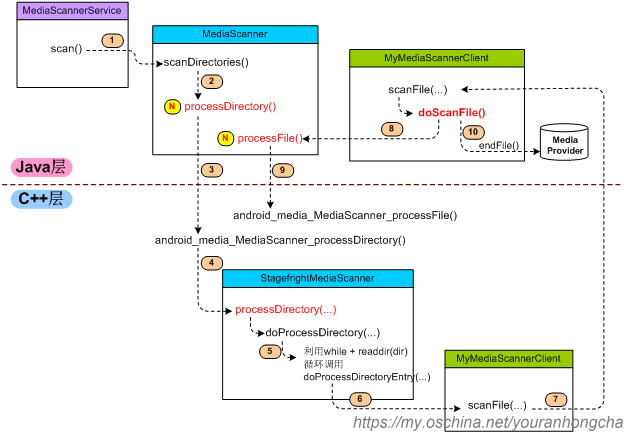
按理说,和processFile()类似,processDirectory()最终对应的代码也应该在StagefrightMediaScanner里,但是StagefrightMediaScanner并没有编写这个函数,又因为StagefrightMediaScanner继承于MediaScanner.cpp(C++层次),所以实际上使用的是MediaScanner.cpp的ProcessDirectory().
/frameworks/av/media/libmedia/MediaScanner.cpp
81  MediaScanResult MediaScanner::processDirectory(
82          const char *path, MediaScannerClient &client) {
83      int pathLength = strlen(path);
84      if (pathLength >= PATH_MAX) {
85          return MEDIA_SCAN_RESULT_SKIPPED;
86      }
87      char* pathBuffer = (char *)malloc(PATH_MAX + 1);
88      if (!pathBuffer) {
89          return MEDIA_SCAN_RESULT_ERROR;
90      }
91
92      int pathRemaining = PATH_MAX - pathLength;
93      strcpy(pathBuffer, path);
94      if (pathLength > 0 && pathBuffer[pathLength - 1] != '/') {
95          pathBuffer[pathLength] = '/';
96          pathBuffer[pathLength + 1] = 0;
97          --pathRemaining;
98      }
99
100      client.setLocale(locale());
101
102      MediaScanResult result = doProcessDirectory(pathBuffer, pathRemaining, client, false);
103
104      free(pathBuffer);
105
106      return result;
107  }

131  MediaScanResult MediaScanner::doProcessDirectory(
132          char *path, int pathRemaining, MediaScannerClient &client, bool noMedia) {
133      // place to copy file or directory name
134      char* fileSpot = path + strlen(path);
135      struct dirent* entry;
136
// 判断扫描的目录是否要跳过.
// 可跳过的目录存在于mSkipList列表中。这个列表的内容其实来自于“testing.mediascanner.skiplist”属性.
// C++层MediaScanner构造函数中,会调用loadSkipList()来读取这个属性,解析属性中记录的所有目录名并写入mSkipList列表。
137      if (shouldSkipDirectory(path)) {
138          ALOGD("Skipping: %s", path);
139          return MEDIA_SCAN_RESULT_OK;
140      }
141
142      // Treat all files as non-media in directories that contain a  ".nomedia" file
143      if (pathRemaining >= 8 /* strlen(".nomedia") */ ) {
144          strcpy(fileSpot, ".nomedia");
145          if (access(path, F_OK) == 0) {
146              ALOGV("found .nomedia, setting noMedia flag");
147              noMedia = true;
148          }
149
150          // restore path
151          fileSpot[0] = 0;
152      }
153
154      DIR* dir = opendir(path);
155      if (!dir) {
156          ALOGW("Error opening directory '%s', skipping: %s.", path, strerror(errno));
157          return MEDIA_SCAN_RESULT_SKIPPED;
158      }
159
160      MediaScanResult result = MEDIA_SCAN_RESULT_OK;
// 用一个while循环多次调用doProcessDirectoryEntry(),其内部在必要时候,会再次调用doProcessDirectory()分析子目录。
// readdir()是linux上返回所指目录中“下一个进入点”(next entry)的函数,我们常常在一个while循环中调用它,以便遍历出目录中的所有内容。
161      while ((entry = readdir(dir))) {
162          if (doProcessDirectoryEntry(path, pathRemaining, client, noMedia, entry, fileSpot)
163                  == MEDIA_SCAN_RESULT_ERROR) {
164              result = MEDIA_SCAN_RESULT_ERROR;
165              break;
166          }
167      }
168      closedir(dir);
169      return result;
170  }

172  MediaScanResult MediaScanner::doProcessDirectoryEntry(
173          char *path, int pathRemaining, MediaScannerClient &client, bool noMedia,
174          struct dirent* entry, char* fileSpot) {
175      struct stat statbuf;
176      const char* name = entry->d_name;
177
178
189
190      int type = entry->d_type;
191      ...
205      if (type == DT_DIR) {// 目录
206          ...
212          // report the directory to the client
213          if (stat(path, &statbuf) == 0) {
214              status_t status = client.scanFile(path, statbuf.st_mtime, 0,
215                      true /*isDirectory*/, childNoMedia);
216              if (status) {
217                  return MEDIA_SCAN_RESULT_ERROR;
218              }
219          }
220
221          // and now process its contents
222          strcat(fileSpot, "/");
223          MediaScanResult result = doProcessDirectory(path, pathRemaining - nameLength - 1,
224                  client, childNoMedia);
225          if (result == MEDIA_SCAN_RESULT_ERROR) {
226              return MEDIA_SCAN_RESULT_ERROR;
227          }
228      } else if (type == DT_REG) {// 文件
229          stat(path, &statbuf);
230          status_t status = client.scanFile(path, statbuf.st_mtime, statbuf.st_size,
231                  false /*isDirectory*/, noMedia);
232          if (status) {
233              return MEDIA_SCAN_RESULT_ERROR;
234          }
235      }
236
237      return MEDIA_SCAN_RESULT_OK;
238  }
不管当前处理的入口类型是“目录”还是“文件”,最终都是依靠client的scanFile()来处理,只不过前者倒数第二个参数(isDirectory)为true,后者为false而已。 client.scanFile()最终也是要调回到Java层的.
/frameworks/base/media/java/android/media/MediaScanner.java
// java层 private class MyMediaScannerClient implements MediaScannerClient中
617          @Override
618          @UnsupportedAppUsage
619          public void scanFile(String path, long lastModified, long fileSize,
620                  boolean isDirectory, boolean noMedia) {
621              // This is the callback funtion from native codes.
		// 回调。doScanFile最终会调用StagefrightMediaScanner::processFile()
623              doScanFile(path, null, lastModified, fileSize, isDirectory, false, noMedia);
624          }
MediaProvider功能
MediaProvider 创建数据库
/packages/providers/MediaProvider/src/com/android/providers/media/MediaProvider.java
@Override
public boolean onCreate() {
    ...
    // DatabaseHelper缓存
    mDatabases = new HashMap<String, DatabaseHelper>();
    // 绑定内部存储数据库
    attachVolume(INTERNAL_VOLUME);
    ...
    String state = Environment.getExternalStorageState();
    if (Environment.MEDIA_MOUNTED.equals(state) ||
            Environment.MEDIA_MOUNTED_READ_ONLY.equals(state)) {
         // 如果已挂载外部存储,绑定外部存储数据库
        attachVolume(EXTERNAL_VOLUME);
    }
    ...
    return true;
}
看下attachVolume方法. 创建数据库:如果此存储卷已经链接上了,则不执行任何操作。否则,查询存储卷的 ID 并且建立对应的数据库。
/**
 * Attach the database for a volume (internal or external).
 * Does nothing if the volume is already attached, otherwise
 * checks the volume ID and sets up the corresponding database.
 *
 * @param volume to attach, either {@link #INTERNAL_VOLUME} or {@link #EXTERNAL_VOLUME}.
 * @return the content URI of the attached volume.
 */
private Uri attachVolume(String volume) {
    ...
    // Update paths to reflect currently mounted volumes
    // 更新路径以反映当前装载的卷
    updateStoragePaths();

    DatabaseHelper helper = null;
    synchronized (mDatabases) {
        helper = mDatabases.get(volume);
        // 判断是否已经attached过了
        if (helper != null) {
            if (EXTERNAL_VOLUME.equals(volume)) {
                // 确保默认的文件夹已经被创建在挂载的主要存储设备上,
                // 对每个存储卷只做一次这种操作,所以当用户手动删除时不会打扰
                ensureDefaultFolders(helper, helper.getWritableDatabase());
            }
            return Uri.parse("content://media/" + volume);
        }

        Context context = getContext();
        if (INTERNAL_VOLUME.equals(volume)) {
            // 如果是内部存储则直接实例化DatabaseHelper
            helper = new DatabaseHelper(context, INTERNAL_DATABASE_NAME, true,
                    false, mObjectRemovedCallback);
        } else if (EXTERNAL_VOLUME.equals(volume)) {
            // 如果是外部存储的操作,只获取主要的外部卷 ID
            // Only extract FAT volume ID for primary public
            final VolumeInfo vol = mStorageManager.getPrimaryPhysicalVolume();
            if (vol != null) {// 判断是否存在主要的外部卷
                // 获取主要的外部卷
                final StorageVolume actualVolume = mStorageManager.getPrimaryVolume();
                // 获取主要的外部卷 ID
                final int volumeId = actualVolume.getFatVolumeId();

                // Must check for failure!
                // If the volume is not (yet) mounted, this will create a new
                // external-ffffffff.db database instead of the one we expect.  Then, if
                // android.process.media is later killed and respawned, the real external
                // database will be attached, containing stale records, or worse, be empty.
                // 数据库都是以类似 external-ffffffff.db 的形式命名的,
                // 后面的 8 个 16 进制字符是该 SD 卡 FAT 分区的 Volume ID。
                // 该 ID 是分区时决定的,只有重新分区或者手动改变才会更改,
                // 可以防止插入不同 SD 卡时数据库冲突。
                if (volumeId == -1) {
                    String state = Environment.getExternalStorageState();
                    if (Environment.MEDIA_MOUNTED.equals(state) ||
                            Environment.MEDIA_MOUNTED_READ_ONLY.equals(state)) {
                        // This may happen if external storage was _just_ mounted.  It may also
                        // happen if the volume ID is _actually_ 0xffffffff, in which case it
                        // must be changed since FileUtils::getFatVolumeId doesn't allow for
                        // that.  It may also indicate that FileUtils::getFatVolumeId is broken
                        // (missing ioctl), which is also impossible to disambiguate.
                        // 已经挂载但是sd卡是只读状态
                        Log.e(TAG, "Can't obtain external volume ID even though it's mounted.");
                    } else {
                        // 还没有挂载
                        Log.i(TAG, "External volume is not (yet) mounted, cannot attach.");
                    }

                    throw new IllegalArgumentException("Can't obtain external volume ID for " +
                            volume + " volume.");
                }

                // generate database name based on volume ID
                // 根据volume ID设置数据库的名称
                String dbName = "external-" + Integer.toHexString(volumeId) + ".db";
                // 创建外部存储数据库
                helper = new DatabaseHelper(context, dbName, false,
                        false, mObjectRemovedCallback);
                mVolumeId = volumeId;
            } else {
                // external database name should be EXTERNAL_DATABASE_NAME
                // however earlier releases used the external-XXXXXXXX.db naming
                // for devices without removable storage, and in that case we need to convert
                // to this new convention
                // 外部数据库名称应为EXTERNAL_DATABASE_NAME
                // 但是较早的版本对没有可移动存储的设备使用external-XXXXXXXX.db命名
                // 在这种情况下,我们需要转换为新的约定
                ...
                // 根据之前转换的数据库名,创建数据库
                helper = new DatabaseHelper(context, dbFile.getName(), false,
                        false, mObjectRemovedCallback);
            }
        } else {
            throw new IllegalArgumentException("There is no volume named " + volume);
        }
        // 缓存起来,标识已经创建过了数据库
        mDatabases.put(volume, helper);
        ...
    }

    if (EXTERNAL_VOLUME.equals(volume)) {
        // 给外部存储创建默认的文件夹
        ensureDefaultFolders(helper, helper.getWritableDatabase());
    }
    return Uri.parse("content://media/" + volume);
}
先来关注一下 getPrimaryPhysicalVolume() 这个相关的方法:
/frameworks/base/core/java/android/os/storage/StorageManager.java
// 获取主要的外部的 VolumeInfo
public @Nullable VolumeInfo getPrimaryPhysicalVolume() {
    final List<VolumeInfo> vols = getVolumes();
    for (VolumeInfo vol : vols) {
        if (vol.isPrimaryPhysical()) {
            return vol;
        }
    }
    return null;
}

/frameworks/base/core/java/android/os/storage/VolumeInfo.java
// 判断该 VolumeInfo 是否是主要的,并且是外部的
public boolean isPrimaryPhysical() {
    return isPrimary() && (getType() == TYPE_PUBLIC);
}

// 判断该 VolumeInfo 是否是主要的
public boolean isPrimary() {
    return (mountFlags & MOUNT_FLAG_PRIMARY) != 0;
}
继续分析创建数据库的源头DatabaseHelper
/**
 * Creates database the first time we try to open it.
 */
@Override
public void onCreate(final SQLiteDatabase db) {
    // 在此方法中对700版本以下的都会新建数据库
    updateDatabase(mContext, db, mInternal, 0, getDatabaseVersion(mContext));
}

/**
 * Updates the database format when a new content provider is used
 * with an older database format.
 */
@Override
public void onUpgrade(final SQLiteDatabase db, final int oldV, final int newV) {
    // 对数据库进行更新
    mUpgradeAttempted = true;
    updateDatabase(mContext, db, mInternal, oldV, newV);
}
这里强调一句 getDatabaseVersion() 方法获取的 fromVersion 不是数据库版本,而是 /packages/providers/MediaProvider/AndroidManifest.xml 中的 versionCode。
/**
 * This method takes care of updating all the tables in the database to the
 * current version, creating them if necessary.
 * This method can only update databases at schema 700 or higher, which was
 * used by the KitKat release. Older database will be cleared and recreated.
 * @param db Database
 * @param internal True if this is the internal media database
 */
private static void updateDatabase(Context context, SQLiteDatabase db, boolean internal,
        int fromVersion, int toVersion) {
    ...
    // 对不同版本的数据库进行判断
    if (fromVersion < 700) {
        // 小于700,重新创建数据库
        createLatestSchema(db, internal);
    } else if (fromVersion < 800) {
        // 对700-800之间的数据库处理
        updateFromKKSchema(db);
    } else if (fromVersion < 900) {
        // 对800-900之间的数据库处理
        updateFromOCSchema(db);
    }
    // 检查audio_meta的_data值是否是不同的,如果不同就删除audio_meta,
    // 在扫描的时候重新创建
    sanityCheck(db, fromVersion);
}
那么还有一个疑惑,我们知道 ContentProvider 的 onCreate() 执行时间,早于 Application onCreate(),那么在 onCreate() 之后挂载外部存储,是如何处理的呢?
搜索 attachVolume() 的调用位置,可以找到在 insertInternal() 中看到:
/packages/providers/MediaProvider/src/com/android/providers/media/MediaProvider.java
private Uri insertInternal(Uri uri, int match, ContentValues initialValues,
                           ArrayList<Long> notifyRowIds) {
    ...
    switch (match) {
        ...
        case VOLUMES:
        {
            String name = initialValues.getAsString("name");
            // 根据name绑定存储数据库
            Uri attachedVolume = attachVolume(name);
            ...
            return attachedVolume;
        }
    ...
}
根据 VOLUMES 找到对应的 URI:URI_MATCHER.addURI("media", null, VOLUMES); 而调用 insertInternal() 方法的地方,是在 insert() 方法中。
那么说明,必然存在一个调用 insert() 方法,并传入了 "content://media/" 的URI,可以在 MediaScannerService 的 openDatabase() 方法中找到: /packages/providers/MediaProvider/src/com/android/providers/media/MediaScannerService.java
private void openDatabase(String volumeName) {
    try {
        ContentValues values = new ContentValues();
        values.put("name", volumeName);
        getContentResolver().insert(Uri.parse("content://media/"), values);
    } catch (IllegalArgumentException ex) {
        Log.w(TAG, "failed to open media database");
    }
}
调用 openDatabase() 方法的地方就是在开始扫描外部存储的时候,也就在这个时候,进行了 DatabaseHelper 的实例化,在前文已经分析了 scan() 的代码,为了方便查看,这里再列该方法:
private void scan(String[] directories, String volumeName) {
    Uri uri = Uri.parse("file://" + directories[0]);
    // don't sleep while scanning
    mWakeLock.acquire();

    try {
        ContentValues values = new ContentValues();
        values.put(MediaStore.MEDIA_SCANNER_VOLUME, volumeName);
        Uri scanUri = getContentResolver().insert(MediaStore.getMediaScannerUri(), values);

        sendBroadcast(new Intent(Intent.ACTION_MEDIA_SCANNER_STARTED, uri));

        try {
            if (volumeName.equals(MediaProvider.EXTERNAL_VOLUME)) {
                openDatabase(volumeName);
            }

            try (MediaScanner scanner = new MediaScanner(this, volumeName)) {
                scanner.scanDirectories(directories);
            }
        } catch (Exception e) {
            Log.e(TAG, "exception in MediaScanner.scan()", e);
        }

        getContentResolver().delete(scanUri, null, null);

    } finally {
        sendBroadcast(new Intent(Intent.ACTION_MEDIA_SCANNER_FINISHED, uri));
        mWakeLock.release();
    }
}
MediaProvider更新update
3550      @Override
3551      public int update(Uri uri, ContentValues initialValues, String userWhere,
3552              String[] whereArgs) {
// 将uri进行转换成合适的格式,去除标准化
3553          uri = safeUncanonicalize(uri);
3554          int count;
3555          //Log.v(TAG, "update for uri=" + uri + ", initValues=" + initialValues +
3556          //        ", where=" + userWhere + ", args=" + Arrays.toString(whereArgs) + " caller:" +
3557          //        Binder.getCallingPid());
// 对uri进行匹配
3558          int match = URI_MATCHER.match(uri);
// 返回查询的对应uri的数据库帮助类
3559          DatabaseHelper helper = getDatabaseForUri(uri);
3560          if (helper == null) {
3561              throw new UnsupportedOperationException(
3562                      "Unknown URI: " + uri);
3563          }
 // 记录更新的次数
3564          helper.mNumUpdates++;
3565
// 通过可写的方式获得数据库实例
3566          SQLiteDatabase db = helper.getWritableDatabase();
3567
3568          String genre = null;
3569          if (initialValues != null) {// 获取流派的信息,然后删除掉
3570              genre = initialValues.getAsString(Audio.AudioColumns.GENRE);
3571              initialValues.remove(Audio.AudioColumns.GENRE);
3572          }
3573
		...
3668
 // 根据匹配的uri进行相应的操作
3669          switch (match) {
3670              case AUDIO_MEDIA:
3671              case AUDIO_MEDIA_ID:
// 更新音乐人和专辑字段。首先从缓存中判断是否有值,如果有直接用缓存中的
// 数据,如果没有再从数据库中查询是否有对应的信息,如果有则更新,
// 如果没有插入这条数据.接下来的操作是增加更新次数,并更新流派
3672                  ...
		      break;
3792              case IMAGES_MEDIA:
3793              case IMAGES_MEDIA_ID:
3794              case VIDEO_MEDIA:
3795              case VIDEO_MEDIA_ID:
// 更新照片 视频,并且发出生成略缩图请求
			...
3835                  break;
3836
3837              case AUDIO_PLAYLISTS_ID_MEMBERS_ID:
// 更新播放列表数据
3852              default:
3853                  helper.mNumUpdates++;
3854                  count = db.update(tableAndWhere.table, initialValues,
3855                      tableAndWhere.where, whereArgs);
3856                  break;
3857          }
3858          // in a transaction, the code that began the transaction should be taking
3859          // care of notifications once it ends the transaction successfully
3860          if (count > 0 && !db.inTransaction()) {
3861              getContext().getContentResolver().notifyChange(uri, null);
3862          }
3863          return count;
3864      }
MediaProvider 插入bulkInsert insert
关于插入,有两个方法插入,一个是大量的插入 bulkInsert 方法传入的是 ContentValues 数组;一个是 insert,传入的是单一个 ContentValues。
@Override
public int bulkInsert(Uri uri, ContentValues values[]) {
    // 首先对传入的Uri进行匹配
    int match = URI_MATCHER.match(uri);
    if (match == VOLUMES) {
        // 如果是匹配的是存储卷,则直接调用父类的方法,进行循环插入
        return super.bulkInsert(uri, values);
    }
    // 对DatabaseHelper和SQLiteDatabase的初始化
    DatabaseHelper helper = getDatabaseForUri(uri);
    if (helper == null) {
        throw new UnsupportedOperationException(
                "Unknown URI: " + uri);
    }
    SQLiteDatabase db = helper.getWritableDatabase();
    if (db == null) {
        throw new IllegalStateException("Couldn't open database for " + uri);
    }

    if (match == AUDIO_PLAYLISTS_ID || match == AUDIO_PLAYLISTS_ID_MEMBERS) {
        // 插入播放列表的数据,在playlistBulkInsert中是开启的事务进行插入
        return playlistBulkInsert(db, uri, values);
    } else if (match == MTP_OBJECT_REFERENCES) {
        // 将MTP对象的ID转换成音频的ID,最终也是调用到playlistBulkInsert
        int handle = Integer.parseInt(uri.getPathSegments().get(2));
        return setObjectReferences(helper, db, handle, values);
    }

    ArrayList<Long> notifyRowIds = new ArrayList<Long>();
    int numInserted = 0;
    // insert may need to call getParent(), which in turn may need to update the database,
    // so synchronize on mDirectoryCache to avoid deadlocks
    synchronized (mDirectoryCache) {
         // 如果不满足上述的条件,则开启事务进行插入其他的数据
        db.beginTransaction();
        try {
            int len = values.length;
            for (int i = 0; i < len; i++) {
                if (values[i] != null) {
                    // 循环调用insertInternal去插入相关的数据
                    insertInternal(uri, match, values[i], notifyRowIds);
                }
            }
            numInserted = len;
            db.setTransactionSuccessful();
        } finally {
            // 结束事务
            db.endTransaction();
        }
    }

    // 通知更新
    getContext().getContentResolver().notifyChange(uri, null);
    return numInserted;
}

@Override
public Uri insert(Uri uri, ContentValues initialValues) {
    int match = URI_MATCHER.match(uri);

    ArrayList<Long> notifyRowIds = new ArrayList<Long>();
    // 只是调用insertInternal进行插入
    Uri newUri = insertInternal(uri, match, initialValues, notifyRowIds);

    // do not signal notification for MTP objects.
    // we will signal instead after file transfer is successful.
    if (newUri != null && match != MTP_OBJECTS) {
        // Report a general change to the media provider.
        // We only report this to observers that are not looking at
        // this specific URI and its descendants, because they will
        // still see the following more-specific URI and thus get
        // redundant info (and not be able to know if there was just
        // the specific URI change or also some general change in the
        // parent URI).
        getContext().getContentResolver().notifyChange(uri, null, match != MEDIA_SCANNER
                ? ContentResolver.NOTIFY_SKIP_NOTIFY_FOR_DESCENDANTS : 0);
        // Also report the specific URIs that changed.
        if (match != MEDIA_SCANNER) {
            getContext().getContentResolver().notifyChange(newUri, null, 0);
        }
    }
    return newUri;
}
MediaProvider 删除delete
3219      @Override
3220      public int delete(Uri uri, String userWhere, String[] whereArgs) {
MediaProvider 查询query
@SuppressWarnings("fallthrough")
@Override
public Cursor query(Uri uri, String[] projectionIn, String selection,
        String[] selectionArgs, String sort) {
    uri = safeUncanonicalize(uri);
    int table = URI_MATCHER.match(uri);
    List<String> prependArgs = new ArrayList<String>();
    // handle MEDIA_SCANNER before calling getDatabaseForUri()
    if (table == MEDIA_SCANNER) {
        if (mMediaScannerVolume == null) {
            return null;
        } else {
            // create a cursor to return volume currently being scanned by the media scanner
            MatrixCursor c = new MatrixCursor(
                new String[] {MediaStore.MEDIA_SCANNER_VOLUME});
            c.addRow(new String[] {mMediaScannerVolume});
            //直接返回的是有关存储卷的cursor
            return c;
        }
    }
    // Used temporarily (until we have unique media IDs) to get an identifier
    // for the current sd card, so that the music app doesn't have to use the
    // non-public getFatVolumeId method
    if (table == FS_ID) {
        MatrixCursor c = new MatrixCursor(new String[] {"fsid"});
        c.addRow(new Integer[] {mVolumeId});
        return c;
    }
    if (table == VERSION) {
        MatrixCursor c = new MatrixCursor(new String[] {"version"});
        c.addRow(new Integer[] {getDatabaseVersion(getContext())});
        return c;
    }
    //初始化DatabaseHelper和SQLiteDatabase
    String groupBy = null;
    DatabaseHelper helper = getDatabaseForUri(uri);
    if (helper == null) {
        return null;
    }
    helper.mNumQueries++;
    SQLiteDatabase db = null;
    try {
        db = helper.getReadableDatabase();
    } catch (Exception e) {
        e.printStackTrace();
        return null;
    }
    if (db == null) return null;
    // SQLiteQueryBuilder类是组成查询语句的帮助类
    SQLiteQueryBuilder qb = new SQLiteQueryBuilder();
    //获取uri里面的查询字符
    String limit = uri.getQueryParameter("limit");
    String filter = uri.getQueryParameter("filter");
    String [] keywords = null;
    if (filter != null) {
        filter = Uri.decode(filter).trim();
        if (!TextUtils.isEmpty(filter)) {
            //对字符进行筛选
            String [] searchWords = filter.split(" ");
            keywords = new String[searchWords.length];
            for (int i = 0; i < searchWords.length; i++) {
                String key = MediaStore.Audio.keyFor(searchWords[i]);
                key = key.replace("\\", "\\\\");
                key = key.replace("%", "\\%");
                key = key.replace("_", "\\_");
                keywords[i] = key;
            }
        }
    }
    if (uri.getQueryParameter("distinct") != null) {
        qb.setDistinct(true);
    }
    boolean hasThumbnailId = false;
    //对匹配的其他类型进行设置查询语句的操作
    switch (table) {
        case IMAGES_MEDIA:
                //设置查询的表是images
                qb.setTables("images");
                if (uri.getQueryParameter("distinct") != null)
                    //设置为唯一的
                    qb.setDistinct(true);
                break;
         //其他类型相类似
         ... ...
    }
    //根据拼装的搜索条件,进行查询
    Cursor c = qb.query(db, projectionIn, selection,
             combine(prependArgs, selectionArgs), groupBy, null, sort, limit);

    if (c != null) {
        String nonotify = uri.getQueryParameter("nonotify");
        if (nonotify == null || !nonotify.equals("1")) {
            //通知更新数据库
            c.setNotificationUri(getContext().getContentResolver(), uri);
        }
    }
    return c;
}
MediaProvider 如何更新数据库
站在 Java 层来看,不管是扫描具体的文件,还是扫描一个目录,最终都会走到 Java 层 MyMediaScannerClient 的 doScanFile()。在前文我们已经列出过这个函数的代码,为了说明问题,这里再列一下其中的重要句子: /frameworks/base/media/java/android/media/MediaScanner.java
public Uri doScanFile(String path, String mimeType, long lastModified,
        long fileSize, boolean isDirectory, boolean scanAlways, boolean noMedia) {
    try {
        // ① beginFile
        FileEntry entry = beginFile(path, mimeType, lastModified,
                fileSize, isDirectory, noMedia);
        ...

        // rescan for metadata if file was modified since last scan
        if (entry != null && (entry.mLastModifiedChanged || scanAlways)) {
            if (noMedia) {
                result = endFile(entry, false, false, false, false, false);
            } else {
                // 正常文件处理走到这里
                ...
                // we only extract metadata for audio and video files
                if (isaudio || isvideo) {
                    // ② processFile 这边主要是解析媒体文件的元数据,以便后续存入到数据库中
                    mScanSuccess = processFile(path, mimeType, this);
                }

                if (isimage) {
                    mScanSuccess = processImageFile(path);
                }
                ...
                // ③ endFile
                result = endFile(entry, ringtones, notifications, alarms, music, podcasts);
            }
        }
    } catch (RemoteException e) {
        Log.e(TAG, "RemoteException in MediaScanner.scanFile()", e);
    }
    ...
    return result;
}
重看一下其中和 MediaProvider 相关的 beginFile() 和 endFile()。
beginFile()是为了后续和MediaProvider打交道,准备一个FileEntry。FileEntry的定义如下:
private static class FileEntry {
    long mRowId;
    String mPath;
    long mLastModified;
    int mFormat;
    boolean mLastModifiedChanged;

    FileEntry(long rowId, String path, long lastModified, int format) {
        mRowId = rowId;
        mPath = path;
        mLastModified = lastModified;
        mFormat = format;
        mLastModifiedChanged = false;
    }
    ...
}
FileEntry 的几个成员变量,其实体现了查表时的若干列的值。 beginFile()的代码截选如下:
public FileEntry beginFile(String path, String mimeType, long lastModified,
        long fileSize, boolean isDirectory, boolean noMedia) {
    ...
    FileEntry entry = makeEntryFor(path); // 从MediaProvider中查出该文件或目录对应的入口
    ...
    if (entry == null || wasModified) {
        // 不管原来表中是否存在这个路径文件数据,这里面都会执行到
        if (wasModified) {
            // 更新最后编辑时间
            entry.mLastModified = lastModified;
        } else {
            // 如果前面没查到FileEntry,就在这里new一个新的FileEntry
            entry = new FileEntry(0, path, lastModified,
                    (isDirectory ? MtpConstants.FORMAT_ASSOCIATION : 0));
        }
        entry.mLastModifiedChanged = true;
    }
    ...
    return entry;
}
其中调用的 makeEntryFor() 内部就会查询 MediaProvider:
FileEntry makeEntryFor(String path) {
    String where;
    String[] selectionArgs;

    Cursor c = null;
    try {
        where = Files.FileColumns.DATA + "=?";
        selectionArgs = new String[] { path };
        c = mMediaProvider.query(mFilesUriNoNotify, FILES_PRESCAN_PROJECTION,
                where, selectionArgs, null, null);
        if (c.moveToFirst()) {
            long rowId = c.getLong(FILES_PRESCAN_ID_COLUMN_INDEX);
            int format = c.getInt(FILES_PRESCAN_FORMAT_COLUMN_INDEX);
            long lastModified = c.getLong(FILES_PRESCAN_DATE_MODIFIED_COLUMN_INDEX);
            return new FileEntry(rowId, path, lastModified, format);
        }
    } catch (RemoteException e) {
    } finally {
        if (c != null) {
            c.close();
        }
    }
    return null;
}
查询语句中用的 FILES_PRESCAN_PROJECTION 的定义如下:
private static final String[] FILES_PRESCAN_PROJECTION = new String[] {
        Files.FileColumns._ID, // 0
        Files.FileColumns.DATA, // 1
        Files.FileColumns.FORMAT, // 2
        Files.FileColumns.DATE_MODIFIED, // 3
};
看到了吗,特意要去查一下 MediaProvider 中记录的待查文件的最后修改日期。能查到就返回一个 FileEntry,如果查询时出现异常就返回 null。beginFile() 的 lastModified 参数可以理解为是从文件系统里拿到的待查文件的最后修改日期,它应该是最准确的。而 MediaProvider 里记录的信息则有可能“较老”。beginFile() 内部通过比对这两个“最后修改日期”,就可以知道该文件是不是真的改动了。如果的确改动了,就要把 FileEntry 里的 mLastModified 调整成最新数据。
基本上而言,beginFile() 会返回一个 FileEntry。如果该阶段没能在MediaProvider里找到文件对应的记录,那么 FileEntry 对象的mRowId会为0,而如果找到了,则为非0值。
与 beginFile() 相对的,就是 endFile() 了。endFile() 是真正向 MediaProvider 数据库插入数据或更新数据的地方。当 FileEntry 的 mRowId 为0时,会考虑调用:
result = mMediaProvider.insert(tableUri, values);
而当 mRowId 为非0值时,则会考虑调用:
mMediaProvider.update(result, values, null, null);
这就是改变 MediaProvider 中相关信息的最核心代码。
endFile() 的代码截选如下:
private Uri endFile(FileEntry entry, boolean ringtones, boolean notifications,
        boolean alarms, boolean music, boolean podcasts)
        throws RemoteException {
    ...
    ContentValues values = toValues();
    String title = values.getAsString(MediaStore.MediaColumns.TITLE);
    if (title == null || TextUtils.isEmpty(title.trim())) {
        title = MediaFile.getFileTitle(values.getAsString(MediaStore.MediaColumns.DATA));
        values.put(MediaStore.MediaColumns.TITLE, title);
    }
    ...
    long rowId = entry.mRowId;
    if (MediaFile.isAudioFileType(mFileType) && (rowId == 0 || mMtpObjectHandle != 0)) {
        // Only set these for new entries. For existing entries, they
        // may have been modified later, and we want to keep the current
        // values so that custom ringtones still show up in the ringtone
        // picker.
        values.put(Audio.Media.IS_RINGTONE, ringtones);
        values.put(Audio.Media.IS_NOTIFICATION, notifications);
        values.put(Audio.Media.IS_ALARM, alarms);
        values.put(Audio.Media.IS_MUSIC, music);
        values.put(Audio.Media.IS_PODCAST, podcasts);
    } else if ((mFileType == MediaFile.FILE_TYPE_JPEG
            || mFileType == MediaFile.FILE_TYPE_HEIF
            || MediaFile.isRawImageFileType(mFileType)) && !mNoMedia) {
        ...
    }
    ...
    if (rowId == 0) {
        // 扫描的是新文件,insert记录。如果是目录的话,必须比它所含有的所有文件更早插入记录,
        // 所以在批量插入时,就需要有更高的优先权。如果是文件的话,而且我们现在就需要其对应
        // 的rowId,那么应该立即进行插入,此时不过多考虑批量插入。
        // New file, insert it.
        // Directories need to be inserted before the files they contain, so they
        // get priority when bulk inserting.
        // If the rowId of the inserted file is needed, it gets inserted immediately,
        // bypassing the bulk inserter.
        if (inserter == null || needToSetSettings) {
            if (inserter != null) {
                inserter.flushAll();
            }
            result = mMediaProvider.insert(tableUri, values);
        } else if (entry.mFormat == MtpConstants.FORMAT_ASSOCIATION) {
            inserter.insertwithPriority(tableUri, values);
        } else {
            inserter.insert(tableUri, values);
        }

        if (result != null) {
            rowId = ContentUris.parseId(result);
            entry.mRowId = rowId;
        }
    } else {
        ...
        mMediaProvider.update(result, values, null, null);
    }
    ...
    return result;
}
除了直接调用 mMediaProvider.insert() 向 MediaProvider 中写入数据,函数中还有一种方式是经由 inserter 对象,其类型为 MediaInserter。
MediaInserter 也是向 MediaProvider 中写入数据,最终大体上会走到其 flush() 函数,该函数的代码如下:
private void flush(Uri tableUri, List<ContentValues> list) throws RemoteException {
    if (!list.isEmpty()) {
        ContentValues[] valuesArray = new ContentValues[list.size()];
        valuesArray = list.toArray(valuesArray);
        mProvider.bulkInsert(tableUri, valuesArray);
        list.clear();
    }
}
android 10(android Q)
扫描入口MediaReceiver.java
查看/packages/providers/MediaProvider/AndroidManifest.xml. 新增了action.PACKAGE_FULLY_REMOVED和action.PACKAGE_FULLY_REMOVED以及action.PACKAGE_DATA_CLEARED.
<receiver android:name=".MediaReceiver">// 注意名称有变化.
58             <intent-filter>
59                 <action android:name="android.intent.action.BOOT_COMPLETED" />
// 表示已下载并应用新的设备自定义项(安装了包、启用了运行时资源覆盖、复制了xml文件等),然后可以清除其缓存。
60                 <action android:name="android.intent.action.DEVICE_CUSTOMIZATION_READY"/>
61                 <action android:name="android.intent.action.LOCALE_CHANGED" />
62             </intent-filter>
63             <intent-filter>
// 已从设备中完全删除现有的应用程序包。数据包含包的名称。
// 这类似于ACTION_PACKAGE_REMOVED,但仅当EXTRA_DATA_REMOVED为真且EXTRA_REPLACING为假时才设置。
// 这是一个受保护的intent,只能由系统发送.
64                 <action android:name="android.intent.action.PACKAGE_FULLY_REMOVED" />
// 用户已清除包的数据。在这之前应该有ACTION_PACKAGE_RESTARTED,在这之后,它的所有持久性数据都将被删除并发送此广播。
// 请注意,清除的包不会接收此广播。数据包含包名。
// EXTRA_UID}包含分配给程序包的整数uid。 如果已清除其数据的软件包是已卸载的即时应用程序,则UID将为-1。
// 卸载后,平台会保留一些与即时应用程序关联的元数据。
// 这是一个受保护的intent,只能由系统发送.
65                 <action android:name="android.intent.action.PACKAGE_DATA_CLEARED" />
66                 <data android:scheme="package" />
67             </intent-filter>
68             <intent-filter>
69                 <action android:name="android.intent.action.MEDIA_MOUNTED" />
70                 <data android:scheme="file" />
71             </intent-filter>
72             <intent-filter>
73                 <action android:name="android.intent.action.MEDIA_SCANNER_SCAN_FILE" />
74                 <data android:scheme="file" />
75             </intent-filter>
76         </receiver>
// android 9版本入口文件名称为MediaScannerReceiver
public class MediaReceiver extends BroadcastReceiver {
26      @Override
27      public void onReceive(Context context, Intent intent) {
28          final String action = intent.getAction();
29          if (Intent.ACTION_BOOT_COMPLETED.equals(action)) {
30              // Register our idle maintenance service
31              IdleService.scheduleIdlePass(context);
32
33          } else if (Intent.ACTION_DEVICE_CUSTOMIZATION_READY.equals(action)) {
34              initResourceRingtones(context);// 初始化自定义的默认声音
35
36          } else {
// 所有其他操作都是重量级的,因此请通过服务将其重定向,以确保它们有空间来完成.
37              // All other operations are heavier-weight, so redirect them through
38              // service to ensure they have breathing room to finish
39              intent.setComponent(new ComponentName(context, MediaService.class));
40              context.startService(intent);
41          }
42      }
43
44      private void initResourceRingtones(Context context) {
45          context.startService(
46                  new Intent(context, RingtoneOverlayService.class));
47      }
48  }
核心类MediaService.java
进入MediaService接着看.
     @Override
59      public void onCreate() {
60          super.onCreate();
61  // 与android 9对比 仅获取电源锁。
62          mWakeLock = getSystemService(PowerManager.class).newWakeLock(
63                  PowerManager.PARTIAL_WAKE_LOCK, TAG);
64      }

66      @Override
67      protected void onHandleIntent(Intent intent) {// 处理接收到的不同intent
68          mWakeLock.acquire();
69          Trace.traceBegin(Trace.TRACE_TAG_DATABASE, intent.getAction());
70          if (Log.isLoggable(TAG, Log.INFO)) {
71              Log.i(TAG, "Begin " + intent);
72          }
73          try {
74              switch (intent.getAction()) {
75                  case Intent.ACTION_LOCALE_CHANGED: {// 区域改变
76                      onLocaleChanged();
77                      break;
78                  }
79                  case Intent.ACTION_PACKAGE_FULLY_REMOVED:
80                  case Intent.ACTION_PACKAGE_DATA_CLEARED: {// 用户已清除包的数据
81                      final String packageName = intent.getData().getSchemeSpecificPart();
82                      onPackageOrphaned(packageName);
83                      break;
84                  }
85                  case Intent.ACTION_MEDIA_MOUNTED: {
86                      onScanVolume(this, intent.getData());// 扫描卷
87                      break;
88                  }
89                  case Intent.ACTION_MEDIA_SCANNER_SCAN_FILE: {
90                      onScanFile(this, intent.getData());// 扫描文件
91                      break;
92                  }
93                  default: {
94                      Log.w(TAG, "Unknown intent " + intent);
95                      break;
96                  }
97              }
98          } catch (Exception e) {
99              Log.w(TAG, "Failed operation " + intent, e);
100          } finally {
101              if (Log.isLoggable(TAG, Log.INFO)) {
102                  Log.i(TAG, "End " + intent);
103              }
104              Trace.traceEnd(Trace.TRACE_TAG_DATABASE);
105              mWakeLock.release();
106          }
107      }
看onScanVolume()和onScanFile()这两个方法。
123      public static void onScanVolume(Context context, Uri uri) throws IOException {
124          final File file = new File(uri.getPath()).getCanonicalFile();
125          final String volumeName = MediaStore.getVolumeName(file);
126
127          // If we're about to scan primary external storage, scan internal first
128          // to ensure that we have ringtones ready to roll before a possibly very
129          // long external storage scan
130          if (MediaStore.VOLUME_EXTERNAL_PRIMARY.equals(volumeName)) {
131              onScanVolume(context, Uri.fromFile(Environment.getRootDirectory()));
132              ensureDefaultRingtones(context);
133          }
134
135          try (ContentProviderClient cpc = context.getContentResolver()
136                  .acquireContentProviderClient(MediaStore.AUTHORITY)) {
137              ((MediaProvider) cpc.getLocalContentProvider()).attachVolume(volumeName);
138
139              final ContentResolver resolver = ContentResolver.wrap(cpc.getLocalContentProvider());
140
141              ContentValues values = new ContentValues();
142              values.put(MediaStore.MEDIA_SCANNER_VOLUME, volumeName);
143              Uri scanUri = resolver.insert(MediaStore.getMediaScannerUri(), values);
144
145              if (!MediaStore.VOLUME_INTERNAL.equals(volumeName)) {
146                  context.sendBroadcast(new Intent(Intent.ACTION_MEDIA_SCANNER_STARTED, uri));
147              }
148
149              for (File dir : resolveDirectories(volumeName)) {
// MediaScanner实例化. 扫描卷目录
150                  MediaScanner.instance(context).scanDirectory(dir);
151              }
152
153              resolver.delete(scanUri, null, null);
154
155          } finally {
156              if (!MediaStore.VOLUME_INTERNAL.equals(volumeName)) {
157                  context.sendBroadcast(new Intent(Intent.ACTION_MEDIA_SCANNER_FINISHED, uri));
158              }
159          }
160      }
161
162      public static Uri onScanFile(Context context, Uri uri) throws IOException {
163          final File file = new File(uri.getPath()).getCanonicalFile();
// MediaScanner实例化.扫描文件
164          return MediaScanner.instance(context).scanFile(file);
165      }
MediaScanner分析
继续看MediaScanner.
26  public interface MediaScanner {
27      public Context getContext();
28      public void scanDirectory(File file);
29      public Uri scanFile(File file);
30      public void onDetachVolume(String volumeName);
31
32      public static MediaScanner instance(Context context) {
// ENABLE_MODERN_SCANNER 通过这个值的设置来选择使用新旧API.ModernMediaScanner或者LegacyMediaScanner
// public static final boolean ENABLE_MODERN_SCANNER = SystemProperties
//	.getBoolean("persist.sys.modern_scanner", true);

33          if (MediaProvider.ENABLE_MODERN_SCANNER) {
34              return new ModernMediaScanner(context);
35          } else {
36              return new LegacyMediaScanner(context);
37          }
38      }
39  }
看下ModernMediaScanner或者LegacyMediaScanner二者有啥区别
LegacyMediaScanner(Java层到c++层)
/packages/providers/MediaProvider/src/com/android/providers/media/scan/LegacyMediaScanner.java
public class LegacyMediaScanner implements MediaScanner {
29      private final Context mContext;
30
31      public LegacyMediaScanner(Context context) {
32          mContext = context;
33      }
34
35      @Override
36      public Context getContext() {
37          return mContext;
38      }
39
40      @Override
41      public void scanDirectory(File file) {
42          final String path = file.getAbsolutePath();
43          final String volumeName = MediaStore.getVolumeName(file);
44
45          Trace.traceBegin(Trace.TRACE_TAG_DATABASE, "scanDirectory");
46          try (android.media.MediaScanner scanner =
47                  new android.media.MediaScanner(mContext, volumeName)) {
48              scanner.scanDirectories(new String[] { path });// 继续看framework层 scanDirectories
49          } finally {
50              Trace.traceEnd(Trace.TRACE_TAG_DATABASE);
51          }
52      }
53
54      @Override
55      public Uri scanFile(File file) {
56          final String path = file.getAbsolutePath();
57          final String volumeName = MediaStore.getVolumeName(file);
58
59          Trace.traceBegin(Trace.TRACE_TAG_DATABASE, "scanFile");
60          try (android.media.MediaScanner scanner =
61                  new android.media.MediaScanner(mContext, volumeName)) {
62              final String ext = path.substring(path.lastIndexOf('.') + 1);
63              return scanner.scanSingleFile(path,
64                      MimeUtils.guessMimeTypeFromExtension(ext));// 继续看framework层 scanSingleFile
65          } finally {
66              Trace.traceEnd(Trace.TRACE_TAG_DATABASE);
67          }
68      }
framework层MediaScanner.java
MediaScanner有两个 native 函数:native_init() 和 native_setup(),以及两个重要成员变量:一个是mClient成员,另一个是 mNativeContext.
/frameworks/base/media/java/android/media/MediaScanner.java // 与android 9相比 没有变化。
    ...
        System.loadLibrary("media_jni");
        native_init();    // 将java层和c++层联系起来
    ...
        native_setup();// 对应JNI的android_media_MediaScanner_native_setup
    ...
    // 一开始就具有明确的mClient对象
    private final MyMediaScannerClient mClient = new MyMediaScannerClient();
    ...
}
MediaScanner 类加载之时,就会同时加载动态链接库“media_jni”,并调用 native_init() 将 Java 层和 C++ 层联系起来。
/frameworks/base/media/jni/android_media_MediaScanner.cpp // 与android 9相比 没有变化。

android_media_MediaScanner_native_init(JNIEnv *env)
{...
}

android_media_MediaScanner_native_setup(JNIEnv *env, jobject thiz)
{
// 创建 native 层的 MediaScanner 对象,StagefrightMediaScanner(frameworks/av/ 中定义)

// 为 Java 层 MediaScanner 的 mNativeContext 域赋值.
// 将 mp 指针保存在 Java 层 MediaScanner 类 mNativeContext 对象中.

}
每当 C++ 层执行扫描动作时,还会再创建一个 MyMediaScannerClient 对象,这个对象和 Java 层的同名类对应。
接上文继续分析scanSingleFile 和scanDirectories.
scanSingleFile 和scanDirectories
先看scanSingleFile
/frameworks/base/media/java/android/media/MediaScanner.java
// scanSingleFile 与android 9 相比没有变化,返回mClient.doScanFile
1459      // this function is used to scan a single file
1460      @UnsupportedAppUsage
1461      public Uri scanSingleFile(String path, String mimeType) {
1462          try {
1463              prescan(path, true);
	...

1473              // always scan the file, so we can return the content://media Uri for existing files
1474              return mClient.doScanFile(path, mimeType, lastModifiedSeconds, file.length(),
1475                      false, true, MediaScanner.isNoMediaPath(path));
	...
1482      }
// 看下doScanFile
public Uri doScanFile(String path, String mimeType, long lastModified,
        long fileSize, boolean isDirectory, boolean scanAlways, boolean noMedia) {
    ...
                // we only extract metadata for audio and video files
                if (isaudio || isvideo) {// 音视频
		// native 函数processFile
                    mScanSuccess = processFile(path, mimeType, this);
                }

                if (isimage) {// 图片
                    mScanSuccess = processImageFile(path);
                }
    ...
}
再看scanDirectories
/frameworks/base/media/java/android/media/MediaScanner.java
// scanDirectories 与android 9 相比没有变化,调用processDirectory
1415      public void scanDirectories(String[] directories) {
	...
1418              prescan(null, true);// 扫描前预准备
	...
1425
1426              for (int i = 0; i < directories.length; i++) {
		// native 函数,调用它来对目标文件夹进行扫描
1427                  processDirectory(directories[i], mClient);
		  }
	...
1437              postscan(directories);// 扫描后处理
	...
1457      }
继续往c++层看
/frameworks/base/media/java/android/media/MediaScanner.java
1968      private native void processDirectory(String path, MediaScannerClient client);
1969      private native boolean processFile(String path, String mimeType, MediaScannerClient client);
MediaScanner中调用的processFile()对应于C + +层的android_media_MediaScanner_processFile(), processDirectory()对应于C + +层的android_media_MediaScanner_processDirectory()。 路径:/frameworks/base/media/jni/android_media_MediaScanner.cpp
// 与android 9 相比没有变化.
240  static void
241  android_media_MediaScanner_processDirectory(
242          JNIEnv *env, jobject thiz, jstring path, jobject client)
243  {
	...
// 调用的是MediaScanner::processDirectory()
262      MediaScanResult result = mp->processDirectory(pathStr, myClient);
	...
267  }
268
269  static jboolean
270  android_media_MediaScanner_processFile(
271          JNIEnv *env, jobject thiz, jstring path,
272          jstring mimeType, jobject client)
273  {
	...
// 调用的就是StagefrightMediaScanner::processFile
302      MediaScanResult result = mp->processFile(pathStr, mimeTypeStr, myClient);
	...
311  }
StagefrightMediaScanner::processFile()
/frameworks/av/media/libstagefright/StagefrightMediaScanner.cpp
50  MediaScanResult StagefrightMediaScanner::processFile(
51          const char *path, const char *mimeType,
52          MediaScannerClient &client) {
	...
57      MediaScanResult result = processFileInternal(path, mimeType, client);
	...
65  }

58  MediaScanResult StagefrightMediaScanner::processFile(
59          const char *path, const char *mimeType,
60          MediaScannerClient &client) {
	...
// processFileInternal()里主要通过两个函数,向Java层的MyMediaScannerClient传递数据,一个是setMimeType(),另一个是addStringTag()。与android 9 相比没有变化。这里不再赘述。
65      MediaScanResult result = processFileInternal(path, mimeType, client);
	...
73  }
MediaScanner::processDirectory()
/frameworks/av/media/libmedia/MediaScanner.cpp
81  MediaScanResult MediaScanner::processDirectory(
82          const char *path, MediaScannerClient &client) {
	...
// 与android 9 相比没有变化。这里不再赘述。
102      MediaScanResult result = doProcessDirectory(pathBuffer, pathRemaining, client, false);
	...
107  }
ModernMediaScanner(Java层到c++层)
/packages/providers/MediaProvider/src/com/android/providers/media/scan/ModernMediaScanner.java
163      @Override
164      public void scanDirectory(File file) {
165          try (Scan scan = new Scan(file)) {
166              scan.run();//看这个run方法
167          } catch (OperationCanceledException ignored) {
168          }
169      }
170
171      @Override
172      public Uri scanFile(File file) {
173          try (Scan scan = new Scan(file)) {
174              scan.run();//看这个run方法
175              return scan.mFirstResult;
176          } catch (OperationCanceledException ignored) {
177              return null;
178          }
179      }


202      /**
203       * Individual scan request for a specific file or directory. When run it
204       * will traverse all included media files under the requested location,
205       * reconciling them against {@link MediaStore}.
206       */
// 对特定文件或目录的单独扫描请求.运行时,它将遍历请求位置下所有包含的媒体文件,并与MediaStore进行协调。
207      private class Scan implements Runnable, FileVisitor<Path>, AutoCloseable {
		...
223
224          public Scan(File root) {
225              Trace.traceBegin(TRACE_TAG_DATABASE, "ctor");
226
227              mClient = mContext.getContentResolver()
228                      .acquireContentProviderClient(MediaStore.AUTHORITY);
229              mResolver = ContentResolver.wrap(mClient.getLocalContentProvider());
230
231              mRoot = root;
232              mVolumeName = MediaStore.getVolumeName(root);
233              mFilesUri = MediaStore.setIncludePending(MediaStore.Files.getContentUri(mVolumeName));
234              mSignal = getOrCreateSignal(mVolumeName);
235
236              mSingleFile = mRoot.isFile();
237
238              Trace.traceEnd(TRACE_TAG_DATABASE);
239          }
240
241          @Override
242          public void run() {
243              // First, scan everything that should be visible under requested
244              // location, tracking scanned IDs along the way
// 首先,扫描在请求位置下应该可见的所有内容,并跟踪扫描的ID
245              walkFileTree();
246
247              // Second, reconcile all items known in the database against all the
248              // items we scanned above
// 其次,将数据库中已知的所有项目与我们上面扫描的所有项目进行协调.
249              if (mSingleFile && mScannedIds.size() == 1) {
250                  // We can safely skip this step if the scan targeted a single
251                  // file which we scanned above
// 如果扫描针对的是我们上面扫描的单个文件,我们可以安全地跳过此步骤.否则调用reconcileAndClean()
252              } else {
253                  reconcileAndClean();
254              }
255
256              // Third, resolve any playlists that we scanned
// 最后,解决我们扫描的所有播放列表.
257              if (mPlaylistIds.size() > 0) {
258                  resolvePlaylists();
259              }
260          }
261
262          private void walkFileTree() {
263              mSignal.throwIfCanceled();
264              if (!isDirectoryHiddenRecursive(mSingleFile ? mRoot.getParentFile() : mRoot)) {
265                  Trace.traceBegin(Trace.TRACE_TAG_DATABASE, "walkFileTree");
266                  try {
// 最终调用到/libcore/ojluni/src/main/java/java/nio/file/Files.java里的walkFileTree(...)
// 遍历以给定起始文件为根的文件树.
267                      Files.walkFileTree(mRoot.toPath(), this);
268                  } catch (IOException e) {
269                      // This should never happen, so yell loudly
270                      throw new IllegalStateException(e);
271                  } finally {
272                      Trace.traceEnd(Trace.TRACE_TAG_DATABASE);
273                  }
274                  applyPending();
275              }
276          }
	...
470      }
/libcore/ojluni/src/main/java/java/nio/file/Files.java
2651      public static Path walkFileTree(Path start,
2652                                      Set<FileVisitOption> options,
2653                                      int maxDepth,
2654                                      FileVisitor<? super Path> visitor)
2655          throws IOException
2656      {
2657          /**
2658           * Create a FileTreeWalker to walk the file tree, invoking the visitor
2659           * for each event.
2660           */
2661          try (FileTreeWalker walker = new FileTreeWalker(options, maxDepth)) {
2662              FileTreeWalker.Event ev = walker.walk(start);
2663              do {
2664                  FileVisitResult result;
2665                  switch (ev.type()) {
2666                      case ENTRY :
2667                          IOException ioe = ev.ioeException();
2668                          if (ioe == null) {
2669                              assert ev.attributes() != null;
2670                              result = visitor.visitFile(ev.file(), ev.attributes());
2671                          } else {
2672                              result = visitor.visitFileFailed(ev.file(), ioe);
2673                          }
2674                          break;
2675
2676                      case START_DIRECTORY :
2677                          result = visitor.preVisitDirectory(ev.file(), ev.attributes());
2678
2679                          // if SKIP_SIBLINGS and SKIP_SUBTREE is returned then
2680                          // there shouldn't be any more events for the current
2681                          // directory.
2682                          if (result == FileVisitResult.SKIP_SUBTREE ||
2683                              result == FileVisitResult.SKIP_SIBLINGS)
2684                              walker.pop();
2685                          break;
2686
2687                      case END_DIRECTORY :
2688                          result = visitor.postVisitDirectory(ev.file(), ev.ioeException());
2689
2690                          // SKIP_SIBLINGS is a no-op for postVisitDirectory
2691                          if (result == FileVisitResult.SKIP_SIBLINGS)
2692                              result = FileVisitResult.CONTINUE;
2693                          break;
2694
2695                      default :
2696                          throw new AssertionError("Should not get here");
2697                  }
2698
2699                  if (Objects.requireNonNull(result) != FileVisitResult.CONTINUE) {
2700                      if (result == FileVisitResult.TERMINATE) {
2701                          break;
2702                      } else if (result == FileVisitResult.SKIP_SIBLINGS) {
2703                          walker.skipRemainingSiblings();
2704                      }
2705                  }
2706                  ev = walker.next();
2707              } while (ev != null);
2708          }
2709
2710          return start;
2711      }
MediaScanner总结
- Java层MediaScannerService创建(或MediaService)一个MediaScanner(/frameworks/base/media/java/android/media/MediaScanner.java),并在其上调用MediaScanner.scanDirectories()。
- MediaScanner.scanDirectories()为每个指定目录调用native方法processDirectory(). processDirectory()JNI方法将提供的mediascanner客户端包装在native类“ MyMediaScannerClient”中,然后在native层MediaScanner对象StagefrightMediaScanner(创建Java MediaScanner时创建)上调用processDirectory()。
- native层MediaScanner.processDirectory()调用doProcessDirectory()遍历该文件夹,并对扩展名匹配的每个文件调用native层MyMediaScannerClient.scanFile()。
- native层MyMediaScannerClient.scanFile()调用Java层MediaScannerClient.scanFile,后者调用doScanFile,在进行一些设置后,它将调用native层MediaScanner.processFile()。 MediaScanner.processFile()调用几种方法之一,具体取决于文件的类型:parseMP3,parseMP4,parseMidi,parseOgg或parseWMA。
- 这些方法中的每一个都从文件中获取元数据键/值对,并重复调用native层MyMediaScannerClient.handleStringTag,该MyMediaScannerClient.handleStringTag调用此文件中的Java副本。
- Java层handleStringTag()收集其感兴趣的键/值对。
- 一旦processFile返回并且我们回到doScanFile()中的Java代码中,它就会调用Java层MyMediaScannerClient.endFile(),它将获取所有已收集的数据并将一个条目插入到数据库中。
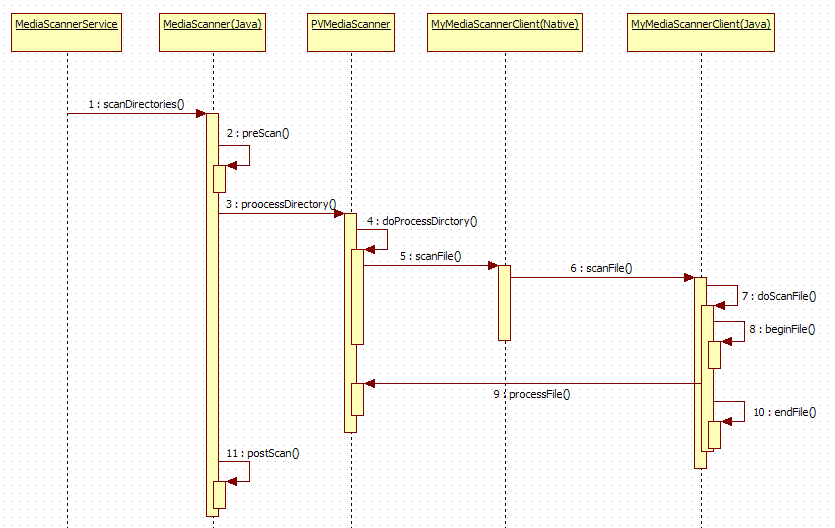
MediaProvider功能
764      @Override
765      public boolean onCreate() {
766          final Context context = getContext();
767
768          // Enable verbose transport logging when requested
769          setTransportLoggingEnabled(LOCAL_LOGV);
770
771          // Shift call statistics back to the original caller
772          Binder.setProxyTransactListener(
773                  new Binder.PropagateWorkSourceTransactListener());
774
775          mStorageManager = context.getSystemService(StorageManager.class);
776          mAppOpsManager = context.getSystemService(AppOpsManager.class);
777          mPackageManager = context.getPackageManager();
778
779          // Reasonable thumbnail size is half of the smallest screen edge width
780          final DisplayMetrics metrics = context.getResources().getDisplayMetrics();
781          final int thumbSize = Math.min(metrics.widthPixels, metrics.heightPixels) / 2;
782          mThumbSize = new Size(thumbSize, thumbSize);
783
784          mInternalDatabase = new DatabaseHelper(context, INTERNAL_DATABASE_NAME, true,
785                  false, mObjectRemovedCallback);
786          mExternalDatabase = new DatabaseHelper(context, EXTERNAL_DATABASE_NAME, false,
787                  false, mObjectRemovedCallback);
788
789          final IntentFilter filter = new IntentFilter();
790          filter.setPriority(10);
791          filter.addDataScheme("file");
792          filter.addAction(Intent.ACTION_MEDIA_UNMOUNTED);
793          filter.addAction(Intent.ACTION_MEDIA_MOUNTED);
794          filter.addAction(Intent.ACTION_MEDIA_EJECT);
795          filter.addAction(Intent.ACTION_MEDIA_REMOVED);
796          filter.addAction(Intent.ACTION_MEDIA_BAD_REMOVAL);
797          context.registerReceiver(mMediaReceiver, filter);
798
799          // Watch for invalidation of cached volumes
800          mStorageManager.registerListener(new StorageEventListener() {
801              @Override
802              public void onVolumeStateChanged(VolumeInfo vol, int oldState, int newState) {
803                  updateVolumes();
804              }
805          });
806          updateVolumes();
807
808          attachVolume(MediaStore.VOLUME_INTERNAL);
809
810          // Attach all currently mounted external volumes
811          for (String volumeName : getExternalVolumeNames()) {
812              attachVolume(volumeName);
813          }
814
815          // Watch for performance-sensitive activity
816          mAppOpsManager.startWatchingActive(new int[] {
817                  AppOpsManager.OP_CAMERA
818          }, mActiveListener);
819
820          return true;
821      }
MediaProvider更新update
4481      @Override
4482      public int update(Uri uri, ContentValues initialValues, String userWhere,
4483              String[] userWhereArgs) {
4484          Trace.traceBegin(TRACE_TAG_DATABASE, "update");
4485          try {
4486              return updateInternal(uri, initialValues, userWhere, userWhereArgs);
4487          } finally {
4488              Trace.traceEnd(TRACE_TAG_DATABASE);
4489          }
4490      }
MediaProvider 插入bulkInsert insert
2190      @Override
2191      public int bulkInsert(Uri uri, ContentValues values[]) {
2192          final int targetSdkVersion = getCallingPackageTargetSdkVersion();
2193          final boolean allowHidden = isCallingPackageAllowedHidden();
2194          final int match = matchUri(uri, allowHidden);
2195
2196          if (match == VOLUMES) {
2197              return super.bulkInsert(uri, values);
2198          }
2199
2200          final DatabaseHelper helper;
2201          final SQLiteDatabase db;
2202          try {
2203              helper = getDatabaseForUri(uri);
2204              db = helper.getWritableDatabase();
2205          } catch (VolumeNotFoundException e) {
2206              return e.translateForUpdateDelete(targetSdkVersion);
2207          }
2208
2209          if (match == MTP_OBJECT_REFERENCES) {
2210              int handle = Integer.parseInt(uri.getPathSegments().get(2));
2211              return setObjectReferences(helper, db, handle, values);
2212          }
2213
2214          helper.beginTransaction();
2215          try {
2216              final int result = super.bulkInsert(uri, values);
2217              helper.setTransactionSuccessful();
2218              return result;
2219          } finally {
2220              helper.endTransaction();
2221          }
2222      }


2899      @Override
2900      public Uri insert(Uri uri, ContentValues initialValues) {
2901          Trace.traceBegin(TRACE_TAG_DATABASE, "insert");
2902          try {
2903              return insertInternal(uri, initialValues);
2904          } finally {
2905              Trace.traceEnd(TRACE_TAG_DATABASE);
2906          }
2907      }
MediaProvider 删除delete
3886      @Override
3887      public int delete(Uri uri, String userWhere, String[] userWhereArgs) {
3888          Trace.traceBegin(TRACE_TAG_DATABASE, "insert");
3889          try {
3890              return deleteInternal(uri, userWhere, userWhereArgs);
3891          } finally {
3892              Trace.traceEnd(TRACE_TAG_DATABASE);
3893          }
3894      }
MediaProvider 查询query
1665      @Override
1666      public Cursor query(Uri uri, String[] projection, String selection, String[] selectionArgs,
1667              String sortOrder) {
1668          return query(uri, projection,
1669                  ContentResolver.createSqlQueryBundle(selection, selectionArgs, sortOrder), null);
1670      }
1671
1672      @Override
1673      public Cursor query(Uri uri, String[] projection, Bundle queryArgs, CancellationSignal signal) {
1674          Trace.traceBegin(TRACE_TAG_DATABASE, "query");
1675          try {
1676              return queryInternal(uri, projection, queryArgs, signal);
1677          } finally {
1678              Trace.traceEnd(TRACE_TAG_DATABASE);
1679          }
1680      }
