最近在做项目时, 遇到了安卓端输入法输入文字时软键盘弹起来会将输入框遮住的问题。
如下图, 在点开个人电话输入框后, 软键盘弹起遮住了输入框
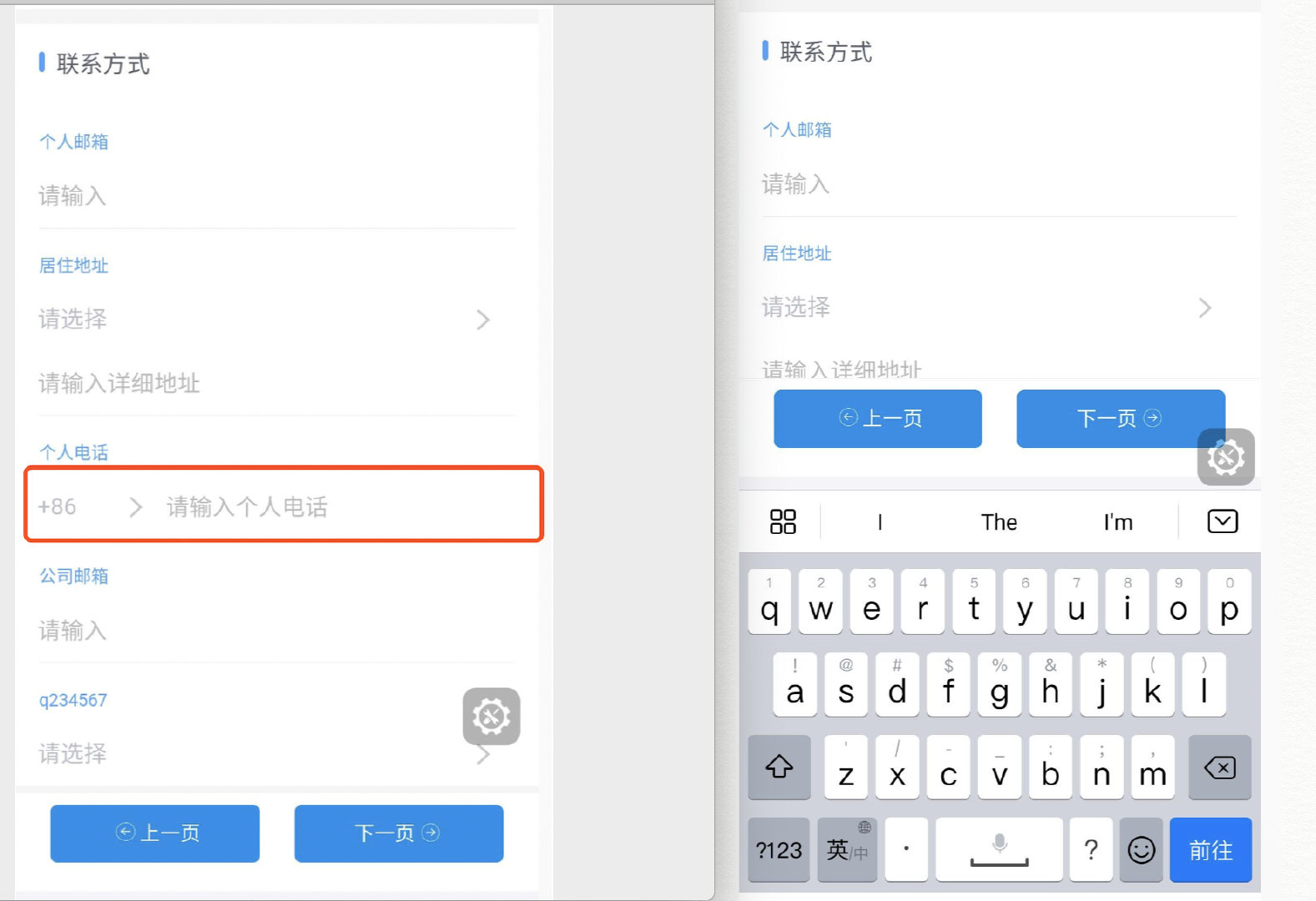
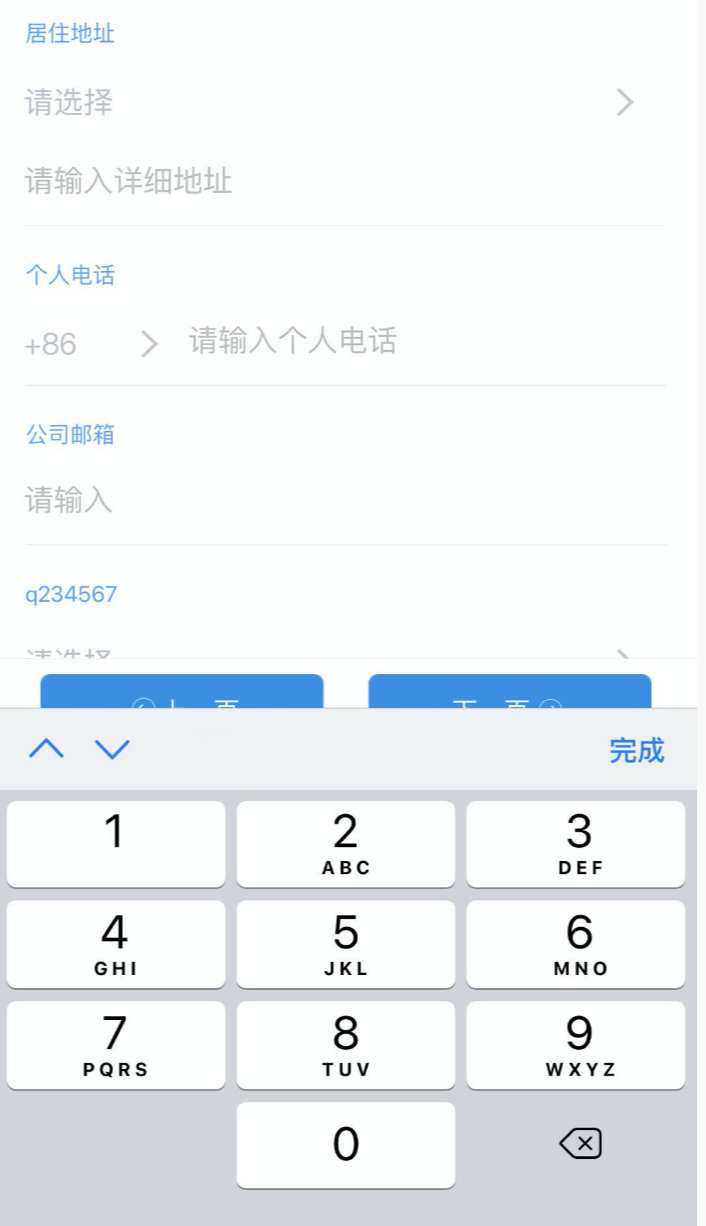
在ios上, 输入框激活后, 当前输入框会自动滚动至可视位置, 这正是我们想要的效果
这是一个很常见的兼容性问题, 应该有比较完善的解决方案了吧,所以我首先去百度了一番, 但是搜出来的大部分结果都是修改app的相关文件, 但是因为我的项目是在微信中打开的, 所以这类解决方案并不能解决我的问题。
最后, 我找到了 scrollIntoView
Element.scrollIntoView() 方法让当前的元素滚动到浏览器窗口的可视区域内。
scrollIntoView() 有两种使用方式: (更详细的介绍戳这里MDN: Element.scrollIntoView())
1. element.scrollIntoView(alignToTop)
alignToTop: Boolean型参数, 默认为 true
true: 元素的顶端将和其所在滚动区的可视区域的顶端对齐, 相当于 scrollIntoViewOptions: {block: "start", inline: "nearest"}
false: 元素的底端将和其所在滚动区的可视区域的底端对齐, 相当于 scrollIntoViewOptions: {block: "end", inline: "nearest"}
2. element.scrollIntoView(scrollIntoViewOptions)
scrollIntoViewOptions: 配置参数, 包含以下属性: behavior (可选) : 定义动画过渡效果, "auto"或 "smooth" 之一。默认为 "auto"。 block (可选): 定义垂直方向的对齐, "start", "center", "end", 或 "nearest"之一。默认为 "start"。 inline (可选): 定义水平方向的对齐, "start", "center", "end", 或 "nearest"之一。默认为 "nearest"。
v1.0
  const onFocus = useCallback(() => {
    document.activeElement.scrollIntoView({ block: 'center', inline: 'nearest' });
  }, []);
给input组件添加onFocus事件, 这样添加之后, 可以明显看出页面确实滚动了, 但是滚动的位置不对。
现在的效果是页面先进行滚动, 选中的输入框滚动至页面中央, 但是页面底部的footer滚动到了软键盘上方的位置, 并且又盖住了输入框(页面底部的footer是固定高度,上方的内容部分采用了 flex: 1的方式撑开)。
v2.0
既然是页面先发生了滚动, 所以加一个延时, 500ms之后进行滚动,这样应该就可以了吧
  const onFocus = useCallback(() => {
    setTimeout(() => {
      document.activeElement.scrollIntoView({ block: 'center', inline: 'nearest' });
    }, 500);
  }, []);
加了计时器之后, 确实大部分情况都已经没问题了, 但是偶尔还是会出现页面滚动比较慢的情况, 可是如果把时间改成1s的话, 整个页面看着会有些卡顿, 而且理论上来说, 这样仍然还是会有出现问题的的可能。
v3.0
实现思路:
软键盘弹起后, 页面body的高度发生了变化, 使用 window.innerHeight 可以获取当前可视部分的高度, 每隔100ms进行一次检测, 一旦window.innerHeigh发生变化, 将输入框滚动至可视区域
const scrollPage = useCallback((oldHeight, oldTime, currentoffsetTop) => {
    setTimeout(() => {
      const currentTimeOffset = new Date() - oldTime;
      // 记录时间, 最长时间800ms , 800ms后没有检测到改变, 则不进行任何操作(正常情况下 800ms应该足够了)
      if (currentTimeOffset < 800) {
        const currentHeight = window.innerHeight;
        // 判断何时进行滚动
        if (Math.abs(oldHeight - currentHeight) > 50 && currentoffsetTop > currentHeight) {
          document.activeElement.scrollIntoView({ block: 'center', inline: 'nearest' });
        } else {
          scrollPage(oldHeight, oldTime, currentoffsetTop);
        }
      }
    }, 100);
  }, []);

  const onFocus = useCallback(() => {
    // 只有安卓的时候需要执行这个操作
    if (!isPc && !isIOS) {

      // 获取当前输入框距离可视区域顶部的高度和输入框高度
      const { top, height } = document.activeElement.getBoundingClientRect();
      const currentoffsetTop = top + (height / 32) * (68 + 32);

      const oldHeight = window.innerHeight;
      const oldTime = new Date();
      scrollPage(oldHeight, oldTime, currentoffsetTop);
    }
  }, [scrollPage]);
到此为止, 已经可以满足我们的需求了
v4.0
公共方法提取
/**
 * 解决安卓输入框输入时软键盘弹起后盖住输入框问题
 * footHeight: 底部有fix固定的button时, button的高度, 默认为 68
 */
function focusAndScroll(footHeight = 68) {
  const activeElement = document.activeElement;
  try {
    if (!isPC() && !isIOS && activeElement) {
      const { top, height } = activeElement.getBoundingClientRect();
      const offsetTop = top + (height / 32) * (footHeight + 32);
      const innerHeight = window.innerHeight;
      const time = new Date();

      const scrollPage = (oldHeight, oldTime, currentoffsetTop) => {
        setTimeout(() => {
          const currentTimeOffset = new Date() - oldTime;
          if (currentTimeOffset < 800) {
            const currentHeight = window.innerHeight;
            if (Math.abs(oldHeight - currentHeight) > 50 && currentoffsetTop > currentHeight) {
              activeElement.scrollIntoView({ block: 'center', inline: 'nearest' });
            } else {
              scrollPage(oldHeight, oldTime, currentoffsetTop);
            }
          }
        }, 50);
      };
      scrollPage(innerHeight, time, offsetTop);
    }
  } catch (e) {
    console.error(e);
  }
}

// onFocus调用
const onFocus = useCallback(() => {
    focusAndScroll();
}, []);
这样 ,这个问题就可以啦~