前言:node.js越来越被广泛的使用,现在找工作职位要求上大都写熟悉或了解一门后端 语言,如(java、php、node等)。Node.js是一个javascript运行环境。它让javascript可以开发后端程序,实现几乎其他后端语言实现的所有功能,Nodejs语法完全是js语法,只要你懂js基础就可以学会Nodejs后端开发,Node打破了过去JavaScript只能在浏览器中运行的局面。前后端编程环境统一,可以大大降低开发成本,也降低了学习成本。
准备工作
一.安装koa
1.什么是koa?
Koa即KoaJS,Koa:基于 Node.js 平台的下一代 web 开发框架。 Koa 是一个新的 web 框架,由 Express 幕后的原班人马打造, 致力于成为 web 应用和 API 开发领域中的一个更小、更富有表现力、更健壮的基石。 通过利用 async 函数,Koa 帮你丢弃回调函数,并有力地增强错误处理。
Koa官网地址:koa.bootcss.com/
2.新建文件serves,初始化项目
npm init -y
3.安装koa模块
npm install koa --save
二.运行本地项目
1.在文件下新建index.js文件,引入依赖
// 导入koa模块
    const Koa = require('koa');
    // 创建koa的实例app
    const app = new Koa();

    app.use(async ctx => {
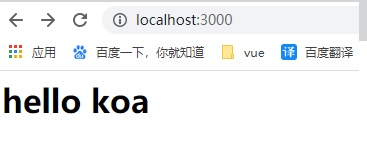
        ctx.body = "<h1>hello koa</h1>"
    })
    // 监听端口
    app.listen(3000, () => {
        console.log("服务器已启动,http://localhost:3000");
    })
2.使用node命令启动服务器
(电脑上要安装node,没有安装自行去安装),在浏览器输入3000端口打开
// 进入当前文件夹
node index.js
三.安装mongoose
npm install mongoose --save
并在使用的地方引入...
四.安装mongodb
查看网址:www.runoob.com/mongodb/mon…
使用mongodb compass,可以对mongoDB数据可视化(window)
安装网址:www.mongodb.com/download-ce… 选择对应的系统安装网址
配置mongodb,点击电脑右键属性 =》 高级系统设置 =》环境变量 =》 点击path =》 新建变量,将安装的mongodb的路径添加确定,mongodb路径(C:\Program Files\MongoDB\Server\4.0\bin)一般是这个路径 配置好后运行mongod就可以运行打开数据库了
五.连接数据库
1.新建schema文件,在该文件下新建Uers.js文件
const mongoose = require("mongoose");
const Schema = mongoose.Schema;
let ObjectId = Schema.Types.ObjectId;

//创建UserShema
const userSchema = new Schema({
  userId: { type: ObjectId },
  username: { unique: true, type: String },
  password: String,
  createdAt: { type: Date, default: Date.now() },
  lastLonginAt: { type: Date, default: Date.now() },
});

// 发布模型
mongoose.model("User", userSchema);
2.连接数据库
新建init.js,连接数据库,安装glob(作用:node的glob模块允许你使用 *等符号, 来写一个glob规则,像在shell里一样,获取匹配对应规则的文件),对连接数据库进行封装配置,代码如下:
npm install glob --save

const mongoose = require("mongoose");
const db = "mongodb://localhost/smile-db"; // 数据库名称smile-db
const glob = require("glob");
const { resolve } = require("path"); //直接引入,不用安装

exports.initSchemas = () => {
  glob.sync(resolve(__dirname, "./schema", "**/*.js")).forEach(require); // 静态配置
};

exports.connect = () => {
  // 连接数据库
  //{ useNewUrlParser: true, useUnifiedTopology: true }
  mongoose.connect(db, { useNewUrlParser: true, useUnifiedTopology: true });
  let maxConnectTimes = 0; //重连次数

  return new Promise((resolve, reject) => {
    mongoose.connection.on("disconnected", () => {
      console.log("-----------------数据库断开");
      if (maxConnectTimes <= 3) {
        maxConnectTimes++;
        mongoose.connect(db);
      } else {
        reject();
        throw new Error("数据库出现错误,请手动解决");
      }
    });

    mongoose.connection.on("error", () => {
      console.log("------------数据库错误----");
      if (maxConnectTimes <= 3) {
        maxConnectTimes++;
        mongoose.connect(db);
      } else {
        reject();
        throw new Error("数据库出现错误,请手动解决");
      }
    });

    //数据库连接成功
    mongoose.connection.once("open", () => {
      console.log("------------数据库连接成功");
      resolve();
    });
  });
};
3.在index.js引入init.js函数,运行程序
const Koa = require("koa");
const app = new Koa();
const { connect, initSchemas} = require("./databse/init.js");
const mongoose = require("mongoose");

//立即执行函数
 (async () => {
  await connect();
  initSchemas()
 })();

app.use(async (ctx) => {
  ctx.body = "<h1>hello koa</h1>";
});

app.listen(3000, () => {
  console.log("端口打开成功");
});
运行后可以看到控制台显示数据库连接成功
六.对密码进行加密
1.连接数据库,写入账户密码(index.js)
(async () => {
  await connect();
  initSchemas();
  const User = mongoose.model("User");
  let oneUser = new User({
    username: "admin121212",
    password: "98652222",
  });
  oneUser.save().then(() => {
    console.log("插入成功");
  });
})();
运行命令 node index.js

2.加密密码,安装bctypt
npm install bcrypt --save

//在user.js文件中引入,
const mongoose = require("mongoose");
const Schema = mongoose.Schema;
let ObjectId = Schema.Types.ObjectId;

const bcrypt = require("bcrypt");
// 加密的幂次
let SALT_WORK_FACTOR = 10; // 默认 10

//创建UserShema
const userSchema = new Schema({
  userId: { type: ObjectId },
  username: { unique: true, type: String },
  password: String,
  createdAt: { type: Date, default: Date.now() },
  lastLonginAt: { type: Date, default: Date.now() },
});

userSchema.pre("save", function (next) {
  console.log("写入操作......");
  bcrypt.genSalt(SALT_WORK_FACTOR, (err, salt) => {
    if (err) return next(err);
    bcrypt.hash(this.password, salt, (err, hash) => {
      if (err) return next(err);
      this.password = hash;
      next();
    });
  });
});

// 发布模型
mongoose.model("User", userSchema);
保存运行并没有写入成功,因为我配置了写入时账户不能重复,所以要更改账户名(username),再次运行,没有写入成功也没有报错,版本是4.0.1,我以为是版本的问题(我也没有测试低版本的),后面查阅了资料,再次确认我没有写错,后来找到问题,window要先安装node-gyp
npm install --save node-gyp

npm install --save  bcryptjs
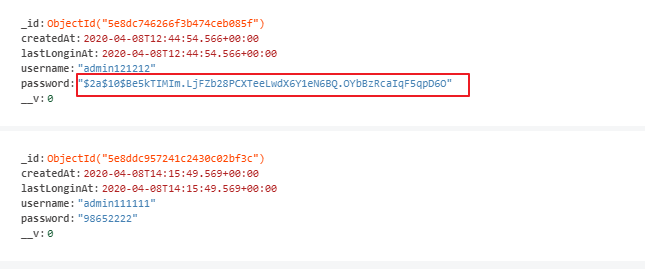
安装成功后引入 bcryptjs,运行,可以看到密码已经加密
七.账户密码验证
1.封装方法验证密码
在user.js封装方法
const mongoose = require("mongoose");
const Schema = mongoose.Schema;
let ObjectId = Schema.Types.ObjectId;
const bcrypt = require("bcryptjs");
// 加密的幂次
let SALT_WORK_FACTOR = 10; // 默认 10

//创建UserShema
const userSchema = new Schema({
  userId: { type: ObjectId },
  username: { unique: true, type: String },
  password: String,
  createdAt: { type: Date, default: Date.now() },
  lastLonginAt: { type: Date, default: Date.now() },
});

userSchema.pre("save", function (next) {
  console.log("写入操作......");
  bcrypt.genSalt(SALT_WORK_FACTOR, (err, salt) => {
    if (err) return next(err);
    bcrypt.hash(this.password, salt, (err, hash) => {
      if (err) return next(err);
      this.password = hash;
      next();
    });
  });
});

userSchema.methods = {
  comparePassword: (_pass, password) => { //验证方法
    // _pass传递过来的密码,password是数据库中的密码
    return new Promise((res, rej) => {
      bcrypt.compare(_pass, password, (err, isMath) => { //compare官方方法
        if (!err) {
          res(isMath); // isMath返回true和false,true代表验证通过
        } else {
          rej(err);
        }
      });
    });
  },
};

// 发布模型
mongoose.model("User", userSchema);
2.填写登录和密码
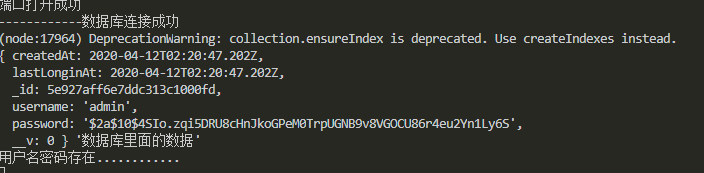
我这边没有写前台,只能手动写账户和密码到 数据库验证(index.js)
const Koa = require("koa");
const app = new Koa();
const { connect, initSchemas } = require("./databse/init.js");
const mongoose = require("mongoose");

//立即执行函数
(async () => {
  await connect();
  initSchemas();

  const User = mongoose.model("User");

//模拟用户登录账户输入的账户面
  let username = "admin";
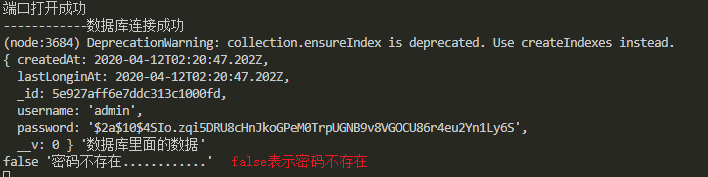
  let pass = "789456123"; // 这个密码是没有的

  await User.findOne({ username: username })
    .exec()
    .then(async (data) => {
      console.log(data, "数据库里面的数据");
      if (data) { // 因为我上面插入数据库的时候设置了账户名不能重复
        let newUser = new User();
        await newUser
          .comparePassword(pass, data.password)
          .then((isMath) => {
            if (isMath) { // 返回true账户密码存在
              console.log("用户名密码存在............");
            } else { // 否则是账户存在密码错误
              console.log(isMath, "密码不存在............");
            }
          })
          .catch((error) => {
            console.log("服务器出现异常,请重启服务器......");
          });
      } else {// 账户名不存在
        console.log("用户名密码不存在");
      }
    })
    .catch((error) => {
      console.log(error, "出现错误...");
    });
})();

app.use(async (ctx) => {
  ctx.body = "<h1>hello koa</h1>";
});

app.listen(3000, () => {
  console.log("端口打开成功");
});
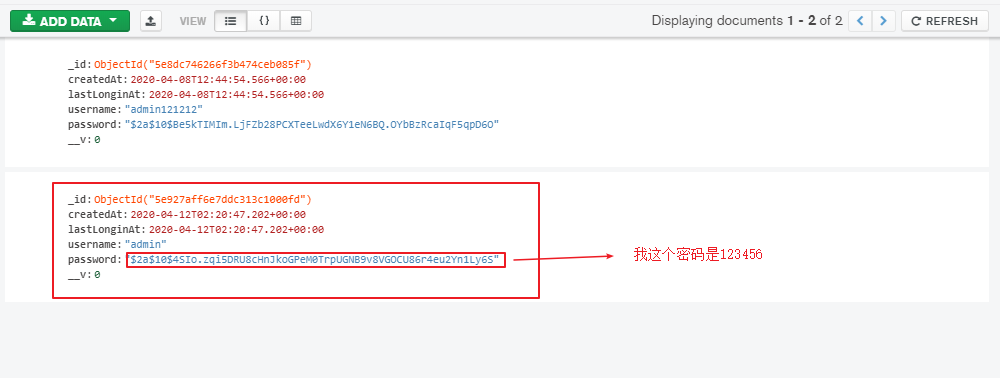
mongodb数据库中的数据
csdn网址:blog.csdn.net/qq_43530917…
写的不足,欢迎大佬吐槽,持续更新...