第一步
导入依赖包
[AppleScript]
<`font style="color:rgb(77, 77, 77)"><font` `face="""><font style="font-size:16px"><dependency>`
<`groupId>com.google.zxing</groupId>`
<`artifactId>core</artifactId>`
<`version>3.1.0</version>`
<`/dependency>`
<`dependency`>
<`groupId>com.google.zxing</groupId>`
<`artifactId>javase</artifactId>`
<`version>3.1.0</version>`
<`/dependency></font></font></font>`
第二步,创建class文件(QRCodeUtils )
[AppleScript]
import java.awt.BasicStroke;
import java.awt.Graphics;
import java.awt.Graphics`2`D;
import java.awt.Image;
import java.awt.Shape;
import java.awt.geom.RoundRectangle`2`D;
import java.awt.`image`.BufferedImage;
import java.io.File;
import java.io.OutputStream;
import java.util.Hashtable;
import java.util.Random;
import javax.imageio.ImageIO;
import com.google.zxing.BarcodeFormat;
import com.google.zxing.BinaryBitmap;
import com.google.zxing.DecodeHintType;
import com.google.zxing.EncodeHintType;
import com.google.zxing.MultiFormatReader;
import com.google.zxing.MultiFormatWriter;
import com.google.zxing.Result;
import com.google.zxing.client.j`2`se.BufferedImageLuminanceSource;
import com.google.zxing.common.BitMatrix;
import com.google.zxing.common.HybridBinarizer;
import com.google.zxing.qrcode.decoder.ErrorCorrectionLevel;
public class QRCodeUtils {
private static final String CHARSET = "utf-8"`;`
private static final String FORMAT_NAME = "JPG"`;`
/`/ 二维码尺寸 `
private static final int QRCODE_SIZE = 300`;`
/`/ LOGO宽度 `
private static final int WIDTH = 60`;`
/`/ LOGO高度 `
private static final int HEIGHT = 60`;`
private static BufferedImage createImage`(String` `content, String imgPath`,
boolean needCompress`) throws Exception {`
Hashtable`<EncodeHintType, Object>` `hints` `=` `new` `Hashtable<EncodeHintType, Object>();`
hints.put`(EncodeHintType.ERROR_CORRECTION, ErrorCorrectionLevel.H);`
hints.put`(EncodeHintType.CHARACTER_SET, CHARSET);`
hints.put`(EncodeHintType.MARGIN, 1);`
BitMatrix bitMatrix = new MultiFormatWriter`().encode(content`,
BarcodeFormat.QR_CODE`, QRCODE_SIZE,` `QRCODE_SIZE, hints);`
int width = bitMatrix.getWidth`();`
int height = bitMatrix.getHeight`();`
BufferedImage image = new BufferedImage`(width, height`,
BufferedImage.TYPE_INT_RGB`)`;
for (`int x = 0; x` `<` `width; x++) {`
for (`int y = 0; y` `<` `height; y++) {`
image`.setRGB(x,` `y, bitMatrix.get(x, y)` `?` `0xFF`000000
: 0`xFFFFFFFF);`
}
}
if (`imgPath ==` `null ||` `"".equals(imgPath)`) {
return image`;`
}
/`/ 插入图片 `
QRCodeUtils.insertImage`(image, imgPath,` `needCompress)`;
return image`;`
}
/`*`*
* 插入LOGO
*
* @param source
* 二维码图片
* @param imgPath
* LOGO图片地址
* @param needCompress
* 是否压缩
* @throws Exception
*`/`
private static void insertImage`(BufferedImage source, String imgPath`,
boolean needCompress`) throws Exception {`
File file = new File`(imgPath)`;
if (`!file.exists()) {`
System.err.println`(""+imgPath+" 该文件不存在!")`;
return`;`
}
Image src = ImageIO.`read(new File(imgPath))`;
int width = src.getWidth`(null)`;
int height = src.getHeight`(null)`;
if (`needCompress)` `{` `// 压缩LOGO `
if (`width > WIDTH`) {
width = WIDTH;
}
if (`height > HEIGHT`) {
height = HEIGHT;
}
Image image = src.getScaledInstance`(width, height`,
Image.SCALE_SMOOTH`)`;
BufferedImage tag = new BufferedImage`(width, height`,
BufferedImage.TYPE_INT_RGB`)`;
Graphics g = tag`.getGraphics()`;
g.drawImage`(image, 0,` `0, null); /`/ 绘制缩小后的图
g.dispose`();`
src = image`;`
}
/`/ 插入LOGO `
Graphics`2D graph` `=` `source.createGraphics();`
int x = (`QRCODE_SIZE - width)` `/` `2;`
int y = (`QRCODE_SIZE - height)` `/` `2;`
graph.drawImage`(src, x,` `y, width,` `height, null);`
Shape shape = new RoundRectangle`2D.Float(x, y,` `width, width,` `6, 6);`
graph.setStroke`(new` `BasicStroke(3f))`;
graph.draw`(shape)`;
graph.dispose`();`
}
/`*`*
* 生成二维码`(内嵌LOGO)`
*
* @param content
* 内容
* @param imgPath
* LOGO地址
* @param destPath
* 存放目录
* @param needCompress
* 是否压缩LOGO
* @throws Exception
*`/`
public static String encode`(String` `content, String imgPath,` `String destPath,`
boolean needCompress`) throws Exception {`
BufferedImage image = QRCodeUtils.createImage`(content, imgPath`,
needCompress`)`;
mkdirs`(destPath)`;
String file = new Random`().nextInt(99999999)+".jpg";`
ImageIO.`write(image,` `FORMAT_NAME, new File(destPath+"/"+file))`;
return file`;`
}
/`*`*
* 当文件夹不存在时,mkdirs会自动创建多层目录,区别于mkdir.`(mkdir如果父目录不存在则会抛出异常)`
* @`date 2013-12-11 上午10:16:`36
* @param destPath 存放目录
*`/`
public static void mkdirs`(String destPath) {`
File file =`new File(destPath);`
/`/当文件夹不存在时,mkdirs会自动创建多层目录,区别于mkdir.(mkdir如果父目录不存在则会抛出异常)`
if (`!file.exists()` `&& !file.isDirectory()`) {
file`.mkdirs()`;
}
}
/`*`*
* 生成二维码`(内嵌LOGO)`
*
* @param content
* 内容
* @param imgPath
* LOGO地址
* @param destPath
* 存储地址
* @throws Exception
*`/`
public static void encode`(String` `content, String imgPath,` `String destPath)`
throws Exception {
QRCodeUtils.encode`(content, imgPath,` `destPath, false);`
}
/`*`*
* 生成二维码
*
* @param content
* 内容
* @param destPath
* 存储地址
* @param needCompress
* 是否压缩LOGO
* @throws Exception
*`/`
public static void encode`(String` `content, String destPath`,
boolean needCompress`) throws Exception {`
QRCodeUtils.encode`(content, null,` `destPath, needCompress);`
}
/`*`*
* 生成二维码
*
* @param content
* 内容
* @param destPath
* 存储地址
* @throws Exception
*`/`
public static void encode`(String` `content, String destPath`) throws Exception {
QRCodeUtils.encode`(content, null,` `destPath, false);`
}
/`*`*
* 生成二维码`(内嵌LOGO)`
*
* @param content
* 内容
* @param imgPath
* LOGO地址
* @param output
* 输出流
* @param needCompress
* 是否压缩LOGO
* @throws Exception
*`/`
public static void encode`(String` `content, String imgPath`,
OutputStream output`, boolean needCompress`) throws Exception {
BufferedImage image = QRCodeUtils.createImage`(content, imgPath`,
needCompress`)`;
ImageIO.`write(image,` `FORMAT_NAME, output);`
}
/`*`*
* 生成二维码
*
* @param content
* 内容
* @param output
* 输出流
* @throws Exception
*`/`
public static void encode`(String` `content, OutputStream output`)
throws Exception {
QRCodeUtils.encode`(content, null,` `output, false);`
}
/`*`*
* 解析二维码
*
* @param file
* 二维码图片
* @`return`
* @throws Exception
*`/`
public static String decode`(File` `file) throws Exception {`
BufferedImage image`;`
image = ImageIO.`read(file);`
if (`image ==` `null) {`
return null;
}
BufferedImageLuminanceSource source = new BufferedImageLuminanceSource`(`
image`)`;
BinaryBitmap bitmap = new BinaryBitmap`(new` `HybridBinarizer(source));`
Result result`;`
Hashtable`<DecodeHintType, Object>` `hints` `=` `new` `Hashtable<DecodeHintType, Object>();`
hints.put`(DecodeHintType.CHARACTER_SET, CHARSET);`
result = new MultiFormatReader`().decode(bitmap,` `hints)`;
String resultStr = result`.getText()`;
return resultStr;
}
/`*`*
* 解析二维码
*
* @param path
* 二维码图片地址
* @`return`
* @throws Exception
*`/`
public static String decode`(String` `path) throws Exception {`
return QRCodeUtils.decode`(new` `File(path));`
}
}
第三步,Controller层
[AppleScript]
@AuthIgnore
@GetMapping`("QRCode")`
public R QRCode`(`) {
String text = "I love you"`; //生成二维码的内容`
String logoPath = "D:\\img\\1575892281966maxresdefault.jpg"`; //二维码的logo图片`
String destPath = "D:\\img"`; //生成的二维码存储本地的地址`
try {
System.out.println`(QRCodeUtils.encode(text, logoPath,` `destPath, true))`;
} catch (`Exception e`) {
/`/ TODO Auto-generated catch block`
e.printStackTrace`();`
}
return R.ok`().put("msg",` `"成功")`;
}
第四步 使用Postman访问接口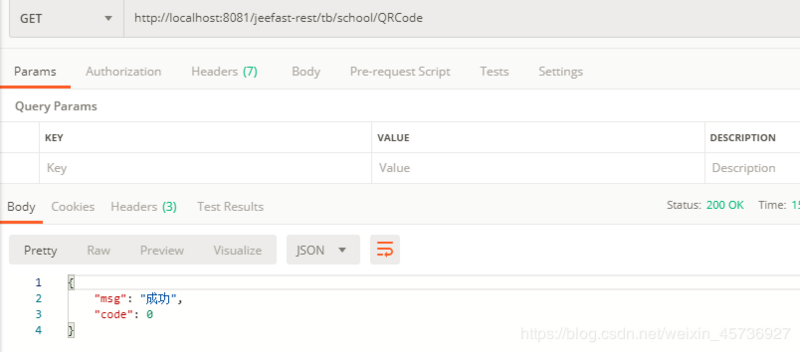
生成成功