1.判断Array Date数据类型
<script>
//可以使用 constructor 属性来查看对象是否为数组
(包含字符串 "Array" ):是否为日期 (包含字符串 "Date" ):
var arr= [1,2,3]
console.log(arr.__proto__.constructor.toString().indexOf('Array' )>-1)//true
var date = new Date();
console.log(date.__proto__.constructor.toString().indexOf('Date' )>-1)//true
</script>
2.toFixed(n)
// toFixed(n) 把数字转换为字符串,结果的小数点后有n位数字。最后一个四舍五入
<script>

    var num = 3.1415926;
    console.log(num.toFixed(3));//3.142
    console.log(num.toFixed(4))//3.1416
</script>
3.正则表达式补充
i 忽视英文大小写
\d 查找数字 \s 查找空白字符
exec() 方法用于检索字符串中的正则表达式的匹配。该函数返回一个数组,其中存放匹配的结果。如果未找到匹配,则返回值为 null。
正则表达式
// i 忽视英文大小写
var str = 'hello world'
var reg = /World/i;
console.log(reg.test(str))//true
// \d 查找数字 \s 查找空白字符
var str1 = 'hello hello hello hello'
console.log(str1.replace(/\s/g,'world' ))//helloworldworldhelloworldworldhelloworldworldhello
//exec () 方法用于检索字符串中的正则表达式的匹配。该函数返回一个数组,其中存放匹配的结果。如果未找到匹配,则返回值为 null。
var reg2 = /(hello)/g
console.log(reg2.exec('你好helloworld谁知道helloworld' ))
4.表单验证
<!-- required 如果表单字段 (fname) 的值为空, required 属性会阻止表单提交: -->
<!-- pattern=''规定输入元素值的模式 在此正则表达式不需要加//-->
<!-- maxlength最大长度 minlenth最小·长度 max最大值 min最小值-->
5.API的验证
//checkValidity()	如果 input 元素中的数据是合法的返回 true,否则返回 false。
//validationMessage	浏览器错误提示信息 如果错误输出错误在哪里
<input type ="text" required maxlength="10" minlength="3" >
<button>提交</button>
<script>
//checkValidity() 如果 input 元素中的数据是合法的返回 true ,否则返回 false 。
//validationMessage 浏览器错误提示信息 如果错误输出错误在哪里
var input = document.querySelector('input' );
var btn = document.querySelector('button' );
btn.onclick = function if (!input.checkValidity()){
// console.log(1)
//输出错误在哪里
console.log(input.validationMessage)
//请将该文本增加为 3 个字符或更多(您当前使用的是 2 个字符)。
}
}
</script>
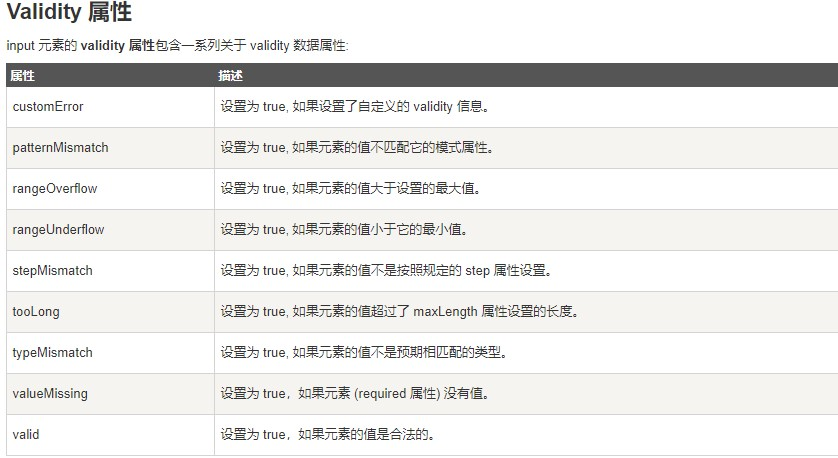
6.validity属性以及其包含的方法
var input1 = document.querySelector('#typeNum' );
var input2 = document.querySelector('#typeText' );
var btn = document.querySelector('button' );
btn.onclick = function 7.JSON
//JSON.parse()	用于将一个 JSON 字符串转换为 JavaScript 对象。
//JSON.stringify()	用于将 JavaScript 对象转换为 JSON 字符串。
var obj1 = {
name:'张三' ,
age:18
}
var str1 = JSON.stringify(obj1)
console.log(str1)//{"name" :"张三" ,"age" :18}
var obj2= JSON.parse(str1)
console.log(obj2)
/*{name: "张三" , age: 18}age: 18name: "张三" __proto__: Object
*/
8. // 函数提升,比变量提升得优先级高!!!
<script>
// 函数提升,比变量提升得优先级高!!!
console.log(a);//ƒ a function a 9.将伪数组转化为真的数组
Array.prototype.slice.call(arguments)
10.箭头函数
//function 被 => 替代
// var demo = (a,b)=>{

// }
// 如果箭头函数不加 {} 就相当于加上了一个return
//var demo = (a,b)=> a + b
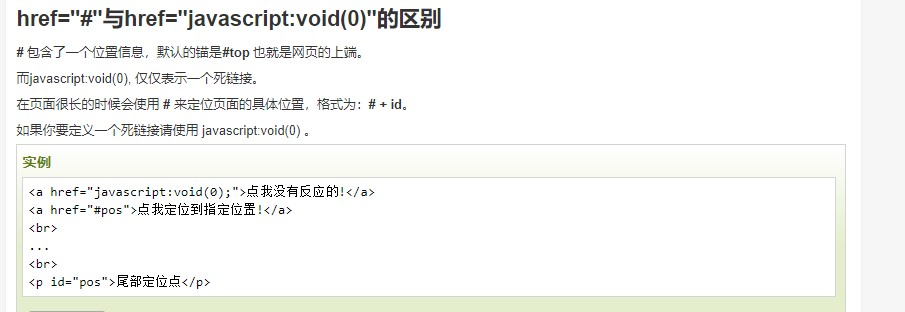
11.void
//javascript:void(0) 中最关键的是 void 关键字, void 是 JavaScript
中非常重要的关键字,该操作符指定要计算一个表达式但是不返回值