

React的基础已经快更新完了,接下来这一篇我记录的是生命周期(只有类组件才有这个概念)相关的知识点,这个也是面试必问的点。
-
在开始之前先提醒一下,HTTP请求数据要放在
componentDidMount生命周期中。有人可能会问为什么不放在componentWillMount生命周期中,这个里面也不是不能发送HTTP请求指示在这个生命周期发送会有可能反复多次执行(这个react设计上的锅)。但是在新版生命周期里面,已经将它弃用所以也就没有了这个问题。 -
旧版生命周期:

    import React, { Component } from 'react';
    import ReactDOM from 'react-dom';
    interface Props { }
    interface State { number: number }
    class Counter extends React.Component<Props, State> { // 他会比较两个状态相等就不会刷新视图 PureComponent是浅比较
        static defaultProps = {
            name: 'name'
        };
        constructor(props) {
            super(props);
            this.state = { number: 0 }
            console.log('1.constructor构造函数')
        }
        componentWillMount() { // 取本地的数据 同步的方式:采用渲染之前获取数据,只渲染一次
            console.log('2.组件将要加载 componentWillMount');
        }
        componentDidMount() {
            console.log('4.组件挂载完成 componentDidMount');
        }
        handleClick = () => {
            this.setState({ number: this.state.number + 1 });
        };
        // react可以shouldComponentUpdate方法中优化 PureComponent 可以帮我们做这件事
        shouldComponentUpdate(nextProps, nextState): boolean {     // 代表的是下一次的属性 和 下一次的状态
            console.log('5.组件是否更新 shouldComponentUpdate');
            return nextState.number % 2 == 0;
            // return nextState.number!==this.state.number; //如果此函数种返回了false 就不会调用render方法了
        } //不要随便用setState 可能会死循环
        componentWillUpdate() {
            console.log('6.组件将要更新 componentWillUpdate');
        }
        componentDidUpdate() {
            console.log('7.组件完成更新 componentDidUpdate');
        }
        render() {
            console.log('3.render');
            return (
                <div>
                    <p>{this.state.number}</p>
                    {this.state.number > 3 ? null : <ChildCounter n={this.state.number} />}
                    <button onClick={this.handleClick}>+</button>
                </div>
            )
        }
    }

    class ChildCounter extends Component<{ n: number }> {
        componentWillUnmount() {
            console.log('组件将要卸载componentWillUnmount')
        }
        componentWillMount() {
            console.log('child componentWillMount')
        }
        render() {
            console.log('child-render')
            return (<div>
            {this.props.n}
            </div>)
        }
        componentDidMount() {
            console.log('child componentDidMount')
        }
        componentWillReceiveProps(newProps) {      //第一次不会执行,之后属性更新时才会执行
            console.log('child componentWillReceiveProps')
        }
        shouldComponentUpdate(nextProps, nextState) {
            return nextProps.n % 3 == 0; //子组件判断接收的属性 是否满足更新条件 为true则更新
        }
    }
    ReactDOM.render(<Counter />, document.getElementById('root'));
    // defaultProps
    // constructor
    // componentWillMount
    // render
    // componentDidMount
    // 状态更新会触发的
    // shouldComponentUpdate nextProps,nextState=>boolean
    // componentWillUpdate
    // componentDidUpdate
    // 属性更新
    // componentWillReceiveProps newProps
    // 卸载
    // componentWillUnmount
-
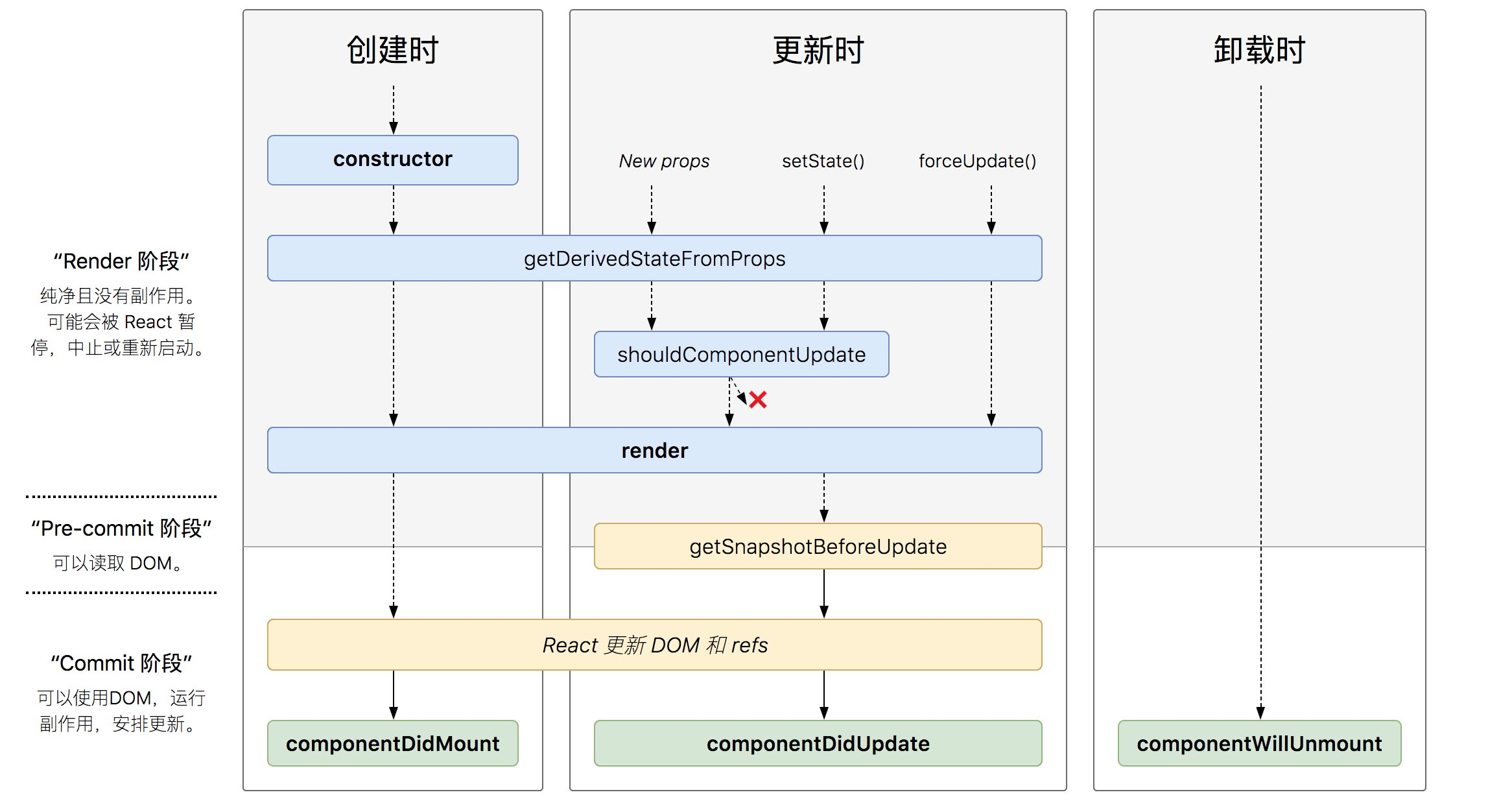
新版生命周期:
static``getDerivedStateFromProps(props, state)这个生命周期的功能实际上就是将传入的props映射到state上面import React from 'react'; import ReactDOM from 'react-dom'; interface Props { } interface State { number: number } class Counter extends React.Component<Props, State> { static defaultProps = { name: 'name' }; constructor(props) { super(props); this.state = { number: 0 } } handleClick = () => { this.setState({ number: this.state.number + 1 }); }; render() { console.log('3.render'); return ( <div> <p>{this.state.number}</p> <ChildCounter number={this.state.number} /> <button onClick={this.handleClick}>+</button> </div> ) } } class ChildCounter extends React.Component<{ number: number }, { number: number }> { constructor(props) { super(props); this.state = { number: 0 }; } static getDerivedStateFromProps(nextProps, prevState) { const { number } = nextProps; // 当传入的type发生变化的时候,更新state if (number % 2 == 0) { return { number: number * 2 }; } else { return { number: number * 3 }; } // 否则,对于state不进行任何操作 return null; } render() { console.log('child-render', this.state) return (<div> {this.state.number} </div>) } } ReactDOM.render( <Counter />, document.getElementById('root') );getSnapshotBeforeUpdate()被调用于render之后,可以读取但无法使用DOM的时候。它使您的组件可以在可能更改之前从DOM捕获一些信息(例如滚动位置)。此生命周期返回的任何值都将作为参数传递给componentDidUpdate()import React from 'react'; import ReactDOM from 'react-dom'; interface Props { } interface State { messages: Array<string> } class ScrollingList extends React.Component<Props, State> { wrapper timeID constructor(props) { super(props); this.state = { messages: [] } this.wrapper = React.createRef(); } addMessage() { this.setState(state => ({ messages: [`${state.messages.length}`, ...state.messages], })) } componentDidMount() { this.timeID = window.setInterval(() => {//设置定时器 this.addMessage(); }, 1000) } componentWillUnmount() {//清除定时器 window.clearInterval(this.timeID); } getSnapshotBeforeUpdate() { //很关键的,我们获取当前rootNode的scrollHeight,传到componentDidUpdate 的参数perScrollHeight return this.wrapper.current.scrollHeight; } componentDidUpdate(pervProps, pervState, prevScrollHeight) { const curScrollTop = this.wrapper.current.scrollTop;//当前向上卷去的高度 //当前向上卷去的高度加上增加的内容高度 this.wrapper.current.scrollTop = curScrollTop + (this.wrapper.current.scrollHeight - prevScrollHeight); } render() { let style = { height: '100px', width: '200px', border: '1px solid red', overflow: 'auto' } return ( <div style={style} ref={this.wrapper} > {this.state.messages.map((message, index) => ( <div key={index}>{message} </div> ))} </div> ); } }
ReactDOM.render( , document.getElementById('root') ); ```
