

1. Introduction
表结构
| 表名 | 字段名 |
|---|---|
| teacher | id, dept, name, phone, mobile |
| dept | id, name |
知识点统计
| 题号 | 知识点 |
|---|---|
| 2,3,4,6,8 | inner join, left join,right join |
| 5,6 | COALESCE |
| 7,8 | COUNT, GROUP BY |
| 9,10 | CASE WHEN |
总结了 join, COALESCE, CASE WHEN 知识点
2. Q & A
- List the teachers who have NULL for their department.
SELECT name
    FROM teacher
    WHERE dept is NULL
- Note the INNER JOIN misses the teachers with no department and the departments with no teacher.
SELECT teacher.name, dept.name
    FROM teacher INNER JOIN dept
        ON (teacher.dept=dept.id)
- Use a different JOIN so that all teachers are listed.
SELECT teacher.name, dept.name
    FROM teacher LEFT JOIN dept
        ON (teacher.dept=dept.id)
- Use a different JOIN so that all departments are listed.
SELECT teacher.name, dept.name
    FROM dept LEFT JOIN teacher
        ON (teacher.dept=dept.id)
- Use COALESCE to print the mobile number. Use the number '07986 444 2266' if there is no number given. Show teacher name and mobile number or '07986 444 2266'
SELECT name, COALESCE(teacher.mobile, '07986 444 2266')
    FROM teacher
- Use the COALESCE function and a LEFT JOIN to print the teacher name and department name. Use the string 'None' where there is no department.
SELECT teacher.name, COALESCE(dept.name, 'None')
    FROM teacher LEFT JOIN dept
        ON (teacher.dept=dept.id)
- Use COUNT to show the number of teachers and the number of mobile phones.
SELECT COUNT(name),COUNT(mobile)
    FROM teacher
- Use COUNT and GROUP BY dept.name to show each department and the number of staff. Use a RIGHT JOIN to ensure that the Engineering department is listed.
SELECT dept.name, COUNT(teacher.id)
    FROM teacher RIGHT JOIN dept
        ON (teacher.dept=dept.id)
    GROUP BY dept.name
- Use CASE to show the name of each teacher followed by 'Sci' if the teacher is in dept 1 or 2 and 'Art' otherwise.
SELECT name, CASE WHEN dept =1 OR dept=2 THEN 'Sci' else 'Art' end
    FROM teacher
- Use CASE to show the name of each teacher followed by 'Sci' if the teacher is in dept 1 or 2, show 'Art' if the teacher's dept is 3 and 'None' otherwise.
SELECT name, CASE
    WHEN dept =1 OR dept=2 THEN 'Sci'
    WHEN dept =3 THEN 'Art'
    else 'None'
    end
  FROM teacher
3. 知识点总结
3.1 主键与外键
- 主键 primary key: 唯一标识.
- 外键 foreign key: 某个表中的一列,它包含另一个表的主键值,定义了两个表之间的关系.
3.2 自然联结,内部联结,外部联结
3.2.1 自然联结
- 定义:无论何时对表进行联结,应该至少有一个列出现不止一个表中(被联结的列)。标准的联结返回所有数据,甚至相同的列多次出现。自然联结排除多次出现,使每个列只返回一次(作用).
- 方法:对一个表使用通配符(SELECT *),对所有其他表的列使用明确的子集.
3.2.2 内部联结
- 定义:内部联结又称为等值联结,将两个表中存在联结关系的字段符合联结关系的那些记录形成记录集的联结。
- 方法:用
INNER JOIN指定表之间的关系,用ON子句指定联结条件.
3.2.3 外部联结
- 定义:外部联结包含了那些在相关表中没有关联行的行。
如有时候我们需要完成这样的工作:
-
对每个客户下了多少订单进行计数,包括那些至今尚未下订单的客户;
-
列出所有产品以及订购数量,包括没有人订购的产品;
-
- 方法:用
LEFT OUTER JOIN\RIGHT OUTER JOIN指定表之间的关系,用ON子句指定联结条件. - 注意:在使用外部联结时,必须使用
LEFT或RIGHT关键字指定包括其所有行的表.RIGHT指出的OUTER JOIN右边的表.LEFT指出的OUTER JOIN左边的表.
3.2.4 内部联结与外部联结举例
3.2.4.1 表结构
customers 表
| 列 | 说明 |
|---|---|
| cust_id | 唯一的顾客ID |
| cust_name | 顾客名 |
order表
| 列 | 说明 |
|---|---|
| order_num | 唯一订单号 |
| cust_id | 订单顾客ID (关联customers 表的cust_id) |
3.2.4.2 查询语句及其结果
现分别用内联和外联对上述两个表检索所有客户及其订单.
- 内部联结:
SELECT customers.cust_id, order.order_num
    FROM customers INNER JOIN orders
        ON customers.cust_id = orders.cust_id;
查询结果:(没有空值)
| cust_id | order_num |
|---|---|
| 10001 | 20005 |
| 10001 | 20009 |
| 10003 | 20006 |
| 10004 | 20007 |
| 10005 | 20008 |
- 外部联结
为了检索所有客户,包括那些没有订单的客户,可使用外部联结:
SELECT customers.cust_id, order.order_num
    FROM customers LEFT OUTER JOIN orders
        ON customers.cust_id = orders.cust_id;
查询结果:(有空值)
| cust_id | order_num |
|---|---|
| 10001 | 20005 |
| 10001 | 20009 |
| 10002 | NULL |
| 10003 | 20006 |
| 10004 | 20007 |
| 10005 | 20008 |
3.2.5 总结
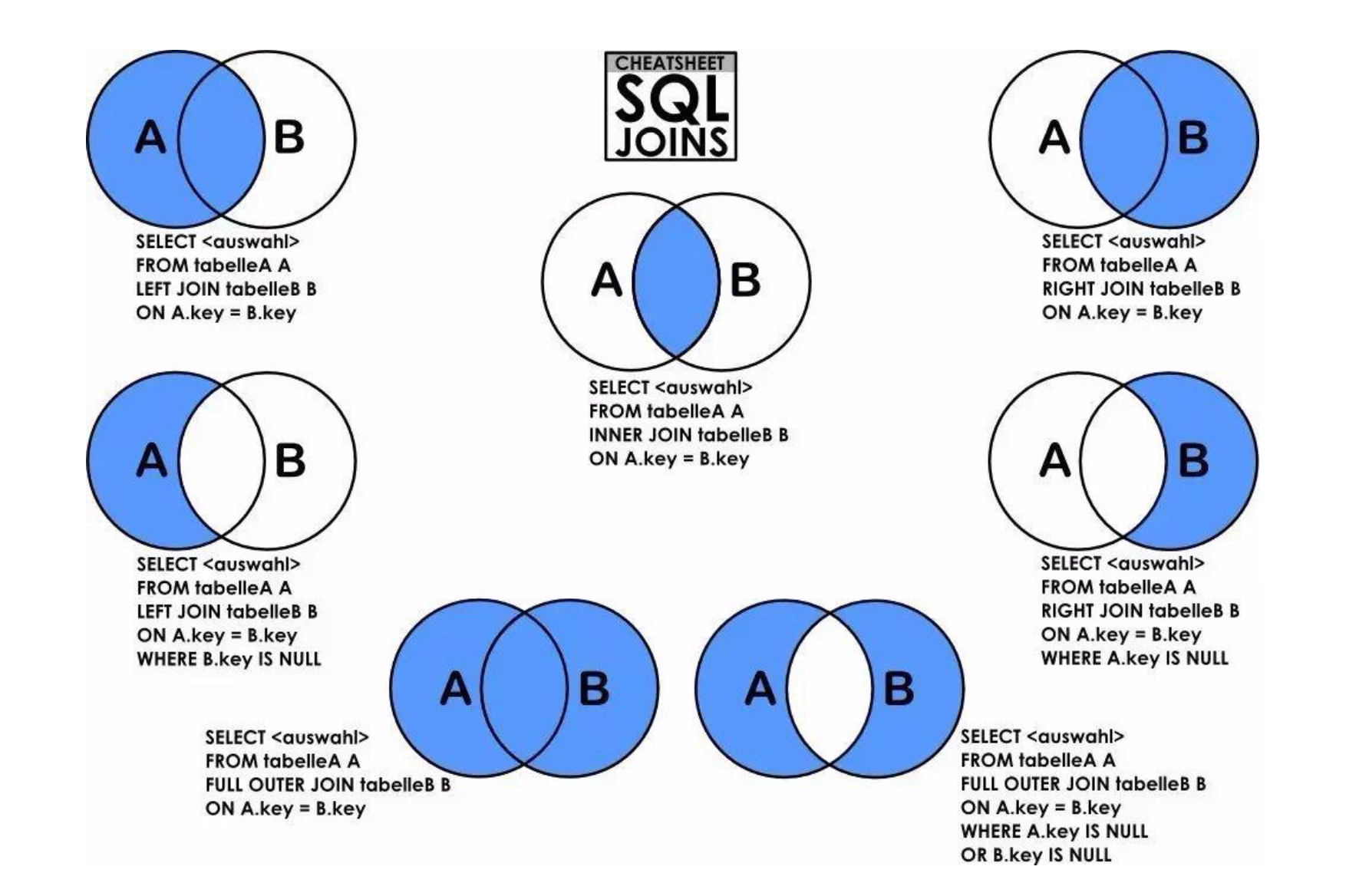
- (1) left和right是外连接,Inner是内连接。
| 名称 | 简写 | 查询语句 |
|---|---|---|
| 左连接(左外连接) | left join | left outer join |
| 右连接(右外连接) | right join | right outer join |
| 内连接 | join | inner join |
| 全连接(全外连接) | 无 | MySQL目前不支持此种方式 |
- (2) 各种联结示意图
3.3 COALESCE
- 作用:返回其参数中第一个非空表达式.如果所有参数均为 NULL,则 COALESCE 返回 NULL.
- 语法:
COALESCE ( expression [ ,...n ] ) - 如在第五题中
SELECT name, COALESCE(teacher.mobile, '07986 444 2266')中COALESCE函数的作用是返回teacher.mobile,如果teacher.mobile为空值,则返回第二个值.
3.4 CASE WHEN
-
语法:
- 简单函数
CASE [col_name] WHEN [value1] THEN [result1]…ELSE [default] END - 搜索函数
CASE WHEN [expr] THEN [result1]…ELSE [default] END
- 简单函数
-
功能
- 简单函数:枚举这个字段所有可能的值,只能实现相等条件判断.
- 搜索函数:可以写判断,适合复杂条件判断,比如大于、小于等,并且搜索函数只会返回第一个符合条件的值,其他case被忽略.
-
举例
- 搜索函数: 题9, 10
- 简单函数
SELECT
	continent,
	CASE continent
		WHEN 'Europe' THEN '欧洲'
		WHEN 'Asia' THEN '亚洲'
		WHEN 'Africa' THEN '非洲'
		ELSE '无'
	END '洲'
FROM world;
知识点总结参考 MySQL必知必会
