

- 基于CentOS 6.9
1. su命令
su命令在工作中如果你拥有root用户密码,那么经常会用到切换用户的这个命令。不过有些细节可以了解下。
1.1 su 和 su - 的区别
[root@testing ~]# pwd
/root
[root@testing ~]# su china
[china@testing root]$ pwd
/root
[china@testing root]$ exit
[root@testing ~]# su - china
[china@testing ~]$ pwd
/home/china
[china@testing ~]$ logout
[root@testing ~]# su -china
bash: hina: command not found
从上面的示例中可以看出几点不同
-
目录切换,带-的情况下,直接切换到用户的家目录下了,但不带-是保持在原来的位置的。
-
su -后面要有空格再接用户,这种方式不多见,su -china 其实-c是一个参数,但我们是-[空格]china,切换到china用户
-
还有其他区别,可以通过比较环境变量来大概看一下。
[root@testing ~]# su - china
[china@testing ~]$ env>su-env
[china@testing ~]$ logout
[root@testing ~]# su china
[china@testing root]$ cd
[china@testing ~]$ env>suenv
[china@testing ~]$ diff suenv su-env
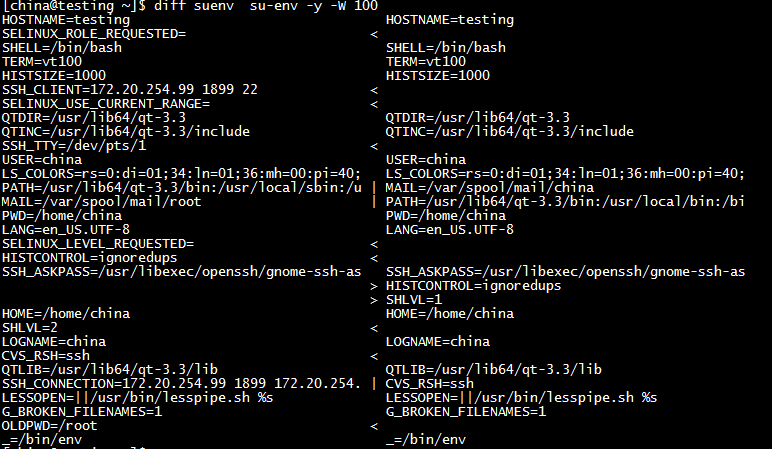
忍不住要吐槽下diff的输出,不太人性化。 还是用g_vim来得好
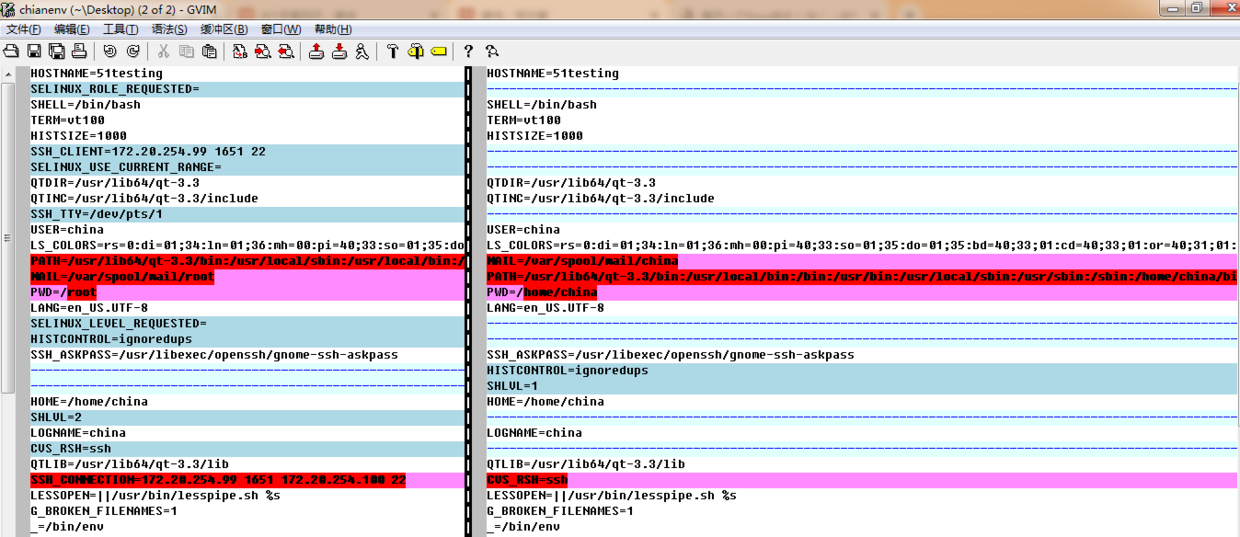
最关键的一点区别是PATH变量的不同(哪里不同?)
话说回来,上面只是了解下,不知道也没事。那来说一个比较有用的东西sudo。
2. sudo
可能不少情况下,你不一定能得到root用户的密码,或者至少root用户的密码不会广泛传播。但特殊的情况下,会授权给一些用户临时的去做一些只有root能做的事情,就像我们工作中的委托授权这样的事情,不可避免。
那么在linux下如果一个普通用户要执行一些越权的命令怎么来做呢?sudo
[china@testing ~]$ useradd nanjing
-bash: /usr/sbin/useradd: Permission denied
[china@testing ~]$ passwd nanjing
passwd: Only root can specify a user name.
[china@testing ~]$ shutdown -r now
shutdown: Need to be root
[china@testing ~]$ ls /root
ls: cannot open directory /root: Permission denied
2.1 /etc/sudoers
在man sudo的时候看到sudo的配置文件是/etc/sudoers,这个文件说简单也简单,说复杂也相当复杂。对于初学者,只需知道在此处配置,语法只需了解初步的即可。
-
文件权限
[root@testing ~]# ll /etc/sudoers
-r--r-----. 1 root root 3729 Dec  8  2015 /etc/sudoers
/etc/sudoers文件的权限是440,只有可读权限,无法写入(会提示read only,但其实还是可以写入wq!,谁让你是用root来做的呢)
正确的编辑姿势应该是visudo,直接输入命令即可,之后就是跟vi一样的操作。先只看下91行。
 90 ## Allow root to run any commands anywhere
 91 root      ALL=(ALL)       ALL
 92 china     ALL=(ALL)       passwd
保存退出的时候提示
     visudo: >>> /etc/sudoers: syntax error near line 92 <<<
     What now?
这也是为何要用visudo来编辑这个文件的原因之一了,可以检查语法是否正确,此处命令要写完整路径。那我们可以编辑成这样。
       90 ## Allow root to run any commands anywhere
       91 root    ALL=(ALL)       ALL
       92 china   ALL=(ALL)  /usr/bin/passwd,/sbin/shutdown,/bin/ls,/usr/sbin/useradd
2.2 命令执行
      [root@testing ~]# su - china
      [china@testing ~]$ useradd nanjing
      -bash: /usr/sbin/useradd: Permission denied
添加了权限,并非意味着可以直接执行useradd的命令了,要执行命令需要加sudo。正确的姿势是这样的:
    [china@testing ~]$ sudo useradd nanjing

    We trust you have received the usual lecture from the local System
    Administrator. It usually boils down to these three things:

      #1) Respect the privacy of others.
      #2) Think before you type.
      #3) With great power comes great responsibility.

      [sudo] password for china:
      【作者注】此处输入的china用户的密码
这样就可以执行一些定义好的命令了。
[china@testing ~]$ sudo ls /root
anaconda-ks.cfg  Desktop  Documents  Downloads  install.log  install.log.syslog      Music  Pictures  Public  Templates  test  test1  Videos
[china@testing ~]$ sudo shutdown -r 10:30

Broadcast message from root@testing
    (/dev/pts/1) at 10:24 ...

The system is going down for reboot in 6 minutes!
2.3 关于/etc/sudoers
       90 ## Allow root to run any commands anywhere
       91 root    ALL=(ALL)       ALL
       92 china   ALL=(ALL)       /usr/bin/passwd,/sbin/shutdown,/bin/ls,/usr/sbin/useradd
此处的格式是: 谁 在哪里=(以谁之名) 做啥事 这里面细节就多了,暂且不表,有空再说。
