传统的事务是本地事务,在当今的微服务架构中已经不能满足要求,此时需要解决的问题是分布式事务,当前的分布式事务存在两大理论依据:CAP定律、BASE理论。
下面先介绍一下这两个理论:
CAP定律
CAP定理的内容主要是指在分布式系统中Consistency(一致性)、Availability(可用性)、Partition(分区容错性),这个三个不可兼得。
一致性
在分布式系统中的所有数据备份,在同一时刻是否同样的值。(等同于所有节点访问同一份最新的数据副本)
可用性
在集群中一部分节点故障后,集群整体是否还能响应客户端的读写请求。(对数据更新具备高可用性)
分区容错性
以实际效果而言,分区相当于对通信的时限要求。系统如果不能在时限内达成数据一致性,就意味着发生了分区的情况,必须就当前操作在C和A之间做出选择。
BASE理论
BASE是指Basically Available(基本可用)、Soft state(软状态)和Eventually consistent(最终一致性)三个短语的缩写。BASE理论是对CAP中一致性和可用性权衡的结构,是基于CAP定理逐渐演化而来的。
BASE的核心思想就是:即使无法做到强一致性,但每个应用都可以根据自身业务特点,采用适当的方式来使系统达到最终一致性。
基本可用
基本可用是指分布式系统在出现不可预知故障的时候,允许损失部分可用性----注意,这绝不等价于系统不可用。
-
响应时间上的损失。正常情况下,一个在线搜索引擎需要在0.5秒之内返回给用户相应的查询结果,但由于出现故障,查询结果的响应时间增加了1~2秒
-
系统功能上的损失:正常情况下,在一个电子商务网站上进行购物的时候,消费者几乎能够顺利完成每一笔订单,但是在一些节日大促购物高峰的时候,由于消费者的购物行为激增,为了保护购物系统的稳定性,部分消费者可能会被引导到一个降级页面
软状态
软状态指允许系统中的数据存在中间状态,并认为该中间状态的存在不会影响系统的整体可用性,即允许系统在不同节点的数据副本之间进行数据同步的过程存在延时
最终一致性
最终一致性强调的是所有的数据副本,在经过一段时间的同步之后,最终都能够达到一个一致的状态。因此,最终一致性的本质是需要系统保证最终数据能够达到一致,而不需要实时保证系统数据的强一致性。
LCN框架的定位
LCN不生产事务, 只是本地事务的搬运工。TX-LCN定位是于一款事务协调性框架,框架本身并不操作事务,而是基于对事务的协调从而达到事务一致性的效果。
LCN事务控制原理
TX-LCN由两大模块组成, TxClient、TxManager,TxClient作为模块的依赖框架,提供TX-LCN的标准支持,TxManager作为分布式事务的控制方。事务发起方或者参与方都由TxClient端来控制。
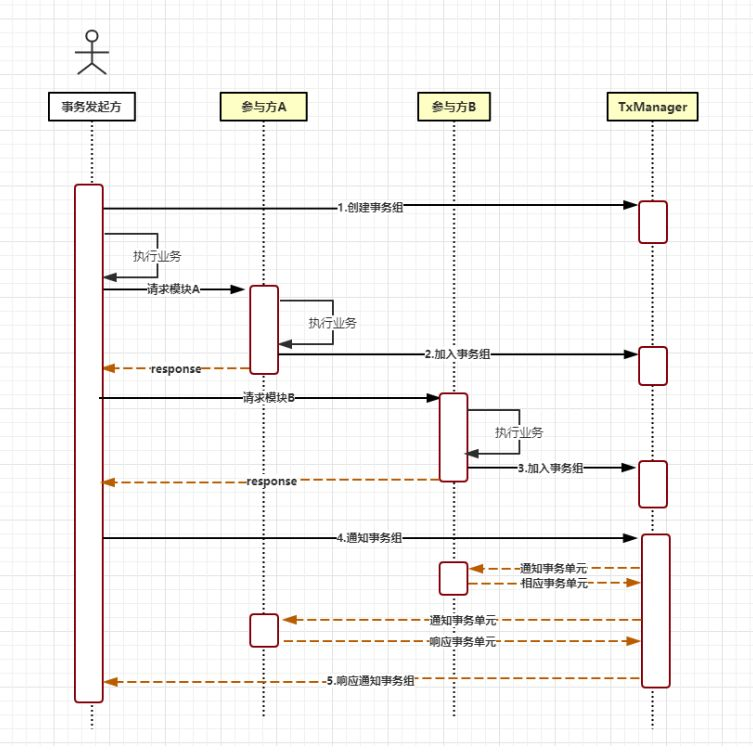
核心的步骤:
-
创建事务组,是指在事务发起方开始执行业务代码之前先调用TxManager创建事务组对象,然后拿到事务标示GroupId的过程。
-
加入事务组,添加事务组是指参与方在执行完业务方法以后,将该模块的事务信息通知给TxManager的操作。
-
通知事务组,是指在发起方执行完业务代码以后,将发起方执行结果状态通知给TxManager,TxManager将根据事务最终状态和事务组的信息来通知相应的参与模块提交或回滚事务,并返回结果给事务发起方。
主要有三种事务模式:
LCN模式
原理:
LCN模式是通过代理Connection的方式实现对本地事务的操作,然后在由TxManager统一协调控制事务。当本地事务提交回滚或者关闭连接时将会执行假操作,该代理的连接将由LCN连接池管理。
特点:
-
该模式对代码的嵌入性最低。
-
该模式仅限于本地存在连接对象且可通过连接对象控制事务的模块。
-
该模式下的事务提交与回滚是由本地事务方控制,对于数据一致性上有较高的保障。
-
该模式缺陷在于代理的连接需要随事务发起方一起释放连接,增加了连接占用的时间。
TCC模式
原理:
TCC事务机制相对于传统事务机制(X/Open XA Two-Phase-Commit),其特征在于它不依赖资源管理器(RM)对XA的支持,而是通过对(由业务系统提供的)业务逻辑的调度来实现分布式事务。主要由三步操作,Try: 尝试执行业务、 Confirm:确认执行业务、 Cancel: 取消执行业务。
特点:
-
该模式对代码的嵌入性高,要求每个业务需要写三种步骤的操作。
-
该模式对有无本地事务控制都可以支持使用面广。
-
数据一致性控制几乎完全由开发者控制,对业务开发难度要求高。
TXC模式
原理:
TXC模式命名来源于淘宝,实现原理是在执行SQL之前,先查询SQL的影响数据,然后保存执行的SQL快走信息和创建锁。当需要回滚的时候就采用这些记录数据回滚数据库,目前锁实现依赖redis分布式锁控制。
特点:
-
该模式同样对代码的嵌入性低。
-
该模式仅限于对支持SQL方式的模块支持。
-
该模式由于每次执行SQL之前需要先查询影响数据,因此相比LCN模式消耗资源与时间要多。
-
该模式不会占用数据库的连接资源。
TC配置
application.properties
# 是否启动LCN负载均衡策略(优化选项,开启与否,功能不受影响)tx-lcn.ribbon.loadbalancer.dtx.enabled=true# tx-manager 的配置地址,可以指定TM集群中的任何一个或多个地址# tx-manager 下集群策略,每个TC都会从始至终<断线重连>与TM集群保持集群大小个连接。# TM方,每有TM进入集群,会找到所有TC并通知其与新TM建立连接。# TC方,启动时按配置与集群建立连接,成功后,会再与集群协商,查询集群大小并保持与所有TM的连接tx-lcn.client.manager-address=127.0.0.1:8070# 该参数是分布式事务框架存储的业务切面信息。采用的是h2数据库。绝对路径。该参数默认的值为{user.dir}/.txlcn/{application.name}-{application.port}tx-lcn.aspect.log.file-path=logs/.txlcn/demo-8080# 调用链长度等级,默认值为3(优化选项。系统中每个请求大致调用链平均长度,估算值。)tx-lcn.client.chain-level=3# 该参数为tc与tm通讯时的最大超时时间,单位ms。该参数不需要配置会在连接初始化时由tm返回。tx-lcn.client.tm-rpc-timeout=2000# 该参数为分布式事务的最大时间,单位ms。该参数不允许TC方配置,会在连接初始化时由tm返回。tx-lcn.client.dtx-time=8000# 该参数为雪花算法的机器编号,所有TC不能相同。该参数不允许配置,会在连接初始化时由tm返回。tx-lcn.client.machine-id=1# 该参数为事务方法注解切面的orderNumber,默认值为0.tx-lcn.client.dtx-aspect-order=0# 该参数为事务连接资源方法切面的orderNumber,默认值为0.tx-lcn.client.resource-order=0# 是否开启日志记录。当开启以后需要配置对应logger的数据库连接配置信息。tx-lcn.logger.enabled=falsetx-lcn.logger.driver-class-name=${spring.datasource.driver-class-name}tx-lcn.logger.jdbc-url=${spring.datasource.url}tx-lcn.logger.username=${spring.datasource.username}tx-lcn.logger.password=${spring.datasource.password}注意:
-
微服务集群且用到了LCN事务模式时,为保证性能要开启TX-LCN重写的负载策略。
以SpringCloud为例开启
tx-lcn.springcloud.loadbalance.enable=true2. 关闭业务RPC重试
-
TxClient所有配置均有默认配置,请按需覆盖默认配置。
-
为什么要关闭服务调用的重试。远程业务调用失败有两种可能:(1),远程业务执行失败 (2)、远程业务执行成功,网络失败。对于第2种,事务场景下重试会发生,某个业务执行两次的问题。如果业务上控制某个事务接口的幂等,则不用关闭重试。
3. 通过AOP配置本地事务和分布式事务
@Configuration@EnableTransactionManagementpublic class TransactionConfiguration { /** * 本地事务配置 * @param transactionManager * @return */ @Bean @ConditionalOnMissingBean public TransactionInterceptor transactionInterceptor(PlatformTransactionManager transactionManager) { Properties properties = new Properties(); properties.setProperty("*", "PROPAGATION_REQUIRED,-Throwable"); TransactionInterceptor transactionInterceptor = new TransactionInterceptor(); transactionInterceptor.setTransactionManager(transactionManager); transactionInterceptor.setTransactionAttributes(properties); return transactionInterceptor; } /** * 分布式事务配置 设置为LCN模式 * @param dtxLogicWeaver * @return */ @ConditionalOnBean(DTXLogicWeaver.class) @Bean public TxLcnInterceptor txLcnInterceptor(DTXLogicWeaver dtxLogicWeaver) { TxLcnInterceptor txLcnInterceptor = new TxLcnInterceptor(dtxLogicWeaver); Properties properties = new Properties(); properties.setProperty(Transactions.DTX_TYPE,Transactions.LCN); properties.setProperty(Transactions.DTX_PROPAGATION, "REQUIRED"); txLcnInterceptor.setTransactionAttributes(properties); return txLcnInterceptor; } @Bean public BeanNameAutoProxyCreator beanNameAutoProxyCreator() { BeanNameAutoProxyCreator beanNameAutoProxyCreator = new BeanNameAutoProxyCreator(); //需要调整优先级,分布式事务在前,本地事务在后。 beanNameAutoProxyCreator.setInterceptorNames("txLcnInterceptor","transactionInterceptor"); beanNameAutoProxyCreator.setBeanNames("*Impl"); return beanNameAutoProxyCreator; }}-
TXC模式定义表的实际主键
TXC 是基于逆向sql的方式实现对业务的回滚控制,在逆向sql操作数据是会检索对应记录的主键作为条件处理回滚业务。但是在有些情况下可能表中并没有主键字段(primary key),仅存在业务上的名义主键,此时可通过重写
PrimaryKeysProvider方式定义表对应的主键关系。 -
TC模块标识策略
TC模块在负载时,TM为了区分具体模块,会要求TC注册时提供唯一标识。默认策略是,应用名称加端口方式标识。也可以自定义,自定义需要保证各个模块标识不能重复。
TM配置
application.properties
spring.application.name=TransactionManagerserver.port=7970# JDBC 数据库配置spring.datasource.driver-class-name=com.mysql.jdbc.Driverspring.datasource.url=jdbc:mysql://127.0.0.1:3306/tx-manager?characterEncoding=UTF-8spring.datasource.username=rootspring.datasource.password=123456# 数据库方言spring.jpa.database-platform=org.hibernate.dialect.MySQL5InnoDBDialect# 第一次运行可以设置为: create, 为TM创建持久化数据库表spring.jpa.hibernate.ddl-auto=validate# TM监听IP. 默认为 127.0.0.1tx-lcn.manager.host=127.0.0.1# TM监听Socket端口. 默认为 ${server.port} - 100tx-lcn.manager.port=8070# 心跳检测时间(ms). 默认为 300000tx-lcn.manager.heart-time=300000# 分布式事务执行总时间(ms). 默认为36000tx-lcn.manager.dtx-time=8000# 参数延迟删除时间单位ms 默认为dtx-time值tx-lcn.message.netty.attr-delay-time=${tx-lcn.manager.dtx-time}# 事务处理并发等级. 默认为机器逻辑核心数5倍tx-lcn.manager.concurrent-level=160# TM后台登陆密码,默认值为codingapitx-lcn.manager.admin-key=codingapi# 分布式事务锁超时时间 默认为-1,当-1时会用tx-lcn.manager.dtx-time的时间tx-lcn.manager.dtx-lock-time=${tx-lcn.manager.dtx-time}# 雪花算法的sequence位长度,默认为12位.tx-lcn.manager.seq-len=12# 异常回调开关。开启时请制定ex-urltx-lcn.manager.ex-url-enabled=false# 事务异常通知(任何http协议地址。未指定协议时,为TM提供内置功能接口)。默认是邮件通知tx-lcn.manager.ex-url=/provider/email-to/***@**.com# 开启日志,默认为falsetx-lcn.logger.enabled=truetx-lcn.logger.enabled=falsetx-lcn.logger.driver-class-name=${spring.datasource.driver-class-name}tx-lcn.logger.jdbc-url=${spring.datasource.url}tx-lcn.logger.username=${spring.datasource.username}tx-lcn.logger.password=${spring.datasource.password}# redis 的设置信息. 线上请用Redis Clusterspring.redis.host=127.0.0.1spring.redis.port=6379spring.redis.password=注意:
(1) TxManager所有配置均有默认配置,请按需覆盖默认配置。
(2) 特别注意 TxManager进程会监听两个端口号,一个为TxManager端口 ,另一个是事务消息端口 。TxClient默认连接事务消息端口 是8070 , 所以,为保证TX-LCN基于默认配置运行良好,请设置TxManager端口 号为8069 或者指定事务消息端口 为8070
(3) 分布式事务执行总时间 a 与 TxClient通讯最大等待时间 b 、TxManager通讯最大等待时间 c 、微服务间通讯时间 d 、微服务调用链长度 e 几个时间存在着依赖关系。a >= 2c + (b + c + d) * (e - 1) , 特别地,b、c、d 一致时,a >= (3e-1)b 。你也可以在此理论上适当在减小a的值,发生异常时能更快得到自动补偿,即 a >= (3e-1)b - Δ (原因)。最后,调用链小于等于3时,将基于默认配置运行良好
(4) 若用tx-lcn.manager.ex-url=/provider/email-to/xxx@xx.xxx 这个配置,配置管理员邮箱信息(如QQ邮箱):
spring.mail.host=smtp.qq.comspring.mail.port=587spring.mail.username=xxxxx@**.comspring.mail.password=*********以SpringCloud为例:
SpringServiceA (发起方 | LCN模式) SpringServiceB (参与方 | TXC模式)SpringServiceC (参与方 | TCC模式)
-
调用关系说明:SpringServiceA -> DemoController的
txlcn的Mapping是调用发起方法
@RestControllerpublic class DemoController { private final DemoService demoService; @Autowired public DemoController(DemoService demoService) { this.demoService = demoService; } @RequestMapping("/txlcn") public String execute( @RequestParam("value") String value, @RequestParam(value = "ex", required = false) String exFlag) { return demoService.execute(value, exFlag); }}2. demoService.execute(value, exFlag)代码:
@Service@Slf4jpublic class DemoServiceImpl implements DemoService { private final DemoMapper demoMapper; private final ServiceBClient serviceBClient; private final ServiceCClient serviceCClient; @Autowired public DemoServiceImpl( ClientDemoMapper demoMapper, ServiceBClient serviceBClient, ServiceCClient serviceCClient) { this.demoMapper = demoMapper; this.serviceBClient = serviceBClient; this.serviceCClient = serviceCClient; } @Override @LcnTransaction public String execute(String value) { // ServiceB String dResp = serviceBClient.rpc(value); // ServiceC String eResp = serviceCClient.rpc(value); // Local transaction Demo demo = new Demo(); demo.setGroupId(DTXLocalContext.getOrNew().getGroupId()); demo.setDemoField(value); demo.setAppName(Transactions.APPLICATION_ID_WHEN_RUNNING); demo.setCreateTime(new Date()); demoMapper.save(demo); // 置异常标志,DTX 回滚 if (Objects.nonNull(exFlag)) { throw new IllegalStateException("by exFlag"); } return dResp + " > " + eResp + " > " + "ok-service-a"; }}3. ServiceBClient.rpc(value)代码
@Service@Slf4jpublic class DemoServiceImpl implements DemoService { private final DemoMapper demoMapper; @Autowired public DemoServiceImpl(DemoMapper demoMapper) { this.demoMapper = demoMapper; } @Override @TxcTransaction(propagation = DTXPropagation.SUPPORTS) @Transactional public String rpc(String value) { Demo demo = new Demo(); demo.setGroupId(TracingContext.tracing().groupId()); demo.setDemoField(value); demo.setAppName(Transactions.getApplicationId()); demo.setCreateTime(new Date()); demoMapper.save(demo); return "ok-service-b"; }}4. ServiceCClient.rpc(value)代码
@Service@Slf4jpublic class DemoServiceImpl implements DemoService { private final DemoMapper demoMapper; private ConcurrentHashMap<String, Long> ids = new ConcurrentHashMap<>(); @Autowired public DemoServiceImpl(DemoMapper demoMapper) { this.demoMapper = demoMapper; } @Override @TccTransaction(propagation = DTXPropagation.SUPPORTS) @Transactional public String rpc(String value) { Demo demo = new Demo(); demo.setDemoField(value); demo.setCreateTime(new Date()); demo.setAppName(Transactions.getApplicationId()); demo.setGroupId(TracingContext.tracing().groupId()); demoMapper.save(demo); ids.put(TracingContext.tracing().groupId(), demo.getId()); return "ok-service-c"; } public void confirmRpc(String value) { log.info("tcc-confirm-" + TracingContext.tracing().groupId()); ids.remove(TracingContext.tracing().groupId()); } public void cancelRpc(String value) { log.info("tcc-cancel-" + TracingContext.tracing().groupId()); Long kid = ids.get(TracingContext.tracing().groupId()); demoMapper.deleteByKId(kid); }}发起方 txlcn-demo-spring-service-a :
-
项目配置文件 application.properties
################### 这个是启动本服务的配置文件,其它的application-xxx.properties 是开发者的个性化配置,不用关心。# 你可以在 https://txlcn.org/zh-cn/docs/setting/client.html 看到所有的个性化配置#################spring.application.name=txlcn-demo-spring-service-aserver.port=12011spring.datasource.driver-class-name=com.mysql.jdbc.Driver## TODO 你的配置spring.datasource.url=jdbc:mysql://127.0.0.1:3306/txlcn-demo?\characterEncoding=UTF-8&serverTimezone=UTCspring.datasource.username=rootspring.datasource.password=rootspring.datasource.hikari.maximum-pool-size=20mybatis.configuration.map-underscore-to-camel-case=truemybatis.configuration.use-generated-keys=truelogging.level.com.codingapi.txlcn=DEBUG# 关闭Ribbon的重试机制(如果有必要)ribbon.MaxAutoRetriesNextServer=0ribbon.ReadTimeout=5000ribbon.ConnectTimeout=5000-
启动类
@SpringBootApplication@EnableDiscoveryClient@EnableDistributedTransactionpublic class SpringServiceAApplication { public static void main(String[] args) { SpringApplication.run(SpringServiceAApplication.class, args); }}
事务参与方, txlcn-demo-spring-service-b
-
项目配置文件 application.properties
################### 这个是启动本服务的配置文件,其它的application-xxx.properties 是开发者的个性化配置,不用关心。# 你可以在 https://txlcn.org/zh-cn/docs/setting/client.html 看到所有的个性化配置#################spring.application.name=txlcn-demo-spring-service-bserver.port=12002spring.datasource.type=com.alibaba.druid.pool.DruidDataSourcespring.datasource.driver-class-name=com.mysql.jdbc.Driver## TODO 你的配置spring.datasource.url=jdbc:mysql://127.0.0.1:3306/txlcn-demo\ ?characterEncoding=UTF-8&serverTimezone=UTCspring.datasource.username=rootspring.datasource.password=root#spring.datasource.hikari.maximum-pool-size=20mybatis.configuration.map-underscore-to-camel-case=truemybatis.configuration.use-generated-keys=truelogging.level.com.codingapi.txlcn=DEBUG-
启动类
@SpringBootApplication@EnableDiscoveryClient@EnableDistributedTransactionpublic class SpringServiceBApplication { public static void main(String[] args) { SpringApplication.run(SpringServiceBApplication.class, args); }}
事务参与方, txlcn-demo-spring-service-c
-
项目配置文件 application.properties
################### 这个是启动本服务的配置文件,其它的application-xxx.properties 是开发者的个性化配置,不用关心。# 你可以在 https://txlcn.org/zh-cn/docs/setting/client.html 看到所有的个性化配置#################spring.application.name=txlcn-demo-spring-service-cserver.port=12003spring.datasource.driver-class-name=com.mysql.jdbc.Driver## TODO 你的配置spring.datasource.url=jdbc:mysql://127.0.0.1:3306/txlcn-demo\ ?characterEncoding=UTF-8&serverTimezone=UTCspring.datasource.username=rootspring.datasource.password=rootspring.datasource.hikari.maximum-pool-size=20mybatis.configuration.map-underscore-to-camel-case=truemybatis.configuration.use-generated-keys=truelogging.level.com.codingapi.txlcn=DEBUG-
启动类
@SpringBootApplication@EnableDiscoveryClient@EnableDistributedTransactionpublic class SpringServiceCApplication { public static void main(String[] args) { SpringApplication.run(SpringServiceCApplication.class, args); }}启动服务测试...