not finished 存在错误
vue-router简介
Vue Router是 Vue.js官方的路由管理器。他和Vue.js的核心集成,让构建单页面应用变得易如反掌。 功能有:
- 嵌套的路由/视图表
- 模块化、基于组件的路由配置
- 路由参数、查询、通配符
- 基于Vue.js过渡系统的视图过渡效果
- 细粒度的导航控制
- 带有自动激活的CSS class的链接
- HTML5历史模式或hash模式,在IE9中自动降级
- 自定义的滚动条行为。
注:this.$router和router使用起来完全一样。使用this.$router的原因是不想在每个独立需要封装路由的组件中都导入路由。
当<router-link>对应的路由匹配成功,将自动设置class属性值为.router-link-active
路由常用配置参数
- path 路由路径
- component 路径对应的组件
- name 路由命名
- meta 路由元信息
- children 子路由的配置参数(路由嵌套)
- props 路由解耦 设置成props:true,在需要接受组件的内部通过props进行接受
- redirect 重定向路由
路由组件传参
- 动态路由传值 path:"/home/:id/:name" this.$route.params.id/name
- query传值 因为在url?后的参数不会被解析,因此可通过query进行传值。 this.$route.query
- 路由解耦
props:true,
在需要接受参数的组件页面通过props进行 - 编程式导航 this.$router.push({path:"/home",query:{}})
布尔模式
对象模式
函数模式
编程式导航
- 路由跳转 this.$router.push()
- 路由替换 this.$router.replace()
- 后退 this.$router.back()
- 前进 this.$router.forward()
路由守卫
概念:路由跳转前后做的一些验证 常见的钩子函数以及场景
- beforeRouteEnter 路由进入之前 登录验证、热力图的记录
- beforeRouteUpdate 路由更新的时候 如果当前路由发生了变化,但是不需要组件销毁的过程,就需要用这个钩子函数
- beforeRouteLeave 路由离开的时候 当用户没有进行支付离开的时候,当用户填写完信息没有保存的时候
- beforeEach 全局守卫
验证用户是否登陆
hash和history
前端路由和后端路由
路由:根据不同的url地址展示不同的内容或页面
前端路由
后端路由
路由起步
//app.js
<!-- 使用 router-link 组件来导航. -->
<!-- 通过传入 `to` 属性指定链接. -->
<!-- <router-link> 默认会被渲染成一个 `<a>` 标签 -->
<router-link to="/foo">Go to Foo</router-link>
<router-link to="/bar">Go to Bar</router-link>
<!-- 路由出口 -->
<!-- 路由匹配到的组件将渲染在这里 -->
<router-view></router-view>
//其他文件
const Foo = { template: '<div>foo</div>' }
const Bar = { template: '<div>bar</div>' }
const routes = [
    {path:'/foo',component:Foo},
    {path:'/bar',component:Bar}
]
const router = new VueRouter({
    routes
})
const app = new Vue({
    router
}).$mout('#app');
动态路由匹配
| 模式 | 匹配路径 | $route.params |
|---|---|---|
| /user/:username | /user/evan | {username:'evan'} |
| /user/:username/post/:post_id | /user/evan/post/123 | {username:'evan',post_id:'123'} |
/foo?user=1,$route.query.user==1
响应路由参数的变化
当使用参数时,从/user/foo到/user/bar,原来的组件实例会被复用。因为这两个路由都渲染同个组件,比起销毁再创建,复用则更高效。这也意味着组件的生命周期钩子不会再被调用。
//复用组件时,想对路由参数的变化作出响应的话,可用watch检测$route对象
cosnt User = {
    template:'..',
    watch:{
        '$route'(to,from){
            //对路由变化作出响应...
        }
        //或者使用2.2引入的导航守卫
        beforeRouteUpdate (to, from, next) {
        // react to route changes...
        // don't forget to call next()
        }
    }
}
当使用一个通配符时,$route.params 内会自动添加一个名为 pathMatch 参数
{
  // 会匹配以 `/user-` 开头的任意路径
  path: '/user-*',
  path: '*';   // 会匹配所有路径
}
// 给出一个路由 { path: '/user-*' }
this.$router.push('/user-admin')
this.$route.params.pathMatch // 'admin'
// 给出一个路由 { path: '*' }
this.$router.push('/non-existing')
this.$route.params.pathMatch // '/non-existing'
注:同一个路径可匹配多个路由,谁先定义,谁的优先级就最高
嵌套路由
const router = new VueRouter({
    routes:[
        {path:'/user/:id',component:User},
        children:[
            {
                // 当 /user/:id/profile 匹配成功,
                // UserProfile 会被渲染在 User 的 <router-view> 中
                path:'profile',
                component:UserProfile
            },
            {
                // 当 /user/:id/posts 匹配成功
                // UserPosts 会被渲染在 User 的 <router-view> 中
                path:'post',
                component:UserPosts
            },
            {
                //当/user/foo,没有匹配到合适的路由,可提供个空的子路由
                path:'',component:UserHome
            }
        ]
    ]
})
编程式导航
在Vue的内部可用$router访问路由实例。
| 声明式 | 编程式 |
|---|---|
<router-link :to="..." replace> |
router.replace(...) |
<router-link :to="..."> |
router.push(...) |
命名路由
const router = new VueRouter({
  routes: [
    {
      path: '/user/:userId',
      name: 'user',
      component: User
    }
  ]
});
<router-link :to="{ name: 'user', params: { userId: 123 }}">User</router-link>
//等价于
router.push({name:'user',params:{userId:123}})
//以上两种范式都可以导航到/user/123
命名视图
有时想同级展示多个视图,而不是嵌套展示。例如侧边栏sidebar+主内容main。可在界面中定义多个单独命名的视图,而不是只有一个单独的出口。若rouer-view没有设置名字,则默认为default
<router-view class="view one"></router-view>
<router-view class="view two" name="a"></router-view>
<router-view class="view three" name="b"></router-view>

const router = new VueRouter({
  routes: [
    {
      path: '/',
      components: {
        default: Foo,
        a: Bar,
        b: Baz
      }
    }
  ]
})
例子二:
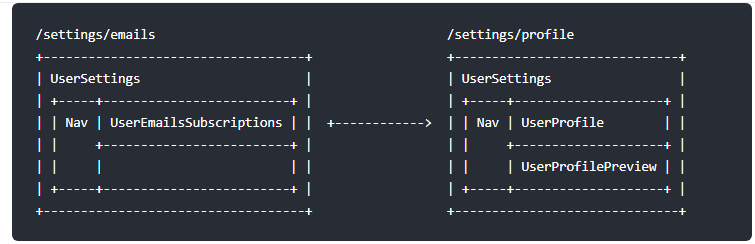
<!-- UserSettings.vue -->
<div>
  <h1>User Settings</h1>
  <NavBar/>
  <router-view/>
  <router-view name="helper"/>
</div>
{
    path:'/settings',
    //也可在顶级路由就配置命名视图
    component:UserSettings,
    children:[{
        path:'emails',
        component:UserEmailsSubscriptions
    },{
        path:'profile',
        components:{
            default:UserProfile,
            helper:UserProfilePreview
        }
    }]
}
重定向和别名
const router = new VueRouter({
    routes:[
        //用户访问/a,url会替换成/b
        {path:'/a',redirect:'/b'},
        //命名路由
        {path:'/a',redirect:{name:'foo'}},
        //方法,动态返回重定向目标
        {path:'/a',redirect:to=>{
            //方法接收 目标路由 作为参数
            //return 重定向的 字符串路径/路径对象
        }}
    ]
})
别名
功能是:可自由地将UI结构映射到任意的URL,而不受限于配置的嵌套路由结构。
const router = new VueRouter({
    routes:[
        //访问URL为/b,实际是在访问/a
        {path:'/a',component:A,alias:'/b'}
    ]
})
路由组件传参
在组件中使用$route会使之与其对应路由形成高度耦合,从而使组件只能在某些特定的URL上使用,限制了其灵活性。
使用props将组件和路由解耦。
例子:未解耦之前
const User = {
  //为了复用这个组件,进行解耦
  template: '<div>User {{ $route.params.id }}</div>'
}
const router = new VueRouter({
  routes: [
    { path: '/user/:id', component: User }
  ]
}
通过props解耦
//此时该组件可在任何地方使用,便于重用和测试
const User = {
    props:['id'],
    template:'<div>User {{id}}</div>'
}
const router = new VueRouter({
    routes:[
        {path:'user/:id',component:User,props:true},
        //对于包含命名视图的路由,必须分别为每个命名视图添加'props'
        {
            path:'/user/:id',
            components:{default:User,sidebar:Sidebar},
            props:{default:true,sidebar:false}
        }
    ]
})
props的三种形式:
- 布尔模式
若props:true,route.params将被设置为组件属性 - 对象模式
props是对象时,会按原样设置为组件属性。当props是静态的时候有用。
const router = new VueRouter({
  routes: [
    {
        path: '/promotion/from-newsletter',
        component: Promotion,
        props: { newsletterPopup: false }
    }
  ]
})
- 函数模式
可创建一个函数返回props。则可将参数转换为另一种类型,将静态值与基于路由的值结合等等。
const router = new VueRouter({
    routes:[
        {
            path:'/search',
            component:SearchUser,
            props:(route)=>({query:route.query.q})
        }
    ]
})
URL:/search?q=vue会将{query:'vue'}作为属性传递给SearchUser组件。
注:尽量保持props函数为无状态的,因为它只会在路由发生变化时起作用。若需要状态定义props,用包装组件(?高阶组件吗),只有Vue才可对状态变化做出反应。
HTML5 History模式
默认用hash模式。——当URL改变时,页面不会重新加载。
history模式,利用history.pushState API完成URL跳转而无须重新加载页面。
但需要后端配置正确,否则会返回404。即在服务端增加一个覆盖所有情况的静态资源,则应该返回一个index.html页面。
警告
如果history后端设置了全部返回app依赖的页面(单页面程序)。则服务器就不在返回404错误页面,因为对于所有路径都会返回index.html。为了避免这种情况,一个在Vue应用里面覆盖所有的路由情况,然后在给出一个404页面。
const router = new VueRouter({
    mode:'history',
    routes:[
        {path:'*',component:NotFoundComponent}
    ]
})
导航守卫
全局前置守卫
const router = new VueRouter({ ... })
router.beforeEach((to,from,next)=>{
    //...
})
- to:Route
- from:Route
- next:Function
next一定要调用,否则钩子就不会被resolved
全局后置钩子
route.afterEach((to,from)=>{
    //...
})
路由独享的守卫
const router = new VueRouter({
    routes:[
        {
            path:'/foo',
            component:Foo,
            beforeEnter:(to,from,next)=>{
                //...
            }
        }
    ]
})
组件内的守卫
- beforeRouteEnter(to,from,next)
不能获取组件实例this。因为当守卫执行前,组件实例还没被创建 - beforeRouteUpdate(to,from,next)
在当前路由改变,但该组件被复用时调用
例如/foo/:id,在/foo/1和/foo/2之间跳转的时候。
Foo组件都会别渲染,因此该组件实例会被复用 - beforeRouteLeave(to,from,next)
导航离开该组件的对应路由时调用
可访问组件实例this
beforeRouteEnter(to,from,next){
    //因为不能访问this
    next(vm=>{
        //通过vm访问组件实例
    })
}
beforeRouteUpdate(to,from,next){
    this.name = to.params.name;
    next()
}
beforeRouteLeave(to,from,next){
    const answer = window.confirm("do you really want to leave? you have unsaved changes!");
    if(answer){
        next()
    }else{
        next(false)
    }
}
完整的导航解析流程
- 导航被触发
- 在失活的组件里调用离开守卫
- 调用全局的beforeEach守卫
- 在重用的组件里调用beforeRouteUpdate
- 在路由配置里调用beforeEnter
- 解析异步路由亣
- 在被激活的组件里调用beforeRouteEnter
- 调用全局的beforeResolve
- 导航被确认
- 调用全局的afterEach钩子
- 触发DOM更新
- 用创建好的实例调用 beforeRouteEnter 守卫中传给 next 的回调函数。
过渡动效
<transition>
  <router-view></router-view>
</transition>
路由懒加载
路由API
基本
会被渲染成a标签
- tag
- to
v-slot
3.1.0新增
<router-link
    to="/about"
    v-slot="{href,route,navigate,isActive,isExactActive}"
>
    <NavLink :active="isActive" :href="href" @click="navigate">{{route.fullPath}}</NavLink>
</router-link>
- href 被解析后的URL
- route
- navigate
- isAvtive
- isExactAvtive
- to
- replace
- append
to="{path:'/b'}",从/a调到/b
如果添加了append,则从/a调到/a/b - tag
- active-class
router-link-active
linkActiveClass - exact-active-class
类型:string
默认值:router-link-exact-active
linkExactActiveClass - exact
- event
类型:string|Array default 'click'
声明可用来触发导航的事件
因为是组件,所以也可与和使用。
<transition>
  <keep-alive>
    <router-view></router-view>
  </keep-alive>
</transition>
- name
Router构建选项
routes
interface RouteConfig = {
    path:string,
    component?:Component,
    name?:string,//命名路由
    components?:{[name:string]:Component},//命名视图组件
    redirect?:string|Location|Function,
    props?:boolean|Object|Function,
    alias?:string|Array<string>,
    children?:Array,//嵌套路由
    beforeEnter?:(to:Route,from:Route,next:Function)=>void,
    meta?:any,
    caseSensitive?:boolean,//匹配规则是否大小写敏感(默认false),
    pathRoTegexpOptions?:Object//编译正则的选项

}
mode
- hash
使用URL hash值来作路由。 - history
- abstract
支持所有JavaScript运行环境,如Node.js服务器端。
base
应用的根路径
如整个单页应用服务在/app/下,则base就该设为/app/
linkActiveClass
router-link-active
linkExactActiveClass
router-link-exact-active
scrollBehavior
parseQuery/stringifyQuery
fellback
Router实例属性
Router实例方法
路由对象
$route.path
字符串,当前路由的路径,绝对路径
如:/foo/bar$route.params
对象,key/value, 若没有路由参数,就是一个空对象$route.query
对象,key/value, URL查询参数。若没有查询参数,返回一个空对象
/foo?user=1,$route.query.user==1$route.hash
string,当前路由的hash值(带#),若无,则空字符串
什么是hash值?$route.fullPath
string,完成解析后的URL。包含查询参数和hash的完整路径。$route.matched
数组,当前路由的所有嵌套路径片段的路由记录。
const router = new VueRouter({
  routes: [
    // 下面的对象就是路由记录
    {
      path: '/foo',
      component: Foo,
      children: [
        // 这也是个路由记录
        { path: 'bar', component: Bar }
      ]
    }
  ]
})
当 URL 为 /foo/bar,$route.matched 将会是一个包含从上到下的所有对象 (副本)。
$route.name
当前路由的名称。$route.redirectedFrom
重定向来源的路由的名字